AI Comparison Table Generator.

You have three columns — yours, and the two products your buyers actually cross-shop. Describe the criteria, the honest cell values, and which option wins for whom, and MeDo generates the table: sticky plan headers, grouped rows, a highlighted recommended column, and a mobile layout that swaps columns instead of hiding trade-offs.

Comparison Table
C

A Comparison Table Is an Editorial Argument, Not a Grid

A comparison table is written for a visitor who has already narrowed the field to two or three options and is now looking for permission to commit. That makes it an editorial object: the hard work is deciding which rows a real buyer weighs — integrations, SSO, migration cost, what happens after the trial — and then answering each one honestly, including the rows where a competitor wins. A matrix of green checkmarks that flatters only your own column gets read exactly as advertising, and the visitor leaves to find a third-party review instead. The honest version converts precisely because it concedes: name the dealbreaker, say who should not buy this plan, and the best-for row becomes the most-read cell on the page. That is also the boundary with a data table: a data table's rows are records to filter, sort and act on; a comparison table's rows are decision criteria, and its job is a verdict.

4 templates

Comparison Table Templates You Can Generate

Every template is a real prompt, not a screenshot. Copy it into any AI editor, or run it in MeDo and get React + Tailwind code back.

PricingPricing Matrix

Three-Plan SaaS Comparison

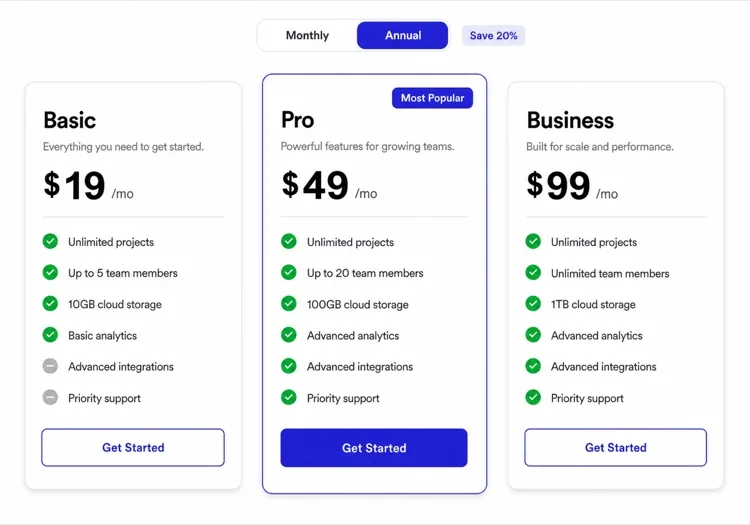
The default pricing-page upgrade: your tiers as columns, buyer criteria as grouped rows, one recommended column carrying the highlight — and a Best for row that closes the argument.

Create a pricing comparison table with three plan columns — Free, Pro, Business — and 16 feature rows grouped under labels: Usage, Collaboration, Security, Support. Make the Pro column recommended with an indigo-50 tint, a 2px indigo-600 top border and a Most popular pill. Cells hold real values with units such as 5 GB or 20 projects; use checkmarks only for plain yes rows and a zinc-300 dash where a feature is absent. Add a final Best for row with one sentence per plan written for a specific buyer. Sticky header row, zinc-50 hover on rows, focus rings on all plan CTAs, and a mobile layout that switches to one plan at a time with a segmented control.
Try in MeDo
VersusHead-to-Head

Us vs. Them Decision Layout

Two products, one verdict per row. The version buyers trust most, because it is allowed to show the competitor winning — and says when to choose you anyway.

Build a two-column versus comparison between our product and one named competitor with a slim feature label column: three columns total. Each row carries an outcome badge — Us, Them, or Tie — derived from the data, and the winning cell gets a subtle green-50 tint. Include at least two rows where the competitor wins, such as price and legacy integrations, and a When to choose us card under the table with three bullet criteria phrased as facts, not superlatives. Add an anonymous-label toggle so the same table renders as Competitor A for markets where naming is unwise. Rows highlight on hover, all cells are keyboard-reachable, and mobile stacks to a per-feature card keeping both product values visible.

Try in MeDo
MatrixFeature Matrix

Five-Product Capability Grid

For shoppers comparing a whole category, not just you versus one rival. Cells stay short, the recommended column is tinted rather than declared, and column toggles shrink the grid on demand.

Create a wide feature matrix comparing five products across 20 capabilities grouped into four labeled sections. Cell values are short text — numbers with units, Yes, or a dash — never sentences, so the grid scans cleanly at 14px. Tint our column with indigo-50 and a top badge, but put no winner language in cells; the data does the arguing. The header row sticks below the navbar and the first capability column sticks left with a white background and 1px border while the grid scrolls horizontally under a right-edge fade mask that disappears once scrolled. Add column visibility toggles above the table so a shopper can narrow to two products, plus a CSV export button.

Try in MeDo
GuidedDecision Helper

Use-Case Rows With a Verdict Column

Rows become jobs-to-be-done instead of feature names: if you need X, the row points at the plan that honestly serves it. The gentlest way to send different buyers to different answers.

Build a decision-oriented comparison where rows are use cases instead of feature names — Launch a blog, Sell subscriptions, Run a docs site — and columns are three plans. Each cell holds a fit verdict: a green Check pill, an amber Partial pill, or a grey Not for this, each with an icon so color is never the only signal. Under the grid add one summary card per plan naming the builder it fits in a sentence, with a CTA. Sort rows from the most common job to the most niche, announce the verdict of the focused row through a polite aria-live region, and drive everything from one data array so pills and summary cards cannot disagree.

Try in MeDo

How to Customize Your Comparison Table

Write cells as claims a buyer can verify

"10 GB", "Unlimited", "SOC 2 report available" — a value with a unit is information; a green checkmark is a shrug. Reserve checkmarks for plain yes rows and use a visible dash in zinc-300 for genuinely absent features, because an empty cell reads as a rendering bug rather than an answer. The dash is the most honest cell on the page.

Pick the recommended column before you design

A highlighted column earns trust only when the row data supports it. Decide who the recommendation is for — solo builders, not enterprises — and write the Best for row so the tint and the sentence agree. If two of your three plans could claim the highlight, the grid is telling you to split the table by audience instead of picking a winner at random.

Decide the mobile collapse strategy in the prompt

Five columns cannot survive a 390px screen, so name the strategy: a single-plan view with a segmented switcher, or a sticky first column with horizontal scroll and a right-edge fade. What is never acceptable is silent column hiding — a buyer who cannot see the Enterprise cell for data residency assumes the worst and leaves.

Name competitors only with facts you can source

Comparative tables naming another product are legal in most markets when every claim is factual, current and provable — nominative use of the name is fine, invented shortcomings are not. Link each contested cell to its source page, date-stamp the table, and prefer product facts ("no SSO on free tier") over superlatives ("slower").

Who Uses the Comparison Table Component

SaaS pricing page

Plan cards up top, then the full matrix beneath: 16 to 20 rows grouped by Usage, Security and Support, a sticky plan header that survives scrolling, and a Best for row that sends each buyer to exactly one column.

E-commerce product vs product

A phone-versus-phone grid on the category page: spec rows with real values, winner chips computed from the data, and a quiet reminder line that the losing spec may not matter for how the shopper actually uses the device.

Developer tool edition comparison

Open source vs Cloud vs Enterprise, where most cells are text values and the differences are compliance and support rows. The table doubles as sales documentation, so every cell links to the doc page that proves it.

Agency vendor shortlist

Three service packages compared on deliverables, revision rounds and turnaround instead of features — the same criteria grid doing procurement work, with a decision-helper row for teams that do not know what to ask yet.

Comparison Table Patterns for Different Websites

The same comparison table component, tuned to the kind of site it ships on.

01 / 04

SaaS Pricing Pages

Plan cards sell; the matrix beneath them proves. Keep the two visually connected — same column order, same names — or the reader re-does their mental matching. The comparison is also where enterprise objections (SSO, audit logs, data residency) get answered without a sales call.

Comparison Table Styles and Variants

Pick the variant that matches the rest of the page, then generate it.

01 / 04

Checkmark Grid

The dense default: thin dividers, centered ticks, 13-14px rows. Works when rows are genuinely binary and the table stays under about 20 rows; turns into green noise the moment values have degrees, so pair it with a values-with-units policy from the start.

Comparison Table in React, Next.js, Vue and Svelte

React, Next.js, Vue 3, SvelteKit, Astro or plain HTML — the same comparison table, six ways to drop it in.

01 / 03

React Comparison Table

Model the table as config — columns and rows as data, with the recommended flag on the column, so the highlight, the mobile switcher and the CSV export all read the same source of truth.

src/components/ComparisonTable.tsx

const columns = [
  { key: 'feature', label: '' },
  { key: 'starter', label: 'Starter' },
  { key: 'growth', label: 'Growth', recommended: true },
  { key: 'enterprise', label: 'Enterprise' },
]

function Cell({ col, value }) {
  if (value === null) return <td className="text-zinc-300">—</td>
  return <td className={col.recommended ? 'bg-indigo-50' : ''}>{value}</td>
}

How to Add Your Comparison Table to a Project

Four steps, from picking a comparison table template to shipping it in production.

01~2min

List the Columns a Buyer Actually Cross-Shops

Two to four options, chosen from search terms, sales calls and review-site comparisons — not the competitors you wish you had. The table is only as credible as its column list: omit the obvious rival and the reader notices.

02~5min

Write Rows as Decision Criteria, Not Feature Names

Turn your feature list into the questions a buyer asks: "Can I migrate my existing data?", not "Import API". Then fill every cell honestly, including dashes where you lose. The concession rows are what make the winning rows believable.

03~3min

Generate, Then Pressure-Test the Verdicts

Generate the table in MeDo and you get running React + Tailwind, not a screenshot. Check the three failure spots before styling: sticky headers that slide under the navbar, the dash cells rendering blank, and the mobile collapse hiding a column instead of swapping to it.

04~2min

Link the Claims and Ship

Every contested cell gets a source link, the table gets a last-updated date, and the Best for row gets read aloud one more time. If any sentence in it could be true of a competitor's column too, sharpen it until it picks a side.

Common Questions About Comparison Table

When do I need a comparison table instead of a data table?

Ask what the first column holds. If it is a record — an order ID, a customer name, a thousand rows a user will filter, sort and act on — you want a data table. If the first column is a decision criterion and there are two to five columns the reader is choosing between, you want a comparison table. The comparison table is editorial and finite; the data table is interactive and open-ended. Merging them produces the worst of both: a pricing grid with filters nobody asked for, or an admin grid where the vendor conveniently highlighted its own column.

How is a comparison table different from a pricing table section?

A pricing table is a conversion section: plan cards with prices, CTAs and a handful of headline features, built to close the decision. A comparison table is the evidence layer that can sit below it — the full criteria grid a skeptical buyer scrolls to when the cards alone do not settle it. The same component also generalizes far past pricing: product vs product specs, edition matrices, vendor shortlists. If your page only needs three plan cards and a CTA, generate a pricing table; when buyers need to interrogate the differences row by row, add the comparison beneath it.

Should my comparison table include competitor products?

Only if you are prepared to keep it factual. Comparative advertising is legal in most jurisdictions when claims are accurate and provable, and a head-to-head grid converts precisely because it is checkable — but every cell becomes a claim with your name on it. Name the competitor with nominative use, keep phrasing to verifiable product facts, link sources, and date-stamp the table so a competitor's pricing change does not turn your grid into a libel. If that maintenance is unrealistic, use an anonymous "Other tools" column.

Should cells be checkmarks or text values?

Text whenever values differ in degree — storage, seat limits, response times — because checkmarks flatten "5 GB" and "unlimited" into the same green tile and the reader learns your table cannot be trusted for the details that matter. Checkmarks are right for binary rows: SSO available or not, audit log or not. The strongest matrices mix both deliberately: ticks where the answer is genuinely yes-or-no, values with units everywhere else, and a dash where the feature does not exist.

How many columns can a comparison table hold before mobile breaks?

Comfortably four to five on desktop including the criteria column; past that, cell values must get shorter or the grid needs horizontal scroll. On phones, choose a strategy in the prompt: a single-plan view with a segmented switcher is the cleanest, while a sticky first column with sideways scroll works better for spec matrices. Five-plus columns of equal importance is usually a content problem — split the matrix into Security, Usage and Support groups, or collapse rare rows behind an expandable group.

Should I highlight a recommended column?

Yes, if you can defend it in one sentence; that sentence should be printed in the table. A tinted column with a Most popular pill orients an undecided buyer in seconds and measurably lifts plan selection — but highlighting your most expensive tier with no justification is the fastest way to make everything else on the page look manipulative too. Alternative structures when no column deserves the crown: highlight nothing and let the Best for row carry the verdict, or tint one column per audience segment.