AI Testimonials Generator.

Describe the social proof section you need — quote style, star ratings, avatar layout, grid or carousel — and MeDo generates production-ready code in seconds. Let your customers do the selling.

Testimonials
Testimonials

Social Proof Is the Most Persuasive Copy on Your Page.

Visitors trust other customers more than they trust you — and a well-designed testimonials section is the fastest way to prove your product delivers. It reduces doubt at the exact moment buyers are deciding. Yet most teams either skip testimonials entirely or dump quotes into a wall of text. MeDo makes it easy to generate a section that's visually compelling, credible, and conversion-tested.

6 templates

Testimonials Templates You Can Generate

Every template is a real prompt, not a screenshot. Copy it into any AI editor, or run it in MeDo and get React + Tailwind code back.

Three-up gridAcme

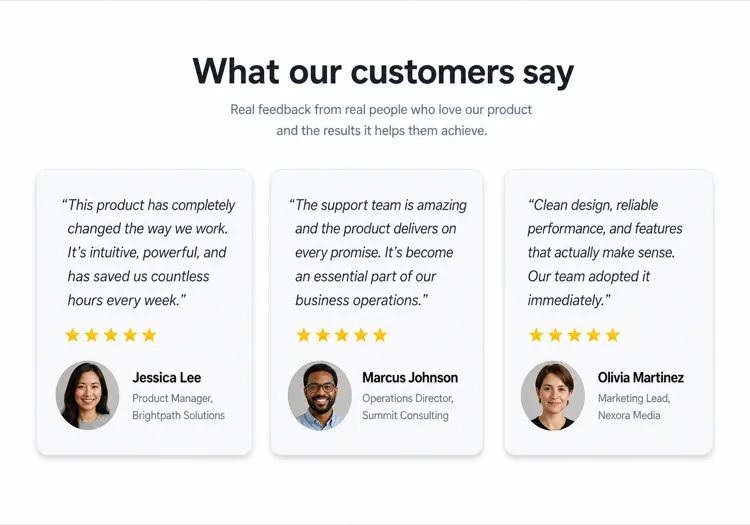
Three Quote Cards With Attribution

The baseline social proof section. It fails on attribution, not layout — an unnamed quote from "a happy customer" reads as invented and costs more trust than it buys.

Create a testimonials section with a centered h2 and three quote cards in one row. Each card holds a quote of 20 to 40 words in a blockquote element, then an attribution row with a 40px circular avatar, the customer's real name in medium weight, and their role plus company on a muted second line. Use a cite element for the source and explicit width and height on the avatar with an initials fallback on image error. Light card surface, hairline border, 12px radius, no hover animation. Stack to a single column at 768px keeping the avatar row intact rather than centering it.


Try in MeDo
Featured quoteMega

One Large Quote Above the Grid

Promotes your strongest testimonial out of the grid, where it would have been averaged out by two weaker ones. The featured card should be the quote naming a specific outcome, not the most flattering adjective.

Create a testimonials section with a featured quote above a grid. The featured card spans the full container: a quote of 40 to 60 words at large size, a 56px avatar, the customer name, their role and company, and a company logo at the right edge. Below it, three smaller cards in one row each with a shorter quote and a 40px avatar attribution row. Wrap each quote in a blockquote with a cite for the person and company. Featured card gets a tinted background to separate it from the grid. Collapse the grid to one column at 768px and reduce the featured quote by one type step.

Try in MeDo
Logo wallShipfast

Customer Logos With Quotes on Hover

Logos first, quotes second — the right order when your customer names are more persuasive than anything they said. Never make the quote hover-only; that hides it from touch and keyboard entirely.

Create a social proof section that leads with a customer logo wall: eight monochrome logos in two rows at reduced opacity, each an interactive button that reveals that customer's quote in a panel below the wall. Reveal on hover, focus and click so the content is reachable by keyboard and touch, with the active logo at full opacity and aria-pressed set. The panel shows the quote, avatar, name, role and company, and keeps a fixed min-height so the page does not jump between quotes. Default to the first quote on load. Four logos per row at 768px, two at 480px.

Try in MeDo
MasonryBuilders

Masonry Wall of Short Quotes

Nine to twelve quotes of uneven length in staggered columns. Volume is the argument here, so it only works if every card still carries a name and a face — a wall of anonymous praise reads as filler.

Create a masonry testimonial wall of nine to twelve short quotes across three CSS columns, letting the natural quote lengths stagger the card baselines. Each card carries a 32px avatar, a name, a role, and a source label such as G2 or Product Hunt. Use blockquote and cite markup throughout, and give avatars explicit dimensions with an initials fallback. Add a fade mask and a Show more button that expands from six visible cards to the full set, updating aria-expanded. Drop to two columns at 900px and one at 600px, preserving the source label on every card.

Try in MeDo
CarouselStudio

Single-Quote Slider With Controls

One long quote at a time, for case-study length testimonials that will not fit a card. The only variant here that needs client state, so keep the interactive shell small and leave the rest of the page static.

Create a testimonial carousel showing one quote at a time: a 60 to 100 word quote, a 64px avatar, the customer name, role, company and logo. Add previous and next buttons plus dot indicators, all real buttons with accessible labels, and support left and right arrow keys when the region has focus. Wrap the slides in an aria-roledescription carousel region with a live region announcing "slide 2 of 5". Pause any autoplay on hover and focus, and disable it entirely under prefers-reduced-motion. On mobile, swap the side buttons for a swipeable track with the dots below.

Try in MeDo
VideoBrand*

Video Testimonials With Transcript Quote

A thumbnail that opens a short customer video, with the strongest sentence quoted in text beneath it. Most visitors never press play, so the text quote is doing the actual work and cannot be skipped.

Create a video testimonials section with three cards. Each card shows a poster image at explicit dimensions with a centered play button overlay, a duration chip, and beneath it a one-sentence pull quote in text plus the customer name, role and company. Do not embed the player on load — render the poster as an image and only mount the iframe when the play button is activated, so three third-party players do not block the page. Give each play button a label naming the customer. Provide a captions note and a transcript link per card. One column at 768px.

Try in MeDo

How to Customize Your Testimonials

Match the layout to your quote volume

Three to four quotes in a grid is the sweet spot for most landing pages. If you have many testimonials, ask MeDo for a carousel or masonry layout so you can showcase more without overwhelming the page.

Lead with the strongest quote

The first testimonial gets the most attention. In your prompt, describe a featured large-quote card at the top — a single standout review in a hero card before the grid — to anchor trust immediately.

Add company logos for authority

For B2B products, ask MeDo to include a company logo placeholder next to the customer name. Recognized brand logos in testimonials significantly increase perceived credibility.

Specify star ratings selectively

5-star ratings on every card can feel manufactured. Ask MeDo to vary the visual emphasis — some cards with ratings, some without — to make the section feel authentic and hand-curated.

Who Uses the Testimonials Component

SaaS product

Role-specific quotes from power users — "As a growth marketer, I saved 6 hours a week" — paired with job titles and company logos to build credibility with buyers evaluating the tool.

E-commerce brand

Photo-forward testimonial cards with product images, customer selfies, and short punchy quotes. Visual proof that the product looks and works as advertised.

Agency or freelancer portfolio

Client quotes about outcomes delivered — revenue grown, projects shipped on time — presented in a clean two-column layout that lets results speak louder than any bio.

Online course or coaching

Before-and-after style testimonials with the student name, course name, and a transformation quote. Drives enrollment by making outcomes feel attainable and real.

Testimonials Patterns for Different Websites

The same testimonials component, tuned to the kind of site it ships on.

01 / 06

SaaS Product Testimonials

Role-specific quotes with job title, company and logo, because a B2B buyer is checking whether someone in their seat succeeded with this. Name the outcome in the quote — a quote praising the support team does not answer the question the pricing page raised.

Testimonials Styles and Variants

Pick the variant that matches the rest of the page, then generate it.

01 / 06

Quote Card Grid

Three or four equal cards in a row, each with quote plus attribution row. The safest default and the easiest to keep balanced, provided you trim quotes to a similar length — one 80-word card next to two 20-word cards makes the grid look broken.

Testimonials in React, Next.js, Vue and Svelte

React, Next.js, Vue 3, SvelteKit, Astro or plain HTML — the same testimonials, six ways to drop it in.

01 / 06

React Testimonials Section

A grid of quotes needs no state at all — keep hooks for the carousel variant only. Type the testimonial array so a card missing a name or role fails at build rather than shipping as anonymous praise.

src/components/Testimonials.tsx

export function Testimonials({ items }) {
  return (
    <div className="grid gap-6 md:grid-cols-3">
      {items.map((t) => (
        <figure key={t.name} className="rounded-xl border p-6">
          <blockquote className="text-lg">{t.quote}</blockquote>
          <figcaption className="mt-6 flex items-center gap-3">
            <Avatar src={t.photo} name={t.name} />
            <span>{t.name}, {t.role} at {t.company}</span>
          </figcaption>
        </figure>
      ))}
    </div>
  )
}

How to Add Your Testimonials to a Project

Four steps, from picking a testimonials template to shipping it in production.

01~30s

Pick a Testimonials Template

Choose by what you have. Three solid quotes means the card grid; one outstanding quote means the featured layout; recognisable customer names mean lead with the logo wall.

02~10s

Copy the Prompt

Take the prompt into MeDo, Lovable, Bolt, v0 or Cursor. Decide the quote length before you run it — the card grid only stays balanced if every quote lands in the same range.

03~2min

Generate and Refine

You get React + Tailwind back with a live preview. Follow up in plain English — "add a company logo to each card", "make it two columns on tablet" — instead of editing class strings.

04~2min

Swap In Real Attribution

Replace every placeholder with a real name, role, company and photo, and get written permission for each. A card left as "Jane Doe, CEO" is worse than no testimonials section at all.

Common Questions About Testimonials

How do I create a testimonials section with AI?

In MeDo, describe the testimonials layout you want — grid vs. carousel, number of cards, whether to include star ratings or avatars, and the visual style. MeDo generates the full component code with placeholder quotes, names, and avatars that you replace with your real customer content.

What is the best AI testimonials generator?

MeDo is purpose-built for generating production-ready website components, including testimonials sections. Unlike generic AI chat tools, MeDo understands grid layouts, responsive design, and the conversion patterns that make social proof actually work — so you get clean, usable code rather than a rough mockup.

Can I generate a testimonials carousel with AI?

Yes. Ask MeDo for a 'testimonials carousel with auto-play and navigation dots' and it will generate an interactive slider component. You can specify how many cards are visible at once, transition speed, and whether to include prev/next arrow controls.

How do I add star ratings to an AI-generated testimonials section?

Include "5-star rating using filled star icons" in your MeDo prompt. You can also ask for variable ratings — "show between 4 and 5 stars per card" — to make the section feel more authentic and trustworthy.

Can AI generate testimonials with customer photos?

MeDo will generate the component with circular avatar image placeholders and the correct layout structure. You replace the placeholder src attributes with your real customer photos. You can also describe a fallback — "show initials in a colored circle if no photo is available."

How do I make a mobile-friendly testimonials section with AI?

Add "responsive, stacks to a single column on mobile" to your MeDo prompt. The generated component will use CSS grid or flexbox that automatically collapses the multi-column layout to a vertically scrolling single-card view on small screens.