












Indie Hackers Shipping Fast
Skip a week of layout work. Generate a hero, a pricing table and a footer, assemble them in one MeDo project, and put the landing page live tonight.
أنشئ أزرارًا وحقول إدخال وبطاقات ونوافذ منبثقة وأشرطة تنقل وأقسام بطولية والمزيد بالذكاء الاصطناعي. انسخ الموجِّه واحصل على مكوِّن جاهز للإنتاج في ثوانٍ.
A prompt-first component workflow: the prompt is the artifact, the output is real code you own, and the same component drops into whichever editor you already use.
01 / 06
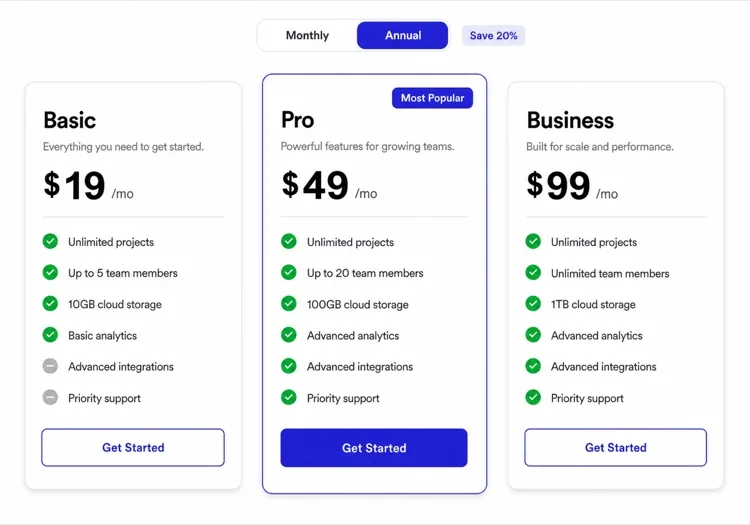
Type "a pricing table with three tiers and a monthly-yearly toggle" and MeDo returns React and Tailwind code with a live preview. No hunting through a docs site for the closest example, no reverse-engineering someone else's prop API.
Every common part of a modern web app — reusable UI primitives, full-width page sections, and complete pages — available as a prompt-generated, themeable React component.
اختر مكوِّنًا لإنشائه، أو صِف مكوِّنك الخاص.
عناصر قابلة لإعادة الاستخدام تضعها في أي مكان: أزرار، حقول إدخال، بطاقات، نوافذ منبثقة، وتنقل.
Composed interaction and layout patterns — conversation flows, content grids and collections, built from reusable pieces.
كتل بعرض كامل تتراكم لتكوين صفحة: أقسام بطولية، شبكات ميزات، جداول أسعار، وأقسام CTA.
Multi-region working environments that combine navigation, panels and editing into one surface.
صفحات كاملة يتم إنشاؤها من البداية إلى النهاية، جاهزة للنشر.
Indie hackers, vibe coders, designers, agencies, non-technical founders and design system teams all reach for the same starting patterns.
Skip a week of layout work. Generate a hero, a pricing table and a footer, assemble them in one MeDo project, and put the landing page live tonight.
Stop asking your AI editor to redraw the same navbar and getting a different answer each time. Copy a specific prompt from here and the output stays consistent across runs.
Prototype with actual Tailwind components instead of static frames. Every component is responsive and interactive, so the handoff is the artifact rather than a spec describing one.
Start every client site from the same vetted set — one navbar, one hero, one pricing block — and retheme rather than rebuild. The layout stays battle-tested across handoffs.
You do not need to know React or Tailwind. Describe the section you want, drop it into your MeDo project, and keep editing in plain English.
Use these as the reference spec for your own components. Each page documents the states and edge cases a component has to handle, which is the part usually missing from an internal library.
From a prompt to a themeable component in four steps — no copy-pasting from a docs site, no wiring up someone else's prop API.
Type a prompt like "a dark footer with four link columns, newsletter signup and social icons", or start from one of the prompts on any component page.
A live preview renders next to the code. Refine with follow-up prompts, adjust the theme tokens, or edit the JSX directly — whichever is faster for the change you want.
Copy the prompt into Lovable, Bolt, v0 or Cursor, take the raw code, or keep building in MeDo where the component lands as a real file with its dependencies wired up.
Publish from MeDo to a live URL, or commit the component into your own repository. The code is yours either way — nothing here needs MeDo at runtime.
A kit gives you a fixed catalogue to copy from; when your case is slightly different, you are editing someone else's code. Here the prompt is the artifact — you edit the description and regenerate, so the component matches your case instead of the nearest catalogue entry. The generated code is plain React and Tailwind with no runtime dependency on MeDo.
Components are authored as React and TypeScript with Tailwind CSS — the same stack Lovable, Bolt, v0 and Cursor projects use. Each component page also shows the same component mounted in Next.js, Vue 3, SvelteKit, Astro and plain HTML, since the markup itself is framework-agnostic.
Generating and previewing components in MeDo runs on the same credits as the rest of the builder, and there is a free allowance to start with. Downloading the full source of a project is a separate credit cost. See the pricing page for the current numbers.
Yes. The prompts are plain English with no MeDo-specific syntax, so they run in any AI editor. Every component page has a copy button for exactly this, and the specificity is the point: a vague prompt produces a different component every run, while these name the states and edge cases explicitly.
Each component page states the accessibility contract for that component — focus trapping and restore for modals, live-region politeness for toasts, hidden text labels for anything that would otherwise convey meaning through color alone. Those requirements are in the prompts, so they are in the generated code rather than being a follow-up task.
Yes. The pages here cover the components people search for most, but the generator takes any description. If you need something unusual, describe it directly rather than looking for the closest listed match.
MeDo يُنشئ أي مكوِّن لموقع ويب من موجِّه — لا حاجة لقوالب.