MeDo

Générateur de Page 404 IA.

Les pages perdues sont inévitables — une 404 oubliable ne l'est pas. Décrivez le style de votre marque et MeDo génère une page d'erreur entièrement conçue avec illustration, navigation claire et texte qui garde les visiteurs engagés au lieu de les faire fuir.

Page 404
Page 404

Une page 404 est votre dernière chance de retenir un visiteur

Quand quelqu'un atteint une URL cassée, l'écran d'erreur par défaut du navigateur est une impasse — il ferme l'onglet et vous oublie. Une page 404 bien conçue reconnaît l'erreur avec personnalité, offre une navigation claire vers du contenu utile et renforce la confiance en la marque exactement au moment où elle est le plus menacée. Les sites avec des pages 404 fidèles à leur marque réduisent mesurablément les taux de rebond des états d'erreur et récupèrent du trafic qui serait autrement perdu à jamais.

6 modèles

Modèles de Page 404 que vous pouvez générer

Chaque modèle est un vrai prompt, pas une capture d'écran. Copiez-le dans n'importe quel éditeur IA, ou exécutez-le dans MeDo pour récupérer du code React + Tailwind.

MinimalCentered

Vertically Centered 404 Layout

Numeral, one line of copy, one button. The layout to reach for when you have no search index and no obvious second destination — two links beat a sitemap dump.

Create a not-found page layout, vertically centered in the viewport: a large 404 numeral as a display element, an h1 stating that the page was not found in plain language, one sentence explaining it may have moved or been deleted, and a primary Back to home button. Reuse the site header and footer so the page does not read as a different site. The route must return an HTTP 404 status, not a 200 with error copy on it, or search engines will index the dead URL. Give the h1 focus on load so screen reader users land on the error rather than the nav, and keep the numeral decorative with aria-hidden so it is not announced as a number.


Tester dans MeDo
RecoverySearch

404 With a Search Field

For any site with more than a few dozen pages, where the visitor was looking for one specific thing. The input, not the home button, is the real recovery path.

Create a not-found page built around a search affordance: a compact 404 heading, one line of copy, then a labelled search input with an autofocus and a submit button that posts to the site search route. Below it, list five popular or recently updated pages as real links rather than a generic Back to home. Seed the search input with any meaningful slug segment from the failed URL so the visitor starts from their own query. Return an HTTP 404 status from the route and do not redirect to the homepage. Label the input with a visible label, announce result counts through an aria-live region, and keep the header and footer navigation intact.

Tester dans MeDo
DeveloperDocs

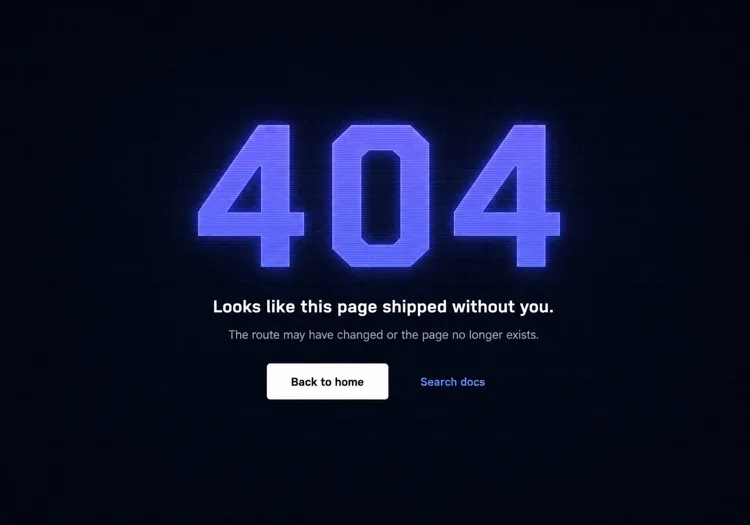
Terminal-Aesthetic 404 Page

Monospace numeral, scanline texture, links to search and the docs index. The audience here reads error output for a living, so the page can be terse without feeling cold.

Create a not-found page for a developer tool: a monospace 404 with a faint glow on a dark surface, a short headline, one line noting the page may have moved between versions, and a docs search input. Add links to the docs index, the changelog and the version switcher, since a broken docs URL is usually a version mismatch rather than a typo. Return an HTTP 404 status and keep the docs sidebar rendered so the reader retains their place in the tree. Set the h1 as the focus target on load, mark the background texture aria-hidden, and hold contrast at 4.5:1 for the muted supporting copy against the dark background.

Tester dans MeDo
CommerceStorefront

404 With Products and Categories

A dead product URL usually means the item sold out or was renamed, so the page should show alternatives rather than apologise. Category links recover more sessions than a home button does.

Create a not-found page for a store: a short heading acknowledging the product or page is unavailable, a product search input, a row of four top-level category links, and a grid of four bestseller cards with image, name and price. Explain in one line that items can sell out or be renamed. Return an HTTP 404 status for the missing URL — a soft 404 redirecting to the homepage strands the visitor and keeps the dead link indexed. Give every product image real alt text, keep the cards keyboard reachable in reading order, and preserve the cart indicator in the header so an in-progress basket is visibly intact.

Tester dans MeDo
In-appConsole

404 Inside the App Shell

For authenticated routes, render the error inside the existing nav instead of ejecting the user to the marketing site. Losing the app shell reads as a logout, which triggers support tickets.

Create an in-app not-found view that renders inside the authenticated shell with the sidebar and top bar intact: a compact heading stating the resource was not found, one line noting it may have been deleted or belongs to a different workspace, a Back to dashboard button, and a link to switch workspace. Do not sign the user out or bounce them to the marketing homepage. Return an HTTP 404 for a genuinely missing resource and a 403 where the resource exists but is not theirs, since conflating the two leaks whether an ID is real. Move focus to the heading on render and keep the page title informative for browser history.

Tester dans MeDo
Brand-ledCanvas

Illustrated Full-Bleed 404 Page

The error page as a piece of the brand — an illustration or animation carrying the page and the copy staying out of its way. Only works if the recovery link is still obvious at a glance.

Create a brand-led not-found page: a full-bleed illustration or looping animation filling the viewport, an oversized 404 or short witty headline set over it, one line of copy, and a single high-contrast Back to home button that stays legible against the artwork. Mark the illustration aria-hidden and carry all meaning in the text. Respect prefers-reduced-motion by holding a static frame instead of looping. Keep the total weight in check — a 3MB hero on an error page is bandwidth spent on a failed request. Return an HTTP 404 status and keep the footer navigation present beneath the artwork.

Tester dans MeDo

Comment personnaliser votre Page 404

Donnez du poids visuel au numéro d'erreur, pas juste une taille de texte

Le « 404 » est la première chose qu'un visiteur voit — faites-en un élément de design, pas juste un chiffre. Un remplissage en dégradé, une lueur subtile, une ombre décalée ou même un personnage illustré interagissant avec lui transforme un code d'erreur froid en quelque chose de mémorable et cohérent avec la marque.

Rédigez un texte qui reconnaît la frustration et avance vite

Évitez les lignes génériques comme « Oups, page introuvable. » Reconnaissez ce qui s'est passé en une phrase courte, puis orientez immédiatement vers l'avant. Le ton doit correspondre à votre marque : ludique pour les apps grand public, net et direct pour les outils développeur, chaleureux et apologétique pour l'e-commerce.

Offrez deux chemins de récupération — un primaire, un secondaire

Un simple bouton « Retour à l'accueil » est le minimum. Une excellente page 404 ajoute une option secondaire adaptée à l'intention probable du visiteur : « Parcourir la doc », « Rechercher », « Voir les pages populaires » ou « Contacter le support ». Deux chemins distincts évitent le rebond du tout-ou-rien.

Incluez un champ de recherche pour les sites riches en contenu

Pour les blogs, sites de documentation et boutiques e-commerce, intégrer un champ de recherche directement sur la page 404 transforme l'impasse en moment de découverte. Un visiteur cherchant un article ou produit spécifique peut le trouver immédiatement sans retourner à la page d'accueil.

Qui utilise le composant Page 404

Application web SaaS

Les pages 404 SaaS utilisent typiquement le style d'illustration principal du produit, un titre empathique court et un bouton « Retour au tableau de bord » — gardant l'utilisateur dans le produit plutôt que de le renvoyer vers la page marketing.

Outil développeur ou site de documentation

Les pages 404 d'outils dev adoptent l'esthétique terminal ou code : polices monospace, textures de lignes de balayage ou un faux stack trace d'erreur rendu comme du design. Les liens de récupération pointent vers la recherche et l'index de la documentation plutôt qu'un accueil générique.

Boutique e-commerce

Les pages 404 de retail minimisent le rebond en affichant les bestsellers, liens de catégories ou une barre de recherche directement sur la page d'erreur. Certaines incluent une petite offre de réduction (« Laissez-nous nous rattraper — voici 10 % de réduction ») pour convertir la frustration en moment d'achat.

Site marketing ou de marque

Les pages 404 de marques et agences traitent l'écran d'erreur comme une toile de créativité — illustrations inattendues, textes spirituels et animations interactives qui rendent le lien cassé lui-même partageable et fidèle à la marque.

Modèles de Page 404 pour différents sites web

Le même composant page 404, adapté au type de site sur lequel il est publié.

01 / 06

SaaS Application 404

Render the error inside the app shell with the sidebar intact and point at the dashboard, not the marketing homepage. Dropping an authenticated user onto the public site looks like a session expiry, and they will contact support rather than click Back.

Styles et variantes de Page 404

Choisissez la variante qui correspond au reste de la page, puis générez-la.

01 / 06

Centered Minimal 404

Numeral, headline, one button, vertically centered. Ships in an hour and never looks broken. The right choice when you have no search index, because the alternative is a page whose main action leads nowhere useful.

Page 404 en React, Next.js, Vue et Svelte

React, Next.js, Vue 3, SvelteKit, Astro ou HTML simple — le même page 404, six façons de l'intégrer.

01 / 06

React 404 Page

In a client-only SPA a catch-all route renders the page but the server still answers 200, so configure the host to serve index.html with a 404 status for unknown paths — otherwise crawlers index every dead URL.

src/routes.tsx

<Routes>
  <Route path="/" element={<Home />} />
  <Route path="/docs/*" element={<Docs />} />
  <Route path="*" element={<NotFound />} />
</Routes>

Comment ajouter votre Page 404 à un projet

Quatre étapes, du choix d'un modèle de page 404 à sa mise en production.

01~30s

Pick a 404 Layout

Match it to why your URLs break — search-first for a content site, category links for a store, the app shell for authenticated routes, centered minimal for everything else.

02~10s

Copy the Prompt

Paste it into MeDo, Lovable, Bolt, v0 or Cursor. Swap the placeholder recovery links for the two destinations you would actually want a lost visitor to reach.

03~1min

Generate and Refine

You get React + Tailwind with a live preview. Follow up in plain English — "seed the search box from the failed slug", "keep the sidebar rendered", "hold a static frame under reduced motion".

04~1min

Wire the Not-Found Route

Drop it into not-found.tsx, +error.svelte, 404.astro or your catch-all route, then curl a dead URL and confirm the response is 404 and not a 200 with error copy on it.

Questions fréquentes à propos de Page 404

Qu'est-ce qu'un générateur de page 404 IA ?

Un générateur de page 404 IA prend une description en langage courant du style, de l'audience et du ton de marque de votre site et produit une page d'erreur complète et stylée — concept d'illustration, titre, texte d'accompagnement, liens de navigation et code prêt pour la production. MeDo génère le composant complet incluant le layout, les couleurs et les états interactifs, pas juste un squelette de code.

Comment créer une page 404 personnalisée avec l'IA ?

Ouvrez MeDo et décrivez l'esthétique de votre site, votre nom de marque et comment vous voulez que les visiteurs se rétablissent. Par exemple : « Crée une page 404 pour une agence de design minimaliste. Fond blanc, grand 404 sans-serif en gris clair, un titre court et spirituel, un bouton principal 'Retour au travail' et un lien secondaire 'Voir les études de cas'. » MeDo génère le composant ; affinez avec des prompts de suivi jusqu'à correspondre exactement à votre marque.

Que doit contenir une bonne page 404 ?

Au minimum : une indication claire que la page n'a pas été trouvée, une courte explication rédigée par un humain (pas juste « Erreur 404 »), et au moins un chemin de navigation vers du contenu utile. Les pages 404 fortes incluent aussi des visuels ou illustrations cohérents avec la marque, une option de récupération secondaire (recherche ou liens de catégories), et un texte qui correspond au ton général du site.

Comment une page 404 affecte-t-elle le SEO ?

Une page 404 correctement implémentée renvoie un code de statut HTTP 404, qui indique aux moteurs de recherche que l'URL n'existe pas — c'est un comportement correct et attendu. Ce qui compte pour le SEO, c'est que les liens internes cassés soient corrigés à la source et que la page 404 aide les visiteurs humains à se rétablir pour qu'ils ne rebondissent pas immédiatement. Une page 404 bien conçue ne nuit pas au SEO et peut réduire le signal de taux de rebond qu'un état d'erreur sans issue produit.

Quel est le meilleur design pour une page 404 ?

Le meilleur design de page 404 correspond à votre marque, communique l'erreur clairement sans jargon et ramène le visiteur vers du contenu utile en un clic. Pour la plupart des sites, cela signifie un signal d'erreur visuellement proéminent (illustré ou typographique), une explication en une phrase en langage clair, et un bouton d'action principal. Évitez les pages surchargées avec trop d'options de navigation — deux chemins de récupération clairs surpassent un dump complet du sitemap.

Puis-je générer une illustration de page 404 avec l'IA ?

Oui. Quand vous décrivez votre page 404 dans MeDo, vous pouvez spécifier le style d'illustration — basé sur un personnage, géométrique, abstrait ou icônes uniquement — et MeDo l'intègre dans le layout du composant. Vous pouvez aussi demander des concepts d'illustration spécifiques comme « un astronaute perdu », « un robot cassé » ou « un panneau routier vide » et MeDo générera du SVG ou HTML stylé correspondant pour donner vie au concept.
