MeDo

AI 404 페이지 생성기.

페이지 소실은 피할 수 없지만 잊히는 404는 피할 수 있습니다. 브랜드 스타일을 설명하면 MeDo가 일러스트, 명확한 내비게이션, 방문자를 이탈시키지 않고 참여시키는 카피를 갖춘 완전 설계된 에러 페이지를 생성합니다.

404 페이지
404 페이지

404 페이지는 방문자를 붙잡을 마지막 기회입니다

깨진 URL에 도달하면 브라우저의 기본 에러 화면은 막다른 길입니다 — 탭을 닫고 당신의 존재를 잊습니다. 잘 디자인된 404 페이지는 개성으로 에러를 인정하고, 유용한 콘텐츠로 돌아가는 명확한 내비게이션을 제공하며, 브랜드 신뢰가 가장 위험한 순간에 이를 강화합니다. 브랜드에 맞는 404 페이지를 가진 사이트는 에러 상태에서의 이탈률을 측정 가능하게 줄이고, 그렇지 않으면 영원히 잃을 트래픽을 회복합니다.

템플릿 6개

생성할 수 있는 404 페이지 템플릿

모든 템플릿은 스크린샷이 아니라 실제 프롬프트입니다. 어떤 AI 에디터에든 붙여넣거나 MeDo에서 실행해 React + Tailwind 코드를 그대로 받으세요.

MinimalCentered

Vertically Centered 404 Layout

Numeral, one line of copy, one button. The layout to reach for when you have no search index and no obvious second destination — two links beat a sitemap dump.

Create a not-found page layout, vertically centered in the viewport: a large 404 numeral as a display element, an h1 stating that the page was not found in plain language, one sentence explaining it may have moved or been deleted, and a primary Back to home button. Reuse the site header and footer so the page does not read as a different site. The route must return an HTTP 404 status, not a 200 with error copy on it, or search engines will index the dead URL. Give the h1 focus on load so screen reader users land on the error rather than the nav, and keep the numeral decorative with aria-hidden so it is not announced as a number.


MeDo에서 시도하기
RecoverySearch

404 With a Search Field

For any site with more than a few dozen pages, where the visitor was looking for one specific thing. The input, not the home button, is the real recovery path.

Create a not-found page built around a search affordance: a compact 404 heading, one line of copy, then a labelled search input with an autofocus and a submit button that posts to the site search route. Below it, list five popular or recently updated pages as real links rather than a generic Back to home. Seed the search input with any meaningful slug segment from the failed URL so the visitor starts from their own query. Return an HTTP 404 status from the route and do not redirect to the homepage. Label the input with a visible label, announce result counts through an aria-live region, and keep the header and footer navigation intact.

MeDo에서 시도하기
DeveloperDocs

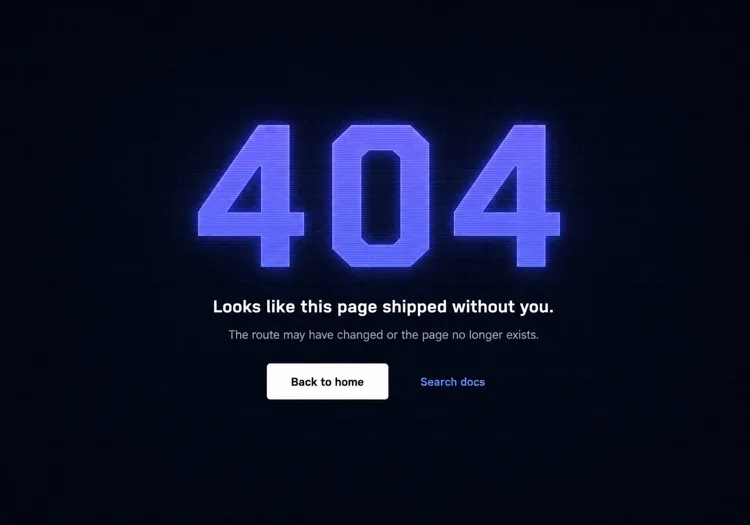
Terminal-Aesthetic 404 Page

Monospace numeral, scanline texture, links to search and the docs index. The audience here reads error output for a living, so the page can be terse without feeling cold.

Create a not-found page for a developer tool: a monospace 404 with a faint glow on a dark surface, a short headline, one line noting the page may have moved between versions, and a docs search input. Add links to the docs index, the changelog and the version switcher, since a broken docs URL is usually a version mismatch rather than a typo. Return an HTTP 404 status and keep the docs sidebar rendered so the reader retains their place in the tree. Set the h1 as the focus target on load, mark the background texture aria-hidden, and hold contrast at 4.5:1 for the muted supporting copy against the dark background.

MeDo에서 시도하기
CommerceStorefront

404 With Products and Categories

A dead product URL usually means the item sold out or was renamed, so the page should show alternatives rather than apologise. Category links recover more sessions than a home button does.

Create a not-found page for a store: a short heading acknowledging the product or page is unavailable, a product search input, a row of four top-level category links, and a grid of four bestseller cards with image, name and price. Explain in one line that items can sell out or be renamed. Return an HTTP 404 status for the missing URL — a soft 404 redirecting to the homepage strands the visitor and keeps the dead link indexed. Give every product image real alt text, keep the cards keyboard reachable in reading order, and preserve the cart indicator in the header so an in-progress basket is visibly intact.

MeDo에서 시도하기
In-appConsole

404 Inside the App Shell

For authenticated routes, render the error inside the existing nav instead of ejecting the user to the marketing site. Losing the app shell reads as a logout, which triggers support tickets.

Create an in-app not-found view that renders inside the authenticated shell with the sidebar and top bar intact: a compact heading stating the resource was not found, one line noting it may have been deleted or belongs to a different workspace, a Back to dashboard button, and a link to switch workspace. Do not sign the user out or bounce them to the marketing homepage. Return an HTTP 404 for a genuinely missing resource and a 403 where the resource exists but is not theirs, since conflating the two leaks whether an ID is real. Move focus to the heading on render and keep the page title informative for browser history.

MeDo에서 시도하기
Brand-ledCanvas

Illustrated Full-Bleed 404 Page

The error page as a piece of the brand — an illustration or animation carrying the page and the copy staying out of its way. Only works if the recovery link is still obvious at a glance.

Create a brand-led not-found page: a full-bleed illustration or looping animation filling the viewport, an oversized 404 or short witty headline set over it, one line of copy, and a single high-contrast Back to home button that stays legible against the artwork. Mark the illustration aria-hidden and carry all meaning in the text. Respect prefers-reduced-motion by holding a static frame instead of looping. Keep the total weight in check — a 3MB hero on an error page is bandwidth spent on a failed request. Return an HTTP 404 status and keep the footer navigation present beneath the artwork.

MeDo에서 시도하기

404 페이지 커스터마이즈 방법

에러 번호에 텍스트 크기가 아닌 시각적 무게를 부여하세요

"404"는 방문자가 가장 먼저 보는 것입니다 — 단순한 숫자가 아닌 디자인 요소로 만드세요. 그래디언트 채우기, 미묘한 글로우, 오프셋 그림자, 또는 그것과 상호작용하는 일러스트 캐릭터가 차가운 에러 코드를 기억에 남고 브랜드에 일관된 것으로 변환합니다.

좌절감을 인정하고 빠르게 앞으로 나아가는 카피를 작성하세요

"이런, 페이지를 찾을 수 없습니다"와 같은 일반적인 문구를 피하세요. 짧은 한 문장으로 무슨 일이 일어났는지 인정한 다음 즉시 앞을 가리키세요. 톤은 브랜드에 맞춰야 합니다: 소비자 앱은 장난스럽게, 개발자 도구는 깔끔하고 직접적으로, 이커머스는 따뜻하고 사과하는 톤으로.

두 가지 복구 경로를 제공하세요 — 프라이머리와 세컨더리

"홈으로 가기" 버튼 하나는 최소한입니다. 훌륭한 404 페이지는 방문자의 의도에 맞춘 세컨더리 옵션을 추가합니다: "문서 탐색", "검색", "인기 페이지 보기" 또는 "지원 연락". 두 개의 뚜렷한 경로가 전부 아니면 전무의 이탈을 방지합니다.

콘텐츠가 많은 사이트에는 검색 필드를 포함하세요

블로그, 문서 사이트, 이커머스 스토어에서는 404 페이지에 직접 검색 입력을 삽입하면 막다른 길을 발견의 순간으로 전환합니다. 특정 기사나 상품을 찾는 방문자가 홈페이지로 돌아가지 않고 즉시 찾을 수 있습니다.

404 페이지 컴포넌트를 사용하는 사람

SaaS 웹 애플리케이션

SaaS 404 페이지는 일반적으로 제품의 메인 일러스트 스타일, 짧은 공감적 헤드라인, "대시보드로 돌아가기" 버튼을 사용합니다 — 마케팅 홈페이지로 보내는 대신 사용자를 제품 내에 유지합니다.

개발자 도구 또는 문서 사이트

개발 도구 404 페이지는 터미널이나 코드 미학을 활용합니다: 모노스페이스 폰트, 스캔라인 텍스처 또는 디자인으로 렌더링된 모의 에러 스택 트레이스. 복구 링크는 일반적인 홈이 아닌 검색과 문서 인덱스를 가리킵니다.

이커머스 스토어

리테일 404 페이지는 베스트셀러, 카테고리 링크 또는 검색바를 에러 페이지에 직접 표시하여 이탈을 최소화합니다. 일부는 좌절감을 구매 순간으로 전환하기 위해 소규모 할인 제안("보상으로 10% 할인을 드립니다")을 포함합니다.

마케팅 또는 브랜드 사이트

브랜드 및 에이전시 404 페이지는 에러 화면을 창의성의 캔버스로 취급합니다 — 예상치 못한 일러스트, 위트 있는 카피, 깨진 링크 자체를 공유 가능하고 브랜드에 맞게 만드는 인터랙티브 애니메이션.

웹사이트 유형별 404 페이지 패턴

같은 404 페이지 컴포넌트를 게시되는 사이트 유형에 맞춰 조정합니다.

01 / 06

SaaS Application 404

Render the error inside the app shell with the sidebar intact and point at the dashboard, not the marketing homepage. Dropping an authenticated user onto the public site looks like a session expiry, and they will contact support rather than click Back.

404 페이지 스타일과 변형

페이지의 나머지 부분과 어울리는 변형을 골라 바로 생성하세요.

01 / 06

Centered Minimal 404

Numeral, headline, one button, vertically centered. Ships in an hour and never looks broken. The right choice when you have no search index, because the alternative is a page whose main action leads nowhere useful.

React, Next.js, Vue, Svelte에서의 404 페이지

React, Next.js, Vue 3, SvelteKit, Astro 또는 순수 HTML — 같은 404 페이지을 여섯 가지 방식으로 넣을 수 있습니다.

01 / 06

React 404 Page

In a client-only SPA a catch-all route renders the page but the server still answers 200, so configure the host to serve index.html with a 404 status for unknown paths — otherwise crawlers index every dead URL.

src/routes.tsx

<Routes>
  <Route path="/" element={<Home />} />
  <Route path="/docs/*" element={<Docs />} />
  <Route path="*" element={<NotFound />} />
</Routes>

404 페이지을 프로젝트에 추가하는 방법

404 페이지 템플릿을 고르고 프로덕션에 배포하기까지 네 단계.

01~30s

Pick a 404 Layout

Match it to why your URLs break — search-first for a content site, category links for a store, the app shell for authenticated routes, centered minimal for everything else.

02~10s

Copy the Prompt

Paste it into MeDo, Lovable, Bolt, v0 or Cursor. Swap the placeholder recovery links for the two destinations you would actually want a lost visitor to reach.

03~1min

Generate and Refine

You get React + Tailwind with a live preview. Follow up in plain English — "seed the search box from the failed slug", "keep the sidebar rendered", "hold a static frame under reduced motion".

04~1min

Wire the Not-Found Route

Drop it into not-found.tsx, +error.svelte, 404.astro or your catch-all route, then curl a dead URL and confirm the response is 404 and not a 200 with error copy on it.

404 페이지에 대한 자주 묻는 질문

AI 404 페이지 생성기란?

AI 404 페이지 생성기는 사이트의 스타일, 대상 독자, 브랜드 톤에 대한 자연어 설명을 받아 완전히 스타일링된 에러 페이지를 생성합니다 — 일러스트 컨셉, 헤드라인, 서포트 카피, 내비게이션 링크, 프로덕션 준비 코드. MeDo는 레이아웃, 색상, 인터랙티브 상태를 포함한 완전한 컴포넌트를 생성합니다. 코드 스켈레톤만이 아닙니다.

AI로 맞춤 404 페이지를 만드는 방법은?

MeDo를 열고 사이트의 미학, 브랜드명, 방문자가 어떻게 복구하기를 원하는지 설명하세요. 예: "미니멀리스트 디자인 에이전시를 위한 404 페이지를 만들어주세요. 흰 배경, 연한 회색의 큰 산세리프 404, 짧고 위트 있는 헤드라인, '작업으로 돌아가기' 프라이머리 버튼, '케이스 스터디 보기' 세컨더리 링크." MeDo가 컴포넌트를 생성합니다. 후속 프롬프트로 브랜드에 정확히 맞을 때까지 다듬으세요.

좋은 404 페이지에는 무엇이 포함되어야 하나요?

최소한: 페이지를 찾을 수 없다는 명확한 표시, 사람이 작성한 짧은 설명("에러 404"만이 아닌), 유용한 콘텐츠로 돌아가는 최소 하나의 내비게이션 경로. 강력한 404 페이지에는 브랜드에 일관된 비주얼이나 일러스트, 세컨더리 복구 옵션(검색이나 카테고리 링크), 사이트의 전체 톤에 맞는 카피도 포함됩니다.

404 페이지가 SEO에 어떤 영향을 미치나요?

올바르게 구현된 404 페이지는 HTTP 404 상태 코드를 반환하여 검색 엔진에 URL이 존재하지 않음을 알립니다 — 이것은 올바르고 예상된 동작입니다. SEO에서 중요한 것은 깨진 내부 링크가 소스에서 수정되고 404 페이지가 인간 방문자의 복구를 도와 즉시 이탈하지 않게 하는 것입니다. 잘 디자인된 404 페이지는 SEO를 해치지 않으며 막다른 에러 상태가 만드는 이탈률 신호를 줄일 수 있습니다.

404 페이지에 가장 좋은 디자인은?

최고의 404 페이지 디자인은 브랜드에 맞고, 전문 용어 없이 에러를 명확히 전달하며, 한 번의 클릭으로 방문자를 유용한 콘텐츠로 돌려보냅니다. 대부분의 사이트에서 이는 시각적으로 눈에 띄는 에러 신호(일러스트 또는 타이포그래피), 한 문장의 평이한 설명, 프라이머리 액션 버튼을 의미합니다. 내비게이션 옵션이 너무 많은 복잡한 페이지는 피하세요 — 두 개의 명확한 복구 경로가 전체 사이트맵 덤프보다 나은 성과를 냅니다.

AI로 404 페이지 일러스트를 생성할 수 있나요?

네. MeDo에서 404 페이지를 설명할 때 일러스트 스타일을 지정할 수 있습니다 — 캐릭터 기반, 기하학적, 추상적 또는 아이콘 전용 — MeDo가 컴포넌트 레이아웃에 통합합니다. "길 잃은 우주비행사", "고장난 로봇", "빈 도로 표지판"과 같은 구체적인 일러스트 컨셉을 요청할 수도 있으며 MeDo가 컨셉에 생명을 불어넣는 일치하는 SVG나 스타일된 HTML을 생성합니다.
