MeDo

Generatore di Pagina 404 IA.

Le pagine perse sono inevitabili — una 404 dimenticabile no. Descrivi lo stile del tuo brand e MeDo genera una pagina di errore completamente progettata con illustrazione, navigazione chiara e testo che mantiene i visitatori coinvolti invece di farli rimbalzare.

Pagina 404
Pagina 404

Una pagina 404 è la tua ultima occasione per trattenere un visitatore

Quando qualcuno raggiunge un URL non funzionante, la schermata di errore predefinita del browser è un vicolo cieco — chiudono la scheda e si dimenticano che esistevi. Una pagina 404 ben progettata riconosce l'errore con personalità, offre una navigazione chiara verso contenuti utili e rafforza la fiducia nel brand esattamente nel momento in cui è più a rischio. I siti con pagine 404 coerenti con il brand riducono misurabilmente i tassi di rimbalzo dagli stati di errore e recuperano traffico che altrimenti andrebbe perso per sempre.

6 modelli

Modelli di Pagina 404 che puoi generare

Ogni modello è un prompt reale, non uno screenshot. Copialo in qualsiasi editor IA, oppure eseguilo in MeDo e ottieni codice React + Tailwind.

MinimalCentered

Vertically Centered 404 Layout

Numeral, one line of copy, one button. The layout to reach for when you have no search index and no obvious second destination — two links beat a sitemap dump.

Create a not-found page layout, vertically centered in the viewport: a large 404 numeral as a display element, an h1 stating that the page was not found in plain language, one sentence explaining it may have moved or been deleted, and a primary Back to home button. Reuse the site header and footer so the page does not read as a different site. The route must return an HTTP 404 status, not a 200 with error copy on it, or search engines will index the dead URL. Give the h1 focus on load so screen reader users land on the error rather than the nav, and keep the numeral decorative with aria-hidden so it is not announced as a number.


Prova in MeDo
RecoverySearch

404 With a Search Field

For any site with more than a few dozen pages, where the visitor was looking for one specific thing. The input, not the home button, is the real recovery path.

Create a not-found page built around a search affordance: a compact 404 heading, one line of copy, then a labelled search input with an autofocus and a submit button that posts to the site search route. Below it, list five popular or recently updated pages as real links rather than a generic Back to home. Seed the search input with any meaningful slug segment from the failed URL so the visitor starts from their own query. Return an HTTP 404 status from the route and do not redirect to the homepage. Label the input with a visible label, announce result counts through an aria-live region, and keep the header and footer navigation intact.

Prova in MeDo
DeveloperDocs

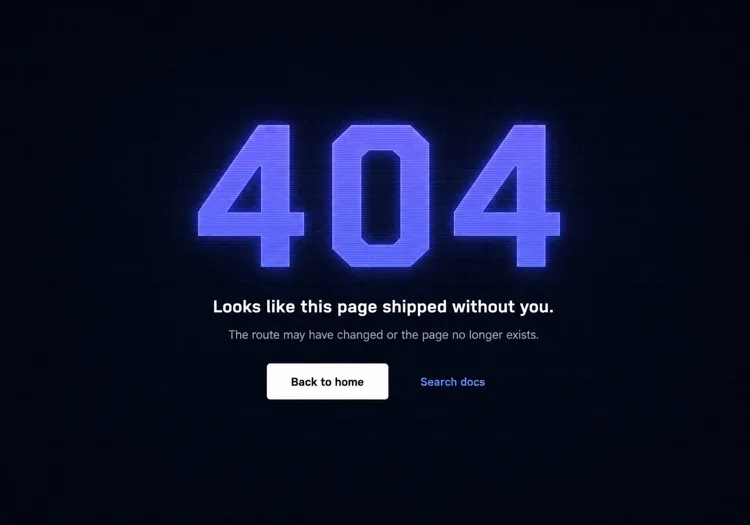
Terminal-Aesthetic 404 Page

Monospace numeral, scanline texture, links to search and the docs index. The audience here reads error output for a living, so the page can be terse without feeling cold.

Create a not-found page for a developer tool: a monospace 404 with a faint glow on a dark surface, a short headline, one line noting the page may have moved between versions, and a docs search input. Add links to the docs index, the changelog and the version switcher, since a broken docs URL is usually a version mismatch rather than a typo. Return an HTTP 404 status and keep the docs sidebar rendered so the reader retains their place in the tree. Set the h1 as the focus target on load, mark the background texture aria-hidden, and hold contrast at 4.5:1 for the muted supporting copy against the dark background.

Prova in MeDo
CommerceStorefront

404 With Products and Categories

A dead product URL usually means the item sold out or was renamed, so the page should show alternatives rather than apologise. Category links recover more sessions than a home button does.

Create a not-found page for a store: a short heading acknowledging the product or page is unavailable, a product search input, a row of four top-level category links, and a grid of four bestseller cards with image, name and price. Explain in one line that items can sell out or be renamed. Return an HTTP 404 status for the missing URL — a soft 404 redirecting to the homepage strands the visitor and keeps the dead link indexed. Give every product image real alt text, keep the cards keyboard reachable in reading order, and preserve the cart indicator in the header so an in-progress basket is visibly intact.

Prova in MeDo
In-appConsole

404 Inside the App Shell

For authenticated routes, render the error inside the existing nav instead of ejecting the user to the marketing site. Losing the app shell reads as a logout, which triggers support tickets.

Create an in-app not-found view that renders inside the authenticated shell with the sidebar and top bar intact: a compact heading stating the resource was not found, one line noting it may have been deleted or belongs to a different workspace, a Back to dashboard button, and a link to switch workspace. Do not sign the user out or bounce them to the marketing homepage. Return an HTTP 404 for a genuinely missing resource and a 403 where the resource exists but is not theirs, since conflating the two leaks whether an ID is real. Move focus to the heading on render and keep the page title informative for browser history.

Prova in MeDo
Brand-ledCanvas

Illustrated Full-Bleed 404 Page

The error page as a piece of the brand — an illustration or animation carrying the page and the copy staying out of its way. Only works if the recovery link is still obvious at a glance.

Create a brand-led not-found page: a full-bleed illustration or looping animation filling the viewport, an oversized 404 or short witty headline set over it, one line of copy, and a single high-contrast Back to home button that stays legible against the artwork. Mark the illustration aria-hidden and carry all meaning in the text. Respect prefers-reduced-motion by holding a static frame instead of looping. Keep the total weight in check — a 3MB hero on an error page is bandwidth spent on a failed request. Return an HTTP 404 status and keep the footer navigation present beneath the artwork.

Prova in MeDo

Come personalizzare il tuo Pagina 404

Dai peso visivo al numero di errore, non solo dimensione del testo

Il "404" è la prima cosa che un visitatore vede — rendilo un elemento di design, non solo un numero. Un riempimento a gradiente, un bagliore sottile, un'ombra sfalsata o persino un personaggio illustrato che interagisce con esso trasforma un freddo codice di errore in qualcosa di memorabile e coerente con il brand.

Scrivi un testo che riconosca la frustrazione e vada avanti veloce

Evita frasi generiche come "Ops, pagina non trovata." Riconosci cosa è successo in una frase breve, poi indica immediatamente il percorso avanti. Il tono deve corrispondere al tuo brand: giocoso per app consumer, pulito e diretto per strumenti developer, caldo e apologetico per l'e-commerce.

Offri due percorsi di recupero — uno primario, uno secondario

Un singolo pulsante "Vai alla home" è il minimo. Un'ottima pagina 404 aggiunge un'opzione secondaria calibrata sull'intento probabile del visitatore: "Esplora la doc", "Cerca", "Vedi pagine popolari" o "Contatta il supporto". Due percorsi distinti prevengono il rimbalzo tutto-o-niente.

Includi un campo di ricerca per siti ricchi di contenuti

Per blog, siti di documentazione e negozi e-commerce, incorporare un campo di ricerca direttamente nella pagina 404 trasforma il vicolo cieco in un momento di scoperta. Un visitatore che cerca un articolo o prodotto specifico può trovarlo immediatamente senza tornare alla homepage.

Chi usa il componente Pagina 404

Applicazione web SaaS

Le pagine 404 SaaS usano tipicamente lo stile di illustrazione principale del prodotto, un titolo empatico breve e un pulsante "Torna alla dashboard" — mantenendo l'utente dentro il prodotto invece di scaricarlo sulla homepage di marketing.

Strumento developer o sito di documentazione

Le pagine 404 di tool per developer abbracciano l'estetica terminale o codice: font monospace, texture scanline o un finto stack trace di errore renderizzato come design. I link di recupero puntano alla ricerca e all'indice della documentazione piuttosto che a una home generica.

Negozio e-commerce

Le pagine 404 retail minimizzano il rimbalzo mostrando bestseller, link di categorie o una barra di ricerca direttamente nella pagina di errore. Alcune includono una piccola offerta di sconto ("Lascia che ci facciamo perdonare — ecco il 10% di sconto") per convertire la frustrazione in un momento di acquisto.

Sito marketing o di brand

Le pagine 404 di brand e agenzie trattano la schermata di errore come una tela per la creatività — illustrazioni inaspettate, testi spiritosi e animazioni interattive che rendono il link rotto stesso condivisibile e in linea con il brand.

Pattern di Pagina 404 per siti web diversi

Lo stesso componente pagina 404, calibrato sul tipo di sito su cui viene pubblicato.

01 / 06

SaaS Application 404

Render the error inside the app shell with the sidebar intact and point at the dashboard, not the marketing homepage. Dropping an authenticated user onto the public site looks like a session expiry, and they will contact support rather than click Back.

Stili e varianti di Pagina 404

Scegli la variante che si adatta al resto della pagina, poi generala.

01 / 06

Centered Minimal 404

Numeral, headline, one button, vertically centered. Ships in an hour and never looks broken. The right choice when you have no search index, because the alternative is a page whose main action leads nowhere useful.

Pagina 404 in React, Next.js, Vue e Svelte

React, Next.js, Vue 3, SvelteKit, Astro o HTML puro: lo stesso pagina 404, sei modi per integrarlo.

01 / 06

React 404 Page

In a client-only SPA a catch-all route renders the page but the server still answers 200, so configure the host to serve index.html with a 404 status for unknown paths — otherwise crawlers index every dead URL.

src/routes.tsx

<Routes>
  <Route path="/" element={<Home />} />
  <Route path="/docs/*" element={<Docs />} />
  <Route path="*" element={<NotFound />} />
</Routes>

Come aggiungere il tuo Pagina 404 a un progetto

Quattro passaggi, dalla scelta di un modello di pagina 404 alla messa in produzione.

01~30s

Pick a 404 Layout

Match it to why your URLs break — search-first for a content site, category links for a store, the app shell for authenticated routes, centered minimal for everything else.

02~10s

Copy the Prompt

Paste it into MeDo, Lovable, Bolt, v0 or Cursor. Swap the placeholder recovery links for the two destinations you would actually want a lost visitor to reach.

03~1min

Generate and Refine

You get React + Tailwind with a live preview. Follow up in plain English — "seed the search box from the failed slug", "keep the sidebar rendered", "hold a static frame under reduced motion".

04~1min

Wire the Not-Found Route

Drop it into not-found.tsx, +error.svelte, 404.astro or your catch-all route, then curl a dead URL and confirm the response is 404 and not a 200 with error copy on it.

Domande comuni su Pagina 404

Cos'è un generatore di pagine 404 IA?

Un generatore di pagine 404 IA prende una descrizione in linguaggio naturale dello stile, del pubblico e del tono del tuo sito e produce una pagina di errore completa e stilizzata — concetto di illustrazione, titolo, testo di supporto, link di navigazione e codice pronto per la produzione. MeDo genera il componente completo inclusi layout, colori e stati interattivi, non solo uno scheletro di codice.

Come creo una pagina 404 personalizzata con l'IA?

Apri MeDo e descrivi l'estetica del tuo sito, il nome del tuo brand e come vuoi che i visitatori si riprendano. Per esempio: "Crea una pagina 404 per un'agenzia di design minimalista. Sfondo bianco, grande 404 sans-serif in grigio chiaro, un titolo breve e spiritoso, un pulsante primario 'Torna al lavoro' e un link secondario 'Vedi casi studio'." MeDo genera il componente; affina con prompt di follow-up finché non corrisponde esattamente al tuo brand.

Cosa deve includere una buona pagina 404?

Come minimo: un'indicazione chiara che la pagina non è stata trovata, una breve spiegazione scritta da un umano (non solo "Errore 404"), e almeno un percorso di navigazione verso contenuti utili. Le pagine 404 forti includono anche visual o illustrazioni coerenti con il brand, un'opzione di recupero secondaria (ricerca o link di categorie), e testo che corrisponda al tono generale del sito.

Come influisce una pagina 404 sulla SEO?

Una pagina 404 correttamente implementata restituisce un codice di stato HTTP 404, che dice ai motori di ricerca che l'URL non esiste — questo è un comportamento corretto e atteso. Ciò che conta per la SEO è che i link interni rotti vengano corretti alla fonte e che la pagina 404 aiuti i visitatori umani a riprendersi così da non rimbalzare immediatamente. Una pagina 404 ben progettata non danneggia la SEO e può ridurre il segnale di tasso di rimbalzo che uno stato di errore senza uscita produce.

Qual è il miglior design per una pagina 404?

Il miglior design di pagina 404 corrisponde al tuo brand, comunica l'errore chiaramente senza gergo e riporta il visitatore a contenuti utili in un clic. Per la maggior parte dei siti questo significa un segnale di errore visivamente prominente (illustrato o tipografico), una spiegazione di una frase in linguaggio chiaro, e un pulsante di azione principale. Evita pagine affollate con troppe opzioni di navigazione — due percorsi di recupero chiari superano un dump completo della sitemap.

Posso generare un'illustrazione per la pagina 404 con l'IA?

Sì. Quando descrivi la tua pagina 404 in MeDo, puoi specificare lo stile di illustrazione — basato su personaggi, geometrico, astratto o solo icone — e MeDo lo integra nel layout del componente. Puoi anche richiedere concetti di illustrazione specifici come "un astronauta perso", "un robot rotto" o "un cartello stradale vuoto" e MeDo genererà SVG o HTML stilizzato corrispondente per dare vita al concetto.
