MeDo

Gerador de Página 404 com IA.

Páginas perdidas são inevitáveis — uma 404 esquecível não é. Descreva o estilo da sua marca e o MeDo gera uma página de erro completamente projetada com ilustração, navegação clara e texto que mantém visitantes engajados em vez de fazê-los sair.

Página 404
Página 404

Uma página 404 é sua última chance de manter um visitante

Quando alguém chega a uma URL quebrada, a tela de erro padrão do navegador é um beco sem saída — eles fecham a aba e esquecem que você existia. Uma página 404 bem projetada reconhece o erro com personalidade, oferece navegação clara de volta a conteúdo útil e reforça a confiança na marca exatamente no momento em que ela está mais em risco. Sites com páginas 404 alinhadas à marca reduzem mensuravelmente as taxas de rejeição em estados de erro e recuperam tráfego que de outra forma seria perdido para sempre.

6 modelos

Modelos de Página 404 que você pode gerar

Cada modelo é um prompt real, não uma captura de tela. Copie para qualquer editor de IA, ou rode no MeDo e receba código React + Tailwind.

MinimalCentered

Vertically Centered 404 Layout

Numeral, one line of copy, one button. The layout to reach for when you have no search index and no obvious second destination — two links beat a sitemap dump.

Create a not-found page layout, vertically centered in the viewport: a large 404 numeral as a display element, an h1 stating that the page was not found in plain language, one sentence explaining it may have moved or been deleted, and a primary Back to home button. Reuse the site header and footer so the page does not read as a different site. The route must return an HTTP 404 status, not a 200 with error copy on it, or search engines will index the dead URL. Give the h1 focus on load so screen reader users land on the error rather than the nav, and keep the numeral decorative with aria-hidden so it is not announced as a number.


Teste no MeDo
RecoverySearch

404 With a Search Field

For any site with more than a few dozen pages, where the visitor was looking for one specific thing. The input, not the home button, is the real recovery path.

Create a not-found page built around a search affordance: a compact 404 heading, one line of copy, then a labelled search input with an autofocus and a submit button that posts to the site search route. Below it, list five popular or recently updated pages as real links rather than a generic Back to home. Seed the search input with any meaningful slug segment from the failed URL so the visitor starts from their own query. Return an HTTP 404 status from the route and do not redirect to the homepage. Label the input with a visible label, announce result counts through an aria-live region, and keep the header and footer navigation intact.

Teste no MeDo
DeveloperDocs

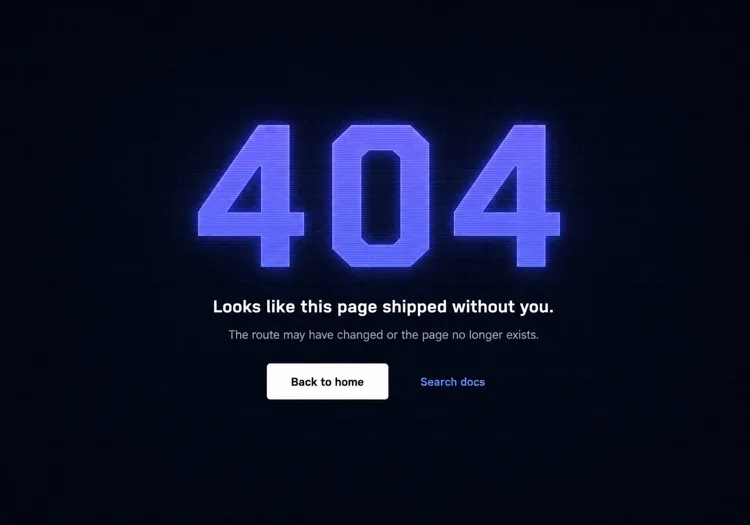
Terminal-Aesthetic 404 Page

Monospace numeral, scanline texture, links to search and the docs index. The audience here reads error output for a living, so the page can be terse without feeling cold.

Create a not-found page for a developer tool: a monospace 404 with a faint glow on a dark surface, a short headline, one line noting the page may have moved between versions, and a docs search input. Add links to the docs index, the changelog and the version switcher, since a broken docs URL is usually a version mismatch rather than a typo. Return an HTTP 404 status and keep the docs sidebar rendered so the reader retains their place in the tree. Set the h1 as the focus target on load, mark the background texture aria-hidden, and hold contrast at 4.5:1 for the muted supporting copy against the dark background.

Teste no MeDo
CommerceStorefront

404 With Products and Categories

A dead product URL usually means the item sold out or was renamed, so the page should show alternatives rather than apologise. Category links recover more sessions than a home button does.

Create a not-found page for a store: a short heading acknowledging the product or page is unavailable, a product search input, a row of four top-level category links, and a grid of four bestseller cards with image, name and price. Explain in one line that items can sell out or be renamed. Return an HTTP 404 status for the missing URL — a soft 404 redirecting to the homepage strands the visitor and keeps the dead link indexed. Give every product image real alt text, keep the cards keyboard reachable in reading order, and preserve the cart indicator in the header so an in-progress basket is visibly intact.

Teste no MeDo
In-appConsole

404 Inside the App Shell

For authenticated routes, render the error inside the existing nav instead of ejecting the user to the marketing site. Losing the app shell reads as a logout, which triggers support tickets.

Create an in-app not-found view that renders inside the authenticated shell with the sidebar and top bar intact: a compact heading stating the resource was not found, one line noting it may have been deleted or belongs to a different workspace, a Back to dashboard button, and a link to switch workspace. Do not sign the user out or bounce them to the marketing homepage. Return an HTTP 404 for a genuinely missing resource and a 403 where the resource exists but is not theirs, since conflating the two leaks whether an ID is real. Move focus to the heading on render and keep the page title informative for browser history.

Teste no MeDo
Brand-ledCanvas

Illustrated Full-Bleed 404 Page

The error page as a piece of the brand — an illustration or animation carrying the page and the copy staying out of its way. Only works if the recovery link is still obvious at a glance.

Create a brand-led not-found page: a full-bleed illustration or looping animation filling the viewport, an oversized 404 or short witty headline set over it, one line of copy, and a single high-contrast Back to home button that stays legible against the artwork. Mark the illustration aria-hidden and carry all meaning in the text. Respect prefers-reduced-motion by holding a static frame instead of looping. Keep the total weight in check — a 3MB hero on an error page is bandwidth spent on a failed request. Return an HTTP 404 status and keep the footer navigation present beneath the artwork.

Teste no MeDo

Como personalizar seu Página 404

Dê peso visual ao número de erro, não apenas tamanho de texto

O "404" é a primeira coisa que um visitante vê — faça dele um elemento de design, não apenas um número. Um preenchimento gradiente, brilho sutil, sombra deslocada ou até um personagem ilustrado interagindo com ele transforma um código de erro frio em algo memorável e consistente com a marca.

Escreva texto que reconheça a frustração e avance rápido

Pule linhas genéricas como "Ops, página não encontrada." Reconheça o que aconteceu em uma frase curta e aponte imediatamente para frente. O tom deve corresponder à sua marca: divertido para apps de consumo, limpo e direto para ferramentas de desenvolvedor, caloroso e apologético para e-commerce.

Ofereça dois caminhos de recuperação — um primário, um secundário

Um único botão "Ir para o início" é o mínimo. Uma ótima página 404 adiciona uma opção secundária sintonizada com a provável intenção do visitante: "Explorar docs", "Pesquisar", "Ver páginas populares" ou "Contatar suporte". Dois caminhos distintos previnem a rejeição de tudo-ou-nada.

Inclua um campo de busca para sites ricos em conteúdo

Para blogs, sites de documentação e lojas de e-commerce, incorporar um campo de busca diretamente na página 404 converte o beco sem saída em um momento de descoberta. Um visitante procurando um artigo ou produto específico pode encontrá-lo imediatamente sem voltar à página inicial.

Quem usa o componente Página 404

Aplicação web SaaS

Páginas 404 de SaaS tipicamente usam o estilo de ilustração principal do produto, um título empático curto e um botão "Voltar ao dashboard" — mantendo o usuário dentro do produto em vez de jogá-lo na página de marketing.

Ferramenta de desenvolvedor ou site de documentação

Páginas 404 de ferramentas de dev adotam estéticas de terminal ou código: fontes monoespaçadas, texturas de linhas de varredura ou um stack trace de erro fictício renderizado como design. Links de recuperação apontam para busca e índice da documentação em vez de um início genérico.

Loja de e-commerce

Páginas 404 de varejo minimizam a rejeição exibindo bestsellers, links de categorias ou uma barra de busca diretamente na página de erro. Algumas incluem uma pequena oferta de desconto ("Deixe-nos compensar — aqui está 10% de desconto") para converter a frustração em um momento de compra.

Site de marketing ou marca

Páginas 404 de marcas e agências tratam a tela de erro como uma tela para criatividade — ilustrações inesperadas, textos espirituosos e animações interativas que tornam o link quebrado em si compartilhável e alinhado à marca.

Padrões de Página 404 para diferentes sites

O mesmo componente página 404, ajustado ao tipo de site em que ele entra.

01 / 06

SaaS Application 404

Render the error inside the app shell with the sidebar intact and point at the dashboard, not the marketing homepage. Dropping an authenticated user onto the public site looks like a session expiry, and they will contact support rather than click Back.

Estilos e variações de Página 404

Escolha a variação que combina com o resto da página e gere-a.

01 / 06

Centered Minimal 404

Numeral, headline, one button, vertically centered. Ships in an hour and never looks broken. The right choice when you have no search index, because the alternative is a page whose main action leads nowhere useful.

Página 404 em React, Next.js, Vue e Svelte

React, Next.js, Vue 3, SvelteKit, Astro ou HTML puro — o mesmo página 404, seis formas de integrar.

01 / 06

React 404 Page

In a client-only SPA a catch-all route renders the page but the server still answers 200, so configure the host to serve index.html with a 404 status for unknown paths — otherwise crawlers index every dead URL.

src/routes.tsx

<Routes>
  <Route path="/" element={<Home />} />
  <Route path="/docs/*" element={<Docs />} />
  <Route path="*" element={<NotFound />} />
</Routes>

Como adicionar o seu Página 404 a um projeto

Quatro passos, de escolher um modelo de página 404 até subir para produção.

01~30s

Pick a 404 Layout

Match it to why your URLs break — search-first for a content site, category links for a store, the app shell for authenticated routes, centered minimal for everything else.

02~10s

Copy the Prompt

Paste it into MeDo, Lovable, Bolt, v0 or Cursor. Swap the placeholder recovery links for the two destinations you would actually want a lost visitor to reach.

03~1min

Generate and Refine

You get React + Tailwind with a live preview. Follow up in plain English — "seed the search box from the failed slug", "keep the sidebar rendered", "hold a static frame under reduced motion".

04~1min

Wire the Not-Found Route

Drop it into not-found.tsx, +error.svelte, 404.astro or your catch-all route, then curl a dead URL and confirm the response is 404 and not a 200 with error copy on it.

Perguntas comuns sobre Página 404

O que é um gerador de página 404 com IA?

Um gerador de página 404 com IA recebe uma descrição em linguagem natural do estilo, público e tom de marca do seu site e produz uma página de erro completa e estilizada — conceito de ilustração, título, texto de apoio, links de navegação e código pronto para produção. O MeDo gera o componente completo incluindo layout, cores e estados interativos, não apenas um esqueleto de código.

Como criar uma página 404 personalizada com IA?

Abra o MeDo e descreva a estética do seu site, nome da marca e como quer que os visitantes se recuperem. Por exemplo: "Crie uma página 404 para uma agência de design minimalista. Fundo branco, 404 grande em sans-serif cinza claro, um título curto e espirituoso, um botão primário 'Voltar ao trabalho' e um link secundário 'Ver estudos de caso'." O MeDo gera o componente; refine com prompts de acompanhamento até corresponder exatamente à sua marca.

O que uma boa página 404 deve incluir?

No mínimo: uma indicação clara de que a página não foi encontrada, uma explicação curta escrita por humano (não apenas "Erro 404"), e pelo menos um caminho de navegação de volta a conteúdo útil. Páginas 404 fortes também incluem visuais ou ilustrações consistentes com a marca, uma opção de recuperação secundária (busca ou links de categorias), e texto que corresponda ao tom geral do site.

Como uma página 404 afeta o SEO?

Uma página 404 corretamente implementada retorna um código de status HTTP 404, que diz aos mecanismos de busca que a URL não existe — este é um comportamento correto e esperado. O que importa para SEO é que links internos quebrados sejam corrigidos na fonte e que a página 404 ajude visitantes humanos a se recuperarem para que não saiam imediatamente. Uma página 404 bem projetada não prejudica o SEO e pode reduzir o sinal de taxa de rejeição que um estado de erro sem saída produz.

Qual é o melhor design para uma página 404?

O melhor design de página 404 corresponde à sua marca, comunica o erro claramente sem jargão e leva o visitante de volta a conteúdo útil em um clique. Para a maioria dos sites isso significa um sinal de erro visualmente proeminente (ilustrado ou tipográfico), uma explicação de uma frase em linguagem clara e um botão de ação principal. Evite páginas lotadas com muitas opções de navegação — dois caminhos claros de recuperação superam um dump completo do sitemap.

Posso gerar uma ilustração de página 404 com IA?

Sim. Ao descrever sua página 404 no MeDo, você pode especificar o estilo de ilustração — baseado em personagem, geométrico, abstrato ou apenas ícones — e o MeDo integra ao layout do componente. Você também pode solicitar conceitos específicos de ilustração como "um astronauta perdido", "um robô quebrado" ou "uma placa de estrada vazia" e o MeDo gerará SVG ou HTML estilizado correspondente para dar vida ao conceito.
