AI 404頁面產生器。

頁面遺失無可避免——但平庸的404可以避免。描述你品牌的風格,MeDo產生包含插圖、清晰導覽和讓訪客留下而非離開的文案的完整設計錯誤頁面。

404頁面
404頁面

404頁面是你留住訪客的最後機會

當有人造訪了一個失效的URL時,瀏覽器的預設錯誤畫面是一個死胡同——他們關閉分頁然後忘記你的存在。一個設計精良的404頁面以個性化的方式承認錯誤,提供清晰的導覽回到有用內容,並在品牌信任最脆弱的時刻加以鞏固。擁有品牌化404頁面的網站可顯著降低錯誤狀態的跳出率,並恢復那些本會永久流失的流量。

6 個模板

可以產生的 404頁面 模板

每個模板都是真實的提示詞,而非截圖。複製到任何 AI 編輯器,或在 MeDo 中執行,直接取得 React + Tailwind 程式碼。

MinimalCentered

Vertically Centered 404 Layout

Numeral, one line of copy, one button. The layout to reach for when you have no search index and no obvious second destination — two links beat a sitemap dump.

Create a not-found page layout, vertically centered in the viewport: a large 404 numeral as a display element, an h1 stating that the page was not found in plain language, one sentence explaining it may have moved or been deleted, and a primary Back to home button. Reuse the site header and footer so the page does not read as a different site. The route must return an HTTP 404 status, not a 200 with error copy on it, or search engines will index the dead URL. Give the h1 focus on load so screen reader users land on the error rather than the nav, and keep the numeral decorative with aria-hidden so it is not announced as a number.


在 MeDo 中試試
RecoverySearch

404 With a Search Field

For any site with more than a few dozen pages, where the visitor was looking for one specific thing. The input, not the home button, is the real recovery path.

Create a not-found page built around a search affordance: a compact 404 heading, one line of copy, then a labelled search input with an autofocus and a submit button that posts to the site search route. Below it, list five popular or recently updated pages as real links rather than a generic Back to home. Seed the search input with any meaningful slug segment from the failed URL so the visitor starts from their own query. Return an HTTP 404 status from the route and do not redirect to the homepage. Label the input with a visible label, announce result counts through an aria-live region, and keep the header and footer navigation intact.

在 MeDo 中試試
DeveloperDocs

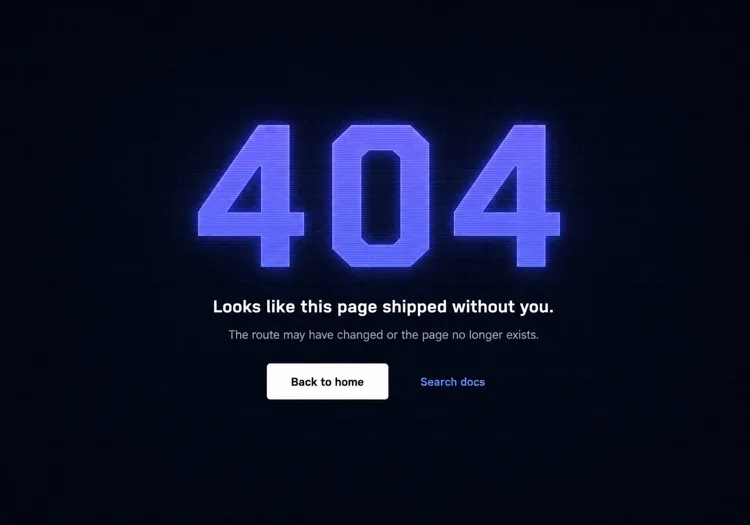
Terminal-Aesthetic 404 Page

Monospace numeral, scanline texture, links to search and the docs index. The audience here reads error output for a living, so the page can be terse without feeling cold.

Create a not-found page for a developer tool: a monospace 404 with a faint glow on a dark surface, a short headline, one line noting the page may have moved between versions, and a docs search input. Add links to the docs index, the changelog and the version switcher, since a broken docs URL is usually a version mismatch rather than a typo. Return an HTTP 404 status and keep the docs sidebar rendered so the reader retains their place in the tree. Set the h1 as the focus target on load, mark the background texture aria-hidden, and hold contrast at 4.5:1 for the muted supporting copy against the dark background.

在 MeDo 中試試
CommerceStorefront

404 With Products and Categories

A dead product URL usually means the item sold out or was renamed, so the page should show alternatives rather than apologise. Category links recover more sessions than a home button does.

Create a not-found page for a store: a short heading acknowledging the product or page is unavailable, a product search input, a row of four top-level category links, and a grid of four bestseller cards with image, name and price. Explain in one line that items can sell out or be renamed. Return an HTTP 404 status for the missing URL — a soft 404 redirecting to the homepage strands the visitor and keeps the dead link indexed. Give every product image real alt text, keep the cards keyboard reachable in reading order, and preserve the cart indicator in the header so an in-progress basket is visibly intact.

在 MeDo 中試試
In-appConsole

404 Inside the App Shell

For authenticated routes, render the error inside the existing nav instead of ejecting the user to the marketing site. Losing the app shell reads as a logout, which triggers support tickets.

Create an in-app not-found view that renders inside the authenticated shell with the sidebar and top bar intact: a compact heading stating the resource was not found, one line noting it may have been deleted or belongs to a different workspace, a Back to dashboard button, and a link to switch workspace. Do not sign the user out or bounce them to the marketing homepage. Return an HTTP 404 for a genuinely missing resource and a 403 where the resource exists but is not theirs, since conflating the two leaks whether an ID is real. Move focus to the heading on render and keep the page title informative for browser history.

在 MeDo 中試試
Brand-ledCanvas

Illustrated Full-Bleed 404 Page

The error page as a piece of the brand — an illustration or animation carrying the page and the copy staying out of its way. Only works if the recovery link is still obvious at a glance.

Create a brand-led not-found page: a full-bleed illustration or looping animation filling the viewport, an oversized 404 or short witty headline set over it, one line of copy, and a single high-contrast Back to home button that stays legible against the artwork. Mark the illustration aria-hidden and carry all meaning in the text. Respect prefers-reduced-motion by holding a static frame instead of looping. Keep the total weight in check — a 3MB hero on an error page is bandwidth spent on a failed request. Return an HTTP 404 status and keep the footer navigation present beneath the artwork.

在 MeDo 中試試

如何自訂你的 404頁面

給錯誤數字視覺重量,而不僅僅是文字大小

「404」是訪客看到的第一個東西——讓它成為設計元素,而不僅是一個數字。漸變填充、微妙發光、偏移陰影,甚至一個與之互動的插畫角色,都能將冰冷的錯誤代碼轉變為令人難忘且品牌一致的設計。

寫出承認挫折感並快速推進的文案

跳過「哎呀,頁面找不到」這樣的通用措辭。用一句話承認發生了什麼,然後立即指向前方。語調應與品牌一致:消費者應用用俏皮風格,開發者工具用簡潔直接的風格,電商用溫暖歉意的風格。

提供兩條恢復路徑——一條主要,一條次要

一個「回到首頁」按鈕是最低要求。出色的404頁面會新增一個針對訪客可能意圖的次要選項:「瀏覽文件」「搜尋」「檢視熱門頁面」或「聯絡客服」。兩條不同路徑防止全有或全無的跳出。

為內容豐富的網站新增搜尋框

對於部落格、文件站點和電商商店,在404頁面直接嵌入搜尋輸入框可將死胡同變為發現時刻。尋找特定文章或產品的訪客可以立即找到,無需返回首頁。

誰在使用 404頁面 組件

SaaS Web應用程式

SaaS的404頁面通常使用產品的主插圖風格、簡短的共情標題和「返回儀表板」按鈕——讓使用者留在產品內部,而不是把他們丟到行銷首頁。

開發者工具或文件站點

開發工具的404頁面傾向終端或程式碼美學:等寬字型、掃描線紋理或作為設計呈現的模擬錯誤堆疊追蹤。恢復連結指向搜尋和文件索引,而非通用首頁。

電商商店

零售404頁面通過直接在錯誤頁面展示暢銷品、分類連結或搜尋列來最小化跳出。一些包含小額折扣優惠(「讓我們補償你——這是9折優惠」)將挫折轉化為購買時刻。

行銷或品牌網站

品牌和代理商的404頁面將錯誤畫面視為創意畫布——意想不到的插圖、機智的文案和互動動畫,讓失效連結本身變得可分享且品牌一致。

不同網站的 404頁面 方案

同一個 404頁面 組件,針對它所在網站的類型作調整。

01 / 06

SaaS Application 404

Render the error inside the app shell with the sidebar intact and point at the dashboard, not the marketing homepage. Dropping an authenticated user onto the public site looks like a session expiry, and they will contact support rather than click Back.

404頁面 的風格與變體

挑選與頁面其餘部分相襯的變體,然後產生它。

01 / 06

Centered Minimal 404

Numeral, headline, one button, vertically centered. Ships in an hour and never looks broken. The right choice when you have no search index, because the alternative is a page whose main action leads nowhere useful.

在 React、Next.js、Vue 與 Svelte 中使用 404頁面

React、Next.js、Vue 3、SvelteKit、Astro 或純 HTML —— 同一個 404頁面,六種接入方式。

01 / 06

React 404 Page

In a client-only SPA a catch-all route renders the page but the server still answers 200, so configure the host to serve index.html with a 404 status for unknown paths — otherwise crawlers index every dead URL.

src/routes.tsx

<Routes>
  <Route path="/" element={<Home />} />
  <Route path="/docs/*" element={<Docs />} />
  <Route path="*" element={<NotFound />} />
</Routes>

如何把 404頁面 加入專案

四個步驟,從挑選 404頁面 模板到推上生產環境。

01~30s

Pick a 404 Layout

Match it to why your URLs break — search-first for a content site, category links for a store, the app shell for authenticated routes, centered minimal for everything else.

02~10s

Copy the Prompt

Paste it into MeDo, Lovable, Bolt, v0 or Cursor. Swap the placeholder recovery links for the two destinations you would actually want a lost visitor to reach.

03~1min

Generate and Refine

You get React + Tailwind with a live preview. Follow up in plain English — "seed the search box from the failed slug", "keep the sidebar rendered", "hold a static frame under reduced motion".

04~1min

Wire the Not-Found Route

Drop it into not-found.tsx, +error.svelte, 404.astro or your catch-all route, then curl a dead URL and confirm the response is 404 and not a 200 with error copy on it.

關於 404頁面 的常見問題

什麼是AI 404頁面產生器?

AI 404頁面產生器接受對你網站風格、受眾和品牌調性的自然語言描述,產生完整的樣式化錯誤頁面——插圖概念、標題、輔助文案、導覽連結和生產就緒程式碼。MeDo產生包含版面配置、顏色和互動狀態的完整元件,不只是程式碼骨架。

如何用AI建立自訂404頁面?

開啟MeDo,描述你網站的美學、品牌名稱以及你希望訪客如何恢復。例如:「為一個極簡設計機構建立404頁面。白色背景,淺灰色大號無襯線字型404,簡短機智的標題,一個'回到工作'主按鈕和一個'檢視案例'次要連結。」MeDo產生元件;通過後續提示詞細化,直到完全匹配你的品牌。

好的404頁面應該包含什麼?

最少需要:明確指示頁面未找到、一段人工撰寫的簡短解釋(不只是「錯誤404」)、以及至少一條返回有用內容的導覽路徑。優秀的404頁面還包括品牌一致的視覺或插圖、次要恢復選項(搜尋或分類連結)、以及與網站整體調性匹配的文案。

404頁面如何影響SEO?

正確實作的404頁面回傳HTTP 404狀態碼,告知搜尋引擎該URL不存在——這是正確且預期的行為。對SEO而言重要的是在源頭修復損壞的內部連結,以及404頁面幫助人類訪客恢復以避免立即跳出。設計良好的404頁面不會損害SEO,並可以減少死胡同錯誤狀態產生的跳出率訊號。

404頁面的最佳設計是什麼?

最佳404頁面設計匹配你的品牌,清晰地傳達錯誤而不使用術語,並讓訪客一鍵回到有用內容。對大多數網站來說,這意味着一個視覺上醒目的錯誤訊號(插圖或排版)、一句通俗的解釋和一個主要操作按鈕。避免導覽選項過多的雜亂頁面——兩條清晰的恢復路徑勝過完整的網站地圖傾倒。

我可以用AI產生404頁面插圖嗎?

可以。在MeDo中描述你的404頁面時,你可以指定插圖風格——基於角色的、幾何的、抽象的或純圖示——MeDo將其整合到元件版面配置中。你還可以提示特定的插圖概念如「迷路的太空人」「壞掉的機器人」或「空的路標」,MeDo將產生匹配的SVG或樣式化HTML來實現概念。
