MeDo

AI Masonry Generator.

Media refuses to share one aspect ratio, and masonry is the layout that stops pretending otherwise — portfolios, pinboards, and galleries packed into balanced columns with nothing cropped. Describe your media and MeDo generates the column engine, the breakpoints, and the load-time placeholders that keep it still.

Masonry
M

Built for Heights Nobody Chose

A masonry layout exists for one specific problem: media that carries its own proportions. A portrait photograph is tall because the subject is tall; a full-page screenshot is tall because the interface is long; no aspect ratio you impose on them is honest. A uniform grid answers by cropping or letterboxing — losing the subject or littering the page with whitespace. Masonry answers by accepting every natural height and balancing the columns instead: nothing is cropped, no cell is padded, and the ragged bottom edge is the honest report of what the collection contains. The price is reading order. A layout that packs by height cannot also read in a straight line, so masonry fits collections people browse — moodboards, portfolios, discovery feeds — and misfits any sequence whose order carries meaning. Its most common failure is not style but motion: without aspect-ratio placeholders, the page reflows with every image that arrives.

4 modelli

Modelli di Masonry che puoi generare

Ogni modello è un prompt reale, non uno screenshot. Copialo in qualsiasi editor IA, oppure eseguilo in MeDo e ottieni codice React + Tailwind.

No JavaScriptCSS Columns

Pure CSS Column Masonry

The zero-dependency version. Its fill order is the tradeoff, and the code says so out loud.

Create a masonry using pure CSS multi-column layout: columns-1 on mobile, sm:columns-2, lg:columns-3, gap-4, each figure mb-4 with break-inside-avoid so no tile is ever sliced across two columns. Images use natural height with explicit width and height attributes, loading lazy. Add a code comment stating the honest tradeoff: CSS columns fill down column one before column two, so with a large collection the top of the page is all column one and the visual reading order runs vertically — fine for an even photo set, wrong where sequence matters.
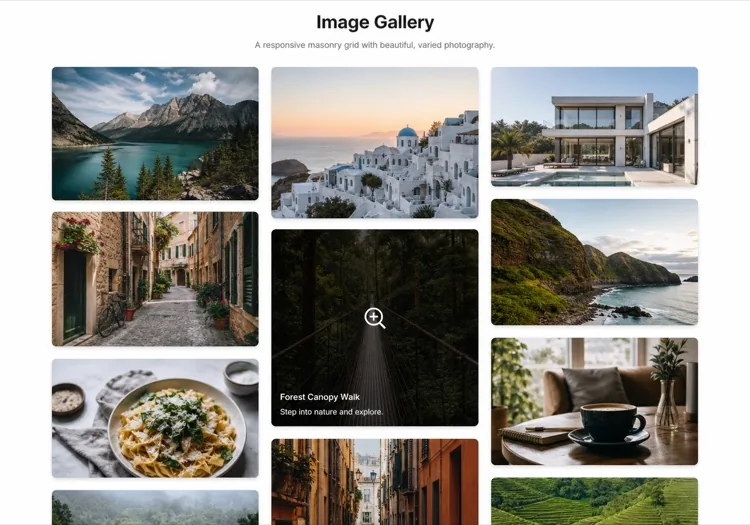

Prova in MeDo
Order keptBalanced JS

Shortest-Column JavaScript Masonry

Bucket items into columns by height so the bottom stays tidy and the DOM keeps your curated order.

Create a JavaScript-balanced masonry: distribute items into column arrays by shortest-column placement weighted with aspect ratio, render each column as a flex column, and recompute the buckets on resize with a ResizeObserver debounced at 150ms. DOM order stays identical to the source array, so screen readers and tab order follow the curated sequence even while visual placement balances heights. Show a 1-2-3-4 column progression across breakpoints with a 16px gutter and aspect-ratio placeholders that eliminate layout shift while images load.

Prova in MeDo
MediaPortfolio Spread

Filterable Portfolio With Lightbox

The working portfolio: filters that re-bucket survivors, captions on a scrim, and column density as a user control.

Create a photographer portfolio masonry with a filter row above it — All, Portraits, Travel, Studio — where filtering animates tiles out with scale and opacity and re-buckets the survivors. Each tile shows the image plus a bottom gradient scrim carrying title and year that strengthens on hover. Offer a column-density control (2, 3, 4) in the corner. Clicking opens a lightbox with previous and next arrows and Escape to close. Source images carry known dimensions so placeholders reserve exact space and nothing shifts.

Prova in MeDo
PredictableRow-Span Hybrid

Grid-Based Masonry Approximation

Masonry inside CSS Grid: shared horizontal rhythm, no library, near-source order on screen.

Create a masonry approximation inside CSS Grid: grid-auto-rows of 8px, each image tile computing its row span from its aspect ratio at render time (span = round(height / width * columnCount * 8) + 1), with grid-auto-flow: dense to backfill holes. This keeps a shared horizontal rhythm that pure masonry lacks, works without a masonry library, and preserves near-source order on screen. Include the span utility function and show it on 15 mixed-orientation images. Document in a comment that dense flow may swap visual order for pack tightness on irregular spans.

Prova in MeDo

Come personalizzare il tuo Masonry

Say how the columns balance

Shortest-column placement, round-robin, and plain CSS column fill all produce different walls from the same items. Name the strategy so the preview matches production — and so you know which item lands at the top of column two before your users tell you.

Reserve heights before images arrive

Require width and height attributes or aspect-ratio boxes with placeholder fills. Without them, every image arrival reflows the page — the single most common masonry failure, and invisible in a fast demo where every image is cached.

Match the column engine to your order needs

Pure CSS columns fill down each column in sequence; JavaScript bucketing balances by height. Both keep DOM order equal to your source array — what changes is the visual sequence readers get. Curate the source array as the intended browsing order and accept the visual scatter as the cost of balance.

Cap the column count, not the width

On an ultrawide monitor an unconstrained masonry keeps adding columns until every tile is a stamp. Ask for a maximum column count with a centered container instead of letting tracks scale forever — three to five columns is where media stays readable.

Chi usa il componente Masonry

Photography portfolios

Portrait, landscape, and square work shown at natural proportions, nothing cropped to fit a template — the ragged column ends read as editorial honesty rather than mess.

Discovery feeds and moodboards

Pinterest-style walls where variable heights keep every pin's composition intact and the balance algorithm feeds the eye a full column at every scroll position.

Wedding, event, and interior studios

Mixed-orientation shoots from real venues presented without letterboxing, so the tall staircase shot stays tall and actually sells the space it photographed.

Blog and recipe card walls

Cards whose heights vary because their content varies — long titles, three-line summaries, tag rows — packed without forcing one invented card height on every story.

Pattern di Masonry per siti web diversi

Lo stesso componente masonry, calibrato sul tipo di sito su cui viene pubblicato.

01 / 04

Photography and Art Portfolios

The work is the aspect ratio — cropping it to fit a template misrepresents the product. Masonry with quiet gutters and honest captions lets the images set the rhythm.

Stili e varianti di Masonry

Scegli la variante che si adatta al resto della pagina, poi generala.

01 / 04

Gapless Masonry

Tiles touch — no gutters at all. Reads as one composed poster wall with maximum image per pixel; demands strong images and disciplined color, because nothing mediates between them.

Masonry in React, Next.js, Vue e Svelte

React, Next.js, Vue 3, SvelteKit, Astro o HTML puro: lo stesso masonry, sei modi per integrarlo.

01 / 03

React Shortest-Column Masonry

The whole layout is one bucket function: aspect ratio as weight, shortest column wins. No library, and the DOM keeps your source order while the columns balance the heights.

src/components/Masonry.tsx

type Tile = { id: string; src: string; width: number; height: number }

function bucketByShortest(tiles: Tile[], count: number): Tile[][] {
  const cols: Tile[][] = Array.from({ length: count }, () => [])
  const heights = new Array(count).fill(0)
  for (const tile of tiles) {
    const i = heights.indexOf(Math.min(...heights))
    cols[i].push(tile)
    heights[i] += tile.height / tile.width
  }
  return cols
}

<div className="flex gap-4">
  {bucketByShortest(tiles, 3).map((col, i) => (
    <div key={i} className="flex-1 space-y-4">
      {col.map((t) => (
        <img key={t.id} src={t.src} alt="" loading="lazy"
             width={t.width} height={t.height}
             className="w-full rounded-lg" />
      ))}
    </div>
  ))}
</div>

Come aggiungere il tuo Masonry a un progetto

Quattro passaggi, dalla scelta di un modello di masonry alla messa in produzione.

01~1min

Confirm the Content Is Browsable, Not Sequential

Masonry spends reading order to buy balance. If your items form a ranked list, a tutorial, or any sequence with meaning, keep them in a grid or list — no packing algorithm fixes the wrong layout choice.

02~1min

Pick the Column Engine

CSS columns for zero JavaScript and small sets, JS bucketing for balanced bottoms and load-more, the grid row-span hybrid when you want shared rhythm without a library. Name it in the prompt — they produce different orders.

03~2min

Generate and Watch It Load

Open the preview on a throttled connection. Every jump or reflow is a missing placeholder — fix it by requiring dimensions per image, not by hiding images until they load.

04~2min

Audit the Order a Reader Gets

Resize from mobile to desktop and watch which items move columns. Then read the DOM order: that is what screen readers and keyboard users get. Reorder the source array until both stories are ones you intend.

Domande comuni su Masonry

How do I decide between a grid and masonry for my media?

Ask whether one aspect ratio can represent every item honestly. Product photos, post covers, and video thumbnails can — a uniform grid keeps them aligned and predictable. Portraits, screenshots, and editorial photography cannot — cropping them to a shared ratio amputates the subject. Masonry trades aligned rows for intact proportions: columns stay regular, heights stay natural. If you find yourself choosing crop subjects per image to make a grid work, the content has already answered for you.

Why does my masonry show items in a different order than my array?

Because a packing layout cannot preserve both visual order and balanced heights. CSS multi-column fills down column one before column two, so the first third of a large set stacks vertically; shortest-column placement sends each item to whichever column is currently shortest. Both keep DOM order equal to your source array — screen readers follow the array, not the pixels — but the visual sequence belongs to the algorithm. Curate the source array as the reading order you mean, and treat the visual scatter as the price of balance.

Is masonry bad for accessibility?

It is manageable under one contract: DOM order equals the reading order you intend, because keyboard focus and screen readers traverse the DOM, not the columns. That breaks when the visual columns are sorted independently of the DOM — never do that. Beyond order, masonry inherits the standard image requirements: alt text, focusable controls with visible focus rings, captions that do not depend on hover alone. The layout is not the accessibility problem; visual-versus-DOM divergence caused by bypassing the DOM is.

Should I use CSS columns or a JavaScript masonry?

CSS columns win on simplicity: no dependencies, no measurement, and reflow on resize is free. Their costs are fill order down each column first, the need for break-inside: avoid so tiles are not sliced, and a ragged bottom edge. A JavaScript masonry balances by shortest column, keeps the bottom tidy, and handles load-more appends gracefully, at the price of measurement code and resize recalculation. Small, even sets: CSS columns. Large mixed sets with load-more: the JS layout earns its keep.

How do I stop the layout from jumping while images load?

Reserve every tile's space before its bytes arrive: width and height attributes on the img, or an aspect-ratio box computed from known dimensions, with a placeholder fill so the column plan is final before rendering. Layout shift from late images is the most common masonry complaint, and it is invisible in development where everything is cached — test on a throttled connection. MeDo generates the placeholders when the prompt requires known dimensions per image.

Is the Pinterest-style masonry layout dated?

The structure never left — discovery feeds across the web still pack variable-height media into balanced columns because the alternative is cropping. What dates a masonry is styling: hover gimmicks, endless animated tiles, decorative randomness. Generate the structure with current taste — quiet gutters, honest captions, fast placeholders — and it reads as considered rather than 2014. The real question stays fit: browsable media yes, sequential or ranked content no.