MeDo

مولّد جداول الأسعار بالذكاء الاصطناعي.

صف خططك ودع الذكاء الاصطناعي يتولى العمل الشاق. من أسماء المستويات وقوائم الميزات إلى مفاتيح التبديل والخطط الموصى بها المُبرزة — مُولَّد وجاهز للنشر.

جدول الأسعار
جدول الأسعار

جدول الأسعار هو آخر ما يقرأه المشتري قبل اتخاذ القرار

جدول الأسعار يفعل أكثر من سرد الأسعار — إنه يُؤطّر القيمة، ويعالج الاعتراضات، ويوجّه الزائر نحو الخطة المناسبة. قسم تسعير مزدحم أو مربك يُسبب شلل القرار ويُبعد المشترين المؤهلين. إتقان التخطيط والتسلسل الهرمي والنص هو من أكثر التحسينات تأثيراً على معدل التحويل لأي موقع SaaS أو منتج.

6 قالبًا

قوالب جدول الأسعار التي يمكنك توليدها

كل قالب هو طلب حقيقي لا صورة. انسخه إلى أي محرّر ذكاء اصطناعي، أو شغّله في MeDo لتحصل على كود React و Tailwind مباشرة.

Three tierAcme

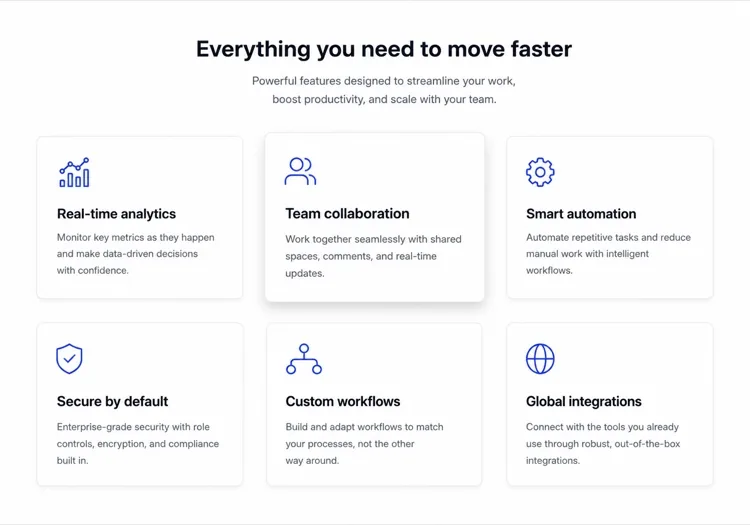
Three Cards With a Highlighted Plan

The default for a reason — three prices in one row is the most comparison a visitor will do without scrolling. It fails when all three cards look equal, because then the buyer has to decide instead of being told.

Create a three-tier pricing section with Starter, Growth and Scale as equal-width cards in one row. Raise the Growth card, give it a ring border and a Most Popular badge. Above the cards, a segmented monthly/yearly toggle that swaps the price figure in place and reveals a two-months-free chip when yearly is active; hold the card height constant so nothing reflows on switch. Each card carries a plan name, a one-line note on who it is for, the price with its per-seat per-month unit, a primary button, and six feature rows listed in the same order in every card so the eye can compare across instead of reading down. Collapse to one column on mobile with the highlighted plan first.

جرّبه في MeDo
Comparison gridMega

Full Feature Comparison Matrix

For products where the upgrade reason is a specific limit rather than a vibe. The horizontal scroll on mobile is what kills these — render one plan per accordion instead.

Create a pricing comparison matrix: a header row of four plan columns and a left column of feature names grouped into labelled sections such as Core, Collaboration, Security and Support. Use a filled check for included, an em dash for absent, and a short value string wherever a plan has a numeric limit rather than a boolean. Pin the header row so plan names and CTAs stay visible while the reader scrolls the feature list, and highlight the recommended column its full height. Zebra-stripe rows to keep the eye on one line. On mobile, drop the matrix entirely and render one plan per collapsible panel rather than putting a wide table in a horizontal scroller.

جرّبه في MeDo
Single planShipfast

One Plan, One Price Card

When there is nothing to compare, a row of three cards is theatre. One card removes the decision and makes the feature list read as a promise rather than a diff.

Create a single-plan pricing section: one centred card with a max width of about 32rem holding the plan name, a large price figure, a monthly/yearly toggle inside the card, and an everything-included feature list laid out in two columns so the card stays short enough to read without scrolling. Add a primary Get started button, a muted no-credit-card-required line directly beneath it, and a small text link to contact sales for volume pricing. Above the card, one headline naming exactly who the plan is for. Stack the feature columns and keep the toggle full-width on mobile.

جرّبه في MeDo
Usage basedMeter

Volume Slider With a Live Total

Metered pricing only lands if the buyer can find their own number on it. A slider that recomputes the total as it moves answers the real question — what will this cost me — without a spreadsheet.

Create a usage-based pricing section: a range slider for monthly volume with tick labels at the tier boundaries, a live total that recomputes the price and the effective unit rate as the handle moves, and a plan name that changes as the volume crosses each threshold. Below the slider, a fixed list of what is included at every tier and one line on what happens on overage. Add a primary CTA plus a secondary Talk to sales link for volumes past the top of the range. Announce the computed total in an aria-live region and support arrow-key stepping, so keyboard and screen-reader users get the same feedback as a mouse drag.

جرّبه في MeDo
Enterprise rowLedger

Two Self-Serve Cards Plus a Contact Band

Puts the no-price plan outside the card row, where it stops competing on price. An Enterprise card sitting next to two real numbers just reads as the expensive one.

Create a pricing section with two self-serve cards, Pro and Team, side by side with Team highlighted, followed by a full-width enterprise band beneath them. The band gets a tinted surface, a short heading, three inline value points covering SSO, audit logs and a named contact, and a Contact sales button where a price would be — so it never reads as a third card competing on price. Each card shows a monthly and yearly price with a per-seat unit, five feature rows in matching order, and a primary button. Stack all three blocks vertically on mobile with the band last.

جرّبه في MeDo
Audience tabsSegment

Audience Tabs Over Shared Tiers

One pricing page serving individuals, teams and education without three URLs. Worth it only if the plans genuinely differ per audience — otherwise you have added a click to reach the same table.

Create a pricing section with audience tabs above the cards — Individuals, Teams and Education — where switching a tab swaps in a different set of plan names, prices and feature lists rather than filtering rows in place. Keep the monthly/yearly toggle on the same bar as the tabs so the two controls read as one control group, and preserve the toggle state across tab switches. Use real tab semantics with a tablist, arrow-key navigation and managed focus, and reflect the active tab in the URL so a link can point straight at the Teams view. Highlight exactly one plan inside each tab.

جرّبه في MeDo

كيف تخصّص جدول الأسعار الخاص بك

أبرز دائماً خطة موصى بها

كثرة الخيارات تقتل التحويلات. إبراز مستوى واحد بصرياً كـ"الأكثر شعبية" أو "أفضل قيمة" بحدود ملونة أو بطاقة مرتفعة أو شارة يُقلل الحمل المعرفي ويوجّه الزوار نحو الخطة الأنسب لمعظم العملاء — عادةً المستوى المتوسط.

استخدم مفتاح تبديل الفوترة لإظهار التوفير السنوي

مفتاح تبديل شهري/سنوي مع نسبة خصم مرئية (مثل "وفّر 20% سنوياً") يزيد اعتماد الخطة السنوية دون إخفاء الأسعار. ضع المفتاح بشكل بارز فوق البطاقات واجعله مضبوطاً على السنوي افتراضياً لتثبيت القيمة المُدركة أعلى.

اجعل صفوف الميزات قابلة للمسح السريع وليست شاملة

اقصر كل عمود مستوى على 6-8 صفوف من الميزات الأهم لشخصيات المشترين لديك. استخدم علامات الصح وعلامات X (أو نص رمادي) للميزات الغائبة بدلاً من حذف الصفوف — المقارنة البصرية هي ما يحفّز نية الترقية.

اقرن كل زر CTA بمخفف التزام مصغر

عبارات قصيرة مثل "لا حاجة لبطاقة ائتمان" أو "ألغِ في أي وقت" أو "تجربة مجانية 14 يوماً" موضوعة مباشرة تحت زر CTA الرئيسي تُزيل التردد الأخير قبل النقر للتسجيل. طابق الطمأنة مع المخاطر المحددة التي من المرجح أن يشعر بها جمهورك.

من يستخدم مكوّن جدول الأسعار

موقع منتج SaaS

تتضمن جداول أسعار SaaS عادةً 3 مستويات، ومفتاح تبديل شهري/سنوي، وخطة وسطى مُبرزة، وصفوف مقارنة ميزات، وCTA تجربة مجانية — الشكل الذي أصبح المعيار الفعلي لبرمجيات الاشتراك.

API أو أداة للمطورين

تتضمن جداول أسعار أدوات المطورين غالباً مستوى قائم على الاستخدام بجانب خطط ثابتة، تُظهر حدود الطلبات أو عدد المقاعد لكل مستوى، مع خيار مجاني أو مفتوح المصدر بارز لتقليل حاجز الدخول للمطورين الأفراد.

وكالة أو شركة خدمات

تستخدم شركات الخدمات جداول الأسعار لتجميع المخرجات في مستويات محددة النطاق — مثل Starter / Professional / Custom — مع قائمة واضحة بالخدمات المشمولة لكل حزمة وCTA "احجز مكالمة" للمستوى الأعلى.

منصة تعليم إلكتروني أو عضوية

تستخدم مواقع المحتوى والعضوية جداول الأسعار لفصل الوصول المجاني عن المحتوى المميز، غالباً مع CTA ترقية واحد ودليل اجتماعي (عدد الأعضاء أو شهادة) مُدمج مباشرة في بطاقة الجدول.

أنماط جدول الأسعار لمواقع مختلفة

المكوّن جدول الأسعار نفسه، مُهيّأ لنوع الموقع الذي يُنشر عليه.

01 / 06

SaaS Pricing Table

Three tiers, a yearly toggle, a highlighted middle plan and identical feature ordering across columns. The ordering is the part teams skip — if row four means something different in each card, the buyer cannot compare across and falls back to picking the cheapest.

أنماط جدول الأسعار وتنويعاته

اختر التنويعة التي تناسب بقية الصفحة، ثم ولّدها.

01 / 06

Highlighted Card Row

Three cards, one elevated with a ring and a badge. The elevation is doing real work: choice overload is the failure mode of a pricing section, and a visually recommended plan is the cheapest fix available.

جدول الأسعار في React و Next.js و Vue و Svelte

React و Next.js و Vue 3 و SvelteKit و Astro أو HTML صِرف — المكوّن جدول الأسعار نفسه بست طرق للإضافة.

01 / 06

React Pricing Table

Keep the plans in a data array and let the billing toggle be the only piece of state. Deriving the price from that one boolean is what stops the yearly and monthly copies of the table drifting apart.

src/components/PricingTable.tsx

const PLANS = [
  { name: 'Starter', monthly: 29, yearly: 290 },
  { name: 'Growth', monthly: 79, yearly: 790, featured: true },
]

export function PricingTable() {
  const [yearly, setYearly] = useState(false)
  return (
    <section>
      <BillingToggle value={yearly} onChange={setYearly} />
      {PLANS.map((p) => (
        <PlanCard key={p.name} plan={p} yearly={yearly} />
      ))}
    </section>
  )
}

كيف تضيف جدول الأسعار إلى مشروعك

أربع خطوات، من اختيار قالب جدول الأسعار إلى إطلاقه في الإنتاج.

01~30s

Pick a Pricing Layout

Match the layout to what the buyer has to decide — three cards when plans differ by size, a comparison matrix when they differ by a specific limit, one card when there is nothing to compare.

02~10s

Copy the Prompt

Take the prompt into MeDo, or paste it into Lovable, Bolt, v0 or Cursor. Swap in your real plan names, prices and feature rows first, and keep the rows in the same order across every tier.

03~1min

Generate and Refine

You get React + Tailwind back with a live preview. Follow up in plain English — "default the toggle to yearly", "move Enterprise into a band below" — rather than editing class strings by hand.

04~2min

Wire the CTAs to Checkout

Point each plan button at its own checkout session or signup URL and keep the price figures in one data array, so a price change is one edit rather than three cards and a matrix.

أسئلة شائعة حول جدول الأسعار

ما هو مولّد جداول الأسعار بالذكاء الاصطناعي؟

مولّد جداول الأسعار بالذكاء الاصطناعي يأخذ وصفاً بلغة طبيعية لمستويات التسعير والميزات والأهداف وينتج مكون جدول أسعار كامل ومُنسّق — يشمل التخطيط والنص وسلوك التبديل وأزرار CTA — جاهز للإدراج في صفحة الويب. MeDo يُنشئ المكون الكامل بكود جاهز للإنتاج، وليس مجرد قالب.

كيف أنشئ جدول أسعار بالذكاء الاصطناعي؟

افتح MeDo وصف هيكل التسعير الخاص بك: كم عدد المستويات، أسماؤها وأسعارها، الميزات الرئيسية لكل مستوى، وأي خطة تريد إبرازها. مثال: "أنشئ جدول أسعار SaaS من 3 مستويات مع مفتاح تبديل شهري/سنوي، وأبرز الخطة الوسطى كالأكثر شعبية، واستخدم علامات صح خضراء للميزات المشمولة." ينشئ MeDo المكون؛ استخدم أوامر متابعة لضبط الألوان أو النص أو التخطيط.

ما أفضل أداة ذكاء اصطناعي لتوليد جداول الأسعار؟

MeDo مصمم خصيصاً لتوليد مكونات UI فردية من الأوامر النصية، بما في ذلك جداول الأسعار. على عكس أدوات الذكاء الاصطناعي العامة، يفهم MeDo أنماط التحويل — الخطط المُبرزة، تفاعلات التبديل، صفوف مقارنة الميزات — لذا يتبع الناتج أفضل ممارسات التصميم الحقيقية بدلاً من إنتاج كود عام المظهر.

كم عدد مستويات التسعير التي يجب أن يحتويها جدول أسعار SaaS؟

ثلاث مستويات هي النقطة المثلى المُثبتة لمعظم منتجات SaaS: مستوى دخول أدنى للمستخدمين الصغار، ومستوى أوسط مُبرز لغالبية عملائك المستهدفين، ومستوى أعلى أو خيار Enterprise مخصص للحسابات عالية الحجم. أقل من ثلاثة يعطي المشترين القليل للمقارنة؛ أكثر من أربعة يُسبب شلل القرار.

هل يجب استخدام مفتاح تبديل الفوترة الشهرية/السنوية في صفحة الأسعار؟

نعم — مفتاح تبديل الفوترة من أبسط الطرق لزيادة اعتماد الخطة السنوية. اعرض الخصم السنوي بشكل بارز (مثل "وفّر 20%") واضبط المفتاح على التسعير السنوي افتراضياً لتثبيت القيمة أعلى. المفتاح يُشير أيضاً إلى شفافية التسعير، مما يبني الثقة مع المشترين المترددين.

هل يمكن للذكاء الاصطناعي توليد نص جدول الأسعار بالإضافة إلى الكود؟

نعم. ينشئ MeDo كلاً من المكون البصري والنص بداخله — أسماء المستويات، نقاط الميزات، تسميات أزرار CTA، وإشارات الثقة. يمكنك تزويده بمنتجك وجمهورك وعروض القيمة وسيكتب نصاً مركّزاً على التحويل إلى جانب الكود المُنسّق. الأوامر اللاحقة تتيح لك ضبط النبرة أو إعادة كتابة مستويات محددة أو اختبار عناوين بديلة.