MeDo

AI संपर्क फ़ॉर्म जनरेटर।

आपको जिन फ़ील्ड की ज़रूरत है, जो टोन चाहते हैं, और जो वैलिडेशन नियम मायने रखते हैं — उनका वर्णन करें — MeDo आपके प्रॉम्प्ट को सेकंडों में एक पूर्ण, एक्सेसिबल संपर्क फ़ॉर्म कंपोनेंट में बदल देता है।

संपर्क फ़ॉर्म
संपर्क फ़ॉर्म

हर वेबसाइट को एक शानदार संपर्क फ़ॉर्म की ज़रूरत होती है

संपर्क फ़ॉर्म अक्सर वह आखिरी कंपोनेंट होता है जिसके साथ विज़िटर लीड बनने से पहले इंटरैक्ट करता है — फिर भी अधिकांश इसे बाद में सोचते हैं। खराब फ़ील्ड डिज़ाइन, गायब वैलिडेशन और भ्रमित करने वाले एरर स्टेट ठीक उस समय कनवर्ज़न को मारने वाला घर्षण पैदा करते हैं जब इरादा होता है। एक अच्छी तरह से बना संपर्क फ़ॉर्म प्रोफेशनलिज़्म दर्शाता है, अबैंडनमेंट कम करता है, और सही लोगों के लिए आपसे संपर्क करना आसान बनाता है।

6 टेम्पलेट

संपर्क फ़ॉर्म टेम्पलेट जो आप जेनरेट कर सकते हैं

हर टेम्पलेट एक असली प्रॉम्प्ट है, स्क्रीनशॉट नहीं। इसे किसी भी AI एडिटर में कॉपी करें, या MeDo में चलाकर React + Tailwind कोड सीधे पाएं।

BasicInquiry

Name, Email, Message Form

Three fields and nothing else. The right default when you have no routing logic yet — every field you add past this point has to justify itself against a measurable drop in completions.

Create a three-field contact form — full name, email, message — inside a bordered card. Every input gets a visible label tied by htmlFor, and validates on blur rather than on every keystroke: name non-empty, email checked against a permissive pattern, message at least twenty characters with a live counter. Render each error in a span referenced by aria-describedby and set aria-invalid on the failing input. On submit, disable the button, swap its label for a spinner with role="status", then replace the card with a confirmation that names the reply window. On failure keep every typed value, show a retry banner and move focus to it. Add a honeypot field and a minimum time-to-submit check instead of a CAPTCHA.


MeDo में आज़माएं
QualifyingStudio

Project Type and Budget Form

Adds the two questions that decide whether you reply today or next week. Worth the extra friction for service businesses, wasteful for anything self-serve.

Create an agency inquiry form in a light card: full name, work email, a project type select (Brand Identity, Web Design, Motion, Other), a budget radio group (Under $5k, $5k-$20k, $20k+) wrapped in a fieldset with a legend, and a message textarea. Mark the select and the radio group required but validate on submit, not on mount, so the form never opens already covered in red. Collect the failures into an error summary above the card with in-page links to each field, set aria-invalid and aria-describedby on the offenders, and move focus to the summary heading. Show a pending state on the button, a success panel replacing the card, and a failure banner that preserves every answer.

MeDo में आज़माएं
BranchingSwitchboard

Sales or Support Split Form

One URL, two queues. Stops enterprise leads from landing in the bug tracker without asking you to maintain two contact pages that drift apart.

Create a contact form that opens with a two-option segmented control — Sales inquiry or Support request — built from radio inputs in a fieldset, and swaps the fields beneath it. Sales shows company, team size and budget; Support shows account email, affected feature and a severity select. Announce the swap through an aria-live="polite" region and move focus to the first field of the new branch. Validate only the visible branch, keep the hidden branch out of the submitted payload, and wire every error to its input with aria-describedby and aria-invalid. On submit show a pending button, then a success message naming the queue the request went to. Rate-limit repeat submissions from the same session and include a hidden honeypot.

MeDo में आज़माएं
High trustChambers

Confidential Consultation Form

For regulated practices, where the reassurance copy next to the submit button does more work than the field layout does. Say what happens to the data before you ask for it.

Create a consultation request form for a law or financial practice: full name, email, phone with a format hint in the label rather than as placeholder-only text, a matter type select for routing, a preferred contact method radio group, and a details textarea with a note that this form is not privileged communication. Put a one-line confidentiality statement directly above the submit button, not in the footer. Validate on blur, expose errors through aria-describedby, and set aria-invalid on failures. Submit button reads Request a confidential consultation, goes to a disabled pending state, then a success panel stating the response window and an alternative phone number. On failure show the error inline and never clear the textarea.

MeDo में आज़माएं
Two columnLedger

Contact Details Beside the Form

Form on the right, address, hours and direct email on the left. Cuts the volume of people who fill in a form to ask a question the sidebar already answered.

Create a two-column contact section: on the left, an office address, opening hours, a direct email and phone as real mailto and tel links; on the right, a card form with name, email, subject select and message. Stack the columns on mobile with the form first. Labels are always visible, errors validate on blur and attach via aria-describedby with aria-invalid on the input, and the submit button moves through idle, pending with a role="status" spinner, and success states. On failure show a banner above the form, focus it, and keep all values. Add a honeypot input hidden from assistive technology and a timestamp check to drop bot submissions.

MeDo में आज़माएं
Multi stepEnquire

Three-Step Contact Wizard

Splits a long inquiry into three short screens with a step indicator. Only pays off past about eight fields — below that the wizard adds clicks and removes context.

Create a three-step contact wizard: step one collects name and email, step two collects project type, budget and timeline, step three shows a message textarea and a read-only review of the earlier answers. Render a step indicator with aria-current="step" on the active item. Validate the current step before allowing Next, focus the first invalid field, and expose errors with aria-describedby and aria-invalid. Keep all answers in state so Back never loses data. The final submit shows a pending state, then a success screen replacing the wizard, and on failure returns to step three with a retry banner and every answer intact. Include a honeypot field.

MeDo में आज़माएं

अपने संपर्क फ़ॉर्म को कैसे कस्टमाइज़ करें

सिर्फ़ वही पूछें जो आप वास्तव में उपयोग करेंगे

हर अतिरिक्त फ़ील्ड कम्प्लीशन रेट कम करता है। अपने फ़ॉर्म का ऑडिट करें: अगर आप नहीं बता सकते कि कोई फ़ील्ड आपकी प्रतिक्रिया को कैसे प्रभावित करता है, तो उसे हटा दें। नाम, ईमेल और एक क्वालिफ़ाइंग सवाल अक्सर बातचीत शुरू करने के लिए पर्याप्त होता है।

वैलिडेशन एरर लिखें जो गाइड करें, डांटें नहीं

"अमान्य ईमेल" जैसे संदेशों को "कृपया एक वैध ईमेल पता दर्ज करें, जैसे you@example.com" से बदलें। विशिष्ट, कार्रवाई योग्य एरर टेक्स्ट री-सबमिशन की परेशानी कम करता है और ईमानदार गलतियां करने वाले विज़िटर्स के साथ विश्वास बनाता है।

अपनी सक्सेस स्टेट को फ़ॉर्म जितनी सावधानी से डिज़ाइन करें

सबमिट के बाद का कन्फ़र्मेशन अधिकांश साइटों पर एक छूटा हुआ अवसर है। इसका उपयोग अपेक्षाएं सेट करने ("हम एक कार्यदिवस में जवाब देते हैं"), विकल्प देने ("या सीधे कॉल बुक करें") या अपनी ब्रांड वॉइस को मजबूत करने के लिए करें — सिर्फ़ एक जेनेरिक "धन्यवाद" नहीं।

फ़ॉर्म को छोटा रखने के लिए कंडीशनल फ़ील्ड का उपयोग करें

अतिरिक्त सवाल तभी दिखाएं जब वे पिछले उत्तरों के लिए प्रासंगिक हों — उदाहरण के लिए, बजट फ़ील्ड तभी दिखाएं जब विज़िटर "नया प्रोजेक्ट" चुने। कंडीशनल लॉजिक अनुमानित लंबाई कम करता है और हर विज़िटर को उनकी स्थिति के लिए महत्वपूर्ण इनपुट पर केंद्रित करता है।

संपर्क फ़ॉर्म कंपोनेंट का उपयोग कौन करता है

क्रिएटिव एजेंसी या फ्रीलांसर

एजेंसी संपर्क फ़ॉर्म में आमतौर पर नाम और ईमेल के साथ प्रोजेक्ट-टाइप सेलेक्टर, बजट रेंज और टाइमलाइन फ़ील्ड शामिल होती है — स्टूडियो को पहली प्रतिक्रिया से पहले आने वाले लीड्स को क्वालिफ़ाई और प्राथमिकता देने के लिए पर्याप्त संदर्भ देता है।

SaaS या टेक प्रोडक्ट

प्रोडक्ट संपर्क फ़ॉर्म अक्सर शीर्ष पर "सेल्स इंक्वायरी" बनाम "सपोर्ट रिक्वेस्ट" में विभाजित होते हैं, फिर प्रत्येक पथ के अनुसार प्रासंगिक फ़ील्ड दिखाते हैं — दो अलग पेजों की आवश्यकता के बिना एंटरप्राइज़ लीड्स को बग रिपोर्ट से अलग रखते हैं।

प्रोफेशनल सर्विसेज (कानून, वित्त, स्वास्थ्य)

विनियमित उद्योगों में उच्च-विश्वास संपर्क फ़ॉर्म गोपनीयता आश्वासन पर ज़ोर देते हैं, रूटिंग के लिए मामला-प्रकार ड्रॉपडाउन शामिल करते हैं, और जेनेरिक सबमिट बटन को "गोपनीय परामर्श का अनुरोध करें" जैसी कॉपी से बदलते हैं।

इवेंट या कॉन्फ्रेंस साइट

इवेंट इंक्वायरी फ़ॉर्म अटेंडेंस टाइप, स्पॉन्सरशिप टियर्स के लिए कंपनी साइज़, और पसंदीदा सेशन टॉपिक्स पूछते हैं — इवेंट शुरू होने से पहले ही लीड-कैप्चर और ऑडियंस-सेगमेंटेशन टूल दोनों के रूप में काम करते हैं।

अलग-अलग वेबसाइटों के लिए संपर्क फ़ॉर्म पैटर्न

वही संपर्क फ़ॉर्म कंपोनेंट, उस वेबसाइट के प्रकार के हिसाब से ढाला गया जहाँ वह लगेगा।

01 / 06

Agency and Studio Contact Forms

Project type, budget band and timeline earn their place here because they decide reply order, not because they look thorough. The one field to cut first is company website — you can find it from the email domain in less time than the visitor spends typing it.

संपर्क फ़ॉर्म की शैलियाँ और वेरिएंट

जो वेरिएंट बाकी पेज से मेल खाता है उसे चुनें और जेनरेट करें।

01 / 06

Card Form With Visible Labels

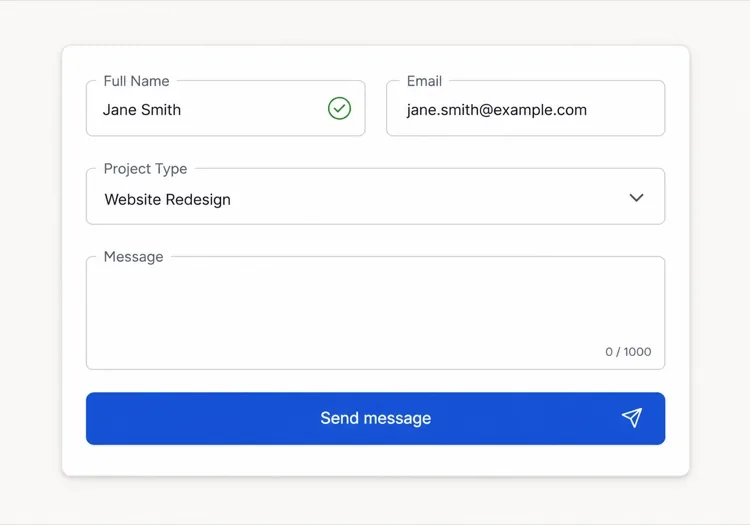
A bordered card, one column, labels above every input. The most boring option and the one that tests best, because a label above the field survives autofill, zoom and translation without collapsing into the value.

React, Next.js, Vue और Svelte में संपर्क फ़ॉर्म

React, Next.js, Vue 3, SvelteKit, Astro या सादा HTML — वही संपर्क फ़ॉर्म, जोड़ने के छह तरीके।

01 / 06

React Contact Form

Keep the form uncontrolled and read values from FormData on submit — controlled state on every field re-renders the whole form on each keystroke for no benefit. Hold only errors and status in state.

src/components/ContactForm.tsx

export function ContactForm() {
  const [status, setStatus] = useState('idle')

  async function onSubmit(e) {
    e.preventDefault()
    setStatus('pending')
    const data = new FormData(e.currentTarget)
    const res = await send(data)
    setStatus(res.ok ? 'success' : 'error')
  }

  return <form onSubmit={onSubmit} noValidate>{/* fields */}</form>
}

अपने संपर्क फ़ॉर्म को प्रोजेक्ट में कैसे जोड़ें

संपर्क फ़ॉर्म टेम्पलेट चुनने से प्रोडक्शन में भेजने तक, चार चरण।

01~30s

Pick a Contact Form Template

Match the template to how you triage replies — three fields if every message goes to one inbox, the branching form if sales and support are different queues.

02~10s

Copy the Prompt

Paste it into MeDo, Lovable, Bolt, v0 or Cursor. Replace the placeholder select options with your real ones first, since the option list is what determines the routing you have to build behind it.

03~2min

Generate and Refine

You get React + Tailwind with a live preview. Follow up in plain English — "validate on blur, not on change", "add an error summary above the card", "keep the values on a failed submit".

04~2min

Wire Up the Submit Handler

Point the action at a serverless function, Resend, Formspree or your own API. Test the failure path before shipping: a form that silently drops a message is worse than no form at all.

संपर्क फ़ॉर्म के बारे में सामान्य प्रश्न

AI संपर्क फ़ॉर्म जनरेटर क्या है?

AI संपर्क फ़ॉर्म जनरेटर आपके वांछित फ़ील्ड, वैलिडेशन नियमों और डिज़ाइन का प्राकृतिक भाषा में विवरण लेता है और काम करने वाले कोड के साथ एक पूर्ण, स्टाइल किया हुआ फ़ॉर्म कंपोनेंट तैयार करता है। MeDo पूरा कंपोनेंट जनरेट करता है — लेआउट, लेबल, एरर स्टेट, सक्सेस स्टेट और एक्सेसिबिलिटी एट्रिब्यूट — ताकि आप इसे सीधे अपने प्रोजेक्ट में डाल सकें।

AI से संपर्क फ़ॉर्म कैसे बनाएं?

MeDo खोलें और अपने फ़ॉर्म का हिंदी में वर्णन करें: ज़रूरी फ़ील्ड, वैलिडेशन आवश्यकताएं, विज़ुअल स्टाइल और कंडीशनल फ़ील्ड या कस्टम सक्सेस मैसेज जैसे विशेष व्यवहार सूचीबद्ध करें। MeDo तुरंत कंपोनेंट जनरेट करता है। आप फ़ॉलो-अप प्रॉम्प्ट से इसे रिफ़ाइन कर सकते हैं — फ़ील्ड टाइप बदलें, वैलिडेशन एडजस्ट करें या लेआउट रीडिज़ाइन करें — जब तक यह बिल्कुल सही न हो जाए।

संपर्क फ़ॉर्म बनाने के लिए सबसे अच्छा AI टूल कौन सा है?

MeDo विशेष रूप से प्रॉम्प्ट से व्यक्तिगत UI कंपोनेंट जनरेट करने के लिए बनाया गया है, जिसमें संपर्क फ़ॉर्म शामिल हैं। सामान्य AI चैट टूल्स के विपरीत, MeDo फ़ॉर्म एक्सेसिबिलिटी (ARIA लेबल, कीबोर्ड नेविगेशन, फ़ोकस मैनेजमेंट), वैलिडेशन पैटर्न और कंपोनेंट स्ट्रक्चर समझता है — इसलिए आउटपुट प्रोडक्शन-रेडी है, सिर्फ़ अच्छा दिखने वाला कोड नहीं।

क्या AI वैलिडेशन के साथ संपर्क फ़ॉर्म जनरेट कर सकता है?

हां। जब आप अपने प्रॉम्प्ट में वैलिडेशन आवश्यकताएं शामिल करते हैं — उदाहरण के लिए, "अनिवार्य फ़ील्ड", "वैध ईमेल फ़ॉर्मेट" या "मैसेज फ़ील्ड में कम से कम 20 कैरेक्टर" — MeDo कंपोनेंट के साथ इनलाइन वैलिडेशन लॉजिक जनरेट करता है। आप अपने स्टैक के अनुसार विशिष्ट वैलिडेशन लाइब्रेरी या नेटिव HTML5 कंस्ट्रेंट वैलिडेशन का भी अनुरोध कर सकते हैं।

बिना प्लगइन के वेबसाइट में संपर्क फ़ॉर्म कैसे जोड़ें?

MeDo से फ़ॉर्म कंपोनेंट जनरेट करें, फिर सबमिट हैंडलर को किसी भी HTTP एंडपॉइंट से कनेक्ट करें — एक सर्वरलेस फ़ंक्शन, Resend या Formspree जैसी फ़ॉर्म-हैंडलिंग सर्विस, या आपकी अपनी बैकएंड API। चूंकि MeDo बिना किसी बाहरी फ़ॉर्म लाइब्रेरी डिपेंडेंसी के क्लीन कंपोनेंट कोड प्रोड्यूस करता है, आप सबमिशन लॉजिक और डेटा रूटिंग पर पूरा नियंत्रण रखते हैं।

संपर्क फ़ॉर्म में कौन से फ़ील्ड होने चाहिए?

कम से कम, एक संपर्क फ़ॉर्म में एक नाम फ़ील्ड, एक ईमेल एड्रेस फ़ील्ड और एक मैसेज टेक्स्टएरिया होना चाहिए। इसके अलावा, सिर्फ़ वे फ़ील्ड जोड़ें जो आपकी प्रतिक्रिया बदलें: रूटिंग के लिए सब्जेक्ट या प्रोजेक्ट-टाइप सेलेक्टर, कॉल ऑफ़र करने पर फ़ोन फ़ील्ड, या सर्विस बिज़नेस के लिए बजट रेंज। हर अतिरिक्त अनिवार्य फ़ील्ड अबैंडनमेंट बढ़ाता है, इसलिए डिफ़ॉल्ट छोटा रखें और प्रासंगिक होने पर कंडीशनल लॉजिक से विस्तार करें।

अभी अपना संपर्क फ़ॉर्म जेनरेट करें।

कोई भी प्रॉम्प्ट आज़माएं — मुफ्त, कोई साइन अप नहीं।
