MeDo

Pagination: The Only List That Search Engines Can Page Through.

Describe your list and MeDo generates numbered pagination with crawlable page URLs, a windowed range that stays readable at ten thousand items, and prev-next controls that never wrap — plus the load-more and cursor variants for the pages where you genuinely do not want page numbers.

Pagination
Pagination

Pagination Is a Routing Decision That Got a UI

The buttons are the easy part; what you actually chose is how your content is discovered. Numbered pagination gives every page of a list its own URL — /blog?page=3 — which search engines crawl and follow like any other link, which deep-links can open directly, and which a footer can escape into when a visitor reaches the bottom of page one and bounces. Infinite scroll trades all of that for a frictionless scroll: no clicks, no page boundaries, and in exchange content beyond the first screenful may never be crawled, no page can be shared, and there is no bottom edge. E-commerce categories and blog archives almost always want pagination because their pages compete for search traffic; an activity feed or a chat log wants a cursor, because nobody searches for item 4,000. Deciding deliberately — and changing your mind later only costs a prompt — is worth more than any styling of the controls themselves.

4 plantillas

Plantillas de Pagination que puedes generar

Cada plantilla es un prompt real, no una captura de pantalla. Cópialo en cualquier editor de IA o ejecútalo en MeDo y obtén código React + Tailwind.

StandardNumbered Classic

Windowed Numbered Pagination

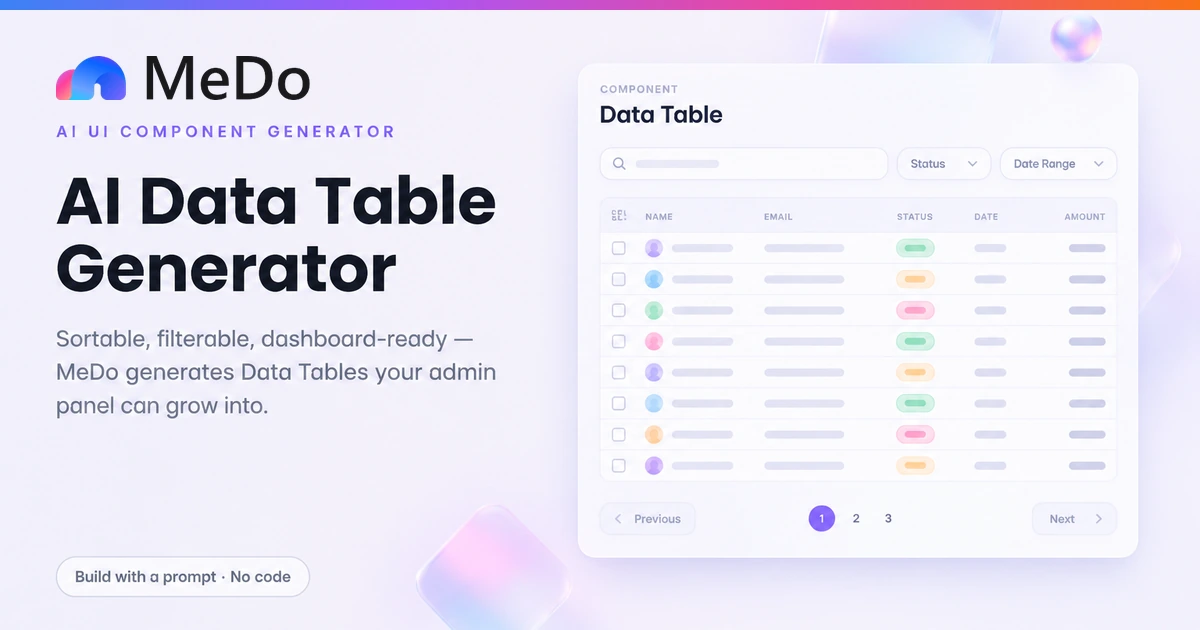
Prev, Next, and up to five centered page numbers with ellipses for the gaps. The default for anything search engines should page through.

Create numbered pagination for a product grid: Prev and Next buttons plus a windowed range showing up to five page numbers centered on the current page, collapsing distant ranges into ellipses while first and last stay visible. The current page gets aria-current="page", a filled indigo-600 background and white text; Prev is disabled on page one and Next on the last page, using aria-disabled, with no wrap-around. Each page is a real anchor to /products?page=n so every page is crawlable and shareable, with scroll reset to the grid top on change. Style 40px square buttons, rounded-lg, zinc-200 borders, hover zinc-50, visible focus-visible rings, and a "1–24 of 312" results line on the left. Collapse the window to three pages plus ellipses under 640px.
Prueba en MeDo
AppendLoad More

Load-More With Progress Count

One button that appends the next batch and reports the running total. For galleries and feeds where readers sample rather than hunt.

Create a load-more pagination control for a photo gallery. A full-width centered button beneath the grid reads "Load more (24 of 180 shown)" and refetches the next 24 items, appending them to the existing list rather than replacing it. Show a brief spinner inside the button during fetch, then update the count label; disable the button and change it to "All 180 loaded" at the end. After each load, move focus to the first newly added item so keyboard users are not stranded, and push the loaded count into the URL query so refreshing keeps the same depth. Use React state for the items array, Tailwind for a ghost-style button that fills with zinc-900 on hover, and skeleton placeholders in the grid while loading.

Prueba en MeDo
APICursor Next-Prev

Cursor-Based Next/Previous

For APIs that page by cursor: only forward and back, honest about it, with the cursor kept in the URL so a page can be shared.

Create a Next/Previous pagination control wired to a cursor-based API. Two buttons only — no numbered pages, since cursors cannot jump. Next fetches the next page with the returned cursor and Previous uses the kept cursor of the prior page from a small history stack. Persist the current cursor in the URL search params so a shared link restores the exact page, and disable Previous on the first page and Next when the API reports no more results. Include a subtle "Page unknown — cursor mode" results hint and a data-count line showing items on the current page. Style as a right-aligned pair with primary Next and outline Previous, plus focus rings and a 150ms opacity transition on the disabled state.

Prueba en MeDo
CrawlableSEO Deep

Server-Rendered Pages With Self-Canonicals

Every page a real address with its own title and canonical — the version that actually earns rankings on a category or archive.

Create server-rendered pagination for a blog archive where each page is fully crawlable: real anchor tags to /blog?page=n, page numbers rendered in the initial HTML without JavaScript, and no client-only fetching. Generate a per-page title and meta description ("Page 3 of 12 — Essay Archive"), a canonical tag on each page that includes the page parameter so pages do not collapse into one canonical, and rel prev and next link tags on adjacent pages. Include BreadcrumbList-style signals by keeping the archive route stable, render the item list server-side at 10 per page, and keep the pagination controls in the footer of each page so crawlers reach every page by following links alone.

Prueba en MeDo

Cómo personalizar tu Pagination

Put the page in the URL, not in state

If the current page lives in useState alone, refreshing loses your place and the back button exits the site instead of returning to page 3. Ask for the page parameter synced to the URL with shallow routing, and for scroll restoration so returning lands where the visitor left off.

Say whether pages are server-rendered or client-fetched

Server-rendered pages mean each page number is a real link that works without JavaScript and gets crawled. Client fetching with a spinner is fine for logged-in dashboards, but on a public listing page it silently deletes the SEO benefit you chose pagination for. Name the mode in the prompt.

Cap the visible page range with a window

A store with 400 categories will render 400 numbered buttons and the control becomes a horizontal scroll of its own. Ask for a windowed range — current page with neighbors, ellipses for gaps, first and last always shown — so the control is the same width whether you have 5 pages or 500.

Disable the edges instead of wrapping them

A Next button that jumps from the last page back to page one surprises everyone who misread the count. Request disabled states with aria-disabled on the boundary buttons, and pair them with the "1–24 of 312" results line so the range is legible without reading the numbers.

Quién usa el componente Pagination

E-commerce category page

A 24-per-page product grid with server-rendered page URLs, so Google indexes deep category pages as separate entries, and a results line that tells a shopper how many more screens of sofas exist.

Blog or news archive

Numbered pages at 10 posts per page below the archive, with page links wired to routing so a reader sharing page 4 gets exactly page 4 — the archive becomes an internal-linking spine for the whole site.

Admin dashboard table

Client-side pagination over a fetched dataset with page-size selection (10, 25, 50), where crawlability is irrelevant and snappy refetching plus preserved filters across pages is what matters.

Search results page

Numbered pagination under site-search results with the query preserved in every page URL, so page 2 of a search is a real address a colleague can paste into a ticket.

Patrones de Pagination para distintos sitios web

El mismo componente pagination, adaptado al tipo de sitio donde se publica.

01 / 06

E-commerce Category Pages

Server-rendered numbered pages at 24 products each, so a "sectional sofas page 2" is a distinct crawlable entry rather than scroll position. Keep filters in the URL alongside the page so a shared page-3 link lands on filtered page 3, not page 3 of everything.

Estilos y variantes de Pagination

Elige la variante que encaje con el resto de la página y genérala.

01 / 05

Minimal Prev-Next

Just two arrows and "Page 2 of 14". Right for lists where the reader almost always goes forward — a tutorial series, a changelog — and wrong the moment someone needs to jump back five pages.

Pagination en React, Next.js, Vue y Svelte

React, Next.js, Vue 3, SvelteKit, Astro o HTML puro: el mismo pagination, seis formas de integrarlo.

01 / 03

React Pagination

A window function computes which numbers to show; the page lives in search params so back and refresh behave. Disabled edges, never wrapping.

src/components/Pagination.tsx

const params = useSearchParams()
const page = Number(params.get('page') ?? 1)
const href = (p: number) => `/products?page=${p}`

<nav aria-label="Pagination">
  {page > 1 && <a href={href(page - 1)} rel="prev">Prev</a>}
  {pages.map((p) =>
    p === page
      ? <span key={p} aria-current="page" className="bg-indigo-600 text-white">{p}</span>
      : <a key={p} href={href(p)}>{p}</a>
  )}
  {page < total && <a href={href(page + 1)} rel="next">Next</a>}
</nav>

Cómo añadir tu Pagination a un proyecto

Cuatro pasos, desde elegir una plantilla de pagination hasta llevarlo a producción.

01~1min

Decide the paging model before the pixels

Numbered pages, load-more, or cursor Next — this choice fixes whether each page gets a crawlable URL, so changing it later is a rebuild, not a restyle. Server-rendered or client-fetched is part of the same decision.

02~10s

Generate from a template prompt

Paste the matching prompt into MeDo with your real per-page count and total, and say explicitly whether page URLs should be server-rendered links or client fetches. Ambiguity here is how client-only pagination ends up on a public archive.

03~2min

Refine in plain English

Ask for the window size, the results line wording, page-size selection, or filter preservation across pages as follow-up messages rather than editing the range math by hand. Verify the ellipses logic with a fake 500-page total before connecting real data.

04~5min

Wire the data and test the edges

Connect the real list, then check the four failure cases: page one with Prev disabled, the last page with Next disabled, a page beyond the total (should clamp), and a shared deep link restoring page, filters, and scroll position.

Preguntas frecuentes sobre Pagination

Should I use pagination or infinite scroll?

Decide by asking whether the pages of this list deserve to be found on their own. For e-commerce categories and blog archives the answer is yes — each page is a crawlable URL that can rank, be linked, and be shared, so paginate. For feeds, message threads, and dashboards where nobody arrives at item 4,000 via search, a cursor or infinite scroll removes clicks for the same content. A common hybrid is to start with a load-more button that converts to numbered pages after a few expansions, or to give an infinite-scroll page real pagination URLs under the hood for crawlers.

Does pagination help SEO?

It makes your deep content crawlable, which is the precondition for it ranking. Numbered pagination turns one long list into linked pages with stable URLs that search engines follow, and it keeps pages from being so heavy that crawlers truncate them. Google no longer uses rel prev and next as a ranking signal, but emitting them is still harmless documentation of the sequence. What actually hurts is pagination implemented as client-only buttons with no URL per page — to a crawler that is a list that never advances.

How many items should I show per page?

Pick a number that keeps one page meaningful on its own: 10–12 for blog posts and search results, 24–48 for product grids where the visual density does the persuading. More items per page means fewer, shallower pages; fewer means more crawlable pages but more clicks. Keep it consistent across the site — a grid that flips between 12 and 48 per page makes page 2 a different list depending on where you entered from.

Is a load-more button still pagination?

It is the middle option: one click to reveal the next batch, with the page count in the button label so progress is visible. It suits listicles and galleries where readers sample rather than hunt. Two things to demand if you use it: append the new batch to the URL or history so back does not discard everything, and keep each batch present in the DOM rather than replacing the last one. If your analytics show most users never click load-more at all, that is the moment to switch to numbered pages.

How do I paginate data from an API with cursor paging?

Many APIs hand out opaque cursors instead of page numbers, so the client cannot compute page 7 without walking there. Ask MeDo to keep cursor paging for the data layer while presenting numbered controls for small counts, and to switch to a simple Next button once past the point where the API can jump. Alternatively use offset-based pagination if your dataset is small enough that offsets stay fast — for a few thousand rows it usually is.

How is pagination different from a stepper?

Pagination splits one list into equivalent pages you may visit in any order; a stepper breaks one task into ordered stages you complete in sequence. Page 3 of a category is interchangeable with page 2; step 3 of checkout is meaningless without steps 1 and 2. If clicking "forward" in your interface loses the user work if skipped, it is a flow and wants a stepper — see the MeDo stepper page for that pattern.