AI Breadcrumb Generator.

Paste a prompt and get a fully styled breadcrumb navigation component in seconds. MeDo understands your site structure and generates clean, accessible trail markup — ready to drop into any page.

Breadcrumb
Breadcrumb

Every Multi-Level Site Needs a Great Breadcrumb.

Breadcrumbs reduce bounce rates by giving visitors a one-click path back up the hierarchy — without hitting the browser back button. They also signal page depth to search engines, contributing to better crawlability and structured-data eligibility. A well-built breadcrumb is a tiny component with outsized impact on both UX and SEO.

6 templates

Breadcrumb Templates You Can Generate

Every template is a real prompt, not a screenshot. Copy it into any AI editor, or run it in MeDo and get React + Tailwind code back.

BasicSimple Trail

Chevron Trail With a Plain Current Crumb

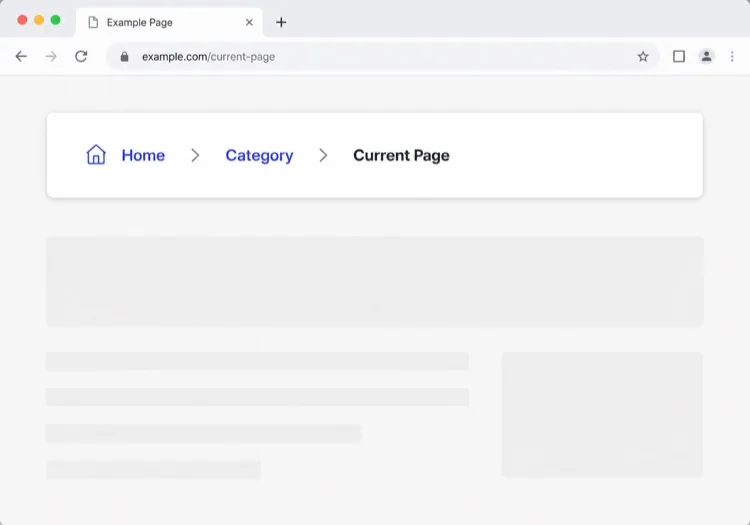
Three or four levels, chevron separators, last crumb unlinked. The baseline every other variant extends — and the one place to get the semantics right, because the markup is copied everywhere else.

Create a breadcrumb component wrapped in a nav element with aria-label="Breadcrumb", containing an ordered list. Render ancestors as links and the final segment as plain text carrying aria-current="page", never as a link to the page you are already on. Insert chevron separators with a CSS pseudo-element or an aria-hidden span so screen readers do not announce them between every item. Keep the trail on one line at desktop widths and allow it to wrap rather than horizontally scroll below 640px. Style the current crumb with a darker weight, not a different color alone.


Try in MeDo
TruncatingCollapsed Middle

Ellipsis Between First and Last

For trails deeper than four levels. Collapse the middle rather than shrinking the font — an ellipsis that expands is honest, while a 10px crumb is just unreadable.

Create a breadcrumb that collapses when the trail exceeds four levels: show the root, an ellipsis button, the immediate parent and the current page. The ellipsis is a real button with aria-expanded and an accessible label such as "Show 3 hidden levels", and expanding it reveals the hidden crumbs inline rather than in a popover. Keep every level in the DOM at all times so the JSON-LD BreadcrumbList still describes the full path even while the visual trail is collapsed. Below 640px, show only the parent and current page with a back chevron in front of the parent.

Try in MeDo
CommerceProduct Path

Category Trail With a Home Icon

Home icon, category, subcategory, product name. Build it from the category the shopper actually arrived through, not the product's first assigned category, or the trail contradicts the path they just took.

Create an e-commerce breadcrumb: a home icon link with a visually hidden "Home" label, then category and subcategory links, then the product name as the current crumb with aria-current="page". Truncate the product name with an ellipsis past 40 characters while keeping the full name in the title attribute and in the JSON-LD BreadcrumbList. Derive the category path from the collection the shopper navigated through rather than the product default, so the trail matches their route. Below 640px, collapse to a single back link showing the subcategory name preceded by a left chevron.

Try in MeDo
DropdownSwitchable Crumb

Crumbs That Open a Sibling Menu

Each level doubles as a switcher listing its siblings, which turns a trail into a lateral navigation tool. Standard in cloud consoles where the path is organisation, project, environment.

Create a breadcrumb where each segment is a link plus a small chevron button that opens a menu of that level's siblings — switch project, switch environment, switch service. Give each chevron aria-expanded and aria-haspopup="menu", open the menu on Enter, Space or Down arrow, move through items with arrow keys, close on Escape and return focus to the chevron. Keep the segment label itself a plain link so clicking it navigates rather than opening the menu. Add a filter input inside any menu with more than ten siblings. On mobile, render the menu as a bottom sheet.

Try in MeDo
SEOStructured Trail

Trail With JSON-LD BreadcrumbList

The visual trail plus the schema.org markup that makes Google render a path instead of a bare URL in results. Build both from one array, or they drift apart the first time the IA changes.

Create a breadcrumb component that emits both the visual trail and a schema.org BreadcrumbList as JSON-LD in a script type="application/ld+json" block, generated from the same array of segments so the two can never disagree. Each ListItem needs position, name and an absolute item URL — relative URLs are ignored. Include the current page as the final ListItem even though it renders unlinked. Do not include the trail in more than one place on the page, since duplicate BreadcrumbList blocks are treated as conflicting. Render the JSON-LD server-side so crawlers see it without executing JavaScript.

Try in MeDo
ContentEditorial Path

Kicker Trail Above the Headline

A two-level trail styled as a section kicker rather than a UI control: uppercase, small, sitting directly above the headline. It does navigational and editorial work at once.

Create a breadcrumb styled as an editorial kicker sitting directly above an article headline: two levels — vertical then topic — in small uppercase text with wide letter spacing, separated by a thin slash, with the current article omitted from the visible trail since the headline beneath already names it. Keep the article as the final entry in the JSON-LD BreadcrumbList even though it is not rendered. Use nav with aria-label="Breadcrumb" so it is still a navigation landmark rather than decorative type, and keep the same trail on mobile at a reduced size rather than collapsing it.

Try in MeDo

How to Customize Your Breadcrumb

Match your separator to your brand voice

Swap the default "/" for a chevron icon, an arrow, or even a custom glyph. A subtle design choice that makes breadcrumbs feel native to your design system rather than bolted on.

Truncate long trails on mobile

On small screens, show only the immediate parent and the current page, hiding middle segments behind an ellipsis. This keeps the component readable without sacrificing the full hierarchy on desktop.

Add schema.org BreadcrumbList markup

Ask MeDo to include JSON-LD structured data alongside the HTML. Search engines use it to render breadcrumbs directly in results pages, increasing click-through rate for deep content.

Style the active segment distinctively

The current-page crumb should never look like a link. Bold weight, darker color, or a subtle background pill all communicate "you are here" without extra copy.

Who Uses the Breadcrumb Component

E-commerce stores

Product pages sit 3-4 levels deep. A breadcrumb lets shoppers jump from a product back to its category or subcategory instantly — reducing navigation frustration during browsing sessions.

Documentation sites

Docs with nested sections (Guides > Authentication > OAuth) benefit enormously from breadcrumbs. Readers who land from search immediately understand where they are within a large content tree.

News & editorial sites

Articles nested under topics and verticals (Tech > AI > Tools) use breadcrumbs to surface related content categories, encouraging readers to explore rather than bouncing after a single article.

SaaS help centers

Support pages nested under product areas (Billing > Invoices > Download) use breadcrumbs so users can back up to a category and find adjacent answers without returning to the root search.

Breadcrumb Patterns for Different Websites

The same breadcrumb component, tuned to the kind of site it ships on.

01 / 06

E-commerce Breadcrumb

Category, subcategory, product, with a home icon at the root. The one detail worth getting right is which category path you render: showing the product's default category when the shopper arrived through a different collection makes the trail lead somewhere they never were.

Breadcrumb Styles and Variants

Pick the variant that matches the rest of the page, then generate it.

01 / 06

Chevron Breadcrumb

A right chevron between crumbs, the most legible separator at small sizes. Insert it with a pseudo-element or an aria-hidden span so a screen reader does not read "greater than" between every level.

Breadcrumb in React, Next.js, Vue and Svelte

React, Next.js, Vue 3, SvelteKit, Astro or plain HTML — the same breadcrumb, six ways to drop it in.

01 / 06

React Breadcrumb

No state at all, so this stays a plain function component. Take the segments as an array of label and href pairs rather than parsing a path string inside it — URL slugs make poor crumb labels.

src/components/Breadcrumb.tsx

export function Breadcrumb({ items }) {
  return (
    <nav aria-label="Breadcrumb">
      <ol className="flex items-center gap-2">
        {items.map((it, i) => (
          <li key={it.href}>
            {i === items.length - 1
              ? <span aria-current="page">{it.label}</span>
              : <a href={it.href}>{it.label}</a>}
          </li>
        ))}
      </ol>
    </nav>
  )
}

How to Add Your Breadcrumb to a Project

Four steps, from picking a breadcrumb template to shipping it in production.

01~30s

Pick a Breadcrumb Pattern

Count your depth. Three or four levels take the simple trail, deeper needs the collapsing variant, and a console where users switch between siblings needs the dropdown crumbs.

02~10s

Copy the Prompt

Paste it into MeDo, Lovable, Bolt, v0 or Cursor. Keep the aria-current and aria-hidden separator clauses — those two are what separate a real breadcrumb from a row of styled links.

03~1min

Generate and Refine

You get React + Tailwind back with a live preview. Follow up in plain English — "swap the slash for a chevron", "add the JSON-LD block", "collapse the middle past four levels".

04~2min

Mount It in Your Layout

Render it in the page or a nested layout where the ancestor titles are already loaded, above the h1 and below the header. Pass real labels rather than URL slugs, and emit the JSON-LD from the same array.

Common Questions About Breadcrumb

How do I create a breadcrumb with AI?

Open MeDo, describe your site hierarchy and the visual style you want, and MeDo generates a production-ready breadcrumb component. You can specify separators, icons, link colors, and whether to include structured data — all in plain English.

What is the best AI breadcrumb generator?

MeDo is purpose-built for generating UI components from prompts. Unlike general-purpose AI tools, MeDo understands design constraints, accessibility requirements, and front-end conventions, so the breadcrumb it generates is actually usable — not just syntactically correct.

Can MeDo generate a breadcrumb with structured data (schema.org)?

Yes. Ask MeDo to include JSON-LD BreadcrumbList markup in your prompt, and it will output both the visual HTML/CSS component and the schema.org script block. This helps search engines display breadcrumbs directly in search results.

How do I make a breadcrumb accessible?

A fully accessible breadcrumb uses a <nav aria-label="Breadcrumb"> wrapper, an ordered list, aria-current="page" on the last item, and keyboard-focusable links. MeDo applies these patterns by default when generating breadcrumb components.

Should the current page be a link in a breadcrumb?

No. The current page should be plain text, not a link — linking to the page you are already on is redundant and can confuse screen readers. MeDo renders ancestor crumbs as links and the final crumb as a non-linked, visually distinct label.

Can I generate a breadcrumb for a React or Next.js project?

Yes. MeDo can generate breadcrumb components as React functional components using dynamic routing patterns from Next.js, including reading path segments from usePathname or params. Specify your framework in the prompt and MeDo adapts the output accordingly.