AI 客户评价生成器。

描述您需要的社会证明区 — 引用风格、星级评分、头像布局、网格或轮播 — MeDo在几秒内生成生产就绪代码。让您的客户来做销售。

客户评价
客户评价

社会证明是您页面上最具说服力的文案。

访客更信任其他客户而非您 — 精心设计的客户评价区是证明产品有效的最快方式。它在买家做决定的关键时刻消除疑虑。然而大多数团队要么完全跳过评价,要么把引用堆砌成文字墙。MeDo让您轻松生成视觉上引人入胜、可信且经过转化测试的评价区。

6 个模板

可以生成的 客户评价 模板

每个模板都是真实的提示词,而不是截图。复制到任意 AI 编辑器,或在 MeDo 中运行,直接拿到 React + Tailwind 代码。

Three-up gridAcme

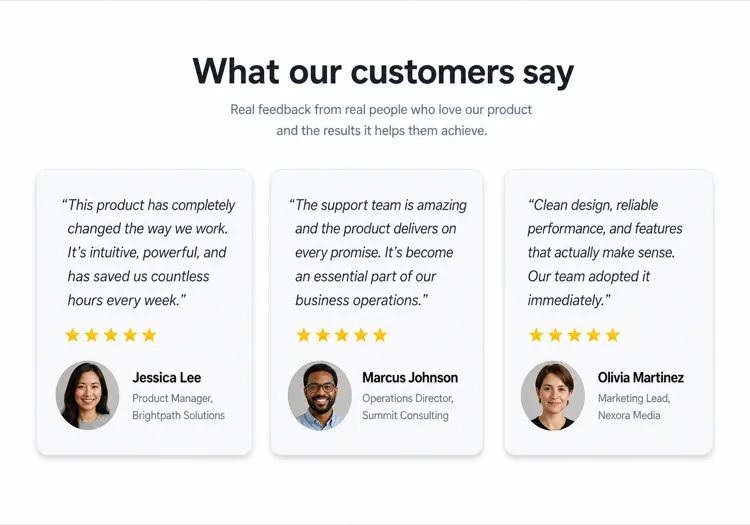
Three Quote Cards With Attribution

The baseline social proof section. It fails on attribution, not layout — an unnamed quote from "a happy customer" reads as invented and costs more trust than it buys.

Create a testimonials section with a centered h2 and three quote cards in one row. Each card holds a quote of 20 to 40 words in a blockquote element, then an attribution row with a 40px circular avatar, the customer's real name in medium weight, and their role plus company on a muted second line. Use a cite element for the source and explicit width and height on the avatar with an initials fallback on image error. Light card surface, hairline border, 12px radius, no hover animation. Stack to a single column at 768px keeping the avatar row intact rather than centering it.


在 MeDo 中尝试
Featured quoteMega

One Large Quote Above the Grid

Promotes your strongest testimonial out of the grid, where it would have been averaged out by two weaker ones. The featured card should be the quote naming a specific outcome, not the most flattering adjective.

Create a testimonials section with a featured quote above a grid. The featured card spans the full container: a quote of 40 to 60 words at large size, a 56px avatar, the customer name, their role and company, and a company logo at the right edge. Below it, three smaller cards in one row each with a shorter quote and a 40px avatar attribution row. Wrap each quote in a blockquote with a cite for the person and company. Featured card gets a tinted background to separate it from the grid. Collapse the grid to one column at 768px and reduce the featured quote by one type step.

在 MeDo 中尝试
Logo wallShipfast

Customer Logos With Quotes on Hover

Logos first, quotes second — the right order when your customer names are more persuasive than anything they said. Never make the quote hover-only; that hides it from touch and keyboard entirely.

Create a social proof section that leads with a customer logo wall: eight monochrome logos in two rows at reduced opacity, each an interactive button that reveals that customer's quote in a panel below the wall. Reveal on hover, focus and click so the content is reachable by keyboard and touch, with the active logo at full opacity and aria-pressed set. The panel shows the quote, avatar, name, role and company, and keeps a fixed min-height so the page does not jump between quotes. Default to the first quote on load. Four logos per row at 768px, two at 480px.

在 MeDo 中尝试
MasonryBuilders

Masonry Wall of Short Quotes

Nine to twelve quotes of uneven length in staggered columns. Volume is the argument here, so it only works if every card still carries a name and a face — a wall of anonymous praise reads as filler.

Create a masonry testimonial wall of nine to twelve short quotes across three CSS columns, letting the natural quote lengths stagger the card baselines. Each card carries a 32px avatar, a name, a role, and a source label such as G2 or Product Hunt. Use blockquote and cite markup throughout, and give avatars explicit dimensions with an initials fallback. Add a fade mask and a Show more button that expands from six visible cards to the full set, updating aria-expanded. Drop to two columns at 900px and one at 600px, preserving the source label on every card.

在 MeDo 中尝试
CarouselStudio

Single-Quote Slider With Controls

One long quote at a time, for case-study length testimonials that will not fit a card. The only variant here that needs client state, so keep the interactive shell small and leave the rest of the page static.

Create a testimonial carousel showing one quote at a time: a 60 to 100 word quote, a 64px avatar, the customer name, role, company and logo. Add previous and next buttons plus dot indicators, all real buttons with accessible labels, and support left and right arrow keys when the region has focus. Wrap the slides in an aria-roledescription carousel region with a live region announcing "slide 2 of 5". Pause any autoplay on hover and focus, and disable it entirely under prefers-reduced-motion. On mobile, swap the side buttons for a swipeable track with the dots below.

在 MeDo 中尝试
VideoBrand*

Video Testimonials With Transcript Quote

A thumbnail that opens a short customer video, with the strongest sentence quoted in text beneath it. Most visitors never press play, so the text quote is doing the actual work and cannot be skipped.

Create a video testimonials section with three cards. Each card shows a poster image at explicit dimensions with a centered play button overlay, a duration chip, and beneath it a one-sentence pull quote in text plus the customer name, role and company. Do not embed the player on load — render the poster as an image and only mount the iframe when the play button is activated, so three third-party players do not block the page. Give each play button a label naming the customer. Provide a captions note and a transcript link per card. One column at 768px.

在 MeDo 中尝试

如何自定义你的 客户评价

根据引用数量选择布局

大多数落地页三到四条引用网格最合适。如果您有很多评价,可以要求MeDo制作轮播或瀑布流布局,展示更多而不让页面显得拥挤。

以最强的引用开头

第一条评价获得最多关注。在提示词中描述顶部一个突出的大型引用卡片 — 网格前的英雄卡中单独一条出色的评价 — 立即建立信任。

添加公司Logo以增强权威

对于B2B产品,要求MeDo在客户姓名旁边包含公司Logo占位符。评价中有知名品牌Logo能显著提升感知可信度。

有选择地指定星级评分

每张卡片都有5星评分可能感觉不真实。让MeDo变化视觉强调 — 有些卡片带评分,有些不带 — 使评价区看起来真实且经过精心筛选。

谁在使用 客户评价 组件

SaaS产品

来自高级用户的特定角色引用 — "作为增长营销人员,我每周节省了6小时" — 配以职位和公司Logo,为评估工具的买家建立可信度。

电商品牌

以产品图片、客户自拍和简短有力的引用为主的视觉评价卡片。产品外观和功能与广告一致的视觉证明。

机构或自由职业者作品集

关于交付成果的客户引用 — 收入增长、按时完成的项目 — 以简洁的两列布局呈现,让成果比任何简介都更有说服力。

在线课程或教练

包含学员姓名、课程名称和转变引用的前后对比式评价。通过让成果感觉可实现且真实来推动注册。

不同网站的 客户评价 方案

同一个 客户评价 组件,针对它所在网站的类型做调整。

01 / 06

SaaS Product Testimonials

Role-specific quotes with job title, company and logo, because a B2B buyer is checking whether someone in their seat succeeded with this. Name the outcome in the quote — a quote praising the support team does not answer the question the pricing page raised.

客户评价 的风格与变体

挑选与页面其余部分匹配的变体,然后生成它。

01 / 06

Quote Card Grid

Three or four equal cards in a row, each with quote plus attribution row. The safest default and the easiest to keep balanced, provided you trim quotes to a similar length — one 80-word card next to two 20-word cards makes the grid look broken.

在 React、Next.js、Vue 与 Svelte 中使用 客户评价

React、Next.js、Vue 3、SvelteKit、Astro 或纯 HTML —— 同一个 客户评价,六种接入方式。

01 / 06

React Testimonials Section

A grid of quotes needs no state at all — keep hooks for the carousel variant only. Type the testimonial array so a card missing a name or role fails at build rather than shipping as anonymous praise.

src/components/Testimonials.tsx

export function Testimonials({ items }) {
  return (
    <div className="grid gap-6 md:grid-cols-3">
      {items.map((t) => (
        <figure key={t.name} className="rounded-xl border p-6">
          <blockquote className="text-lg">{t.quote}</blockquote>
          <figcaption className="mt-6 flex items-center gap-3">
            <Avatar src={t.photo} name={t.name} />
            <span>{t.name}, {t.role} at {t.company}</span>
          </figcaption>
        </figure>
      ))}
    </div>
  )
}

如何把 客户评价 加入项目

四个步骤,从挑选 客户评价 模板到上线生产环境。

01~30s

Pick a Testimonials Template

Choose by what you have. Three solid quotes means the card grid; one outstanding quote means the featured layout; recognisable customer names mean lead with the logo wall.

02~10s

Copy the Prompt

Take the prompt into MeDo, Lovable, Bolt, v0 or Cursor. Decide the quote length before you run it — the card grid only stays balanced if every quote lands in the same range.

03~2min

Generate and Refine

You get React + Tailwind back with a live preview. Follow up in plain English — "add a company logo to each card", "make it two columns on tablet" — instead of editing class strings.

04~2min

Swap In Real Attribution

Replace every placeholder with a real name, role, company and photo, and get written permission for each. A card left as "Jane Doe, CEO" is worse than no testimonials section at all.

关于 客户评价 的常见问题

如何用AI创建客户评价区?

在MeDo中,描述您想要的评价布局 — 网格还是轮播、卡片数量、是否包含星级评分或头像,以及视觉风格。MeDo生成带有占位引用、姓名和头像的完整组件代码,您用真实客户内容替换即可。

最好的AI客户评价生成器是哪个?

MeDo专为生成包括评价区在内的生产就绪网站组件而构建。与通用AI聊天工具不同,MeDo理解网格布局、响应式设计以及让社会证明真正有效的转化模式 — 因此您获得的是干净可用的代码,而非粗糙的原型。

可以用AI生成客户评价轮播吗?

可以。向MeDo请求"带自动播放和导航点的客户评价轮播",它会生成一个交互式滑块组件。您可以指定一次显示多少张卡片、过渡速度以及是否包含上/下一张箭头控件。

如何向AI生成的评价区添加星级评分?

在MeDo提示词中包含"使用填充星形图标的5星评分"。您也可以要求可变评分 — "每张卡片显示4到5颗星" — 使评价区感觉更真实可信。

AI能生成带客户照片的评价吗?

MeDo会生成带有圆形头像图片占位符和正确布局结构的组件。您将占位符src属性替换为真实的客户照片。您也可以描述回退方案 — "如果没有照片,在彩色圆圈中显示首字母。"

如何用AI制作移动端友好的客户评价区?

在MeDo提示词中添加"响应式,在移动端堆叠为单列"。生成的组件将使用CSS grid或flexbox,在小屏幕上自动将多列布局折叠为垂直滚动的单卡视图。