MeDo

AI 고객 후기 생성기.

필요한 소셜 프루프 섹션을 설명하세요 — 인용 스타일, 별점, 아바타 레이아웃, 그리드 또는 캐러셀 — MeDo가 몇 초 안에 프로덕션 준비 코드를 생성합니다. 고객이 대신 판매하도록 하세요.

고객 후기
고객 후기

소셜 프루프는 페이지에서 가장 설득력 있는 카피입니다.

방문자들은 당신보다 다른 고객을 더 신뢰합니다 — 잘 설계된 고객 후기 섹션은 제품이 성과를 낸다는 것을 증명하는 가장 빠른 방법입니다. 구매자가 결정하는 바로 그 순간에 의심을 줄여줍니다. 그러나 대부분의 팀은 고객 후기를 완전히 건너뛰거나 텍스트 벽에 인용문을 쌓습니다. MeDo는 시각적으로 설득력 있고, 신뢰할 수 있으며, 전환 테스트된 섹션을 쉽게 생성할 수 있게 합니다.

템플릿 6개

생성할 수 있는 고객 후기 템플릿

모든 템플릿은 스크린샷이 아니라 실제 프롬프트입니다. 어떤 AI 에디터에든 붙여넣거나 MeDo에서 실행해 React + Tailwind 코드를 그대로 받으세요.

Three-up gridAcme

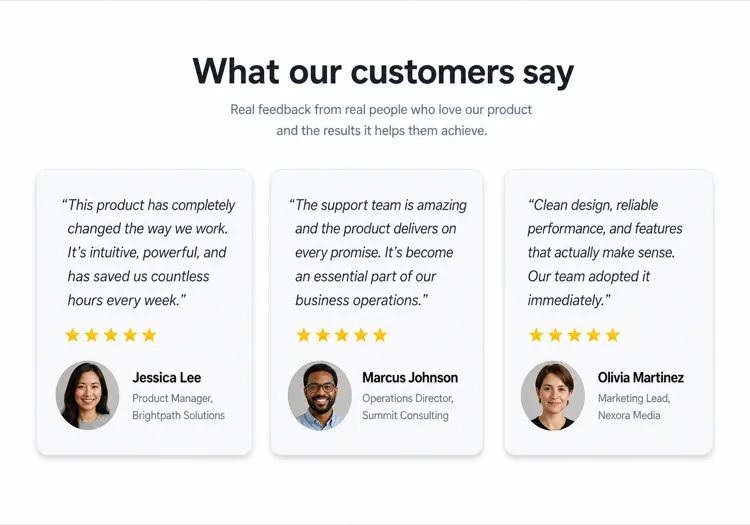
Three Quote Cards With Attribution

The baseline social proof section. It fails on attribution, not layout — an unnamed quote from "a happy customer" reads as invented and costs more trust than it buys.

Create a testimonials section with a centered h2 and three quote cards in one row. Each card holds a quote of 20 to 40 words in a blockquote element, then an attribution row with a 40px circular avatar, the customer's real name in medium weight, and their role plus company on a muted second line. Use a cite element for the source and explicit width and height on the avatar with an initials fallback on image error. Light card surface, hairline border, 12px radius, no hover animation. Stack to a single column at 768px keeping the avatar row intact rather than centering it.


MeDo에서 시도하기
Featured quoteMega

One Large Quote Above the Grid

Promotes your strongest testimonial out of the grid, where it would have been averaged out by two weaker ones. The featured card should be the quote naming a specific outcome, not the most flattering adjective.

Create a testimonials section with a featured quote above a grid. The featured card spans the full container: a quote of 40 to 60 words at large size, a 56px avatar, the customer name, their role and company, and a company logo at the right edge. Below it, three smaller cards in one row each with a shorter quote and a 40px avatar attribution row. Wrap each quote in a blockquote with a cite for the person and company. Featured card gets a tinted background to separate it from the grid. Collapse the grid to one column at 768px and reduce the featured quote by one type step.

MeDo에서 시도하기
Logo wallShipfast

Customer Logos With Quotes on Hover

Logos first, quotes second — the right order when your customer names are more persuasive than anything they said. Never make the quote hover-only; that hides it from touch and keyboard entirely.

Create a social proof section that leads with a customer logo wall: eight monochrome logos in two rows at reduced opacity, each an interactive button that reveals that customer's quote in a panel below the wall. Reveal on hover, focus and click so the content is reachable by keyboard and touch, with the active logo at full opacity and aria-pressed set. The panel shows the quote, avatar, name, role and company, and keeps a fixed min-height so the page does not jump between quotes. Default to the first quote on load. Four logos per row at 768px, two at 480px.

MeDo에서 시도하기
MasonryBuilders

Masonry Wall of Short Quotes

Nine to twelve quotes of uneven length in staggered columns. Volume is the argument here, so it only works if every card still carries a name and a face — a wall of anonymous praise reads as filler.

Create a masonry testimonial wall of nine to twelve short quotes across three CSS columns, letting the natural quote lengths stagger the card baselines. Each card carries a 32px avatar, a name, a role, and a source label such as G2 or Product Hunt. Use blockquote and cite markup throughout, and give avatars explicit dimensions with an initials fallback. Add a fade mask and a Show more button that expands from six visible cards to the full set, updating aria-expanded. Drop to two columns at 900px and one at 600px, preserving the source label on every card.

MeDo에서 시도하기
CarouselStudio

Single-Quote Slider With Controls

One long quote at a time, for case-study length testimonials that will not fit a card. The only variant here that needs client state, so keep the interactive shell small and leave the rest of the page static.

Create a testimonial carousel showing one quote at a time: a 60 to 100 word quote, a 64px avatar, the customer name, role, company and logo. Add previous and next buttons plus dot indicators, all real buttons with accessible labels, and support left and right arrow keys when the region has focus. Wrap the slides in an aria-roledescription carousel region with a live region announcing "slide 2 of 5". Pause any autoplay on hover and focus, and disable it entirely under prefers-reduced-motion. On mobile, swap the side buttons for a swipeable track with the dots below.

MeDo에서 시도하기
VideoBrand*

Video Testimonials With Transcript Quote

A thumbnail that opens a short customer video, with the strongest sentence quoted in text beneath it. Most visitors never press play, so the text quote is doing the actual work and cannot be skipped.

Create a video testimonials section with three cards. Each card shows a poster image at explicit dimensions with a centered play button overlay, a duration chip, and beneath it a one-sentence pull quote in text plus the customer name, role and company. Do not embed the player on load — render the poster as an image and only mount the iframe when the play button is activated, so three third-party players do not block the page. Give each play button a label naming the customer. Provide a captions note and a transcript link per card. One column at 768px.

MeDo에서 시도하기

고객 후기 커스터마이즈 방법

인용문 볼륨에 레이아웃 맞추기

대부분의 랜딩 페이지에서는 그리드에 3~4개의 인용문이 최적입니다. 후기가 많다면 MeDo에 캐러셀이나 매소너리 레이아웃을 요청해 페이지를 압도하지 않고 더 많이 보여줄 수 있습니다.

가장 강력한 인용문으로 시작하기

첫 번째 후기가 가장 많은 주목을 받습니다. 프롬프트에서 그리드 전에 히어로 카드에 단독으로 두드러진 리뷰로 상단에 큰 인용 카드를 묘사하세요 — 즉시 신뢰를 확립하기 위해.

권위를 위한 기업 로고 추가하기

B2B 제품의 경우 고객 이름 옆에 기업 로고 플레이스홀더를 포함하도록 MeDo에 요청하세요. 후기에 인지도 있는 브랜드 로고가 있으면 지각된 신뢰도가 크게 높아집니다.

별점 선택적으로 지정하기

모든 카드에 5점 별점이 있으면 조작된 것처럼 느껴질 수 있습니다. MeDo에 시각적 강조를 다양화하도록 요청하세요 — 별점이 있는 카드와 없는 카드를 혼합 — 섹션이 진짜이고 수작업으로 큐레이션된 것처럼 보이도록.

고객 후기 컴포넌트를 사용하는 사람

SaaS 제품

파워 유저의 역할별 인용문 — "그로스 마케터로서 주 6시간을 절약했습니다" — 직함과 기업 로고와 함께 도구를 평가하는 구매자에게 신뢰성을 구축합니다.

이커머스 브랜드

제품 이미지, 고객 셀카, 짧고 강렬한 인용문이 있는 사진 중심의 후기 카드. 제품이 광고된 대로 보이고 작동한다는 시각적 증거.

에이전시 또는 프리랜서 포트폴리오

달성된 결과에 대한 고객 인용문 — 성장한 매출, 시간 내에 완료된 프로젝트 — 어떤 자기소개보다 결과가 더 크게 말하게 하는 깔끔한 2열 레이아웃으로 제시됩니다.

온라인 강의 또는 코칭

학생 이름, 강의명, 변화 인용문이 있는 비포-애프터 스타일 후기. 결과가 달성 가능하고 실제처럼 느껴지게 만들어 등록을 유도합니다.

웹사이트 유형별 고객 후기 패턴

같은 고객 후기 컴포넌트를 게시되는 사이트 유형에 맞춰 조정합니다.

01 / 06

SaaS Product Testimonials

Role-specific quotes with job title, company and logo, because a B2B buyer is checking whether someone in their seat succeeded with this. Name the outcome in the quote — a quote praising the support team does not answer the question the pricing page raised.

고객 후기 스타일과 변형

페이지의 나머지 부분과 어울리는 변형을 골라 바로 생성하세요.

01 / 06

Quote Card Grid

Three or four equal cards in a row, each with quote plus attribution row. The safest default and the easiest to keep balanced, provided you trim quotes to a similar length — one 80-word card next to two 20-word cards makes the grid look broken.

React, Next.js, Vue, Svelte에서의 고객 후기

React, Next.js, Vue 3, SvelteKit, Astro 또는 순수 HTML — 같은 고객 후기을 여섯 가지 방식으로 넣을 수 있습니다.

01 / 06

React Testimonials Section

A grid of quotes needs no state at all — keep hooks for the carousel variant only. Type the testimonial array so a card missing a name or role fails at build rather than shipping as anonymous praise.

src/components/Testimonials.tsx

export function Testimonials({ items }) {
  return (
    <div className="grid gap-6 md:grid-cols-3">
      {items.map((t) => (
        <figure key={t.name} className="rounded-xl border p-6">
          <blockquote className="text-lg">{t.quote}</blockquote>
          <figcaption className="mt-6 flex items-center gap-3">
            <Avatar src={t.photo} name={t.name} />
            <span>{t.name}, {t.role} at {t.company}</span>
          </figcaption>
        </figure>
      ))}
    </div>
  )
}

고객 후기을 프로젝트에 추가하는 방법

고객 후기 템플릿을 고르고 프로덕션에 배포하기까지 네 단계.

01~30s

Pick a Testimonials Template

Choose by what you have. Three solid quotes means the card grid; one outstanding quote means the featured layout; recognisable customer names mean lead with the logo wall.

02~10s

Copy the Prompt

Take the prompt into MeDo, Lovable, Bolt, v0 or Cursor. Decide the quote length before you run it — the card grid only stays balanced if every quote lands in the same range.

03~2min

Generate and Refine

You get React + Tailwind back with a live preview. Follow up in plain English — "add a company logo to each card", "make it two columns on tablet" — instead of editing class strings.

04~2min

Swap In Real Attribution

Replace every placeholder with a real name, role, company and photo, and get written permission for each. A card left as "Jane Doe, CEO" is worse than no testimonials section at all.

고객 후기에 대한 자주 묻는 질문

AI로 고객 후기 섹션을 어떻게 만드나요?

MeDo에서 원하는 후기 레이아웃을 설명하세요 — 그리드 vs. 캐러셀, 카드 수, 별점이나 아바타 포함 여부, 비주얼 스타일. MeDo는 플레이스홀더 인용문, 이름, 아바타가 있는 전체 컴포넌트 코드를 생성하고 실제 고객 콘텐츠로 교체하면 됩니다.

최고의 AI 고객 후기 생성기는 무엇인가요?

MeDo는 고객 후기 섹션을 포함한 프로덕션 준비된 웹사이트 컴포넌트 생성을 위해 특별히 구축되었습니다. 범용 AI 채팅 도구와 달리 MeDo는 그리드 레이아웃, 반응형 디자인, 소셜 프루프를 실제로 작동하게 하는 전환 패턴을 이해합니다 — 대략적인 목업 대신 깔끔하고 사용 가능한 코드를 얻을 수 있습니다.

AI로 고객 후기 캐러셀을 생성할 수 있나요?

네. MeDo에 '자동 재생과 네비게이션 점이 있는 고객 후기 캐러셀'을 요청하면 인터랙티브 슬라이더 컴포넌트가 생성됩니다. 한 번에 보이는 카드 수, 전환 속도, 이전/다음 화살표 컨트롤 포함 여부를 지정할 수 있습니다.

AI로 생성된 고객 후기 섹션에 별점을 추가하려면 어떻게 하나요?

MeDo 프롬프트에 "채워진 별 아이콘을 사용한 5점 별점"을 포함하세요. 가변 별점을 요청할 수도 있습니다 — "카드당 4~5개의 별 표시" — 섹션이 더 진짜 같고 신뢰할 수 있게 만듭니다.

AI가 고객 사진이 있는 후기를 생성할 수 있나요?

MeDo는 원형 아바타 이미지 플레이스홀더와 올바른 레이아웃 구조로 컴포넌트를 생성합니다. 플레이스홀더 src 속성을 실제 고객 사진으로 교체하면 됩니다. 폴백을 설명할 수도 있습니다 — "사진이 없으면 색상 원에 이니셜 표시."

AI로 모바일 친화적인 고객 후기 섹션을 만들려면 어떻게 하나요?

MeDo 프롬프트에 "반응형, 모바일에서 단일 열로 쌓임"을 추가하세요. 생성된 컴포넌트는 CSS grid 또는 flexbox를 사용하여 작은 화면에서 다중 열 레이아웃이 자동으로 수직 스크롤 단일 카드 뷰로 축소됩니다.