MeDo

AI お客様の声ジェネレーター。

必要なソーシャルプルーフセクションを説明してください — 引用スタイル、星評価、アバターレイアウト、グリッドまたはカルーセル — MeDoが数秒で本番対応コードを生成します。お客様に売り込んでもらいましょう。

お客様の声
お客様の声

ソーシャルプルーフはページ上で最も説得力のあるコピーです。

訪問者はあなたよりも他の顧客を信頼します — そして、よく設計されたお客様の声セクションは、製品が成果を出すことを証明する最速の方法です。購買者が決断しようとしているまさにその瞬間に疑念を取り除きます。しかし、ほとんどのチームはお客様の声を完全にスキップするか、テキストの壁に引用文を並べてしまいます。MeDoを使えば、視覚的に説得力があり、信頼性が高く、コンバージョンテスト済みのセクションを簡単に生成できます。

6 個のテンプレート

生成できる お客様の声 テンプレート

どのテンプレートもスクリーンショットではなく実際のプロンプトです。任意の AI エディタに貼り付けるか、MeDo で実行して React + Tailwind のコードを受け取れます。

Three-up gridAcme

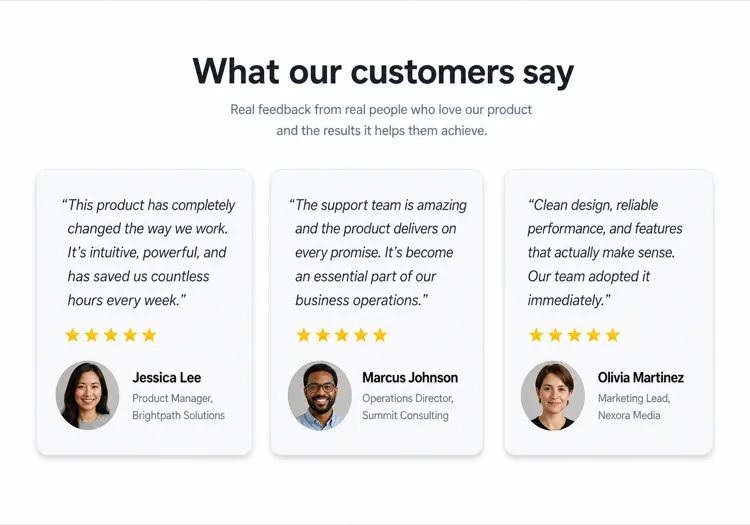
Three Quote Cards With Attribution

The baseline social proof section. It fails on attribution, not layout — an unnamed quote from "a happy customer" reads as invented and costs more trust than it buys.

Create a testimonials section with a centered h2 and three quote cards in one row. Each card holds a quote of 20 to 40 words in a blockquote element, then an attribution row with a 40px circular avatar, the customer's real name in medium weight, and their role plus company on a muted second line. Use a cite element for the source and explicit width and height on the avatar with an initials fallback on image error. Light card surface, hairline border, 12px radius, no hover animation. Stack to a single column at 768px keeping the avatar row intact rather than centering it.


MeDoで試す
Featured quoteMega

One Large Quote Above the Grid

Promotes your strongest testimonial out of the grid, where it would have been averaged out by two weaker ones. The featured card should be the quote naming a specific outcome, not the most flattering adjective.

Create a testimonials section with a featured quote above a grid. The featured card spans the full container: a quote of 40 to 60 words at large size, a 56px avatar, the customer name, their role and company, and a company logo at the right edge. Below it, three smaller cards in one row each with a shorter quote and a 40px avatar attribution row. Wrap each quote in a blockquote with a cite for the person and company. Featured card gets a tinted background to separate it from the grid. Collapse the grid to one column at 768px and reduce the featured quote by one type step.

MeDoで試す
Logo wallShipfast

Customer Logos With Quotes on Hover

Logos first, quotes second — the right order when your customer names are more persuasive than anything they said. Never make the quote hover-only; that hides it from touch and keyboard entirely.

Create a social proof section that leads with a customer logo wall: eight monochrome logos in two rows at reduced opacity, each an interactive button that reveals that customer's quote in a panel below the wall. Reveal on hover, focus and click so the content is reachable by keyboard and touch, with the active logo at full opacity and aria-pressed set. The panel shows the quote, avatar, name, role and company, and keeps a fixed min-height so the page does not jump between quotes. Default to the first quote on load. Four logos per row at 768px, two at 480px.

MeDoで試す
MasonryBuilders

Masonry Wall of Short Quotes

Nine to twelve quotes of uneven length in staggered columns. Volume is the argument here, so it only works if every card still carries a name and a face — a wall of anonymous praise reads as filler.

Create a masonry testimonial wall of nine to twelve short quotes across three CSS columns, letting the natural quote lengths stagger the card baselines. Each card carries a 32px avatar, a name, a role, and a source label such as G2 or Product Hunt. Use blockquote and cite markup throughout, and give avatars explicit dimensions with an initials fallback. Add a fade mask and a Show more button that expands from six visible cards to the full set, updating aria-expanded. Drop to two columns at 900px and one at 600px, preserving the source label on every card.

MeDoで試す
CarouselStudio

Single-Quote Slider With Controls

One long quote at a time, for case-study length testimonials that will not fit a card. The only variant here that needs client state, so keep the interactive shell small and leave the rest of the page static.

Create a testimonial carousel showing one quote at a time: a 60 to 100 word quote, a 64px avatar, the customer name, role, company and logo. Add previous and next buttons plus dot indicators, all real buttons with accessible labels, and support left and right arrow keys when the region has focus. Wrap the slides in an aria-roledescription carousel region with a live region announcing "slide 2 of 5". Pause any autoplay on hover and focus, and disable it entirely under prefers-reduced-motion. On mobile, swap the side buttons for a swipeable track with the dots below.

MeDoで試す
VideoBrand*

Video Testimonials With Transcript Quote

A thumbnail that opens a short customer video, with the strongest sentence quoted in text beneath it. Most visitors never press play, so the text quote is doing the actual work and cannot be skipped.

Create a video testimonials section with three cards. Each card shows a poster image at explicit dimensions with a centered play button overlay, a duration chip, and beneath it a one-sentence pull quote in text plus the customer name, role and company. Do not embed the player on load — render the poster as an image and only mount the iframe when the play button is activated, so three third-party players do not block the page. Give each play button a label naming the customer. Provide a captions note and a transcript link per card. One column at 768px.

MeDoで試す

お客様の声 をカスタマイズする方法

引用文の量に合わせてレイアウトを調整する

ほとんどのランディングページでは、グリッドに3〜4つの引用文が最適です。お客様の声が多い場合は、MeDoにカルーセルやマソンリーレイアウトを依頼して、ページを圧迫せずにより多くを表示できます。

最も強力な引用文からスタートする

最初のお客様の声が最も注目を集めます。プロンプトで、グリッドの前にヒーローカードに入った単独の際立つレビューとして、上部に大きな引用カードを説明してください — 信頼を即座に確立するために。

権威付けのために企業ロゴを追加する

B2B製品の場合、顧客名の隣に企業ロゴのプレースホルダーを含めるようMeDoに依頼してください。お客様の声に認知されたブランドロゴがあると、知覚される信頼性が大幅に向上します。

星評価を選択的に指定する

各カードに5つ星評価があると作為的に見える場合があります。MeDoに視覚的な強調を変えるよう依頼してください — 評価ありのカードとなしのカードを混在させることで、セクションが本物らしく手作業でキュレーションされた印象になります。

お客様の声 コンポーネントを使うのは誰か

SaaS製品

パワーユーザーからの役割固有の引用文 — 「グロースマーケターとして週6時間節約できました」— 職種と企業ロゴと組み合わせて、ツールを評価している購買者に対する信頼性を構築します。

Eコマースブランド

製品画像、顧客のセルフィー、短くインパクトのある引用文を使ったフォト中心のお客様の声カード。製品が宣伝通りに見えて機能するという視覚的な証明。

エージェンシーまたはフリーランサーのポートフォリオ

達成した成果 — 収益成長、時間通りに完了したプロジェクト — についての顧客引用文を、清潔感のある2カラムレイアウトで提示し、どんな経歴よりも結果が語るようにします。

オンラインコースまたはコーチング

生徒名、コース名、変化の引用文を含むビフォーアフタースタイルのお客様の声。結果が達成可能で現実的に感じられることで、受講申込みを促進します。

サイト種別ごとの お客様の声 パターン

同じ お客様の声 コンポーネントを、掲載するサイトの種類に合わせて調整します。

01 / 06

SaaS Product Testimonials

Role-specific quotes with job title, company and logo, because a B2B buyer is checking whether someone in their seat succeeded with this. Name the outcome in the quote — a quote praising the support team does not answer the question the pricing page raised.

お客様の声 のスタイルとバリアント

ページ全体のトーンに合うバリアントを選び、そのまま生成します。

01 / 06

Quote Card Grid

Three or four equal cards in a row, each with quote plus attribution row. The safest default and the easiest to keep balanced, provided you trim quotes to a similar length — one 80-word card next to two 20-word cards makes the grid look broken.

React・Next.js・Vue・Svelte での お客様の声

React、Next.js、Vue 3、SvelteKit、Astro、素の HTML — 同じ お客様の声 を 6 通りの方法で組み込めます。

01 / 06

React Testimonials Section

A grid of quotes needs no state at all — keep hooks for the carousel variant only. Type the testimonial array so a card missing a name or role fails at build rather than shipping as anonymous praise.

src/components/Testimonials.tsx

export function Testimonials({ items }) {
  return (
    <div className="grid gap-6 md:grid-cols-3">
      {items.map((t) => (
        <figure key={t.name} className="rounded-xl border p-6">
          <blockquote className="text-lg">{t.quote}</blockquote>
          <figcaption className="mt-6 flex items-center gap-3">
            <Avatar src={t.photo} name={t.name} />
            <span>{t.name}, {t.role} at {t.company}</span>
          </figcaption>
        </figure>
      ))}
    </div>
  )
}

お客様の声 をプロジェクトに追加する方法

お客様の声 テンプレートを選んで本番に載せるまでの 4 ステップ。

01~30s

Pick a Testimonials Template

Choose by what you have. Three solid quotes means the card grid; one outstanding quote means the featured layout; recognisable customer names mean lead with the logo wall.

02~10s

Copy the Prompt

Take the prompt into MeDo, Lovable, Bolt, v0 or Cursor. Decide the quote length before you run it — the card grid only stays balanced if every quote lands in the same range.

03~2min

Generate and Refine

You get React + Tailwind back with a live preview. Follow up in plain English — "add a company logo to each card", "make it two columns on tablet" — instead of editing class strings.

04~2min

Swap In Real Attribution

Replace every placeholder with a real name, role, company and photo, and get written permission for each. A card left as "Jane Doe, CEO" is worse than no testimonials section at all.

お客様の声に関するよくある質問

AIでお客様の声セクションを作るにはどうすればいいですか?

MeDoで、希望するお客様の声レイアウトを説明してください — グリッドかカルーセルか、カードの数、星評価やアバターを含めるか、ビジュアルスタイル。MeDoはプレースホルダーの引用文、名前、アバター付きの完全なコンポーネントコードを生成します。それを実際の顧客コンテンツに置き換えてください。

最高のAIお客様の声ジェネレーターはどれですか?

MeDoはお客様の声セクションを含む本番対応のウェブサイトコンポーネントを生成するために特別に構築されています。汎用AIチャットツールとは異なり、MeDoはグリッドレイアウト、レスポンシブデザイン、ソーシャルプルーフを実際に機能させるコンバージョンパターンを理解しています — 粗いモックアップではなく、きれいで使えるコードが得られます。

AIでお客様の声カルーセルを生成できますか?

はい。MeDoに「オートプレイとナビゲーションドット付きのお客様の声カルーセル」を依頼すると、インタラクティブなスライダーコンポーネントが生成されます。一度に表示されるカードの数、トランジション速度、前後矢印コントロールを含めるかどうかを指定できます。

AI生成のお客様の声セクションに星評価を追加するにはどうすればいいですか?

MeDoのプロンプトに「塗りつぶされた星アイコンを使った5つ星評価」を含めてください。可変評価を依頼することもできます — 「カードごとに4〜5つの星を表示」— セクションがより本物らしく、信頼できる印象になります。

AIは顧客写真付きのお客様の声を生成できますか?

MeDoは丸いアバター画像プレースホルダーと適切なレイアウト構造でコンポーネントを生成します。プレースホルダーのsrc属性を実際の顧客写真に置き換えてください。フォールバックを説明することもできます — 「写真がない場合は色付きの円にイニシャルを表示する」。

AIでモバイルフレンドリーなお客様の声セクションを作るにはどうすればいいですか?

MeDoのプロンプトに「レスポンシブ、モバイルでは1カラムにスタック」を追加してください。生成されたコンポーネントはCSS GridまたはFlexboxを使用し、小画面では複数カラムのレイアウトが自動的に縦スクロールの1カード表示に折りたたまれます。