MeDo

KI Erfahrungsberichte Generator.

Beschreiben Sie den Social-Proof-Bereich, den Sie benötigen — Zitatstil, Sternebewertungen, Avatar-Layout, Raster oder Karussell — und MeDo generiert produktionsreifen Code in Sekunden. Lassen Sie Ihre Kunden für Sie werben.

Erfahrungsberichte
Erfahrungsberichte

Social Proof ist der überzeugendste Text auf Ihrer Seite.

Besucher vertrauen anderen Kunden mehr als Ihnen — und ein gut gestalteter Testimonials-Bereich ist der schnellste Weg, zu beweisen, dass Ihr Produkt liefert. Er reduziert Zweifel genau in dem Moment, in dem Käufer ihre Entscheidung treffen. Doch die meisten Teams überspringen Testimonials entweder ganz oder häufen Zitate in einem Textwand. MeDo macht es einfach, einen Bereich zu generieren, der visuell überzeugend, glaubwürdig und konversionserprobt ist.

6 Vorlagen

Erfahrungsberichte-Vorlagen, die Sie generieren können

Jede Vorlage ist ein echter Prompt, kein Screenshot. Kopieren Sie ihn in einen KI-Editor oder führen Sie ihn in MeDo aus und erhalten Sie React- und Tailwind-Code zurück.

Three-up gridAcme

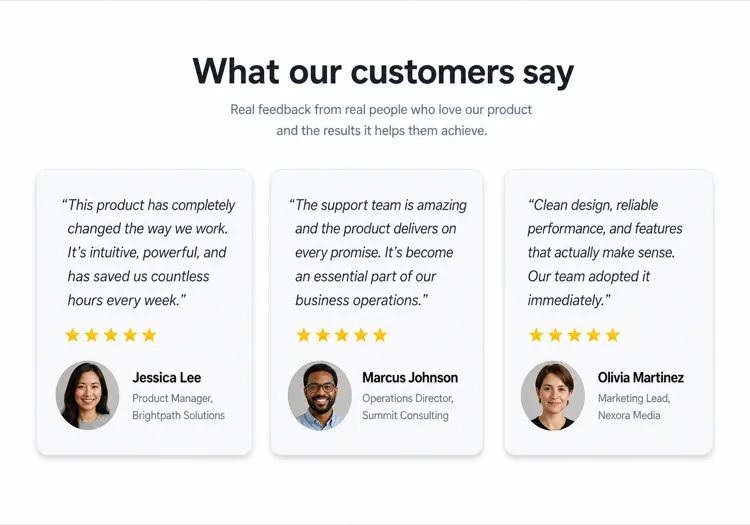
Three Quote Cards With Attribution

The baseline social proof section. It fails on attribution, not layout — an unnamed quote from "a happy customer" reads as invented and costs more trust than it buys.

Create a testimonials section with a centered h2 and three quote cards in one row. Each card holds a quote of 20 to 40 words in a blockquote element, then an attribution row with a 40px circular avatar, the customer's real name in medium weight, and their role plus company on a muted second line. Use a cite element for the source and explicit width and height on the avatar with an initials fallback on image error. Light card surface, hairline border, 12px radius, no hover animation. Stack to a single column at 768px keeping the avatar row intact rather than centering it.


In MeDo testen
Featured quoteMega

One Large Quote Above the Grid

Promotes your strongest testimonial out of the grid, where it would have been averaged out by two weaker ones. The featured card should be the quote naming a specific outcome, not the most flattering adjective.

Create a testimonials section with a featured quote above a grid. The featured card spans the full container: a quote of 40 to 60 words at large size, a 56px avatar, the customer name, their role and company, and a company logo at the right edge. Below it, three smaller cards in one row each with a shorter quote and a 40px avatar attribution row. Wrap each quote in a blockquote with a cite for the person and company. Featured card gets a tinted background to separate it from the grid. Collapse the grid to one column at 768px and reduce the featured quote by one type step.

In MeDo testen
Logo wallShipfast

Customer Logos With Quotes on Hover

Logos first, quotes second — the right order when your customer names are more persuasive than anything they said. Never make the quote hover-only; that hides it from touch and keyboard entirely.

Create a social proof section that leads with a customer logo wall: eight monochrome logos in two rows at reduced opacity, each an interactive button that reveals that customer's quote in a panel below the wall. Reveal on hover, focus and click so the content is reachable by keyboard and touch, with the active logo at full opacity and aria-pressed set. The panel shows the quote, avatar, name, role and company, and keeps a fixed min-height so the page does not jump between quotes. Default to the first quote on load. Four logos per row at 768px, two at 480px.

In MeDo testen
MasonryBuilders

Masonry Wall of Short Quotes

Nine to twelve quotes of uneven length in staggered columns. Volume is the argument here, so it only works if every card still carries a name and a face — a wall of anonymous praise reads as filler.

Create a masonry testimonial wall of nine to twelve short quotes across three CSS columns, letting the natural quote lengths stagger the card baselines. Each card carries a 32px avatar, a name, a role, and a source label such as G2 or Product Hunt. Use blockquote and cite markup throughout, and give avatars explicit dimensions with an initials fallback. Add a fade mask and a Show more button that expands from six visible cards to the full set, updating aria-expanded. Drop to two columns at 900px and one at 600px, preserving the source label on every card.

In MeDo testen
CarouselStudio

Single-Quote Slider With Controls

One long quote at a time, for case-study length testimonials that will not fit a card. The only variant here that needs client state, so keep the interactive shell small and leave the rest of the page static.

Create a testimonial carousel showing one quote at a time: a 60 to 100 word quote, a 64px avatar, the customer name, role, company and logo. Add previous and next buttons plus dot indicators, all real buttons with accessible labels, and support left and right arrow keys when the region has focus. Wrap the slides in an aria-roledescription carousel region with a live region announcing "slide 2 of 5". Pause any autoplay on hover and focus, and disable it entirely under prefers-reduced-motion. On mobile, swap the side buttons for a swipeable track with the dots below.

In MeDo testen
VideoBrand*

Video Testimonials With Transcript Quote

A thumbnail that opens a short customer video, with the strongest sentence quoted in text beneath it. Most visitors never press play, so the text quote is doing the actual work and cannot be skipped.

Create a video testimonials section with three cards. Each card shows a poster image at explicit dimensions with a centered play button overlay, a duration chip, and beneath it a one-sentence pull quote in text plus the customer name, role and company. Do not embed the player on load — render the poster as an image and only mount the iframe when the play button is activated, so three third-party players do not block the page. Give each play button a label naming the customer. Provide a captions note and a transcript link per card. One column at 768px.

In MeDo testen

So passen Sie Ihre Erfahrungsberichte an

Layout an die Anzahl der Zitate anpassen

Drei bis vier Zitate in einem Raster sind der Sweet Spot für die meisten Landing Pages. Wenn Sie viele Testimonials haben, bitten Sie MeDo um ein Karussell- oder Mauerlayout, damit Sie mehr präsentieren können, ohne die Seite zu überladen.

Mit dem stärksten Zitat beginnen

Das erste Testimonial erhält die meiste Aufmerksamkeit. Beschreiben Sie in Ihrem Prompt eine hervorgehobene große Zitatkarte oben — eine einzelne herausragende Bewertung in einer Hero-Karte vor dem Raster — um Vertrauen sofort zu verankern.

Firmenlogos für Autorität hinzufügen

Für B2B-Produkte bitten Sie MeDo, einen Firmenlogo-Platzhalter neben dem Kundennamen einzufügen. Erkannte Markenlogos in Testimonials erhöhen die wahrgenommene Glaubwürdigkeit erheblich.

Sternebewertungen selektiv angeben

5-Sterne-Bewertungen auf jeder Karte können künstlich wirken. Bitten Sie MeDo, die visuelle Betonung zu variieren — einige Karten mit Bewertungen, andere ohne — damit der Bereich authentisch und handkuriert wirkt.

Wer die Erfahrungsberichte-Komponente nutzt

SaaS-Produkt

Rollenspezifische Zitate von Power-Usern — „Als Growth-Marketer habe ich 6 Stunden pro Woche gespart" — kombiniert mit Berufsbezeichnungen und Firmenlogos, um Glaubwürdigkeit bei Käufern aufzubauen, die das Tool evaluieren.

E-Commerce-Marke

Bildlastige Testimonial-Karten mit Produktbildern, Kunden-Selfies und kurzen prägnanten Zitaten. Visueller Beweis, dass das Produkt so aussieht und funktioniert wie versprochen.

Agentur- oder Freelancer-Portfolio

Kundenzitate über erzielte Ergebnisse — gewachsener Umsatz, pünktlich gelieferte Projekte — präsentiert in einem klaren zweispaltigen Layout, das Ergebnisse lauter sprechen lässt als jede Biografie.

Online-Kurs oder Coaching

Vorher-Nachher-Testimonials mit Studentenname, Kursname und einem Transformationszitat. Steigert die Einschreibungen, indem die Ergebnisse erreichbar und real wirken.

Erfahrungsberichte-Muster für verschiedene Websites

Dieselbe erfahrungsberichte-Komponente, abgestimmt auf die Art der Website, auf der sie läuft.

01 / 06

SaaS Product Testimonials

Role-specific quotes with job title, company and logo, because a B2B buyer is checking whether someone in their seat succeeded with this. Name the outcome in the quote — a quote praising the support team does not answer the question the pricing page raised.

Erfahrungsberichte-Stile und -Varianten

Wählen Sie die Variante, die zum Rest der Seite passt, und generieren Sie sie.

01 / 06

Quote Card Grid

Three or four equal cards in a row, each with quote plus attribution row. The safest default and the easiest to keep balanced, provided you trim quotes to a similar length — one 80-word card next to two 20-word cards makes the grid look broken.

Erfahrungsberichte in React, Next.js, Vue und Svelte

React, Next.js, Vue 3, SvelteKit, Astro oder reines HTML — dieselbe erfahrungsberichte, sechs Wege zur Einbindung.

01 / 06

React Testimonials Section

A grid of quotes needs no state at all — keep hooks for the carousel variant only. Type the testimonial array so a card missing a name or role fails at build rather than shipping as anonymous praise.

src/components/Testimonials.tsx

export function Testimonials({ items }) {
  return (
    <div className="grid gap-6 md:grid-cols-3">
      {items.map((t) => (
        <figure key={t.name} className="rounded-xl border p-6">
          <blockquote className="text-lg">{t.quote}</blockquote>
          <figcaption className="mt-6 flex items-center gap-3">
            <Avatar src={t.photo} name={t.name} />
            <span>{t.name}, {t.role} at {t.company}</span>
          </figcaption>
        </figure>
      ))}
    </div>
  )
}

So fügen Sie Ihre Erfahrungsberichte einem Projekt hinzu

Vier Schritte, von der Auswahl einer erfahrungsberichte-Vorlage bis zum Einsatz in der Produktion.

01~30s

Pick a Testimonials Template

Choose by what you have. Three solid quotes means the card grid; one outstanding quote means the featured layout; recognisable customer names mean lead with the logo wall.

02~10s

Copy the Prompt

Take the prompt into MeDo, Lovable, Bolt, v0 or Cursor. Decide the quote length before you run it — the card grid only stays balanced if every quote lands in the same range.

03~2min

Generate and Refine

You get React + Tailwind back with a live preview. Follow up in plain English — "add a company logo to each card", "make it two columns on tablet" — instead of editing class strings.

04~2min

Swap In Real Attribution

Replace every placeholder with a real name, role, company and photo, and get written permission for each. A card left as "Jane Doe, CEO" is worse than no testimonials section at all.

Häufige Fragen zu Erfahrungsberichte

Wie erstelle ich einen Testimonials-Bereich mit KI?

In MeDo beschreiben Sie das gewünschte Testimonials-Layout — Raster vs. Karussell, Anzahl der Karten, ob Sternebewertungen oder Avatare eingeschlossen werden sollen, und den visuellen Stil. MeDo generiert den vollständigen Komponentencode mit Platzhalter-Zitaten, Namen und Avataren, die Sie durch Ihre echten Kundeninhalte ersetzen.

Was ist der beste KI Testimonials Generator?

MeDo wurde speziell für die Generierung produktionsreifer Website-Komponenten einschließlich Testimonials-Bereiche entwickelt. Im Gegensatz zu generischen KI-Chat-Tools versteht MeDo Rasterlayouts, responsives Design und die Konversionsmuster, die Social Proof wirklich funktionieren lassen — so erhalten Sie sauberen, nutzbaren Code statt eines groben Mockups.

Kann ich ein Testimonials-Karussell mit KI erstellen?

Ja. Bitten Sie MeDo um ein 'Testimonials-Karussell mit Auto-Play und Navigationspunkten' und es generiert eine interaktive Slider-Komponente. Sie können angeben, wie viele Karten gleichzeitig sichtbar sind, die Übergangsgeschwindigkeit und ob Vor/Zurück-Pfeilsteuerungen eingeschlossen werden sollen.

Wie füge ich Sternebewertungen zu einem KI-generierten Testimonials-Bereich hinzu?

Fügen Sie „5-Sterne-Bewertung mit ausgefüllten Sternsymbolen" in Ihren MeDo-Prompt ein. Sie können auch variable Bewertungen anfordern — „zeige zwischen 4 und 5 Sternen pro Karte" — damit der Bereich authentischer und vertrauenswürdiger wirkt.

Kann KI Testimonials mit Kundenfotos generieren?

MeDo generiert die Komponente mit runden Avatar-Bildplatzhaltern und der richtigen Layout-Struktur. Sie ersetzen die Platzhalter-src-Attribute durch Ihre echten Kundenfotos. Sie können auch einen Fallback beschreiben — „Zeige Initialen in einem farbigen Kreis, wenn kein Foto verfügbar ist."

Wie erstelle ich einen mobilen Testimonials-Bereich mit KI?

Fügen Sie „responsiv, stapelt sich auf Mobilgeräten zu einer einzelnen Spalte" zu Ihrem MeDo-Prompt hinzu. Die generierte Komponente verwendet CSS Grid oder Flexbox, das das mehrspaltige Layout auf kleinen Bildschirmen automatisch zu einer vertikal scrollenden Einzelkarten-Ansicht zusammenfaltet.