MeDo

AI ग्राहक समीक्षा जनरेटर।

आपको जो सोशल प्रूफ सेक्शन चाहिए उसे बताएं — उद्धरण स्टाइल, स्टार रेटिंग, अवतार लेआउट, ग्रिड या कैरोसेल — और MeDo कुछ सेकंड में प्रोडक्शन-रेडी कोड जनरेट करता है। अपने ग्राहकों को बिक्री करने दें।

ग्राहक समीक्षाएं
ग्राहक समीक्षाएं

सोशल प्रूफ आपके पेज पर सबसे प्रेरक कॉपी है।

विज़िटर आपसे ज़्यादा दूसरे ग्राहकों पर भरोसा करते हैं — और एक अच्छी तरह से डिज़ाइन किया गया समीक्षा सेक्शन यह साबित करने का सबसे तेज़ तरीका है कि आपका प्रोडक्ट काम करता है। यह ठीक उसी समय संदेह को कम करता है जब खरीदार फैसला कर रहे होते हैं। फिर भी ज़्यादातर टीमें या तो समीक्षाओं को पूरी तरह छोड़ देती हैं या उद्धरणों को टेक्स्ट की दीवार में ढेर कर देती हैं। MeDo एक ऐसा सेक्शन जनरेट करना आसान बनाता है जो दृश्य रूप से आकर्षक, विश्वसनीय और कन्वर्ज़न-टेस्टेड हो।

6 टेम्पलेट

ग्राहक समीक्षाएं टेम्पलेट जो आप जेनरेट कर सकते हैं

हर टेम्पलेट एक असली प्रॉम्प्ट है, स्क्रीनशॉट नहीं। इसे किसी भी AI एडिटर में कॉपी करें, या MeDo में चलाकर React + Tailwind कोड सीधे पाएं।

Three-up gridAcme

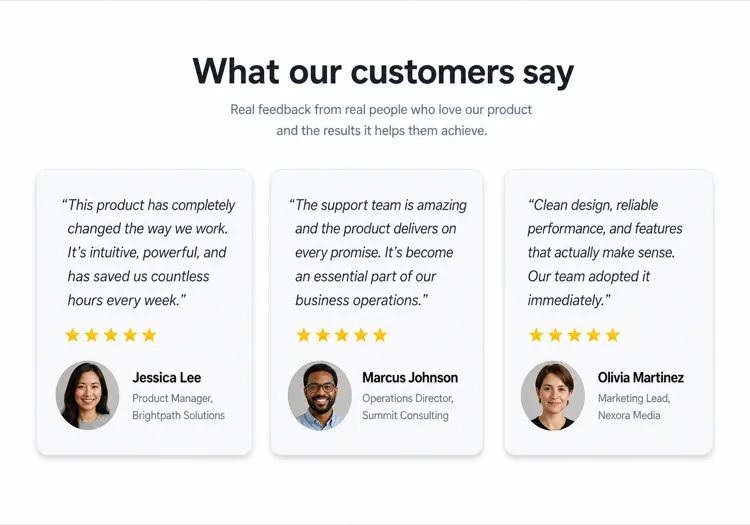
Three Quote Cards With Attribution

The baseline social proof section. It fails on attribution, not layout — an unnamed quote from "a happy customer" reads as invented and costs more trust than it buys.

Create a testimonials section with a centered h2 and three quote cards in one row. Each card holds a quote of 20 to 40 words in a blockquote element, then an attribution row with a 40px circular avatar, the customer's real name in medium weight, and their role plus company on a muted second line. Use a cite element for the source and explicit width and height on the avatar with an initials fallback on image error. Light card surface, hairline border, 12px radius, no hover animation. Stack to a single column at 768px keeping the avatar row intact rather than centering it.


MeDo में आज़माएं
Featured quoteMega

One Large Quote Above the Grid

Promotes your strongest testimonial out of the grid, where it would have been averaged out by two weaker ones. The featured card should be the quote naming a specific outcome, not the most flattering adjective.

Create a testimonials section with a featured quote above a grid. The featured card spans the full container: a quote of 40 to 60 words at large size, a 56px avatar, the customer name, their role and company, and a company logo at the right edge. Below it, three smaller cards in one row each with a shorter quote and a 40px avatar attribution row. Wrap each quote in a blockquote with a cite for the person and company. Featured card gets a tinted background to separate it from the grid. Collapse the grid to one column at 768px and reduce the featured quote by one type step.

MeDo में आज़माएं
Logo wallShipfast

Customer Logos With Quotes on Hover

Logos first, quotes second — the right order when your customer names are more persuasive than anything they said. Never make the quote hover-only; that hides it from touch and keyboard entirely.

Create a social proof section that leads with a customer logo wall: eight monochrome logos in two rows at reduced opacity, each an interactive button that reveals that customer's quote in a panel below the wall. Reveal on hover, focus and click so the content is reachable by keyboard and touch, with the active logo at full opacity and aria-pressed set. The panel shows the quote, avatar, name, role and company, and keeps a fixed min-height so the page does not jump between quotes. Default to the first quote on load. Four logos per row at 768px, two at 480px.

MeDo में आज़माएं
MasonryBuilders

Masonry Wall of Short Quotes

Nine to twelve quotes of uneven length in staggered columns. Volume is the argument here, so it only works if every card still carries a name and a face — a wall of anonymous praise reads as filler.

Create a masonry testimonial wall of nine to twelve short quotes across three CSS columns, letting the natural quote lengths stagger the card baselines. Each card carries a 32px avatar, a name, a role, and a source label such as G2 or Product Hunt. Use blockquote and cite markup throughout, and give avatars explicit dimensions with an initials fallback. Add a fade mask and a Show more button that expands from six visible cards to the full set, updating aria-expanded. Drop to two columns at 900px and one at 600px, preserving the source label on every card.

MeDo में आज़माएं
CarouselStudio

Single-Quote Slider With Controls

One long quote at a time, for case-study length testimonials that will not fit a card. The only variant here that needs client state, so keep the interactive shell small and leave the rest of the page static.

Create a testimonial carousel showing one quote at a time: a 60 to 100 word quote, a 64px avatar, the customer name, role, company and logo. Add previous and next buttons plus dot indicators, all real buttons with accessible labels, and support left and right arrow keys when the region has focus. Wrap the slides in an aria-roledescription carousel region with a live region announcing "slide 2 of 5". Pause any autoplay on hover and focus, and disable it entirely under prefers-reduced-motion. On mobile, swap the side buttons for a swipeable track with the dots below.

MeDo में आज़माएं
VideoBrand*

Video Testimonials With Transcript Quote

A thumbnail that opens a short customer video, with the strongest sentence quoted in text beneath it. Most visitors never press play, so the text quote is doing the actual work and cannot be skipped.

Create a video testimonials section with three cards. Each card shows a poster image at explicit dimensions with a centered play button overlay, a duration chip, and beneath it a one-sentence pull quote in text plus the customer name, role and company. Do not embed the player on load — render the poster as an image and only mount the iframe when the play button is activated, so three third-party players do not block the page. Give each play button a label naming the customer. Provide a captions note and a transcript link per card. One column at 768px.

MeDo में आज़माएं

अपने ग्राहक समीक्षाएं को कैसे कस्टमाइज़ करें

उद्धरण वॉल्यूम के अनुसार लेआउट मैच करें

ज़्यादातर लैंडिंग पेज के लिए ग्रिड में तीन से चार उद्धरण सबसे अच्छा है। अगर आपके पास बहुत सारी समीक्षाएं हैं, तो MeDo से कैरोसेल या मेसनरी लेआउट मांगें ताकि आप पेज को ओवरवेल्म किए बिना और दिखा सकें।

सबसे मजबूत उद्धरण से शुरू करें

पहली समीक्षा को सबसे ज़्यादा ध्यान मिलता है। अपने प्रॉम्प्ट में, ग्रिड से पहले एक हीरो कार्ड में एक बड़े फीचर्ड उद्धरण कार्ड का वर्णन करें — एक अकेली उल्लेखनीय समीक्षा — तुरंत विश्वास स्थापित करने के लिए।

अथॉरिटी के लिए कंपनी लोगो जोड़ें

B2B प्रोडक्ट के लिए, MeDo से ग्राहक के नाम के बगल में कंपनी लोगो प्लेसहोल्डर शामिल करने के लिए कहें। समीक्षाओं में पहचाने जाने वाले ब्रांड लोगो माना जाने वाली विश्वसनीयता को काफी बढ़ाते हैं।

स्टार रेटिंग को चुनिंदा तरीके से निर्दिष्ट करें

हर कार्ड पर 5-स्टार रेटिंग मनगढ़ंत लग सकती है। MeDo से विज़ुअल एम्फेसिस को बदलने के लिए कहें — कुछ कार्ड रेटिंग के साथ, कुछ बिना — ताकि सेक्शन असली और हाथ से क्यूरेट किया हुआ लगे।

ग्राहक समीक्षाएं कंपोनेंट का उपयोग कौन करता है

SaaS प्रोडक्ट

पावर यूज़र्स से रोल-स्पेसिफिक उद्धरण — "ग्रोथ मार्केटर के रूप में, मैंने हर हफ्ते 6 घंटे बचाए" — टूल को एवैल्युएट कर रहे खरीदारों के साथ विश्वसनीयता बनाने के लिए जॉब टाइटल और कंपनी लोगो के साथ।

ई-कॉमर्स ब्रांड

प्रोडक्ट इमेज, ग्राहक सेल्फी और छोटे पंची उद्धरणों के साथ फोटो-फॉरवर्ड टेस्टीमोनियल कार्ड। विज़ुअल प्रूफ कि प्रोडक्ट विज्ञापन के अनुसार दिखता और काम करता है।

एजेंसी या फ्रीलांसर पोर्टफोलियो

डिलीवर किए गए परिणामों के बारे में क्लाइंट उद्धरण — बढ़ा हुआ रेवेन्यू, समय पर पूरे हुए प्रोजेक्ट — एक साफ दो-कॉलम लेआउट में प्रस्तुत जो किसी भी बायो से ज़्यादा परिणामों को बोलने देता है।

ऑनलाइन कोर्स या कोचिंग

स्टूडेंट के नाम, कोर्स के नाम और एक ट्रांसफॉर्मेशन उद्धरण के साथ पहले-बाद वाली समीक्षाएं। परिणामों को प्राप्य और वास्तविक महसूस कराकर एनरोलमेंट बढ़ाता है।

अलग-अलग वेबसाइटों के लिए ग्राहक समीक्षाएं पैटर्न

वही ग्राहक समीक्षाएं कंपोनेंट, उस वेबसाइट के प्रकार के हिसाब से ढाला गया जहाँ वह लगेगा।

01 / 06

SaaS Product Testimonials

Role-specific quotes with job title, company and logo, because a B2B buyer is checking whether someone in their seat succeeded with this. Name the outcome in the quote — a quote praising the support team does not answer the question the pricing page raised.

ग्राहक समीक्षाएं की शैलियाँ और वेरिएंट

जो वेरिएंट बाकी पेज से मेल खाता है उसे चुनें और जेनरेट करें।

01 / 06

Quote Card Grid

Three or four equal cards in a row, each with quote plus attribution row. The safest default and the easiest to keep balanced, provided you trim quotes to a similar length — one 80-word card next to two 20-word cards makes the grid look broken.

React, Next.js, Vue और Svelte में ग्राहक समीक्षाएं

React, Next.js, Vue 3, SvelteKit, Astro या सादा HTML — वही ग्राहक समीक्षाएं, जोड़ने के छह तरीके।

01 / 06

React Testimonials Section

A grid of quotes needs no state at all — keep hooks for the carousel variant only. Type the testimonial array so a card missing a name or role fails at build rather than shipping as anonymous praise.

src/components/Testimonials.tsx

export function Testimonials({ items }) {
  return (
    <div className="grid gap-6 md:grid-cols-3">
      {items.map((t) => (
        <figure key={t.name} className="rounded-xl border p-6">
          <blockquote className="text-lg">{t.quote}</blockquote>
          <figcaption className="mt-6 flex items-center gap-3">
            <Avatar src={t.photo} name={t.name} />
            <span>{t.name}, {t.role} at {t.company}</span>
          </figcaption>
        </figure>
      ))}
    </div>
  )
}

अपने ग्राहक समीक्षाएं को प्रोजेक्ट में कैसे जोड़ें

ग्राहक समीक्षाएं टेम्पलेट चुनने से प्रोडक्शन में भेजने तक, चार चरण।

01~30s

Pick a Testimonials Template

Choose by what you have. Three solid quotes means the card grid; one outstanding quote means the featured layout; recognisable customer names mean lead with the logo wall.

02~10s

Copy the Prompt

Take the prompt into MeDo, Lovable, Bolt, v0 or Cursor. Decide the quote length before you run it — the card grid only stays balanced if every quote lands in the same range.

03~2min

Generate and Refine

You get React + Tailwind back with a live preview. Follow up in plain English — "add a company logo to each card", "make it two columns on tablet" — instead of editing class strings.

04~2min

Swap In Real Attribution

Replace every placeholder with a real name, role, company and photo, and get written permission for each. A card left as "Jane Doe, CEO" is worse than no testimonials section at all.

ग्राहक समीक्षाएं के बारे में सामान्य प्रश्न

AI से ग्राहक समीक्षा सेक्शन कैसे बनाएं?

MeDo में, आप जो समीक्षा लेआउट चाहते हैं उसे बताएं — ग्रिड बनाम कैरोसेल, कार्ड की संख्या, स्टार रेटिंग या अवतार शामिल करना है या नहीं, और विज़ुअल स्टाइल। MeDo प्लेसहोल्डर उद्धरण, नाम और अवतार के साथ पूरा कंपोनेंट कोड जनरेट करता है जिसे आप अपने असली ग्राहक कंटेंट से बदलते हैं।

सबसे अच्छा AI ग्राहक समीक्षा जनरेटर कौन सा है?

MeDo समीक्षा सेक्शन सहित प्रोडक्शन-रेडी वेबसाइट कंपोनेंट जनरेट करने के लिए विशेष रूप से बनाया गया है। जेनेरिक AI चैट टूल के विपरीत, MeDo ग्रिड लेआउट, रिस्पॉन्सिव डिज़ाइन और कन्वर्ज़न पैटर्न को समझता है जो सोशल प्रूफ को वास्तव में काम करते हैं — इसलिए आपको एक मोटे मॉकअप की बजाय क्लीन, उपयोगी कोड मिलता है।

क्या AI से ग्राहक समीक्षा कैरोसेल जनरेट किया जा सकता है?

हां। MeDo से 'ऑटो-प्ले और नेविगेशन डॉट्स वाला समीक्षा कैरोसेल' मांगें और यह एक इंटरएक्टिव स्लाइडर कंपोनेंट जनरेट करेगा। आप एक बार में दिखने वाले कार्ड की संख्या, ट्रांजिशन स्पीड, और प्रेव/नेक्स्ट एरो कंट्रोल शामिल करना है या नहीं, यह निर्दिष्ट कर सकते हैं।

AI-जनरेटेड समीक्षा सेक्शन में स्टार रेटिंग कैसे जोड़ें?

अपने MeDo प्रॉम्प्ट में "भरे हुए स्टार आइकन का उपयोग करके 5-स्टार रेटिंग" शामिल करें। आप वेरिएबल रेटिंग भी मांग सकते हैं — "प्रति कार्ड 4 से 5 स्टार दिखाएं" — सेक्शन को अधिक प्रामाणिक और भरोसेमंद बनाने के लिए।

क्या AI ग्राहक फोटो के साथ समीक्षाएं जनरेट कर सकता है?

MeDo सर्कुलर अवतार इमेज प्लेसहोल्डर और सही लेआउट स्ट्रक्चर के साथ कंपोनेंट जनरेट करेगा। प्लेसहोल्डर src एट्रीब्यूट को अपनी असली ग्राहक फोटो से बदलें। आप एक फॉलबैक भी बता सकते हैं — "अगर कोई फोटो नहीं है तो रंगीन सर्कल में इनिशियल दिखाएं।"

AI से मोबाइल-फ्रेंडली समीक्षा सेक्शन कैसे बनाएं?

अपने MeDo प्रॉम्प्ट में "रिस्पॉन्सिव, मोबाइल पर सिंगल कॉलम में स्टैक" जोड़ें। जनरेट किया गया कंपोनेंट CSS ग्रिड या फ्लेक्सबॉक्स का उपयोग करेगा जो छोटी स्क्रीन पर मल्टी-कॉलम लेआउट को अपने आप वर्टिकल स्क्रॉलिंग सिंगल-कार्ड व्यू में कोलैप्स कर देता है।

अभी अपना ग्राहक समीक्षाएं जेनरेट करें।

कोई भी प्रॉम्प्ट आज़माएं — मुफ्त, कोई साइन अप नहीं।