MeDo

مولّد بانر الكوكيز بالذكاء الاصطناعي.

صِف تجربة الموافقة على الكوكيز التي تحتاجها — نمط البانر، تسميات الأزرار، النص القانوني، نظام الألوان — وMeDo يولّد كوداً جاهزاً للإنتاج فوراً. أطلق بانر كوكيز متوافق ومتسق مع علامتك التجارية بدون قوالب جاهزة.

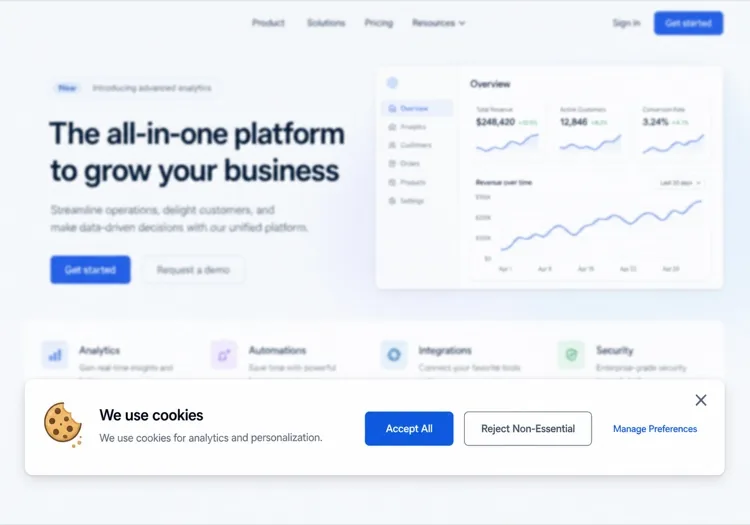
بانر الكوكيز
بانر الكوكيز

بانرات الكوكيز مطلوبة قانونياً — وعادةً سيئة.

تتطلب لوائح GDPR وCCPA وePrivacy الحصول على موافقة مستنيرة قبل تعيين الكوكيز غير الأساسية، والجهات التنظيمية تطبّق ذلك بنشاط. لكن معظم بانرات الكوكيز تستخدم أنماطاً مظلمة، أو قبيحة، أو معطلة. بانر موافقة مصمم جيداً يبني ثقة المستخدم، يقلل معدل الارتداد الناتج عن النوافذ المنبثقة المتطفلة، ويحافظ على امتثال موقعك دون التضحية بالتجربة. MeDo يساعدك على إنشاء بانر يبدو مقصوداً — وليس مُضافاً لاحقاً.

6 قالبًا

قوالب بانر الكوكيز التي يمكنك توليدها

كل قالب هو طلب حقيقي لا صورة. انسخه إلى أي محرّر ذكاء اصطناعي، أو شغّله في MeDo لتحصل على كود React و Tailwind مباشرة.

Bottom barBaseline

Accept and Reject Bottom Bar

One line of copy, two buttons of equal weight, a policy link. The smallest banner that still gives a genuine choice rather than a dismiss disguised as one.

Create a cookie consent bar fixed to the bottom of the viewport: a short line explaining that non-essential cookies are used for analytics, a link to the cookie policy, and two buttons — Accept all and Reject non-essential — rendered with identical size, contrast and padding so neither is visually demoted. Render it in a region with role="region" and an accessible name, do not trap focus, and place it last in the DOM so it does not sit ahead of the page content in tab order. Persist the decision under a versioned key in localStorage with a timestamp, and keep the bar hidden on every later visit until that version changes. Load no analytics script before a decision exists.


جرّبه في MeDo
CategoriesGranular

Per-Category Consent Panel

Four categories, three of them off until someone turns them on. The version to build when tags actually differ in purpose rather than all being one analytics script.

Create a cookie consent panel with four categories: Necessary (locked on, with a note explaining it cannot be disabled), Functional, Analytics and Marketing, each a labelled switch with a one-sentence description of what it enables. Every non-essential switch defaults to off. Provide Accept all, Reject all and Save preferences, with Accept all and Reject all identical in weight. Store the result as an object keyed by category alongside a schema version and timestamp, and emit a consent-changed event so tag loading can react without a page reload. Keep the switches keyboard operable with visible focus rings and expose state through aria-checked rather than colour alone.

جرّبه في MeDo
ModalGate

Centered Consent Modal

Blocks the page until a choice is made. Highest completion rate, highest bounce rate — reach for it only when a decision genuinely has to precede the first render.

Create a centered cookie consent modal with a dimmed backdrop: heading, two sentences of explanation, a cookie policy link, and Accept all, Reject all and Manage preferences buttons with the first two given equal visual weight. Use role="dialog" with aria-modal="true", label it by its heading, move focus to the heading on open, cycle Tab within the dialog, and do not close on Escape or backdrop click since either would leave consent undecided. Persist the choice in a versioned localStorage record with a timestamp and render nothing on subsequent visits. Do not pre-tick any non-essential category, and gate every non-essential script behind the stored value.

جرّبه في MeDo
ToastCorner

Corner Card Consent Toast

A small card in the bottom corner that leaves the page usable. Least disruptive and least answered — expect a large share of visitors to simply ignore it.

Create a cookie consent card anchored to the bottom-left corner, roughly 360px wide, with a cookie icon, a two-line explanation, a policy link and stacked Accept all and Reject all buttons of matching width and contrast. It must not overlap other fixed UI, so offset it above any support launcher. Do not include a bare X dismiss control — a close button that leaves consent unrecorded means the banner returns on every navigation. Render it after the main landmark in the DOM, keep it out of any focus trap, and persist the decision in a versioned localStorage entry with a timestamp so it stays hidden once answered.

جرّبه في MeDo
Persistent accessReopen

Banner With a Preferences Trigger

The banner plus a permanent footer link that reopens it. Consent that cannot be changed later is the most common defect in a shipped banner, and the fix is one link.

Create a cookie consent bar plus a persistent Cookie preferences button for the site footer that reopens the same panel with the stored values pre-loaded, so a visitor can withdraw consent as easily as they gave it. The panel lists Necessary, Functional, Analytics and Marketing switches with non-essential ones reflecting whatever was saved, and offers Accept all, Reject all and Save preferences. On reopen, move focus to the panel heading and return focus to the footer button on close. Write changes to the same versioned localStorage key with a fresh timestamp and emit a consent-changed event so already-loaded tags can be told to stop.

جرّبه في MeDo
Geo-awareRegional

Region-Conditional Consent Banner

Shows the full category panel where prior consent is expected and a lighter notice elsewhere, driven by a server-supplied region hint. The requirements vary by jurisdiction, so confirm the rules for each region with counsel.

Create a consent component that takes a region prop resolved server-side from the request and renders one of two variants: a full category panel with all non-essential switches defaulting to off and Accept all, Reject all and Save preferences of equal weight, or a lighter notice with an acknowledge action and a link to a cookie settings page. Never pre-tick a non-essential category in either variant. Store the decision with the region and a schema version so the record explains which variant produced it, and re-prompt when the version changes. Keep the region check server-side so no tracking script loads before the variant is known.

جرّبه في MeDo

كيف تخصّص بانر الكوكيز الخاص بك

تطابق مع نظام تصميم موقعك

حدد ألوان علامتك التجارية ونصف قطر الحدود والخط في البرومبت حتى يبدو البانر أصلياً — وليس كأداة طرف ثالث. المستخدمون أكثر عرضة للتفاعل مع بانر يبدو أنه جزء من الموقع.

اختر موضع البانر والحركة

الشريط السفلي، النافذة المنبثقة المركزية، وإشعار الزاوية هي الأنماط الثلاثة الرئيسية. أخبر MeDo بما تفضله وما إذا كنت تريد انزلاقاً للأعلى أو ظهوراً تدريجياً أو ظهوراً فورياً. الأشرطة السفلية أقل إزعاجاً؛ النوافذ المنبثقة أكثر امتثالاً للسلطات القضائية الصارمة.

ضبط تسلسل الأزرار

الأنماط المظلمة (إخفاء زر الرفض) تجلب الغرامات التنظيمية. اطلب من MeDo إعطاء "قبول" و"رفض" وزناً بصرياً متساوياً، أو استخدام CTA محايد "إدارة التفضيلات" يؤدي إلى نافذة موافقة تفصيلية.

إضافة لوحة تفضيلات

لامتثال أكثر شمولاً، اطلب من MeDo تضمين لوحة تفضيلات قابلة للتبديل مع مفاتيح تبديل لكل فئة (تحليلات، تسويق، وظيفية). هذا هو المعيار الذهبي لامتثال GDPR وثقة المستخدم.

من يستخدم مكوّن بانر الكوكيز

منتج SaaS

بانر سفلي خفيف مع قبول/رفض ورابط لسياسة الكوكيز. غير متطفل ولكن متوافق — يحافظ على واجهة التطبيق في المقدمة مع تلبية التزامات GDPR.

متجر إلكتروني

بانر موافقة كامل مع نافذة تفضيلات تغطي كوكيز التحليلات والتخصيص والتسويق. ضروري للمتاجر التي تستخدم بكسلات الإعلانات وإعادة الاستهداف.

موقع تسويقي أو مدونة

إشعار كوكيز بسيط بزر "قبول" واحد ورابط نصي لإعدادات الكوكيز. احتكاك أدنى للمواقع المركزة على المحتوى التي تستخدم كوكيز التحليلات فقط.

مؤسسة أو صناعة منظمة

نافذة موافقة تفصيلية مع مفاتيح تبديل لكل مزود، سجل تدقيق كامل لقرارات الموافقة، وخيار "رفض الكل" بارز — مبني لتلبية متطلبات DPA الصارمة.

أنماط بانر الكوكيز لمواقع مختلفة

المكوّن بانر الكوكيز نفسه، مُهيّأ لنوع الموقع الذي يُنشر عليه.

01 / 06

SaaS Product Consent

A bottom bar with equal-weight accept and reject, and the reject path wired to skip product analytics rather than just hiding the bar. The failure here is a banner on the marketing site and none inside the authenticated app, where most of the event tracking actually happens.

أنماط بانر الكوكيز وتنويعاته

اختر التنويعة التي تناسب بقية الصفحة، ثم ولّدها.

01 / 06

Bottom Bar Banner

Full-width strip pinned to the bottom, one line of copy, two buttons. The least disruptive pattern and the safest default. Watch the mobile height — a three-line bar covering a sticky Add to cart button is a conversion bug, not a design detail.

بانر الكوكيز في React و Next.js و Vue و Svelte

React و Next.js و Vue 3 و SvelteKit و Astro أو HTML صِرف — المكوّن بانر الكوكيز نفسه بست طرق للإضافة.

01 / 06

React Cookie Banner

Consent belongs in a context provider at the app root, not in the banner — the banner is one reader of that state and every gated feature is another. Read localStorage in an effect so the first render matches the server.

src/components/ConsentProvider.tsx

const KEY = 'consent.v2'

export function ConsentProvider({ children }) {
  const [consent, setConsent] = useState(null)

  useEffect(() => {
    setConsent(JSON.parse(localStorage.getItem(KEY) ?? 'null'))
  }, [])

  return (
    <Ctx.Provider value={{ consent, setConsent }}>{children}</Ctx.Provider>
  )
}

كيف تضيف بانر الكوكيز إلى مشروعك

أربع خطوات، من اختيار قالب بانر الكوكيز إلى إطلاقه في الإنتاج.

01~30s

Pick a Consent Pattern

Choose by how many distinct cookie purposes you actually have — a bottom bar for one analytics script, a category panel once marketing and functional tags are separate concerns.

02~10s

Copy the Prompt

Paste it into MeDo, Lovable, Bolt, v0 or Cursor. Replace the category descriptions with the tags you really run, since that list is what your policy page has to agree with.

03~1min

Generate and Refine

You get React + Tailwind with a live preview. Follow up in plain English — "give reject all the same weight as accept", "expand preferences in place", "add a footer trigger that reopens it".

04~2min

Gate Your Scripts and Verify

Wire analytics and pixel loading to the stored value, then load the site fresh and confirm no non-essential request fires before a choice. Specific consent obligations vary by jurisdiction — have counsel review what you ship.

أسئلة شائعة حول بانر الكوكيز

كيف أنشئ بانر كوكيز بالذكاء الاصطناعي؟

في MeDo، صِف بانر الموافقة على الكوكيز الذي تحتاجه — موضعه، تسميات الأزرار، الكوكيز التي تستخدمها، ونمطك البصري. MeDo يولّد كود المكوّن الكامل، الذي يمكنك نسخه لمشروعك أو الاستمرار في تحسينه ببرومبتات متتابعة. لا حاجة للبحث عن قوالب.

ما هو أفضل مولّد بانر كوكيز بالذكاء الاصطناعي؟

MeDo مبني خصيصاً لتوليد مكونات مواقع ويب جاهزة للإنتاج، بما في ذلك بانرات الكوكيز. على عكس أدوات الذكاء الاصطناعي العامة، MeDo ينتج كوداً نظيفاً ودلالياً مع ترميز سهل الوصول وإعدادات افتراضية معقولة لتسمية متوافقة مع GDPR — وليس مجرد قالب خام يحتاج للإصلاح.

هل يمكن للذكاء الاصطناعي إنشاء بانر كوكيز متوافق مع GDPR؟

MeDo يمكنه إنشاء بانرات كوكيز تتبع أنماط أفضل ممارسات GDPR: أزرار قبول/رفض بوزن بصري متساوٍ، رابط لسياسة الكوكيز، ومفاتيح تبديل موافقة اختيارية لكل فئة. ومع ذلك، الامتثال القانوني الحقيقي يعتمد على ممارسات البيانات الخاصة بك وسلطتك القضائية — اجعل فريقك القانوني دائماً يراجع التنفيذ النهائي.

كيف أضيف زر "رفض الكل" لبانر الكوكيز الخاص بي؟

ببساطة ضمّنه في برومبتك — مثلاً، "أضف زر رفض الكل بوزن بصري مساوٍ لزر القبول". MeDo سيولّد كلا الزرين بأنماط متطابقة ويربط حوامل المنطق المناسبة.

هل يمكنني إنشاء نافذة تفضيلات كوكيز بالذكاء الاصطناعي؟

نعم. اطلب من MeDo تضمين لوحة تفضيلات بمفاتيح تبديل لكل فئة (مثل التحليلات، التسويق، الكوكيز الوظيفية). MeDo سيولّد نافذة كاملة بمفاتيح تبديل، أوصاف الفئات، وإجراءات الحفظ/التأكيد.

هل يعمل بانر الكوكيز AI مع Google Analytics وMeta Pixel؟

MeDo يولّد واجهة المستخدم ومنطق بوابة الموافقة. يمكنك توجيهه لتضمين hooks حاملة لحظر أو تحميل سكربتات التحليلات بناءً على موافقة المستخدم. ربط هذا بمدير العلامات أو SDK التحليلات الخاص بك يتطلب خطوة تكامل صغيرة بعد التوليد.
