MeDo

AI 쿠키 배너 생성기.

필요한 쿠키 동의 경험을 설명하세요 — 배너 스타일, 버튼 라벨, 법적 문구, 색상 구성 — MeDo가 즉시 프로덕션 레디 코드를 생성합니다. 보일러플레이트 없이 규정 준수하는 브랜드 맞춤 쿠키 배너를 배포하세요.

쿠키 배너
쿠키 배너

쿠키 배너는 법적으로 필수 — 그리고 대부분 끔찍합니다.

GDPR, CCPA, ePrivacy 규정은 비필수 쿠키를 설정하기 전에 정보에 입각한 동의를 요구하며, 규제 기관은 이를 적극적으로 시행합니다. 하지만 대부분의 쿠키 배너는 다크 패턴을 사용하거나, 보기 흉하거나, 작동하지 않습니다. 잘 설계된 동의 배너는 사용자 신뢰를 구축하고, 침입적 팝업으로 인한 이탈을 줄이며, 경험을 희생하지 않고 사이트의 규정 준수를 유지합니다. MeDo는 나중에 덧붙인 것이 아닌 의도적으로 보이는 배너를 생성하도록 도와줍니다.

템플릿 6개

생성할 수 있는 쿠키 배너 템플릿

모든 템플릿은 스크린샷이 아니라 실제 프롬프트입니다. 어떤 AI 에디터에든 붙여넣거나 MeDo에서 실행해 React + Tailwind 코드를 그대로 받으세요.

Bottom barBaseline

Accept and Reject Bottom Bar

One line of copy, two buttons of equal weight, a policy link. The smallest banner that still gives a genuine choice rather than a dismiss disguised as one.

Create a cookie consent bar fixed to the bottom of the viewport: a short line explaining that non-essential cookies are used for analytics, a link to the cookie policy, and two buttons — Accept all and Reject non-essential — rendered with identical size, contrast and padding so neither is visually demoted. Render it in a region with role="region" and an accessible name, do not trap focus, and place it last in the DOM so it does not sit ahead of the page content in tab order. Persist the decision under a versioned key in localStorage with a timestamp, and keep the bar hidden on every later visit until that version changes. Load no analytics script before a decision exists.


MeDo에서 시도하기
CategoriesGranular

Per-Category Consent Panel

Four categories, three of them off until someone turns them on. The version to build when tags actually differ in purpose rather than all being one analytics script.

Create a cookie consent panel with four categories: Necessary (locked on, with a note explaining it cannot be disabled), Functional, Analytics and Marketing, each a labelled switch with a one-sentence description of what it enables. Every non-essential switch defaults to off. Provide Accept all, Reject all and Save preferences, with Accept all and Reject all identical in weight. Store the result as an object keyed by category alongside a schema version and timestamp, and emit a consent-changed event so tag loading can react without a page reload. Keep the switches keyboard operable with visible focus rings and expose state through aria-checked rather than colour alone.

MeDo에서 시도하기
ModalGate

Centered Consent Modal

Blocks the page until a choice is made. Highest completion rate, highest bounce rate — reach for it only when a decision genuinely has to precede the first render.

Create a centered cookie consent modal with a dimmed backdrop: heading, two sentences of explanation, a cookie policy link, and Accept all, Reject all and Manage preferences buttons with the first two given equal visual weight. Use role="dialog" with aria-modal="true", label it by its heading, move focus to the heading on open, cycle Tab within the dialog, and do not close on Escape or backdrop click since either would leave consent undecided. Persist the choice in a versioned localStorage record with a timestamp and render nothing on subsequent visits. Do not pre-tick any non-essential category, and gate every non-essential script behind the stored value.

MeDo에서 시도하기
ToastCorner

Corner Card Consent Toast

A small card in the bottom corner that leaves the page usable. Least disruptive and least answered — expect a large share of visitors to simply ignore it.

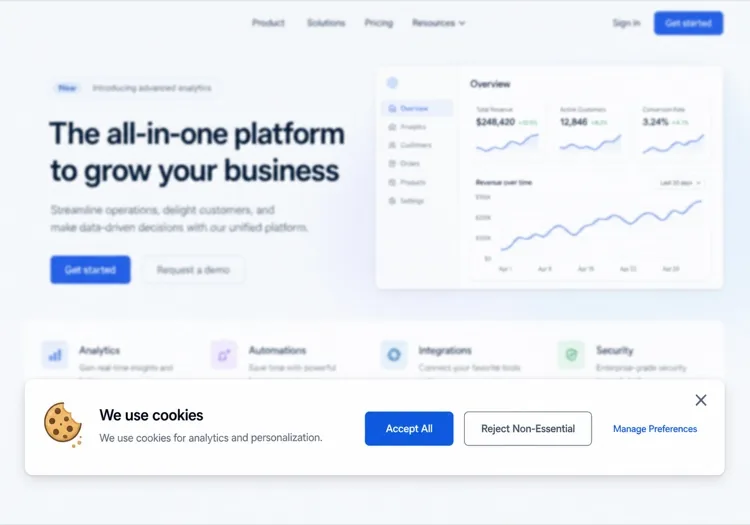
Create a cookie consent card anchored to the bottom-left corner, roughly 360px wide, with a cookie icon, a two-line explanation, a policy link and stacked Accept all and Reject all buttons of matching width and contrast. It must not overlap other fixed UI, so offset it above any support launcher. Do not include a bare X dismiss control — a close button that leaves consent unrecorded means the banner returns on every navigation. Render it after the main landmark in the DOM, keep it out of any focus trap, and persist the decision in a versioned localStorage entry with a timestamp so it stays hidden once answered.

MeDo에서 시도하기
Persistent accessReopen

Banner With a Preferences Trigger

The banner plus a permanent footer link that reopens it. Consent that cannot be changed later is the most common defect in a shipped banner, and the fix is one link.

Create a cookie consent bar plus a persistent Cookie preferences button for the site footer that reopens the same panel with the stored values pre-loaded, so a visitor can withdraw consent as easily as they gave it. The panel lists Necessary, Functional, Analytics and Marketing switches with non-essential ones reflecting whatever was saved, and offers Accept all, Reject all and Save preferences. On reopen, move focus to the panel heading and return focus to the footer button on close. Write changes to the same versioned localStorage key with a fresh timestamp and emit a consent-changed event so already-loaded tags can be told to stop.

MeDo에서 시도하기
Geo-awareRegional

Region-Conditional Consent Banner

Shows the full category panel where prior consent is expected and a lighter notice elsewhere, driven by a server-supplied region hint. The requirements vary by jurisdiction, so confirm the rules for each region with counsel.

Create a consent component that takes a region prop resolved server-side from the request and renders one of two variants: a full category panel with all non-essential switches defaulting to off and Accept all, Reject all and Save preferences of equal weight, or a lighter notice with an acknowledge action and a link to a cookie settings page. Never pre-tick a non-essential category in either variant. Store the decision with the region and a schema version so the record explains which variant produced it, and re-prompt when the version changes. Keep the region check server-side so no tracking script loads before the variant is known.

MeDo에서 시도하기

쿠키 배너 커스터마이즈 방법

사이트 디자인 시스템에 맞추기

프롬프트에서 브랜드 컬러, 보더 라디우스, 폰트를 지정하여 배너가 네이티브하게 보이도록 하세요 — 서드파티 위젯처럼 보이지 않게. 사용자는 사이트에 어울리는 배너와 더 잘 상호작용합니다.

배너 위치와 애니메이션 선택

하단 바, 중앙 모달, 코너 토스트가 세 가지 주요 패턴입니다. MeDo에 어떤 것을 선호하는지, 슬라이드업, 페이드인, 즉시 표시 중 무엇을 원하는지 알려주세요. 하단 바가 가장 덜 방해되며, 모달은 엄격한 법적 관할권에서 가장 규정 준수적입니다.

버튼 계층 구조 조정

다크 패턴(거부 버튼 숨기기)은 규제 벌금을 유발합니다. MeDo에 "수락"과 "거부"에 동일한 시각적 비중을 부여하거나, 세부 동의 모달로 이어지는 중립적인 "환경설정 관리" CTA를 사용하도록 요청하세요.

환경설정 패널 추가

더 완벽한 규정 준수를 위해 카테고리별 토글(분석, 마케팅, 기능)이 포함된 접이식 환경설정 패널을 포함하도록 MeDo에 요청하세요. 이것이 GDPR 규정 준수와 사용자 신뢰의 골드 스탠다드입니다.

쿠키 배너 컴포넌트를 사용하는 사람

SaaS 제품

수락/거부 및 쿠키 정책 링크가 있는 가벼운 하단 배너. 방해되지 않지만 규정 준수 — GDPR 의무를 충족하면서 앱 UI를 전면에 유지합니다.

이커머스 스토어

분석, 개인화, 마케팅 쿠키를 다루는 환경설정 모달이 포함된 완전한 동의 배너. 광고 픽셀과 리타겟팅을 사용하는 스토어에 필수적입니다.

마케팅 또는 블로그 사이트

단일 "수락" 버튼과 쿠키 설정으로의 텍스트 링크가 있는 간단한 쿠키 알림. 분석 쿠키만 있는 콘텐츠 중심 사이트를 위한 최소한의 마찰.

엔터프라이즈 또는 규제 산업

벤더별 토글, 동의 결정의 완전한 감사 로그, 눈에 띄는 "모두 거부" 옵션이 있는 세분화된 동의 모달 — 엄격한 DPA 요구사항을 충족하도록 구축되었습니다.

웹사이트 유형별 쿠키 배너 패턴

같은 쿠키 배너 컴포넌트를 게시되는 사이트 유형에 맞춰 조정합니다.

01 / 06

SaaS Product Consent

A bottom bar with equal-weight accept and reject, and the reject path wired to skip product analytics rather than just hiding the bar. The failure here is a banner on the marketing site and none inside the authenticated app, where most of the event tracking actually happens.

쿠키 배너 스타일과 변형

페이지의 나머지 부분과 어울리는 변형을 골라 바로 생성하세요.

01 / 06

Bottom Bar Banner

Full-width strip pinned to the bottom, one line of copy, two buttons. The least disruptive pattern and the safest default. Watch the mobile height — a three-line bar covering a sticky Add to cart button is a conversion bug, not a design detail.

React, Next.js, Vue, Svelte에서의 쿠키 배너

React, Next.js, Vue 3, SvelteKit, Astro 또는 순수 HTML — 같은 쿠키 배너을 여섯 가지 방식으로 넣을 수 있습니다.

01 / 06

React Cookie Banner

Consent belongs in a context provider at the app root, not in the banner — the banner is one reader of that state and every gated feature is another. Read localStorage in an effect so the first render matches the server.

src/components/ConsentProvider.tsx

const KEY = 'consent.v2'

export function ConsentProvider({ children }) {
  const [consent, setConsent] = useState(null)

  useEffect(() => {
    setConsent(JSON.parse(localStorage.getItem(KEY) ?? 'null'))
  }, [])

  return (
    <Ctx.Provider value={{ consent, setConsent }}>{children}</Ctx.Provider>
  )
}

쿠키 배너을 프로젝트에 추가하는 방법

쿠키 배너 템플릿을 고르고 프로덕션에 배포하기까지 네 단계.

01~30s

Pick a Consent Pattern

Choose by how many distinct cookie purposes you actually have — a bottom bar for one analytics script, a category panel once marketing and functional tags are separate concerns.

02~10s

Copy the Prompt

Paste it into MeDo, Lovable, Bolt, v0 or Cursor. Replace the category descriptions with the tags you really run, since that list is what your policy page has to agree with.

03~1min

Generate and Refine

You get React + Tailwind with a live preview. Follow up in plain English — "give reject all the same weight as accept", "expand preferences in place", "add a footer trigger that reopens it".

04~2min

Gate Your Scripts and Verify

Wire analytics and pixel loading to the stored value, then load the site fresh and confirm no non-essential request fires before a choice. Specific consent obligations vary by jurisdiction — have counsel review what you ship.

쿠키 배너에 대한 자주 묻는 질문

AI로 쿠키 배너를 어떻게 만드나요?

MeDo에서 필요한 쿠키 동의 배너를 설명하세요 — 위치, 버튼 라벨, 사용하는 쿠키, 시각적 스타일. MeDo가 전체 컴포넌트 코드를 생성하며, 프로젝트에 복사하거나 후속 프롬프트로 계속 개선할 수 있습니다. 보일러플레이트 검색이 필요 없습니다.

최고의 AI 쿠키 배너 생성기는?

MeDo는 쿠키 배너를 포함한 프로덕션 레디 웹사이트 컴포넌트 생성에 특화되어 있습니다. 범용 AI 도구와 달리, MeDo는 접근성 마크업과 GDPR 준수 라벨링에 적합한 기본값을 갖춘 깨끗하고 시맨틱한 코드를 출력합니다 — 수정해야 할 대략적인 템플릿이 아닙니다.

AI가 GDPR 준수 쿠키 배너를 생성할 수 있나요?

MeDo는 GDPR 모범 사례 패턴을 따르는 쿠키 배너를 생성할 수 있습니다: 동일한 비중의 수락/거부 버튼, 쿠키 정책 링크, 선택적 카테고리별 동의 토글. 그러나 실제 법적 규정 준수는 특정 데이터 관행과 관할권에 따라 다릅니다 — 최종 구현은 항상 법무팀에 검토를 받으세요.

쿠키 배너에 "모두 거부" 버튼을 어떻게 추가하나요?

프롬프트에 포함하기만 하면 됩니다 — 예를 들어 "수락 버튼과 동일한 시각적 비중의 모두 거부 버튼 추가". MeDo가 일치하는 스타일로 두 버튼을 모두 생성하고 적절한 로직 플레이스홀더를 연결합니다.

AI로 쿠키 환경설정 모달을 생성할 수 있나요?

네. MeDo에 카테고리별 토글(예: 분석, 마케팅, 기능 쿠키)이 포함된 환경설정 패널을 포함하도록 요청하세요. MeDo가 토글 스위치, 카테고리 설명, 저장/확인 액션이 포함된 전체 모달을 생성합니다.

AI 쿠키 배너는 Google Analytics와 Meta Pixel과 호환되나요?

MeDo는 UI와 동의 게이트 로직을 생성합니다. 사용자 동의에 따라 분석 스크립트를 차단하거나 로드하기 위한 플레이스홀더 훅을 포함하도록 요청할 수 있습니다. 특정 태그 관리자나 분석 SDK와의 연결은 생성 후 작은 통합 단계가 필요합니다.
