AI加载动画生成器。

告诉MeDo你需要什么样的加载动画——环形、弹跳圆点、脉冲圆圈、骨架屏覆盖——即刻获得生产就绪的组件代码。无需搜索CodePen,无需手动调整keyframes。

加载动画
加载动画

加载动画是应用慢时用户最先看到的东西。

每个异步操作——数据获取、表单提交、文件上传——都需要加载状态。缺失或生硬的加载动画会侵蚀信任,让应用感觉像坏了一样。精心制作的加载动画传达进度、匹配你的设计系统、让用户保持耐心。这是一个小组件,却对感知性能有着不成比例的巨大影响。

6 个模板

可以生成的 加载动画 模板

每个模板都是真实的提示词,而不是截图。复制到任意 AI 编辑器,或在 MeDo 中运行,直接拿到 React + Tailwind 代码。

BasicRing

Rotating Ring Spinner

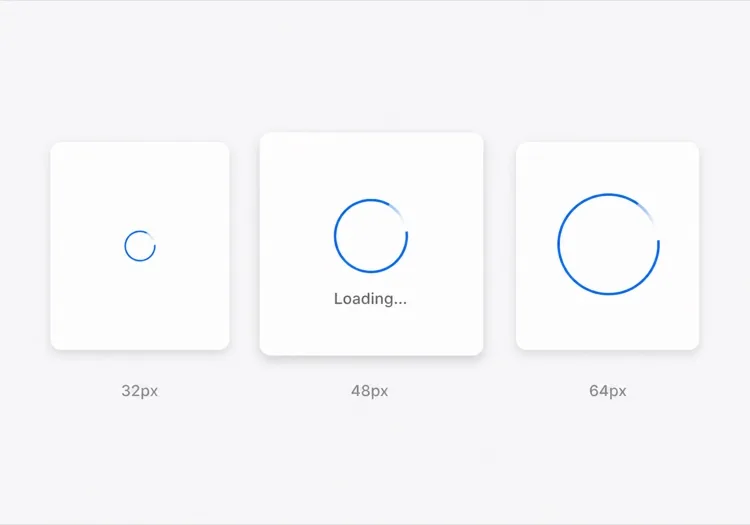
One arc rotating on a faint track. The default for anything under about a second, where a skeleton would flash in and out faster than the eye can resolve it.

Create a circular ring spinner with size variants sm 32px, md 48px and lg 64px, each keeping stroke width proportional so the small variant does not read as a thin grey circle. Render one visible arc over a low-contrast full track so the direction of rotation is legible. Wrap it in an element with role="status" and a visually hidden "Loading" label, and set aria-live="polite" so completion is announced once rather than repeatedly. Under prefers-reduced-motion: reduce, replace the rotation with a two-second opacity pulse rather than removing the indicator. Give the wrapper a fixed height matching the largest variant so mounting the spinner does not shift the surrounding layout.

在 MeDo 中尝试
IndeterminateDots

Three Bouncing Dots

Reads as activity rather than progress, which is honest when you have no idea how long the request will take. Better than a ring inside a chat bubble or a narrow row.

Create a three-dot loading indicator: dots of 8px with 6px gaps, each animating a 400ms vertical bounce staggered by 120ms so the sequence reads left to right. Keep the total width fixed so the row does not reflow as dots move. Wrap it in role="status" with a visually hidden label describing what is loading — "Loading messages" rather than "Loading" — and set aria-live="polite". Under prefers-reduced-motion: reduce, hold the dots static and cross-fade their opacity instead of translating them. Provide a colour prop that inherits currentColor by default so the indicator matches whatever text it sits beside.

在 MeDo 中尝试
InlineButton

Button With a Pending Spinner

The spinner that prevents the most damage, because the alternative is a double-submitted order. Keep the button width fixed or the layout jumps at the worst possible moment.

Create a button component with a pending state: when pending is true, prepend a 16px ring spinner before the label, set aria-busy="true" and the disabled attribute, and keep the button width identical to its idle state by reserving the spinner space in both. Do not remove the label text — swapping "Place order" for a bare spinner destroys the accessible name mid-interaction. Announce the state change through a separate role="status" element rather than an aria-live on the button itself. Under prefers-reduced-motion: reduce, use an opacity pulse. Block repeat clicks in the handler as well as via the disabled attribute, since disabled arrives one render late.

在 MeDo 中尝试
Content shapeSkeleton

Skeleton Blocks Instead of a Spinner

Past roughly 500ms a spinner stops reassuring and starts reading as a stall. Skeletons show the shape of what is coming, which shortens the wait without shortening the request.

Create a skeleton loader for a card list: rounded grey blocks matching the real layout — a 40px circle for the avatar, two text bars at 60% and 40% width, and a 160px image block — with a slow left-to-right shimmer. Match the block heights to the rendered content exactly so swapping in real data causes no layout shift. Mark the container aria-busy="true" and aria-hidden on the blocks themselves so screen readers get one status announcement rather than a stream of empty elements. Under prefers-reduced-motion: reduce, drop the shimmer and hold a flat tint. Add a threshold prop so the skeleton only appears after 300ms and never flashes on a fast response.

在 MeDo 中尝试
Full pageOverlay

Blocking Route Transition Overlay

A centered spinner over a scrim for the rare case where the whole view is unusable. Use it sparingly — blocking the page for a partial fetch makes a fast app feel slow.

Create a full-page loading overlay: a translucent scrim over the app with a 64px ring spinner and a short label centered in the viewport. Lock body scroll while visible, mark the underlying content aria-hidden="true", and use role="status" with aria-live="polite" on the overlay so the state is announced once. Trap focus inside the overlay or move focus to the status text so the keyboard cannot reach controls behind the scrim. Delay the appearance by 300ms so a fast response never produces a flash, and fade out over 150ms rather than snapping. Under prefers-reduced-motion: reduce, hold a static indicator with a text label instead of rotating.

在 MeDo 中尝试
DeterminateProgress

Ring With a Percentage Value

When you know the fraction complete — an upload, a multi-step import — show it. A spinning ring on a 40MB upload hides the one number the user wants.

Create a determinate circular progress ring driven by a value prop from 0 to 100: an SVG circle whose stroke-dashoffset is computed from the value, with the percentage rendered in the center. Use role="progressbar" with aria-valuenow, aria-valuemin and aria-valuemax, and an aria-label describing the operation. When value is null, fall back to the indeterminate spinning arc with role="status" instead. Animate stroke-dashoffset transitions over 200ms so incremental updates do not appear to jump, and under prefers-reduced-motion: reduce apply the value changes without a transition. Reserve the full ring diameter in layout from the first render.

在 MeDo 中尝试

如何自定义你的 加载动画

匹配你的品牌色板

在提示词中指定你的主色和描边粗细。使用品牌蓝或强调色的加载动画看起来是有意为之的;默认灰色的看起来像从未被替换的占位符。

选择合适的动画模式

环形加载动画适合精确、聚焦的加载(按钮提交)。弹跳圆点暗示活动但不暗示进度。脉冲覆盖层适合全页面过渡。告诉MeDo使用场景,它会选择正确的动效模式。

从一开始就添加尺寸变体

让MeDo生成sm、md和lg尺寸prop,这样同一个组件就能作为内联按钮加载动画、卡片骨架屏加载器和全屏覆盖层——全部来自同一个源。

包含无障碍标签

加载动画在没有aria-label或视觉隐藏文本时对屏幕阅读器是不可见的。让MeDo包含视觉隐藏的"加载中"标签和aria-live区域,使辅助技术能在加载完成时发出通知。

谁在使用 加载动画 组件

SaaS仪表盘

数据表格单元格内的内联环形加载动画和首次登录时的全页覆盖加载动画——为用户提供清晰反馈,而不会因小请求而阻塞整个界面。

电商结账

提交时替换"下单"标签的脉冲按钮加载动画——防止重复点击,同时让客户安心其订单正在处理中。

移动优先Web应用

匹配应用主题风格的弹跳圆点加载动画,在内容加载期间出现在卡片骨架屏中——在社交信息流和即时通讯界面中很常见。

开发者工具或CLI仪表盘

柔和灰色的极简单色环形加载动画,尺寸小巧,适合放在日志输出面板或状态徽章内,不会分散对内容的注意力。

不同网站的 加载动画 方案

同一个 加载动画 组件,针对它所在网站的类型做调整。

01 / 06

SaaS Dashboard Loading

Skeleton the widget grid rather than covering the whole dashboard, so the shell, nav and filters stay usable while one chart resolves. A full-page overlay on a dashboard punishes the user for the slowest panel on the screen.

加载动画 的风格与变体

挑选与页面其余部分匹配的变体,然后生成它。

01 / 06

Ring Spinner

A single arc over a faint track. Keep the stroke proportional across size variants — a 32px ring with the same 4px stroke as the 64px one reads as a solid donut, not a spinner. The right choice under a second.

在 React、Next.js、Vue 与 Svelte 中使用 加载动画

React、Next.js、Vue 3、SvelteKit、Astro 或纯 HTML —— 同一个 加载动画,六种接入方式。

01 / 06

React Loading Spinner

No state and no effects — a spinner is pure markup plus a keyframe, so it never needs a hook. Put the delay threshold in the parent that owns the fetch, not in the spinner itself.

src/components/Spinner.tsx

export function Spinner({ size = 'md', label = 'Loading' }) {
  return (
    <span role="status" className={ring[size]}>
      <span className="sr-only">{label}</span>
    </span>
  )
}

如何把 加载动画 加入项目

四个步骤,从挑选 加载动画 模板到上线生产环境。

01~30s

Pick a Loading Pattern

Choose by expected duration and how much of the view is blocked — a ring under a second, a skeleton past 500ms, an inline button spinner for a submit, a determinate ring when you know the percentage.

02~10s

Copy the Prompt

Paste it into MeDo, Lovable, Bolt, v0 or Cursor. Name what is loading in the label — "Loading invoices" beats "Loading", because the hidden label is the only thing a screen reader gets.

03~1min

Generate and Refine

You get React + Tailwind with a live preview. Follow up in plain English — "add a 300ms delay before it shows", "swap rotation for a pulse under reduced motion", "keep the button width fixed".

04~1min

Wire It to Your Loading State

Hook it to Suspense, a route loading file or an isPending flag, and reserve the space it occupies. Throttle the network in devtools and confirm nothing shifts when the real content lands.

关于 加载动画 的常见问题

如何用AI创建加载动画?

在MeDo中描述你需要的加载动画——动画风格(环形、圆点、脉冲)、大小、颜色,以及是否需要尺寸变体或标签。MeDo会生成完整的组件代码,包括CSS keyframes或Tailwind动画类,可直接粘贴到你的项目中。

最好的AI加载动画生成器是什么?

MeDo专为生成生产就绪的UI组件而构建。与输出粗糙代码片段的通用AI工具不同,MeDo生成干净、无障碍的加载动画组件,具有正确的aria属性、可配置的props和匹配你设计系统的动画。

能用AI生成纯CSS加载动画吗?

可以。在MeDo提示词中指定"纯CSS,无JavaScript",它会生成使用纯CSS keyframe动画的加载动画——无依赖,无需JavaScript。非常适合轻量级营销页面或无法添加组件库的场景。

如何让加载动画具有无障碍性?

让MeDo包含一个视觉隐藏的文本标签(如"正在加载,请稍候")并在加载容器上设置aria-busy。MeDo会输出正确的aria-label、role="status"和live区域,使屏幕阅读器自动播报加载状态变化。

如何在React按钮中添加加载动画?

给MeDo这个提示词:"创建一个React按钮组件,带有加载状态,当isLoading为true时将标签替换为小型内联加载动画,禁用按钮并防止重复提交。"MeDo会生成完整的组件,包含集成的无障碍加载动画。

加载动画和骨架屏加载器有什么区别?

加载动画是一种通用动画,指示正在加载但不揭示布局。骨架屏加载器模仿即将到来的内容的形状,通过立即显示结构来减少感知等待时间。MeDo可以根据你的提示词生成任一种——或一个过渡到骨架屏的加载动画。
