MeDo

مولّد مؤشرات التحميل بالذكاء الاصطناعي.

أخبر MeDo بنوع حركة التحميل التي تحتاجها — حلقة، نقاط متقافزة، دائرة نابضة، غطاء هيكلي — واحصل على كود مكوّن جاهز للإنتاج فوراً. لا حاجة للبحث في CodePen ولا لتعديل keyframes يدوياً.

مؤشر التحميل
مؤشر التحميل

مؤشر التحميل هو أول ما يراه المستخدمون عندما يكون تطبيقك بطيئاً.

كل عملية غير متزامنة — جلب بيانات، إرسال نموذج، رفع ملف — تحتاج حالة تحميل. سبينر مفقود أو متقطع يُضعف الثقة ويجعل التطبيق يبدو معطلاً. سبينر مصمم جيداً يُوصل التقدم، يتوافق مع نظام التصميم، ويُبقي المستخدمين صابرين. إنه مكوّن صغير بتأثير كبير غير متناسب على الأداء المُدرَك.

6 قالبًا

قوالب مؤشر التحميل التي يمكنك توليدها

كل قالب هو طلب حقيقي لا صورة. انسخه إلى أي محرّر ذكاء اصطناعي، أو شغّله في MeDo لتحصل على كود React و Tailwind مباشرة.

BasicRing

Rotating Ring Spinner

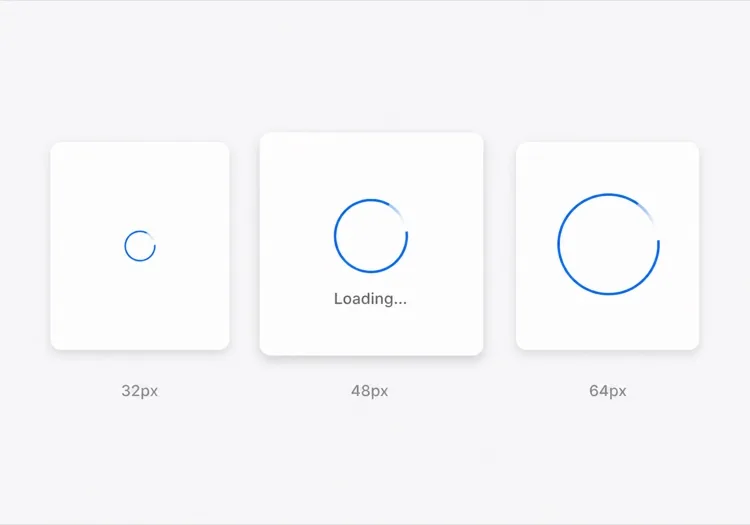
One arc rotating on a faint track. The default for anything under about a second, where a skeleton would flash in and out faster than the eye can resolve it.

Create a circular ring spinner with size variants sm 32px, md 48px and lg 64px, each keeping stroke width proportional so the small variant does not read as a thin grey circle. Render one visible arc over a low-contrast full track so the direction of rotation is legible. Wrap it in an element with role="status" and a visually hidden "Loading" label, and set aria-live="polite" so completion is announced once rather than repeatedly. Under prefers-reduced-motion: reduce, replace the rotation with a two-second opacity pulse rather than removing the indicator. Give the wrapper a fixed height matching the largest variant so mounting the spinner does not shift the surrounding layout.

جرّبه في MeDo
IndeterminateDots

Three Bouncing Dots

Reads as activity rather than progress, which is honest when you have no idea how long the request will take. Better than a ring inside a chat bubble or a narrow row.

Create a three-dot loading indicator: dots of 8px with 6px gaps, each animating a 400ms vertical bounce staggered by 120ms so the sequence reads left to right. Keep the total width fixed so the row does not reflow as dots move. Wrap it in role="status" with a visually hidden label describing what is loading — "Loading messages" rather than "Loading" — and set aria-live="polite". Under prefers-reduced-motion: reduce, hold the dots static and cross-fade their opacity instead of translating them. Provide a colour prop that inherits currentColor by default so the indicator matches whatever text it sits beside.

جرّبه في MeDo
InlineButton

Button With a Pending Spinner

The spinner that prevents the most damage, because the alternative is a double-submitted order. Keep the button width fixed or the layout jumps at the worst possible moment.

Create a button component with a pending state: when pending is true, prepend a 16px ring spinner before the label, set aria-busy="true" and the disabled attribute, and keep the button width identical to its idle state by reserving the spinner space in both. Do not remove the label text — swapping "Place order" for a bare spinner destroys the accessible name mid-interaction. Announce the state change through a separate role="status" element rather than an aria-live on the button itself. Under prefers-reduced-motion: reduce, use an opacity pulse. Block repeat clicks in the handler as well as via the disabled attribute, since disabled arrives one render late.

جرّبه في MeDo
Content shapeSkeleton

Skeleton Blocks Instead of a Spinner

Past roughly 500ms a spinner stops reassuring and starts reading as a stall. Skeletons show the shape of what is coming, which shortens the wait without shortening the request.

Create a skeleton loader for a card list: rounded grey blocks matching the real layout — a 40px circle for the avatar, two text bars at 60% and 40% width, and a 160px image block — with a slow left-to-right shimmer. Match the block heights to the rendered content exactly so swapping in real data causes no layout shift. Mark the container aria-busy="true" and aria-hidden on the blocks themselves so screen readers get one status announcement rather than a stream of empty elements. Under prefers-reduced-motion: reduce, drop the shimmer and hold a flat tint. Add a threshold prop so the skeleton only appears after 300ms and never flashes on a fast response.

جرّبه في MeDo
Full pageOverlay

Blocking Route Transition Overlay

A centered spinner over a scrim for the rare case where the whole view is unusable. Use it sparingly — blocking the page for a partial fetch makes a fast app feel slow.

Create a full-page loading overlay: a translucent scrim over the app with a 64px ring spinner and a short label centered in the viewport. Lock body scroll while visible, mark the underlying content aria-hidden="true", and use role="status" with aria-live="polite" on the overlay so the state is announced once. Trap focus inside the overlay or move focus to the status text so the keyboard cannot reach controls behind the scrim. Delay the appearance by 300ms so a fast response never produces a flash, and fade out over 150ms rather than snapping. Under prefers-reduced-motion: reduce, hold a static indicator with a text label instead of rotating.

جرّبه في MeDo
DeterminateProgress

Ring With a Percentage Value

When you know the fraction complete — an upload, a multi-step import — show it. A spinning ring on a 40MB upload hides the one number the user wants.

Create a determinate circular progress ring driven by a value prop from 0 to 100: an SVG circle whose stroke-dashoffset is computed from the value, with the percentage rendered in the center. Use role="progressbar" with aria-valuenow, aria-valuemin and aria-valuemax, and an aria-label describing the operation. When value is null, fall back to the indeterminate spinning arc with role="status" instead. Animate stroke-dashoffset transitions over 200ms so incremental updates do not appear to jump, and under prefers-reduced-motion: reduce apply the value changes without a transition. Reserve the full ring diameter in layout from the first render.

جرّبه في MeDo

كيف تخصّص مؤشر التحميل الخاص بك

طابق لوحة ألوان علامتك التجارية

حدد لونك الأساسي وسُمك الخط في الأمر. سبينر يستخدم أزرق علامتك أو لون التمييز يبدو مقصوداً؛ سبينر رمادي افتراضي يبدو كعنصر نائب لم يُستبدل أبداً.

اختر نمط الحركة المناسب

سبينرات الحلقة مناسبة للتحميل الدقيق المركّز (إرسال زر). النقاط المتقافزة تُوحي بالنشاط دون الإيحاء بالتقدم. الأغطية النابضة تعمل لانتقالات الصفحة الكاملة. أخبر MeDo بالسياق وسيختار نمط الحركة المناسب.

أضف متغيرات الحجم من البداية

اطلب من MeDo إنشاء خصائص حجم sm و md و lg حتى يعمل نفس المكوّن كسبينر مضمّن في الزر، ومُحمّل هيكلي للبطاقة، وغطاء ملء الشاشة — كلها من مصدر واحد.

أضف تسمية سهلة الوصول

السبينرات غير مرئية لقارئات الشاشة بدون aria-label أو نص مخفي بصرياً. اطلب من MeDo تضمين تسمية "جارٍ التحميل" مخفية بصرياً ومنطقة aria-live حتى تُعلن التقنيات المساعدة عند اكتمال التحميل.

من يستخدم مكوّن مؤشر التحميل

لوحة تحكم SaaS

سبينرات حلقة مضمّنة داخل خلايا جداول البيانات وسبينر غطاء ملء الشاشة عند تسجيل الدخول الأولي — يعطي المستخدمين ملاحظات واضحة دون حجب الواجهة بأكملها لطلبات صغيرة.

إتمام شراء التجارة الإلكترونية

سبينر زر نابض يستبدل تسمية "تأكيد الطلب" عند الإرسال، يمنع النقر المزدوج مع طمأنة العميل بأن طلبه قيد المعالجة.

تطبيق ويب موبايل أولاً

سبينرات نقاط متقافزة مصممة لتتوافق مع ثيم التطبيق، تظهر في هياكل البطاقات أثناء تحميل المحتوى — شائعة في خلاصات التواصل الاجتماعي وواجهات المراسلة.

أداة مطورين أو لوحة تحكم CLI

سبينر حلقة أحادي اللون بسيط بلون رمادي خافت، بحجم صغير ليتناسب داخل لوحات إخراج السجلات أو شارات الحالة دون سحب الانتباه من المحتوى.

أنماط مؤشر التحميل لمواقع مختلفة

المكوّن مؤشر التحميل نفسه، مُهيّأ لنوع الموقع الذي يُنشر عليه.

01 / 06

SaaS Dashboard Loading

Skeleton the widget grid rather than covering the whole dashboard, so the shell, nav and filters stay usable while one chart resolves. A full-page overlay on a dashboard punishes the user for the slowest panel on the screen.

أنماط مؤشر التحميل وتنويعاته

اختر التنويعة التي تناسب بقية الصفحة، ثم ولّدها.

01 / 06

Ring Spinner

A single arc over a faint track. Keep the stroke proportional across size variants — a 32px ring with the same 4px stroke as the 64px one reads as a solid donut, not a spinner. The right choice under a second.

مؤشر التحميل في React و Next.js و Vue و Svelte

React و Next.js و Vue 3 و SvelteKit و Astro أو HTML صِرف — المكوّن مؤشر التحميل نفسه بست طرق للإضافة.

01 / 06

React Loading Spinner

No state and no effects — a spinner is pure markup plus a keyframe, so it never needs a hook. Put the delay threshold in the parent that owns the fetch, not in the spinner itself.

src/components/Spinner.tsx

export function Spinner({ size = 'md', label = 'Loading' }) {
  return (
    <span role="status" className={ring[size]}>
      <span className="sr-only">{label}</span>
    </span>
  )
}

كيف تضيف مؤشر التحميل إلى مشروعك

أربع خطوات، من اختيار قالب مؤشر التحميل إلى إطلاقه في الإنتاج.

01~30s

Pick a Loading Pattern

Choose by expected duration and how much of the view is blocked — a ring under a second, a skeleton past 500ms, an inline button spinner for a submit, a determinate ring when you know the percentage.

02~10s

Copy the Prompt

Paste it into MeDo, Lovable, Bolt, v0 or Cursor. Name what is loading in the label — "Loading invoices" beats "Loading", because the hidden label is the only thing a screen reader gets.

03~1min

Generate and Refine

You get React + Tailwind with a live preview. Follow up in plain English — "add a 300ms delay before it shows", "swap rotation for a pulse under reduced motion", "keep the button width fixed".

04~1min

Wire It to Your Loading State

Hook it to Suspense, a route loading file or an isPending flag, and reserve the space it occupies. Throttle the network in devtools and confirm nothing shifts when the real content lands.

أسئلة شائعة حول مؤشر التحميل

كيف أنشئ مؤشر تحميل بالذكاء الاصطناعي؟

في MeDo، صِف السبينر الذي تحتاجه — نمط الحركة (حلقة، نقاط، نبض)، الحجم، اللون، وما إذا كنت تحتاج متغيرات حجم أو تسمية. يولّد MeDo كود المكوّن الكامل، بما في ذلك CSS keyframes أو فئات حركة Tailwind، جاهز للصق في مشروعك.

ما هو أفضل مولّد مؤشرات تحميل بالذكاء الاصطناعي؟

MeDo مصمم خصيصاً لتوليد مكوّنات واجهة مستخدم جاهزة للإنتاج. على عكس أدوات الذكاء الاصطناعي العامة التي تُخرج مقتطفات تقريبية، ينتج MeDo مكوّنات سبينر نظيفة وسهلة الوصول مع سمات aria صحيحة وخصائص قابلة للتكوين وحركات تتوافق مع نظام التصميم.

هل يمكنني توليد سبينر CSS فقط بالذكاء الاصطناعي؟

نعم. حدد "CSS فقط، بدون JavaScript" في أمر MeDo وسيولّد سبينراً يستخدم حركات CSS keyframe خالصة — بدون تبعيات، بدون حاجة لـ JavaScript. مثالي لصفحات التسويق الخفيفة أو الحالات التي لا يُمكن فيها إضافة مكتبة مكوّنات.

كيف أجعل مؤشر التحميل سهل الوصول؟

اطلب من MeDo تضمين تسمية نصية مخفية بصرياً (مثل "جارٍ التحميل، يرجى الانتظار") وتعيين aria-busy على حاوية التحميل. سيُخرج MeDo aria-label الصحيح، role="status"، ومنطقة حية حتى تُعلن قارئات الشاشة تلقائياً عن تغييرات حالة التحميل.

كيف أضيف سبينر تحميل لزر في React؟

أعطِ MeDo هذا الأمر: "أنشئ مكوّن زر React بحالة تحميل تستبدل التسمية بسبينر مضمّن صغير عندما يكون isLoading صحيحاً، وتُعطّل الزر، وتمنع الإرسال المزدوج." سيولّد MeDo المكوّن الكامل بالسبينر المدمج وسهل الوصول.

ما الفرق بين مؤشر التحميل والمُحمّل الهيكلي؟

مؤشر التحميل هو حركة عامة تشير إلى أن شيئاً ما يُحمّل دون كشف التخطيط. المُحمّل الهيكلي يُحاكي شكل المحتوى القادم، مما يُقلل وقت الانتظار المُدرَك بإظهار البنية فوراً. يمكن لـ MeDo توليد أيٍّ منهما — أو سبينر ينتقل إلى هيكل — حسب أمرك.
