MeDo

AI लोडिंग स्पिनर जनरेटर।

MeDo को बताएं कि आपको किस तरह का लोडिंग एनिमेशन चाहिए — रिंग, बाउंसिंग डॉट्स, पल्सिंग सर्कल, स्केलेटन ओवरले — और तुरंत प्रोडक्शन-रेडी कंपोनेंट कोड पाएं। CodePen पर खोजने या हाथ से keyframes एडजस्ट करने की ज़रूरत नहीं।

लोडिंग स्पिनर
लोडिंग स्पिनर

लोडिंग स्पिनर वह पहली चीज़ है जो यूज़र्स देखते हैं जब आपकी ऐप धीमी होती है।

हर एसिंक्रोनस ऑपरेशन — डेटा फ़ेच, फ़ॉर्म सबमिट, फ़ाइल अपलोड — को एक लोडिंग स्टेट चाहिए। एक गायब या अटपटा स्पिनर विश्वास को कम करता है और ऐप को टूटी हुई लगती है। एक अच्छी तरह से बना स्पिनर प्रगति बताता है, आपके डिज़ाइन सिस्टम से मेल खाता है, और यूज़र्स को धैर्यवान रखता है। यह एक छोटा कंपोनेंट है जिसका परसीव्ड परफ़ॉर्मेंस पर बहुत बड़ा प्रभाव है।

6 टेम्पलेट

लोडिंग स्पिनर टेम्पलेट जो आप जेनरेट कर सकते हैं

हर टेम्पलेट एक असली प्रॉम्प्ट है, स्क्रीनशॉट नहीं। इसे किसी भी AI एडिटर में कॉपी करें, या MeDo में चलाकर React + Tailwind कोड सीधे पाएं।

BasicRing

Rotating Ring Spinner

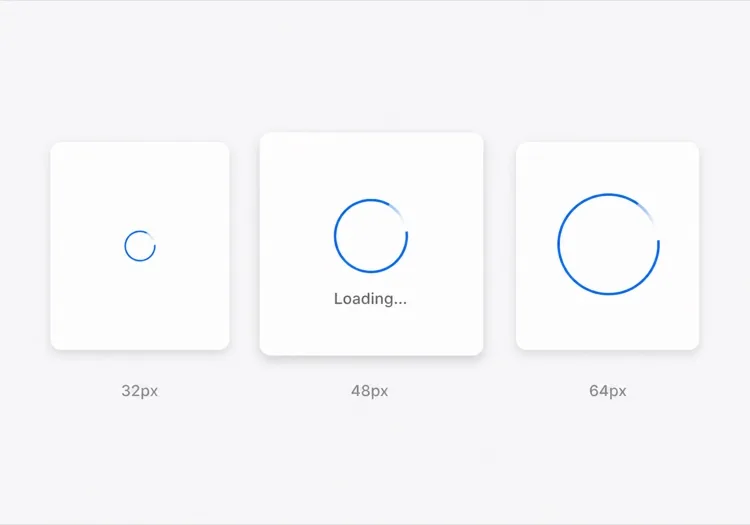
One arc rotating on a faint track. The default for anything under about a second, where a skeleton would flash in and out faster than the eye can resolve it.

Create a circular ring spinner with size variants sm 32px, md 48px and lg 64px, each keeping stroke width proportional so the small variant does not read as a thin grey circle. Render one visible arc over a low-contrast full track so the direction of rotation is legible. Wrap it in an element with role="status" and a visually hidden "Loading" label, and set aria-live="polite" so completion is announced once rather than repeatedly. Under prefers-reduced-motion: reduce, replace the rotation with a two-second opacity pulse rather than removing the indicator. Give the wrapper a fixed height matching the largest variant so mounting the spinner does not shift the surrounding layout.

MeDo में आज़माएं
IndeterminateDots

Three Bouncing Dots

Reads as activity rather than progress, which is honest when you have no idea how long the request will take. Better than a ring inside a chat bubble or a narrow row.

Create a three-dot loading indicator: dots of 8px with 6px gaps, each animating a 400ms vertical bounce staggered by 120ms so the sequence reads left to right. Keep the total width fixed so the row does not reflow as dots move. Wrap it in role="status" with a visually hidden label describing what is loading — "Loading messages" rather than "Loading" — and set aria-live="polite". Under prefers-reduced-motion: reduce, hold the dots static and cross-fade their opacity instead of translating them. Provide a colour prop that inherits currentColor by default so the indicator matches whatever text it sits beside.

MeDo में आज़माएं
InlineButton

Button With a Pending Spinner

The spinner that prevents the most damage, because the alternative is a double-submitted order. Keep the button width fixed or the layout jumps at the worst possible moment.

Create a button component with a pending state: when pending is true, prepend a 16px ring spinner before the label, set aria-busy="true" and the disabled attribute, and keep the button width identical to its idle state by reserving the spinner space in both. Do not remove the label text — swapping "Place order" for a bare spinner destroys the accessible name mid-interaction. Announce the state change through a separate role="status" element rather than an aria-live on the button itself. Under prefers-reduced-motion: reduce, use an opacity pulse. Block repeat clicks in the handler as well as via the disabled attribute, since disabled arrives one render late.

MeDo में आज़माएं
Content shapeSkeleton

Skeleton Blocks Instead of a Spinner

Past roughly 500ms a spinner stops reassuring and starts reading as a stall. Skeletons show the shape of what is coming, which shortens the wait without shortening the request.

Create a skeleton loader for a card list: rounded grey blocks matching the real layout — a 40px circle for the avatar, two text bars at 60% and 40% width, and a 160px image block — with a slow left-to-right shimmer. Match the block heights to the rendered content exactly so swapping in real data causes no layout shift. Mark the container aria-busy="true" and aria-hidden on the blocks themselves so screen readers get one status announcement rather than a stream of empty elements. Under prefers-reduced-motion: reduce, drop the shimmer and hold a flat tint. Add a threshold prop so the skeleton only appears after 300ms and never flashes on a fast response.

MeDo में आज़माएं
Full pageOverlay

Blocking Route Transition Overlay

A centered spinner over a scrim for the rare case where the whole view is unusable. Use it sparingly — blocking the page for a partial fetch makes a fast app feel slow.

Create a full-page loading overlay: a translucent scrim over the app with a 64px ring spinner and a short label centered in the viewport. Lock body scroll while visible, mark the underlying content aria-hidden="true", and use role="status" with aria-live="polite" on the overlay so the state is announced once. Trap focus inside the overlay or move focus to the status text so the keyboard cannot reach controls behind the scrim. Delay the appearance by 300ms so a fast response never produces a flash, and fade out over 150ms rather than snapping. Under prefers-reduced-motion: reduce, hold a static indicator with a text label instead of rotating.

MeDo में आज़माएं
DeterminateProgress

Ring With a Percentage Value

When you know the fraction complete — an upload, a multi-step import — show it. A spinning ring on a 40MB upload hides the one number the user wants.

Create a determinate circular progress ring driven by a value prop from 0 to 100: an SVG circle whose stroke-dashoffset is computed from the value, with the percentage rendered in the center. Use role="progressbar" with aria-valuenow, aria-valuemin and aria-valuemax, and an aria-label describing the operation. When value is null, fall back to the indeterminate spinning arc with role="status" instead. Animate stroke-dashoffset transitions over 200ms so incremental updates do not appear to jump, and under prefers-reduced-motion: reduce apply the value changes without a transition. Reserve the full ring diameter in layout from the first render.

MeDo में आज़माएं

अपने लोडिंग स्पिनर को कैसे कस्टमाइज़ करें

अपनी ब्रांड पैलेट से मैच करें

प्रॉम्प्ट में अपना प्राइमरी कलर और स्ट्रोक वेट बताएं। जो स्पिनर आपके ब्रांड ब्लू या एक्सेंट कलर का उपयोग करता है वह इंटेंशनल लगता है; एक डिफ़ॉल्ट ग्रे वाला कभी न बदले गए प्लेसहोल्डर जैसा लगता है।

सही एनिमेशन पैटर्न चुनें

रिंग स्पिनर प्रिसाइज, फ़ोकस्ड लोडिंग (बटन सबमिट) के लिए उपयुक्त हैं। बाउंसिंग डॉट्स प्रोग्रेस इम्प्लाई किए बिना एक्टिविटी सजेस्ट करते हैं। पल्सिंग ओवरले फ़ुल-पेज ट्रांज़िशन के लिए काम करते हैं। MeDo को कॉन्टेक्स्ट बताएं और वह सही मोशन पैटर्न चुनेगा।

शुरू से ही साइज़ वेरिएंट जोड़ें

MeDo से sm, md, और lg साइज़ props जनरेट करने को कहें ताकि एक ही कंपोनेंट इनलाइन बटन स्पिनर, कार्ड स्केलेटन लोडर, और फ़ुल-स्क्रीन ओवरले के रूप में काम करे — सब एक ही सोर्स से।

एक एक्सेसिबल लेबल शामिल करें

स्पिनर बिना aria-label या विज़ुअली-हिडन टेक्स्ट के स्क्रीन रीडर्स के लिए अदृश्य होते हैं। MeDo से विज़ुअली-हिडन "लोड हो रहा है" लेबल और aria-live रीजन शामिल करने को कहें ताकि असिस्टिव टेक्नोलॉजी लोडिंग पूरा होने पर अनाउंस कर सके।

लोडिंग स्पिनर कंपोनेंट का उपयोग कौन करता है

SaaS डैशबोर्ड

डेटा टेबल सेल्स में इनलाइन रिंग स्पिनर और इनीशियल लॉगिन पर फ़ुल-पेज ओवरले स्पिनर — छोटी रिक्वेस्ट के लिए पूरे इंटरफ़ेस को ब्लॉक किए बिना यूज़र्स को स्पष्ट फ़ीडबैक देता है।

ई-कॉमर्स चेकआउट

सबमिट पर "ऑर्डर करें" लेबल को रिप्लेस करने वाला एक पल्सिंग बटन स्पिनर — डबल-क्लिक रोकता है और कस्टमर को आश्वस्त करता है कि उनका ऑर्डर प्रोसेस हो रहा है।

मोबाइल-फ़र्स्ट वेब ऐप

ऐप थीम से मैच करने वाले स्टाइल्ड बाउंसिंग डॉट स्पिनर, कंटेंट लोड के दौरान कार्ड स्केलेटन में दिखाई देते हैं — सोशल फ़ीड और मैसेजिंग इंटरफ़ेस में आम।

डेवलपर टूल या CLI डैशबोर्ड

म्यूटेड ग्रे में एक मिनिमल मोनोक्रोम रिंग स्पिनर, लॉग आउटपुट पैनल या स्टेटस बैज के अंदर फ़िट होने के लिए छोटे साइज़ में — कंटेंट से ध्यान हटाए बिना।

अलग-अलग वेबसाइटों के लिए लोडिंग स्पिनर पैटर्न

वही लोडिंग स्पिनर कंपोनेंट, उस वेबसाइट के प्रकार के हिसाब से ढाला गया जहाँ वह लगेगा।

01 / 06

SaaS Dashboard Loading

Skeleton the widget grid rather than covering the whole dashboard, so the shell, nav and filters stay usable while one chart resolves. A full-page overlay on a dashboard punishes the user for the slowest panel on the screen.

लोडिंग स्पिनर की शैलियाँ और वेरिएंट

जो वेरिएंट बाकी पेज से मेल खाता है उसे चुनें और जेनरेट करें।

01 / 06

Ring Spinner

A single arc over a faint track. Keep the stroke proportional across size variants — a 32px ring with the same 4px stroke as the 64px one reads as a solid donut, not a spinner. The right choice under a second.

React, Next.js, Vue और Svelte में लोडिंग स्पिनर

React, Next.js, Vue 3, SvelteKit, Astro या सादा HTML — वही लोडिंग स्पिनर, जोड़ने के छह तरीके।

01 / 06

React Loading Spinner

No state and no effects — a spinner is pure markup plus a keyframe, so it never needs a hook. Put the delay threshold in the parent that owns the fetch, not in the spinner itself.

src/components/Spinner.tsx

export function Spinner({ size = 'md', label = 'Loading' }) {
  return (
    <span role="status" className={ring[size]}>
      <span className="sr-only">{label}</span>
    </span>
  )
}

अपने लोडिंग स्पिनर को प्रोजेक्ट में कैसे जोड़ें

लोडिंग स्पिनर टेम्पलेट चुनने से प्रोडक्शन में भेजने तक, चार चरण।

01~30s

Pick a Loading Pattern

Choose by expected duration and how much of the view is blocked — a ring under a second, a skeleton past 500ms, an inline button spinner for a submit, a determinate ring when you know the percentage.

02~10s

Copy the Prompt

Paste it into MeDo, Lovable, Bolt, v0 or Cursor. Name what is loading in the label — "Loading invoices" beats "Loading", because the hidden label is the only thing a screen reader gets.

03~1min

Generate and Refine

You get React + Tailwind with a live preview. Follow up in plain English — "add a 300ms delay before it shows", "swap rotation for a pulse under reduced motion", "keep the button width fixed".

04~1min

Wire It to Your Loading State

Hook it to Suspense, a route loading file or an isPending flag, and reserve the space it occupies. Throttle the network in devtools and confirm nothing shifts when the real content lands.

लोडिंग स्पिनर के बारे में सामान्य प्रश्न

AI से लोडिंग स्पिनर कैसे बनाएं?

MeDo में वह स्पिनर बताएं जो आपको चाहिए — एनिमेशन स्टाइल (रिंग, डॉट्स, पल्स), साइज़, कलर, और क्या आपको साइज़ वेरिएंट या लेबल चाहिए। MeDo CSS keyframes या Tailwind एनिमेशन क्लासेस सहित पूरा कंपोनेंट कोड जनरेट करता है, आपके प्रोजेक्ट में पेस्ट करने के लिए तैयार।

सबसे अच्छा AI लोडिंग स्पिनर जनरेटर कौन सा है?

MeDo विशेष रूप से प्रोडक्शन-रेडी UI कंपोनेंट जनरेट करने के लिए बना है। जेनेरिक AI टूल्स जो रफ़ स्निपेट देते हैं उनके विपरीत, MeDo सही aria एट्रिब्यूट्स, कॉन्फ़िगरेबल props, और आपके डिज़ाइन सिस्टम से मैच करने वाले एनिमेशन के साथ क्लीन, एक्सेसिबल स्पिनर कंपोनेंट बनाता है।

क्या AI से CSS-ओनली लोडिंग स्पिनर जनरेट कर सकते हैं?

हां। अपने MeDo प्रॉम्प्ट में "सिर्फ़ CSS, कोई JavaScript नहीं" बताएं और यह प्योर CSS keyframe एनिमेशन वाला स्पिनर जनरेट करेगा — कोई डिपेंडेंसी नहीं, JavaScript की ज़रूरत नहीं। लाइटवेट मार्केटिंग पेजों या ऐसी स्थितियों के लिए आदर्श जहां कंपोनेंट लाइब्रेरी जोड़ना संभव नहीं।

लोडिंग स्पिनर को एक्सेसिबल कैसे बनाएं?

MeDo से एक विज़ुअली-हिडन टेक्स्ट लेबल (जैसे, "लोड हो रहा है, कृपया प्रतीक्षा करें") शामिल करने और लोडिंग कंटेनर पर aria-busy सेट करने को कहें। MeDo सही aria-label, role="status", और एक लाइव रीजन आउटपुट करेगा ताकि स्क्रीन रीडर ऑटोमैटिकली लोडिंग स्टेट चेंज अनाउंस करें।

React में बटन पर लोडिंग स्पिनर कैसे जोड़ें?

MeDo को यह प्रॉम्प्ट दें: "एक React बटन कंपोनेंट बनाएं जिसमें लोडिंग स्टेट हो जो isLoading true होने पर लेबल को छोटे इनलाइन स्पिनर से रिप्लेस करे, बटन को डिसेबल करे, और डबल सबमिशन रोके।" MeDo स्पिनर इंटीग्रेटेड और एक्सेसिबल पूरा कंपोनेंट जनरेट करेगा।

लोडिंग स्पिनर और स्केलेटन लोडर में क्या अंतर है?

लोडिंग स्पिनर एक जेनेरिक एनिमेशन है जो बताता है कि कुछ लोड हो रहा है बिना लेआउट दिखाए। स्केलेटन लोडर आने वाले कंटेंट की शेप की नकल करता है, तुरंत स्ट्रक्चर दिखाकर परसीव्ड वेट टाइम कम करता है। MeDo आपके प्रॉम्प्ट के अनुसार दोनों में से कुछ भी — या स्केलेटन में ट्रांज़िशन होने वाला स्पिनर — जनरेट कर सकता है।

अभी अपना लोडिंग स्पिनर जेनरेट करें।

कोई भी प्रॉम्प्ट आज़माएं — मुफ्त, कोई साइन अप नहीं।
