AI面包屑导航生成器。

输入提示词,几秒钟内获得完整样式的面包屑导航组件。MeDo理解您的网站结构,生成简洁、无障碍的路径标记 — 随时可嵌入任意页面。

面包屑导航
面包屑导航

每个多层级网站都需要一个优秀的面包屑。

面包屑通过提供一键返回层级路径来降低跳出率 — 无需点击浏览器后退按钮。它们还向搜索引擎传递页面深度信号,有助于提升抓取能力和结构化数据资格。一个构建良好的面包屑是一个小组件,却对用户体验和SEO都有超出预期的影响。

6 个模板

可以生成的 面包屑导航 模板

每个模板都是真实的提示词,而不是截图。复制到任意 AI 编辑器,或在 MeDo 中运行,直接拿到 React + Tailwind 代码。

BasicSimple Trail

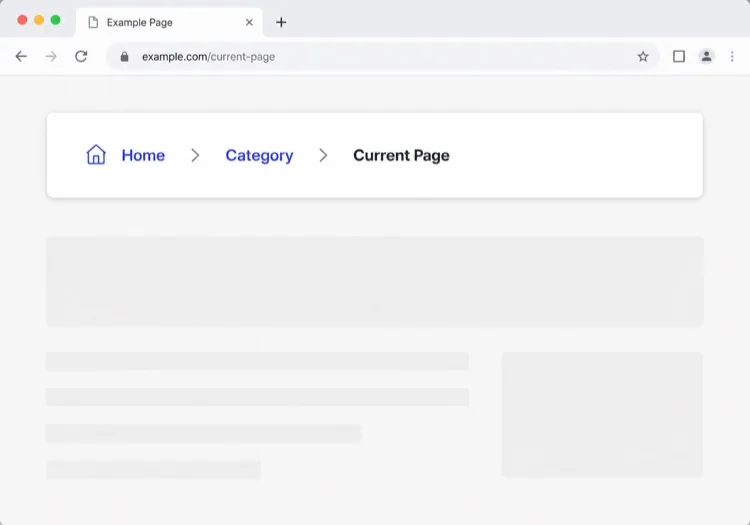
Chevron Trail With a Plain Current Crumb

Three or four levels, chevron separators, last crumb unlinked. The baseline every other variant extends — and the one place to get the semantics right, because the markup is copied everywhere else.

Create a breadcrumb component wrapped in a nav element with aria-label="Breadcrumb", containing an ordered list. Render ancestors as links and the final segment as plain text carrying aria-current="page", never as a link to the page you are already on. Insert chevron separators with a CSS pseudo-element or an aria-hidden span so screen readers do not announce them between every item. Keep the trail on one line at desktop widths and allow it to wrap rather than horizontally scroll below 640px. Style the current crumb with a darker weight, not a different color alone.


在 MeDo 中尝试
TruncatingCollapsed Middle

Ellipsis Between First and Last

For trails deeper than four levels. Collapse the middle rather than shrinking the font — an ellipsis that expands is honest, while a 10px crumb is just unreadable.

Create a breadcrumb that collapses when the trail exceeds four levels: show the root, an ellipsis button, the immediate parent and the current page. The ellipsis is a real button with aria-expanded and an accessible label such as "Show 3 hidden levels", and expanding it reveals the hidden crumbs inline rather than in a popover. Keep every level in the DOM at all times so the JSON-LD BreadcrumbList still describes the full path even while the visual trail is collapsed. Below 640px, show only the parent and current page with a back chevron in front of the parent.

在 MeDo 中尝试
CommerceProduct Path

Category Trail With a Home Icon

Home icon, category, subcategory, product name. Build it from the category the shopper actually arrived through, not the product's first assigned category, or the trail contradicts the path they just took.

Create an e-commerce breadcrumb: a home icon link with a visually hidden "Home" label, then category and subcategory links, then the product name as the current crumb with aria-current="page". Truncate the product name with an ellipsis past 40 characters while keeping the full name in the title attribute and in the JSON-LD BreadcrumbList. Derive the category path from the collection the shopper navigated through rather than the product default, so the trail matches their route. Below 640px, collapse to a single back link showing the subcategory name preceded by a left chevron.

在 MeDo 中尝试
DropdownSwitchable Crumb

Crumbs That Open a Sibling Menu

Each level doubles as a switcher listing its siblings, which turns a trail into a lateral navigation tool. Standard in cloud consoles where the path is organisation, project, environment.

Create a breadcrumb where each segment is a link plus a small chevron button that opens a menu of that level's siblings — switch project, switch environment, switch service. Give each chevron aria-expanded and aria-haspopup="menu", open the menu on Enter, Space or Down arrow, move through items with arrow keys, close on Escape and return focus to the chevron. Keep the segment label itself a plain link so clicking it navigates rather than opening the menu. Add a filter input inside any menu with more than ten siblings. On mobile, render the menu as a bottom sheet.

在 MeDo 中尝试
SEOStructured Trail

Trail With JSON-LD BreadcrumbList

The visual trail plus the schema.org markup that makes Google render a path instead of a bare URL in results. Build both from one array, or they drift apart the first time the IA changes.

Create a breadcrumb component that emits both the visual trail and a schema.org BreadcrumbList as JSON-LD in a script type="application/ld+json" block, generated from the same array of segments so the two can never disagree. Each ListItem needs position, name and an absolute item URL — relative URLs are ignored. Include the current page as the final ListItem even though it renders unlinked. Do not include the trail in more than one place on the page, since duplicate BreadcrumbList blocks are treated as conflicting. Render the JSON-LD server-side so crawlers see it without executing JavaScript.

在 MeDo 中尝试
ContentEditorial Path

Kicker Trail Above the Headline

A two-level trail styled as a section kicker rather than a UI control: uppercase, small, sitting directly above the headline. It does navigational and editorial work at once.

Create a breadcrumb styled as an editorial kicker sitting directly above an article headline: two levels — vertical then topic — in small uppercase text with wide letter spacing, separated by a thin slash, with the current article omitted from the visible trail since the headline beneath already names it. Keep the article as the final entry in the JSON-LD BreadcrumbList even though it is not rendered. Use nav with aria-label="Breadcrumb" so it is still a navigation landmark rather than decorative type, and keep the same trail on mobile at a reduced size rather than collapsing it.

在 MeDo 中尝试

如何自定义你的 面包屑导航

根据品牌风格选择分隔符

将默认的"/"替换为人字形图标、箭头或自定义字符。这一细微的设计选择让面包屑自然融入您的设计系统,而不是显得格格不入。

在移动端截断长路径

在小屏幕上仅显示直接父级和当前页面,将中间段落隐藏在省略号后。这样既保持了组件的可读性,也不牺牲桌面端的完整层级。

添加schema.org BreadcrumbList标记

要求MeDo在HTML旁边包含JSON-LD结构化数据。搜索引擎使用它直接在搜索结果页面中渲染面包屑,提高深层内容的点击率。

以视觉区分活跃段

当前页面的路径段绝不应看起来像链接。加粗字体、更深的颜色或微妙的背景标签都能传达"您在这里",无需额外文字。

谁在使用 面包屑导航 组件

电商店铺

商品页面位于3-4层深处。面包屑让购物者可以从商品直接跳回其分类或子分类 — 减少浏览会话中的导航挫败感。

文档站点

具有嵌套章节(指南 > 认证 > OAuth)的文档从面包屑中获益颇大。从搜索到达的读者能立即了解自己在大型内容树中的位置。

新闻与编辑网站

嵌套在话题和垂直领域(技术 > AI > 工具)下的文章使用面包屑展示相关内容类别,鼓励读者在读完一篇文章后继续探索,而非直接离开。

SaaS帮助中心

嵌套在产品区域(账单 > 发票 > 下载)下的支持页面使用面包屑,让用户可以返回分类并找到相邻答案,而无需回到根目录搜索。

不同网站的 面包屑导航 方案

同一个 面包屑导航 组件,针对它所在网站的类型做调整。

01 / 06

E-commerce Breadcrumb

Category, subcategory, product, with a home icon at the root. The one detail worth getting right is which category path you render: showing the product's default category when the shopper arrived through a different collection makes the trail lead somewhere they never were.

面包屑导航 的风格与变体

挑选与页面其余部分匹配的变体,然后生成它。

01 / 06

Chevron Breadcrumb

A right chevron between crumbs, the most legible separator at small sizes. Insert it with a pseudo-element or an aria-hidden span so a screen reader does not read "greater than" between every level.

在 React、Next.js、Vue 与 Svelte 中使用 面包屑导航

React、Next.js、Vue 3、SvelteKit、Astro 或纯 HTML —— 同一个 面包屑导航,六种接入方式。

01 / 06

React Breadcrumb

No state at all, so this stays a plain function component. Take the segments as an array of label and href pairs rather than parsing a path string inside it — URL slugs make poor crumb labels.

src/components/Breadcrumb.tsx

export function Breadcrumb({ items }) {
  return (
    <nav aria-label="Breadcrumb">
      <ol className="flex items-center gap-2">
        {items.map((it, i) => (
          <li key={it.href}>
            {i === items.length - 1
              ? <span aria-current="page">{it.label}</span>
              : <a href={it.href}>{it.label}</a>}
          </li>
        ))}
      </ol>
    </nav>
  )
}

如何把 面包屑导航 加入项目

四个步骤,从挑选 面包屑导航 模板到上线生产环境。

01~30s

Pick a Breadcrumb Pattern

Count your depth. Three or four levels take the simple trail, deeper needs the collapsing variant, and a console where users switch between siblings needs the dropdown crumbs.

02~10s

Copy the Prompt

Paste it into MeDo, Lovable, Bolt, v0 or Cursor. Keep the aria-current and aria-hidden separator clauses — those two are what separate a real breadcrumb from a row of styled links.

03~1min

Generate and Refine

You get React + Tailwind back with a live preview. Follow up in plain English — "swap the slash for a chevron", "add the JSON-LD block", "collapse the middle past four levels".

04~2min

Mount It in Your Layout

Render it in the page or a nested layout where the ancestor titles are already loaded, above the h1 and below the header. Pass real labels rather than URL slugs, and emit the JSON-LD from the same array.

关于 面包屑导航 的常见问题

如何用AI创建面包屑?

打开MeDo,描述您的网站层级和希望的视觉风格,MeDo将生成生产就绪的面包屑组件。您可以用中文指定分隔符、图标、链接颜色以及是否包含结构化数据。

最好的AI面包屑生成器是什么?

MeDo专门为从提示词生成UI组件而构建。与通用AI工具不同,MeDo理解设计约束、无障碍要求和前端规范,因此生成的面包屑真正可用 — 而不仅仅是语法正确。

MeDo可以生成带结构化数据(schema.org)的面包屑吗?

可以。在提示词中要求MeDo包含JSON-LD BreadcrumbList标记,它将同时输出可视化HTML/CSS组件和schema.org脚本块。这有助于搜索引擎直接在搜索结果中显示面包屑。

如何让面包屑具备无障碍性?

完全无障碍的面包屑使用<nav aria-label="面包屑">包装器、有序列表、最后一项的aria-current="page"以及键盘可聚焦链接。MeDo在生成面包屑组件时默认应用这些模式。

面包屑中当前页面应该是链接吗?

不应该。当前页面应为纯文本,而非链接 — 链接到您已在的页面是冗余的,还可能混淆屏幕阅读器。MeDo将祖先路径段渲染为链接,最后一段渲染为无链接的视觉区分标签。

可以为React或Next.js项目生成面包屑吗?

可以。MeDo可以生成使用Next.js动态路由模式的React函数组件面包屑,包括从usePathname或params读取路径段。在提示词中指定您的框架,MeDo将相应调整输出。