MeDo

منشئ مسار التنقل بالذكاء الاصطناعي.

الصق موجهاً واحصل على مكوّن تنقل مسار مصمم بالكامل في ثوانٍ. MeDo يفهم هيكل موقعك ويُنشئ ترميز مسار نظيف وسهل الوصول — جاهز للإدراج في أي صفحة.

مسار التنقل
مسار التنقل

كل موقع متعدد المستويات يحتاج مسار تنقل رائعاً.

تقلل مسارات التنقل معدلات الارتداد بإتاحة مسار بنقرة واحدة للزوار للتنقل لأعلى في التسلسل الهرمي — دون الضغط على زر الرجوع في المتصفح. كما ترسل إشارات لعمق الصفحة إلى محركات البحث، مما يساهم في قابلية زحف أفضل واستحقاق البيانات المنظمة. مسار التنقل المبني جيداً هو مكوّن صغير ذو تأثير كبير على تجربة المستخدم وتحسين محركات البحث.

6 قالبًا

قوالب مسار التنقل التي يمكنك توليدها

كل قالب هو طلب حقيقي لا صورة. انسخه إلى أي محرّر ذكاء اصطناعي، أو شغّله في MeDo لتحصل على كود React و Tailwind مباشرة.

BasicSimple Trail

Chevron Trail With a Plain Current Crumb

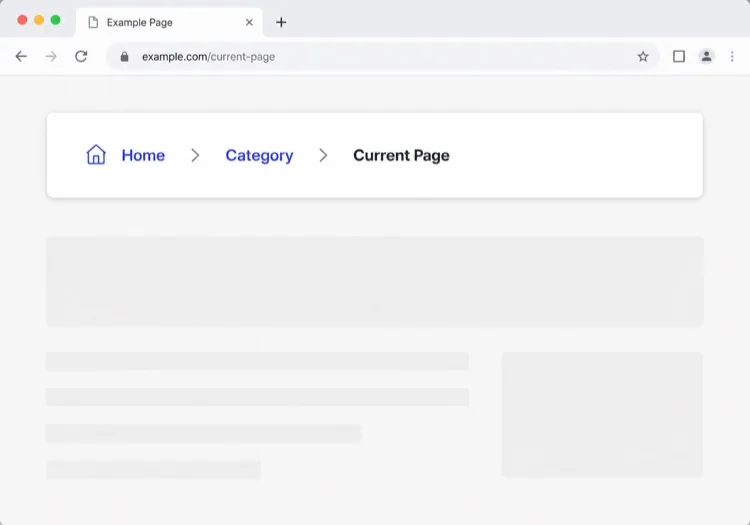
Three or four levels, chevron separators, last crumb unlinked. The baseline every other variant extends — and the one place to get the semantics right, because the markup is copied everywhere else.

Create a breadcrumb component wrapped in a nav element with aria-label="Breadcrumb", containing an ordered list. Render ancestors as links and the final segment as plain text carrying aria-current="page", never as a link to the page you are already on. Insert chevron separators with a CSS pseudo-element or an aria-hidden span so screen readers do not announce them between every item. Keep the trail on one line at desktop widths and allow it to wrap rather than horizontally scroll below 640px. Style the current crumb with a darker weight, not a different color alone.


جرّبه في MeDo
TruncatingCollapsed Middle

Ellipsis Between First and Last

For trails deeper than four levels. Collapse the middle rather than shrinking the font — an ellipsis that expands is honest, while a 10px crumb is just unreadable.

Create a breadcrumb that collapses when the trail exceeds four levels: show the root, an ellipsis button, the immediate parent and the current page. The ellipsis is a real button with aria-expanded and an accessible label such as "Show 3 hidden levels", and expanding it reveals the hidden crumbs inline rather than in a popover. Keep every level in the DOM at all times so the JSON-LD BreadcrumbList still describes the full path even while the visual trail is collapsed. Below 640px, show only the parent and current page with a back chevron in front of the parent.

جرّبه في MeDo
CommerceProduct Path

Category Trail With a Home Icon

Home icon, category, subcategory, product name. Build it from the category the shopper actually arrived through, not the product's first assigned category, or the trail contradicts the path they just took.

Create an e-commerce breadcrumb: a home icon link with a visually hidden "Home" label, then category and subcategory links, then the product name as the current crumb with aria-current="page". Truncate the product name with an ellipsis past 40 characters while keeping the full name in the title attribute and in the JSON-LD BreadcrumbList. Derive the category path from the collection the shopper navigated through rather than the product default, so the trail matches their route. Below 640px, collapse to a single back link showing the subcategory name preceded by a left chevron.

جرّبه في MeDo
DropdownSwitchable Crumb

Crumbs That Open a Sibling Menu

Each level doubles as a switcher listing its siblings, which turns a trail into a lateral navigation tool. Standard in cloud consoles where the path is organisation, project, environment.

Create a breadcrumb where each segment is a link plus a small chevron button that opens a menu of that level's siblings — switch project, switch environment, switch service. Give each chevron aria-expanded and aria-haspopup="menu", open the menu on Enter, Space or Down arrow, move through items with arrow keys, close on Escape and return focus to the chevron. Keep the segment label itself a plain link so clicking it navigates rather than opening the menu. Add a filter input inside any menu with more than ten siblings. On mobile, render the menu as a bottom sheet.

جرّبه في MeDo
SEOStructured Trail

Trail With JSON-LD BreadcrumbList

The visual trail plus the schema.org markup that makes Google render a path instead of a bare URL in results. Build both from one array, or they drift apart the first time the IA changes.

Create a breadcrumb component that emits both the visual trail and a schema.org BreadcrumbList as JSON-LD in a script type="application/ld+json" block, generated from the same array of segments so the two can never disagree. Each ListItem needs position, name and an absolute item URL — relative URLs are ignored. Include the current page as the final ListItem even though it renders unlinked. Do not include the trail in more than one place on the page, since duplicate BreadcrumbList blocks are treated as conflicting. Render the JSON-LD server-side so crawlers see it without executing JavaScript.

جرّبه في MeDo
ContentEditorial Path

Kicker Trail Above the Headline

A two-level trail styled as a section kicker rather than a UI control: uppercase, small, sitting directly above the headline. It does navigational and editorial work at once.

Create a breadcrumb styled as an editorial kicker sitting directly above an article headline: two levels — vertical then topic — in small uppercase text with wide letter spacing, separated by a thin slash, with the current article omitted from the visible trail since the headline beneath already names it. Keep the article as the final entry in the JSON-LD BreadcrumbList even though it is not rendered. Use nav with aria-label="Breadcrumb" so it is still a navigation landmark rather than decorative type, and keep the same trail on mobile at a reduced size rather than collapsing it.

جرّبه في MeDo

كيف تخصّص مسار التنقل الخاص بك

طابق الفاصل مع صوت علامتك التجارية

استبدل "/" الافتراضي بأيقونة شيفرون أو سهم أو حرف مخصص. اختيار تصميمي دقيق يجعل مسارات التنقل أصيلة في نظام التصميم الخاص بك بدلاً من أن تبدو مضافة.

اختصر المسارات الطويلة على الجوّال

على الشاشات الصغيرة، أظهر فقط العنصر الأصلي المباشر والصفحة الحالية، وأخفِ الأقسام الوسطى خلف نقاط الحذف. هذا يبقي المكوّن مقروءاً دون التضحية بالتسلسل الهرمي الكامل على سطح المكتب.

أضف ترميز schema.org BreadcrumbList

اطلب من MeDo تضمين بيانات JSON-LD المنظمة جنباً إلى جنب مع HTML. تستخدمه محركات البحث لعرض مسارات التنقل مباشرة في صفحات النتائج، مما يزيد من معدل النقر للمحتوى العميق.

صمّم الشريحة النشطة بشكل مميز

رابط الصفحة الحالية يجب ألا يبدو كرابط أبداً. الخط العريض أو اللون الأغمق أو حبة الخلفية الخفية تعكس "أنت هنا" دون نسخ إضافية.

من يستخدم مكوّن مسار التنقل

متاجر التجارة الإلكترونية

صفحات المنتج تكون في عمق 3-4 مستويات. يتيح مسار التنقل للمتسوقين القفز من منتج إلى فئته أو فئته الفرعية فوراً — مما يقلل إحباط التنقل أثناء جلسات التصفح.

مواقع التوثيق

الوثائق ذات الأقسام المتداخلة (الأدلة > المصادقة > OAuth) تستفيد كثيراً من مسارات التنقل. القراء الذين يصلون عبر البحث يفهمون فوراً مكانهم في شجرة المحتوى الكبيرة.

مواقع الأخبار والتحرير

المقالات المتداخلة ضمن مواضيع وقطاعات (التقنية > الذكاء الاصطناعي > الأدوات) تستخدم مسارات التنقل لعرض فئات المحتوى ذات الصلة، مما يشجع القراء على الاستكشاف بدلاً من المغادرة بعد مقالة واحدة.

مراكز مساعدة SaaS

صفحات الدعم المتداخلة ضمن مناطق المنتج (الفوترة > الفواتير > التحميل) تستخدم مسارات التنقل حتى يتمكن المستخدمون من الرجوع إلى فئة وإيجاد إجابات مجاورة دون العودة إلى البحث الجذري.

أنماط مسار التنقل لمواقع مختلفة

المكوّن مسار التنقل نفسه، مُهيّأ لنوع الموقع الذي يُنشر عليه.

01 / 06

E-commerce Breadcrumb

Category, subcategory, product, with a home icon at the root. The one detail worth getting right is which category path you render: showing the product's default category when the shopper arrived through a different collection makes the trail lead somewhere they never were.

أنماط مسار التنقل وتنويعاته

اختر التنويعة التي تناسب بقية الصفحة، ثم ولّدها.

01 / 06

Chevron Breadcrumb

A right chevron between crumbs, the most legible separator at small sizes. Insert it with a pseudo-element or an aria-hidden span so a screen reader does not read "greater than" between every level.

مسار التنقل في React و Next.js و Vue و Svelte

React و Next.js و Vue 3 و SvelteKit و Astro أو HTML صِرف — المكوّن مسار التنقل نفسه بست طرق للإضافة.

01 / 06

React Breadcrumb

No state at all, so this stays a plain function component. Take the segments as an array of label and href pairs rather than parsing a path string inside it — URL slugs make poor crumb labels.

src/components/Breadcrumb.tsx

export function Breadcrumb({ items }) {
  return (
    <nav aria-label="Breadcrumb">
      <ol className="flex items-center gap-2">
        {items.map((it, i) => (
          <li key={it.href}>
            {i === items.length - 1
              ? <span aria-current="page">{it.label}</span>
              : <a href={it.href}>{it.label}</a>}
          </li>
        ))}
      </ol>
    </nav>
  )
}

كيف تضيف مسار التنقل إلى مشروعك

أربع خطوات، من اختيار قالب مسار التنقل إلى إطلاقه في الإنتاج.

01~30s

Pick a Breadcrumb Pattern

Count your depth. Three or four levels take the simple trail, deeper needs the collapsing variant, and a console where users switch between siblings needs the dropdown crumbs.

02~10s

Copy the Prompt

Paste it into MeDo, Lovable, Bolt, v0 or Cursor. Keep the aria-current and aria-hidden separator clauses — those two are what separate a real breadcrumb from a row of styled links.

03~1min

Generate and Refine

You get React + Tailwind back with a live preview. Follow up in plain English — "swap the slash for a chevron", "add the JSON-LD block", "collapse the middle past four levels".

04~2min

Mount It in Your Layout

Render it in the page or a nested layout where the ancestor titles are already loaded, above the h1 and below the header. Pass real labels rather than URL slugs, and emit the JSON-LD from the same array.

أسئلة شائعة حول مسار التنقل

كيف أُنشئ مسار تنقل بالذكاء الاصطناعي؟

افتح MeDo وصِف التسلسل الهرمي لموقعك والأسلوب البصري الذي تريده، وسيُنشئ MeDo مكوّن مسار تنقل جاهزاً للإنتاج. يمكنك تحديد الفواصل والأيقونات وألوان الروابط وما إذا كنت تريد تضمين البيانات المنظمة — كل ذلك بالعربية البسيطة.

ما أفضل منشئ مسار تنقل بالذكاء الاصطناعي؟

MeDo مُصمم خصيصاً لإنشاء مكوّنات واجهة المستخدم من الموجهات. على عكس أدوات الذكاء الاصطناعي للأغراض العامة، يفهم MeDo قيود التصميم ومتطلبات إمكانية الوصول واصطلاحات الواجهة الأمامية، لذا فإن مسار التنقل الذي يُنشئه قابل للاستخدام فعلاً — وليس صحيحاً نحوياً فحسب.

هل يمكن لـ MeDo إنشاء مسار تنقل مع البيانات المنظمة (schema.org)؟

نعم. اطلب من MeDo تضمين ترميز JSON-LD BreadcrumbList في موجهك، وسيُخرج مكوّن HTML/CSS المرئي وكتلة نص schema.org معاً. يساعد هذا محركات البحث على عرض مسارات التنقل مباشرة في نتائج البحث.

كيف أجعل مسار التنقل سهل الوصول؟

يستخدم مسار التنقل الكامل الوصول غلاف <nav aria-label="مسار التنقل"> وقائمة مرتبة وaria-current="page" على العنصر الأخير وروابط قابلة للتركيز بلوحة المفاتيح. يطبق MeDo هذه الأنماط افتراضياً عند إنشاء مكوّنات مسار التنقل.

هل يجب أن تكون الصفحة الحالية رابطاً في مسار التنقل؟

لا. يجب أن تكون الصفحة الحالية نصاً عادياً وليس رابطاً — الربط بالصفحة التي أنت فيها بالفعل أمر زائد ويمكن أن يُربك قارئات الشاشة. يُظهر MeDo أرابيط الأجداد كروابط والفتات الأخيرة كعلامة غير مرتبطة مميزة بصرياً.

هل يمكنني إنشاء مسار تنقل لمشروع React أو Next.js؟

نعم. يمكن لـ MeDo إنشاء مكوّنات مسار التنقل كمكوّنات وظيفية React باستخدام أنماط التوجيه الديناميكي من Next.js، بما في ذلك قراءة أجزاء المسار من usePathname أو params. حدد إطار عملك في الموجه وسيُكيّف MeDo المخرجات وفقاً لذلك.