MeDo

AIパンくずリストジェネレーター。

プロンプトを入力するだけで、完全にスタイリングされたパンくずナビゲーションコンポーネントを数秒で取得。MeDoはサイト構造を理解し、クリーンでアクセシブルなパスマークアップを生成 — どのページにもすぐに組み込めます。

パンくずリスト
パンくずリスト

多階層サイトには優れたパンくずが欠かせません。

パンくずはブラウザの戻るボタンを押さずに階層を一クリックで遡れるパスを提供することで直帰率を下げます。また検索エンジンにページの深さを示し、クロール性の向上と構造化データ適格性への貢献をもたらします。適切に構築されたパンくずは小さなコンポーネントですが、UXとSEOへの影響は大きいです。

6 個のテンプレート

生成できる パンくずリスト テンプレート

どのテンプレートもスクリーンショットではなく実際のプロンプトです。任意の AI エディタに貼り付けるか、MeDo で実行して React + Tailwind のコードを受け取れます。

BasicSimple Trail

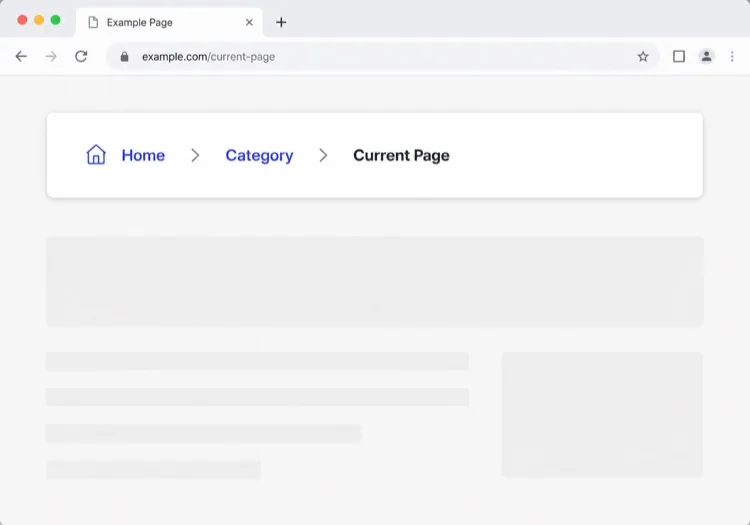
Chevron Trail With a Plain Current Crumb

Three or four levels, chevron separators, last crumb unlinked. The baseline every other variant extends — and the one place to get the semantics right, because the markup is copied everywhere else.

Create a breadcrumb component wrapped in a nav element with aria-label="Breadcrumb", containing an ordered list. Render ancestors as links and the final segment as plain text carrying aria-current="page", never as a link to the page you are already on. Insert chevron separators with a CSS pseudo-element or an aria-hidden span so screen readers do not announce them between every item. Keep the trail on one line at desktop widths and allow it to wrap rather than horizontally scroll below 640px. Style the current crumb with a darker weight, not a different color alone.


MeDoで試す
TruncatingCollapsed Middle

Ellipsis Between First and Last

For trails deeper than four levels. Collapse the middle rather than shrinking the font — an ellipsis that expands is honest, while a 10px crumb is just unreadable.

Create a breadcrumb that collapses when the trail exceeds four levels: show the root, an ellipsis button, the immediate parent and the current page. The ellipsis is a real button with aria-expanded and an accessible label such as "Show 3 hidden levels", and expanding it reveals the hidden crumbs inline rather than in a popover. Keep every level in the DOM at all times so the JSON-LD BreadcrumbList still describes the full path even while the visual trail is collapsed. Below 640px, show only the parent and current page with a back chevron in front of the parent.

MeDoで試す
CommerceProduct Path

Category Trail With a Home Icon

Home icon, category, subcategory, product name. Build it from the category the shopper actually arrived through, not the product's first assigned category, or the trail contradicts the path they just took.

Create an e-commerce breadcrumb: a home icon link with a visually hidden "Home" label, then category and subcategory links, then the product name as the current crumb with aria-current="page". Truncate the product name with an ellipsis past 40 characters while keeping the full name in the title attribute and in the JSON-LD BreadcrumbList. Derive the category path from the collection the shopper navigated through rather than the product default, so the trail matches their route. Below 640px, collapse to a single back link showing the subcategory name preceded by a left chevron.

MeDoで試す
DropdownSwitchable Crumb

Crumbs That Open a Sibling Menu

Each level doubles as a switcher listing its siblings, which turns a trail into a lateral navigation tool. Standard in cloud consoles where the path is organisation, project, environment.

Create a breadcrumb where each segment is a link plus a small chevron button that opens a menu of that level's siblings — switch project, switch environment, switch service. Give each chevron aria-expanded and aria-haspopup="menu", open the menu on Enter, Space or Down arrow, move through items with arrow keys, close on Escape and return focus to the chevron. Keep the segment label itself a plain link so clicking it navigates rather than opening the menu. Add a filter input inside any menu with more than ten siblings. On mobile, render the menu as a bottom sheet.

MeDoで試す
SEOStructured Trail

Trail With JSON-LD BreadcrumbList

The visual trail plus the schema.org markup that makes Google render a path instead of a bare URL in results. Build both from one array, or they drift apart the first time the IA changes.

Create a breadcrumb component that emits both the visual trail and a schema.org BreadcrumbList as JSON-LD in a script type="application/ld+json" block, generated from the same array of segments so the two can never disagree. Each ListItem needs position, name and an absolute item URL — relative URLs are ignored. Include the current page as the final ListItem even though it renders unlinked. Do not include the trail in more than one place on the page, since duplicate BreadcrumbList blocks are treated as conflicting. Render the JSON-LD server-side so crawlers see it without executing JavaScript.

MeDoで試す
ContentEditorial Path

Kicker Trail Above the Headline

A two-level trail styled as a section kicker rather than a UI control: uppercase, small, sitting directly above the headline. It does navigational and editorial work at once.

Create a breadcrumb styled as an editorial kicker sitting directly above an article headline: two levels — vertical then topic — in small uppercase text with wide letter spacing, separated by a thin slash, with the current article omitted from the visible trail since the headline beneath already names it. Keep the article as the final entry in the JSON-LD BreadcrumbList even though it is not rendered. Use nav with aria-label="Breadcrumb" so it is still a navigation landmark rather than decorative type, and keep the same trail on mobile at a reduced size rather than collapsing it.

MeDoで試す

パンくずリスト をカスタマイズする方法

ブランドボイスに合った区切り文字を選ぶ

デフォルトの「/」をシェブロンアイコン、矢印、カスタムグリフに変更しましょう。デザインシステムにパンくずをネイティブに馴染ませるための細やかなデザインの選択です。

モバイルで長いパスを省略する

小さな画面では直接の親と現在のページのみを表示し、中間のセグメントを省略記号で隠しましょう。デスクトップの完全な階層を維持しながらコンポーネントの可読性を保てます。

schema.org BreadcrumbListマークアップを追加する

MeDoにHTMLとともにJSON-LD構造化データを含めるよう依頼しましょう。検索エンジンはこれを使って検索結果ページに直接パンくずを表示し、深いコンテンツのクリック率を向上させます。

アクティブセグメントを視覚的に区別する

現在のページのクラムはリンクのように見えてはいけません。太字、濃い色、または控えめな背景ピルが余計なテキストなしに「あなたはここにいます」を伝えます。

パンくずリスト コンポーネントを使うのは誰か

Eコマースストア

商品ページは3〜4階層の深さにあります。パンくずにより購入者は商品からカテゴリーやサブカテゴリーに即座に戻れます — 閲覧セッション中のナビゲーションの不満を軽減します。

ドキュメントサイト

ネストされたセクション(ガイド > 認証 > OAuth)を持つドキュメントはパンくずから大きな恩恵を受けます。検索から辿り着いた読者は、大きなコンテンツツリーのどこにいるかをすぐに理解できます。

ニュース・編集サイト

トピックや縦断カテゴリー(テクノロジー > AI > ツール)の下にネストされた記事はパンくずを使って関連コンテンツカテゴリーを見せ、一つの記事後に離脱するのではなく探索を促します。

SaaSヘルプセンター

製品エリア(請求 > 請求書 > ダウンロード)の下にネストされたサポートページはパンくずを使い、ユーザーがルート検索に戻ることなくカテゴリーに遡って隣接する回答を見つけられるようにします。

サイト種別ごとの パンくずリスト パターン

同じ パンくずリスト コンポーネントを、掲載するサイトの種類に合わせて調整します。

01 / 06

E-commerce Breadcrumb

Category, subcategory, product, with a home icon at the root. The one detail worth getting right is which category path you render: showing the product's default category when the shopper arrived through a different collection makes the trail lead somewhere they never were.

パンくずリスト のスタイルとバリアント

ページ全体のトーンに合うバリアントを選び、そのまま生成します。

01 / 06

Chevron Breadcrumb

A right chevron between crumbs, the most legible separator at small sizes. Insert it with a pseudo-element or an aria-hidden span so a screen reader does not read "greater than" between every level.

React・Next.js・Vue・Svelte での パンくずリスト

React、Next.js、Vue 3、SvelteKit、Astro、素の HTML — 同じ パンくずリスト を 6 通りの方法で組み込めます。

01 / 06

React Breadcrumb

No state at all, so this stays a plain function component. Take the segments as an array of label and href pairs rather than parsing a path string inside it — URL slugs make poor crumb labels.

src/components/Breadcrumb.tsx

export function Breadcrumb({ items }) {
  return (
    <nav aria-label="Breadcrumb">
      <ol className="flex items-center gap-2">
        {items.map((it, i) => (
          <li key={it.href}>
            {i === items.length - 1
              ? <span aria-current="page">{it.label}</span>
              : <a href={it.href}>{it.label}</a>}
          </li>
        ))}
      </ol>
    </nav>
  )
}

パンくずリスト をプロジェクトに追加する方法

パンくずリスト テンプレートを選んで本番に載せるまでの 4 ステップ。

01~30s

Pick a Breadcrumb Pattern

Count your depth. Three or four levels take the simple trail, deeper needs the collapsing variant, and a console where users switch between siblings needs the dropdown crumbs.

02~10s

Copy the Prompt

Paste it into MeDo, Lovable, Bolt, v0 or Cursor. Keep the aria-current and aria-hidden separator clauses — those two are what separate a real breadcrumb from a row of styled links.

03~1min

Generate and Refine

You get React + Tailwind back with a live preview. Follow up in plain English — "swap the slash for a chevron", "add the JSON-LD block", "collapse the middle past four levels".

04~2min

Mount It in Your Layout

Render it in the page or a nested layout where the ancestor titles are already loaded, above the h1 and below the header. Pass real labels rather than URL slugs, and emit the JSON-LD from the same array.

パンくずリストに関するよくある質問

AIでパンくずを作るには?

MeDoを開き、サイト階層と希望のビジュアルスタイルを説明すれば、MeDoが本番対応のパンくずコンポーネントを生成します。区切り文字、アイコン、リンクの色、構造化データを含めるかどうかを自然な日本語で指定できます。

最高のAIパンくずジェネレーターは?

MeDoはプロンプトからUIコンポーネントを生成するために特化して構築されています。汎用AIツールとは異なりMeDoはデザインの制約、アクセシビリティ要件、フロントエンドの慣習を理解しているため、生成されるパンくずは実際に使用できるものです — 構文的に正しいだけではありません。

MeDoは構造化データ(schema.org)付きのパンくずを生成できますか?

はい。プロンプトでJSON-LD BreadcrumbListマークアップを含めるようMeDoに依頼すると、視覚的なHTML/CSSコンポーネントとschema.orgスクリプトブロックの両方を出力します。これにより検索エンジンが検索結果に直接パンくずを表示するのを助けます。

パンくずをアクセシブルにするには?

完全にアクセシブルなパンくずは<nav aria-label="パンくずリスト">ラッパー、順序付きリスト、最後のアイテムのaria-current="page"、キーボードフォーカス可能なリンクを使用します。MeDoはパンくずコンポーネントを生成する際にこれらのパターンをデフォルトで適用します。

パンくずで現在のページはリンクにすべきですか?

いいえ。現在のページはプレーンテキストであるべきで、リンクではありません — 既にいるページへのリンクは冗長であり、スクリーンリーダーを混乱させる可能性があります。MeDoは祖先クラムをリンクとして、最後のクラムをリンクなしの視覚的に区別されたラベルとして表示します。

ReactやNext.jsプロジェクト用のパンくずを生成できますか?

はい。MeDoはNext.jsの動的ルーティングパターン(usePathnameやparamsからのパスセグメント読み取りを含む)を使用したReact関数コンポーネントとしてパンくずコンポーネントを生成できます。プロンプトでフレームワークを指定すれば、MeDoは出力を適切に調整します。