MeDo

Generador de Breadcrumb con IA.

Escribe un prompt y obtén un componente de navegación breadcrumb completamente estilizado en segundos. MeDo entiende la estructura de tu sitio y genera código de ruta limpio y accesible — listo para insertar en cualquier página.

Breadcrumb
Breadcrumb

Todo sitio multinivel necesita un buen breadcrumb.

Los breadcrumbs reducen la tasa de rebote al dar a los visitantes un camino de un clic de regreso en la jerarquía — sin pulsar el botón atrás del navegador. También señalan la profundidad de la página a los motores de búsqueda, contribuyendo a una mejor rastreabilidad y elegibilidad para datos estructurados. Un breadcrumb bien construido es un componente pequeño con un impacto desproporcionado en la UX y el SEO.

6 plantillas

Plantillas de Breadcrumb que puedes generar

Cada plantilla es un prompt real, no una captura de pantalla. Cópialo en cualquier editor de IA o ejecútalo en MeDo y obtén código React + Tailwind.

BasicSimple Trail

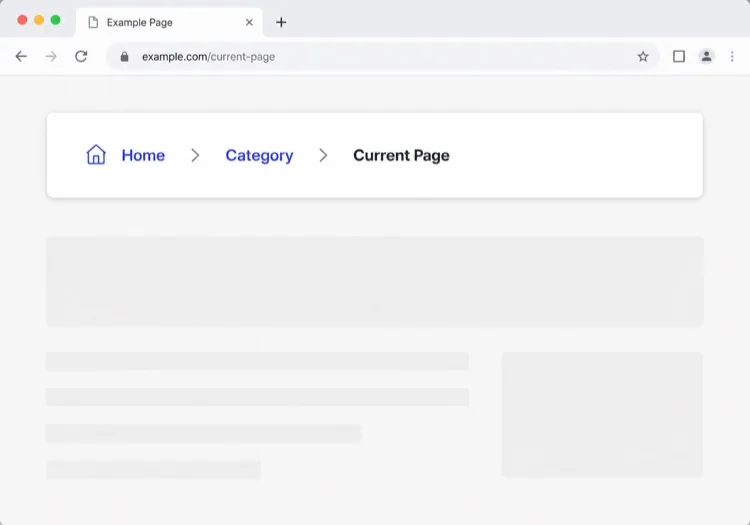
Chevron Trail With a Plain Current Crumb

Three or four levels, chevron separators, last crumb unlinked. The baseline every other variant extends — and the one place to get the semantics right, because the markup is copied everywhere else.

Create a breadcrumb component wrapped in a nav element with aria-label="Breadcrumb", containing an ordered list. Render ancestors as links and the final segment as plain text carrying aria-current="page", never as a link to the page you are already on. Insert chevron separators with a CSS pseudo-element or an aria-hidden span so screen readers do not announce them between every item. Keep the trail on one line at desktop widths and allow it to wrap rather than horizontally scroll below 640px. Style the current crumb with a darker weight, not a different color alone.


Prueba en MeDo
TruncatingCollapsed Middle

Ellipsis Between First and Last

For trails deeper than four levels. Collapse the middle rather than shrinking the font — an ellipsis that expands is honest, while a 10px crumb is just unreadable.

Create a breadcrumb that collapses when the trail exceeds four levels: show the root, an ellipsis button, the immediate parent and the current page. The ellipsis is a real button with aria-expanded and an accessible label such as "Show 3 hidden levels", and expanding it reveals the hidden crumbs inline rather than in a popover. Keep every level in the DOM at all times so the JSON-LD BreadcrumbList still describes the full path even while the visual trail is collapsed. Below 640px, show only the parent and current page with a back chevron in front of the parent.

Prueba en MeDo
CommerceProduct Path

Category Trail With a Home Icon

Home icon, category, subcategory, product name. Build it from the category the shopper actually arrived through, not the product's first assigned category, or the trail contradicts the path they just took.

Create an e-commerce breadcrumb: a home icon link with a visually hidden "Home" label, then category and subcategory links, then the product name as the current crumb with aria-current="page". Truncate the product name with an ellipsis past 40 characters while keeping the full name in the title attribute and in the JSON-LD BreadcrumbList. Derive the category path from the collection the shopper navigated through rather than the product default, so the trail matches their route. Below 640px, collapse to a single back link showing the subcategory name preceded by a left chevron.

Prueba en MeDo
DropdownSwitchable Crumb

Crumbs That Open a Sibling Menu

Each level doubles as a switcher listing its siblings, which turns a trail into a lateral navigation tool. Standard in cloud consoles where the path is organisation, project, environment.

Create a breadcrumb where each segment is a link plus a small chevron button that opens a menu of that level's siblings — switch project, switch environment, switch service. Give each chevron aria-expanded and aria-haspopup="menu", open the menu on Enter, Space or Down arrow, move through items with arrow keys, close on Escape and return focus to the chevron. Keep the segment label itself a plain link so clicking it navigates rather than opening the menu. Add a filter input inside any menu with more than ten siblings. On mobile, render the menu as a bottom sheet.

Prueba en MeDo
SEOStructured Trail

Trail With JSON-LD BreadcrumbList

The visual trail plus the schema.org markup that makes Google render a path instead of a bare URL in results. Build both from one array, or they drift apart the first time the IA changes.

Create a breadcrumb component that emits both the visual trail and a schema.org BreadcrumbList as JSON-LD in a script type="application/ld+json" block, generated from the same array of segments so the two can never disagree. Each ListItem needs position, name and an absolute item URL — relative URLs are ignored. Include the current page as the final ListItem even though it renders unlinked. Do not include the trail in more than one place on the page, since duplicate BreadcrumbList blocks are treated as conflicting. Render the JSON-LD server-side so crawlers see it without executing JavaScript.

Prueba en MeDo
ContentEditorial Path

Kicker Trail Above the Headline

A two-level trail styled as a section kicker rather than a UI control: uppercase, small, sitting directly above the headline. It does navigational and editorial work at once.

Create a breadcrumb styled as an editorial kicker sitting directly above an article headline: two levels — vertical then topic — in small uppercase text with wide letter spacing, separated by a thin slash, with the current article omitted from the visible trail since the headline beneath already names it. Keep the article as the final entry in the JSON-LD BreadcrumbList even though it is not rendered. Use nav with aria-label="Breadcrumb" so it is still a navigation landmark rather than decorative type, and keep the same trail on mobile at a reduced size rather than collapsing it.

Prueba en MeDo

Cómo personalizar tu Breadcrumb

Adapta el separador a la voz de tu marca

Cambia el "/" predeterminado por un ícono de chevron, una flecha o incluso un glifo personalizado. Una elección de diseño sutil que hace que los breadcrumbs se sientan nativos en tu sistema de diseño en lugar de añadidos.

Trunca rutas largas en móvil

En pantallas pequeñas, muestra solo el padre inmediato y la página actual, ocultando los segmentos intermedios tras una elipsis. Esto mantiene el componente legible sin sacrificar la jerarquía completa en escritorio.

Agrega marcado schema.org BreadcrumbList

Pide a MeDo que incluya datos estructurados JSON-LD junto con el HTML. Los motores de búsqueda lo usan para mostrar breadcrumbs directamente en las páginas de resultados, aumentando la tasa de clics para contenido profundo.

Estiliza el segmento activo de forma distintiva

El crumb de la página actual nunca debe parecer un enlace. Peso en negrita, color más oscuro o una píldora de fondo sutil comunican "estás aquí" sin texto adicional.

Quién usa el componente Breadcrumb

Tiendas de comercio electrónico

Las páginas de producto se ubican 3–4 niveles de profundidad. Un breadcrumb permite a los compradores saltar de un producto de regreso a su categoría o subcategoría al instante — reduciendo la frustración de navegación durante las sesiones de compra.

Sitios de documentación

La documentación con secciones anidadas (Guías > Autenticación > OAuth) se beneficia enormemente de los breadcrumbs. Los lectores que llegan desde la búsqueda entienden inmediatamente dónde están dentro de un gran árbol de contenido.

Sitios de noticias y editorial

Los artículos anidados bajo temas y verticales (Tecnología > IA > Herramientas) usan breadcrumbs para exponer categorías de contenido relacionado, animando a los lectores a explorar en lugar de abandonar tras un solo artículo.

Centros de ayuda de SaaS

Las páginas de soporte anidadas bajo áreas de producto (Facturación > Facturas > Descargar) usan breadcrumbs para que los usuarios puedan retroceder a una categoría y encontrar respuestas adyacentes sin volver a la búsqueda raíz.

Patrones de Breadcrumb para distintos sitios web

El mismo componente breadcrumb, adaptado al tipo de sitio donde se publica.

01 / 06

E-commerce Breadcrumb

Category, subcategory, product, with a home icon at the root. The one detail worth getting right is which category path you render: showing the product's default category when the shopper arrived through a different collection makes the trail lead somewhere they never were.

Estilos y variantes de Breadcrumb

Elige la variante que encaje con el resto de la página y genérala.

01 / 06

Chevron Breadcrumb

A right chevron between crumbs, the most legible separator at small sizes. Insert it with a pseudo-element or an aria-hidden span so a screen reader does not read "greater than" between every level.

Breadcrumb en React, Next.js, Vue y Svelte

React, Next.js, Vue 3, SvelteKit, Astro o HTML puro: el mismo breadcrumb, seis formas de integrarlo.

01 / 06

React Breadcrumb

No state at all, so this stays a plain function component. Take the segments as an array of label and href pairs rather than parsing a path string inside it — URL slugs make poor crumb labels.

src/components/Breadcrumb.tsx

export function Breadcrumb({ items }) {
  return (
    <nav aria-label="Breadcrumb">
      <ol className="flex items-center gap-2">
        {items.map((it, i) => (
          <li key={it.href}>
            {i === items.length - 1
              ? <span aria-current="page">{it.label}</span>
              : <a href={it.href}>{it.label}</a>}
          </li>
        ))}
      </ol>
    </nav>
  )
}

Cómo añadir tu Breadcrumb a un proyecto

Cuatro pasos, desde elegir una plantilla de breadcrumb hasta llevarlo a producción.

01~30s

Pick a Breadcrumb Pattern

Count your depth. Three or four levels take the simple trail, deeper needs the collapsing variant, and a console where users switch between siblings needs the dropdown crumbs.

02~10s

Copy the Prompt

Paste it into MeDo, Lovable, Bolt, v0 or Cursor. Keep the aria-current and aria-hidden separator clauses — those two are what separate a real breadcrumb from a row of styled links.

03~1min

Generate and Refine

You get React + Tailwind back with a live preview. Follow up in plain English — "swap the slash for a chevron", "add the JSON-LD block", "collapse the middle past four levels".

04~2min

Mount It in Your Layout

Render it in the page or a nested layout where the ancestor titles are already loaded, above the h1 and below the header. Pass real labels rather than URL slugs, and emit the JSON-LD from the same array.

Preguntas frecuentes sobre Breadcrumb

¿Cómo creo un breadcrumb con IA?

Abre MeDo, describe la jerarquía de tu sitio y el estilo visual que deseas, y MeDo genera un componente breadcrumb listo para producción. Puedes especificar separadores, íconos, colores de enlace y si incluir datos estructurados — todo en español natural.

¿Cuál es el mejor generador de breadcrumbs con IA?

MeDo está creado específicamente para generar componentes de interfaz a partir de prompts. A diferencia de las herramientas de IA de uso general, MeDo entiende las restricciones de diseño, los requisitos de accesibilidad y las convenciones de front-end, por lo que el breadcrumb que genera es realmente utilizable — no solo sintácticamente correcto.

¿Puede MeDo generar un breadcrumb con datos estructurados (schema.org)?

Sí. Pide a MeDo que incluya marcado JSON-LD BreadcrumbList en tu prompt, y generará tanto el componente visual HTML/CSS como el bloque de script schema.org. Esto ayuda a los motores de búsqueda a mostrar breadcrumbs directamente en los resultados de búsqueda.

¿Cómo hago accesible un breadcrumb?

Un breadcrumb completamente accesible usa un wrapper <nav aria-label="Breadcrumb">, una lista ordenada, aria-current="page" en el último elemento y enlaces enfocables con teclado. MeDo aplica estos patrones por defecto al generar componentes breadcrumb.

¿Debe ser un enlace la página actual en un breadcrumb?

No. La página actual debe ser texto plano, no un enlace — enlazar a la página en la que ya estás es redundante y puede confundir a los lectores de pantalla. MeDo renderiza los crumbs ancestros como enlaces y el crumb final como una etiqueta sin enlace, visualmente distinta.

¿Puedo generar un breadcrumb para un proyecto React o Next.js?

Sí. MeDo puede generar componentes breadcrumb como componentes funcionales de React usando patrones de enrutamiento dinámico de Next.js, incluyendo la lectura de segmentos de ruta desde usePathname o params. Especifica tu framework en el prompt y MeDo adapta la salida en consecuencia.