MeDo

Gerador de Breadcrumb com IA.

Cole um prompt e obtenha um componente de navegação breadcrumb completamente estilizado em segundos. MeDo entende a estrutura do seu site e gera marcação de caminho limpa e acessível — pronta para inserir em qualquer página.

Breadcrumb
Breadcrumb

Todo site multi-nível precisa de um ótimo breadcrumb.

Breadcrumbs reduzem as taxas de rejeição dando aos visitantes um caminho de um clique de volta na hierarquia — sem pressionar o botão voltar do navegador. Eles também sinalizam a profundidade da página aos mecanismos de busca, contribuindo para melhor rastreabilidade e elegibilidade para dados estruturados. Um breadcrumb bem construído é um componente pequeno com impacto desproporcional tanto na UX quanto no SEO.

6 modelos

Modelos de Breadcrumb que você pode gerar

Cada modelo é um prompt real, não uma captura de tela. Copie para qualquer editor de IA, ou rode no MeDo e receba código React + Tailwind.

BasicSimple Trail

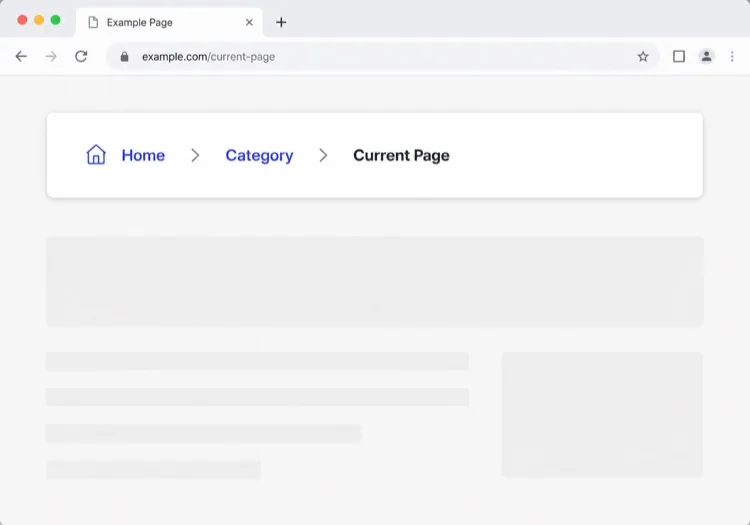
Chevron Trail With a Plain Current Crumb

Three or four levels, chevron separators, last crumb unlinked. The baseline every other variant extends — and the one place to get the semantics right, because the markup is copied everywhere else.

Create a breadcrumb component wrapped in a nav element with aria-label="Breadcrumb", containing an ordered list. Render ancestors as links and the final segment as plain text carrying aria-current="page", never as a link to the page you are already on. Insert chevron separators with a CSS pseudo-element or an aria-hidden span so screen readers do not announce them between every item. Keep the trail on one line at desktop widths and allow it to wrap rather than horizontally scroll below 640px. Style the current crumb with a darker weight, not a different color alone.


Teste no MeDo
TruncatingCollapsed Middle

Ellipsis Between First and Last

For trails deeper than four levels. Collapse the middle rather than shrinking the font — an ellipsis that expands is honest, while a 10px crumb is just unreadable.

Create a breadcrumb that collapses when the trail exceeds four levels: show the root, an ellipsis button, the immediate parent and the current page. The ellipsis is a real button with aria-expanded and an accessible label such as "Show 3 hidden levels", and expanding it reveals the hidden crumbs inline rather than in a popover. Keep every level in the DOM at all times so the JSON-LD BreadcrumbList still describes the full path even while the visual trail is collapsed. Below 640px, show only the parent and current page with a back chevron in front of the parent.

Teste no MeDo
CommerceProduct Path

Category Trail With a Home Icon

Home icon, category, subcategory, product name. Build it from the category the shopper actually arrived through, not the product's first assigned category, or the trail contradicts the path they just took.

Create an e-commerce breadcrumb: a home icon link with a visually hidden "Home" label, then category and subcategory links, then the product name as the current crumb with aria-current="page". Truncate the product name with an ellipsis past 40 characters while keeping the full name in the title attribute and in the JSON-LD BreadcrumbList. Derive the category path from the collection the shopper navigated through rather than the product default, so the trail matches their route. Below 640px, collapse to a single back link showing the subcategory name preceded by a left chevron.

Teste no MeDo
DropdownSwitchable Crumb

Crumbs That Open a Sibling Menu

Each level doubles as a switcher listing its siblings, which turns a trail into a lateral navigation tool. Standard in cloud consoles where the path is organisation, project, environment.

Create a breadcrumb where each segment is a link plus a small chevron button that opens a menu of that level's siblings — switch project, switch environment, switch service. Give each chevron aria-expanded and aria-haspopup="menu", open the menu on Enter, Space or Down arrow, move through items with arrow keys, close on Escape and return focus to the chevron. Keep the segment label itself a plain link so clicking it navigates rather than opening the menu. Add a filter input inside any menu with more than ten siblings. On mobile, render the menu as a bottom sheet.

Teste no MeDo
SEOStructured Trail

Trail With JSON-LD BreadcrumbList

The visual trail plus the schema.org markup that makes Google render a path instead of a bare URL in results. Build both from one array, or they drift apart the first time the IA changes.

Create a breadcrumb component that emits both the visual trail and a schema.org BreadcrumbList as JSON-LD in a script type="application/ld+json" block, generated from the same array of segments so the two can never disagree. Each ListItem needs position, name and an absolute item URL — relative URLs are ignored. Include the current page as the final ListItem even though it renders unlinked. Do not include the trail in more than one place on the page, since duplicate BreadcrumbList blocks are treated as conflicting. Render the JSON-LD server-side so crawlers see it without executing JavaScript.

Teste no MeDo
ContentEditorial Path

Kicker Trail Above the Headline

A two-level trail styled as a section kicker rather than a UI control: uppercase, small, sitting directly above the headline. It does navigational and editorial work at once.

Create a breadcrumb styled as an editorial kicker sitting directly above an article headline: two levels — vertical then topic — in small uppercase text with wide letter spacing, separated by a thin slash, with the current article omitted from the visible trail since the headline beneath already names it. Keep the article as the final entry in the JSON-LD BreadcrumbList even though it is not rendered. Use nav with aria-label="Breadcrumb" so it is still a navigation landmark rather than decorative type, and keep the same trail on mobile at a reduced size rather than collapsing it.

Teste no MeDo

Como personalizar seu Breadcrumb

Combine o separador com a voz da sua marca

Troque o "/" padrão por um ícone de seta, uma seta simples ou até um glifo personalizado. Uma escolha de design sutil que faz os breadcrumbs parecerem nativos ao seu design system, não adicionados à força.

Truncar trilhas longas no mobile

Em telas pequenas, exiba apenas o pai imediato e a página atual, ocultando segmentos intermediários com reticências. Isso mantém o componente legível sem sacrificar a hierarquia completa no desktop.

Adicionar marcação schema.org BreadcrumbList

Peça ao MeDo para incluir dados estruturados JSON-LD junto com o HTML. Os mecanismos de busca usam isso para renderizar breadcrumbs diretamente nas páginas de resultados, aumentando a taxa de cliques para conteúdo profundo.

Estilizar o segmento ativo de forma distinta

O breadcrumb da página atual nunca deve parecer um link. Peso em negrito, cor mais escura ou uma pílula de fundo sutil comunicam "você está aqui" sem texto adicional.

Quem usa o componente Breadcrumb

Lojas de e-commerce

Páginas de produto ficam 3-4 níveis abaixo. Um breadcrumb permite que compradores saltem de um produto de volta à sua categoria ou subcategoria instantaneamente — reduzindo a frustração de navegação durante sessões de compra.

Sites de documentação

Documentações com seções aninhadas (Guias > Autenticação > OAuth) se beneficiam enormemente dos breadcrumbs. Leitores que chegam pela busca entendem imediatamente onde estão dentro de uma grande árvore de conteúdo.

Sites de notícias e editorial

Artigos aninhados sob tópicos e verticais (Tecnologia > IA > Ferramentas) usam breadcrumbs para expor categorias de conteúdo relacionado, incentivando leitores a explorar em vez de sair após um único artigo.

Centrais de ajuda SaaS

Páginas de suporte aninhadas sob áreas de produto (Faturamento > Faturas > Download) usam breadcrumbs para que os usuários possam voltar a uma categoria e encontrar respostas adjacentes sem retornar à busca raiz.

Padrões de Breadcrumb para diferentes sites

O mesmo componente breadcrumb, ajustado ao tipo de site em que ele entra.

01 / 06

E-commerce Breadcrumb

Category, subcategory, product, with a home icon at the root. The one detail worth getting right is which category path you render: showing the product's default category when the shopper arrived through a different collection makes the trail lead somewhere they never were.

Estilos e variações de Breadcrumb

Escolha a variação que combina com o resto da página e gere-a.

01 / 06

Chevron Breadcrumb

A right chevron between crumbs, the most legible separator at small sizes. Insert it with a pseudo-element or an aria-hidden span so a screen reader does not read "greater than" between every level.

Breadcrumb em React, Next.js, Vue e Svelte

React, Next.js, Vue 3, SvelteKit, Astro ou HTML puro — o mesmo breadcrumb, seis formas de integrar.

01 / 06

React Breadcrumb

No state at all, so this stays a plain function component. Take the segments as an array of label and href pairs rather than parsing a path string inside it — URL slugs make poor crumb labels.

src/components/Breadcrumb.tsx

export function Breadcrumb({ items }) {
  return (
    <nav aria-label="Breadcrumb">
      <ol className="flex items-center gap-2">
        {items.map((it, i) => (
          <li key={it.href}>
            {i === items.length - 1
              ? <span aria-current="page">{it.label}</span>
              : <a href={it.href}>{it.label}</a>}
          </li>
        ))}
      </ol>
    </nav>
  )
}

Como adicionar o seu Breadcrumb a um projeto

Quatro passos, de escolher um modelo de breadcrumb até subir para produção.

01~30s

Pick a Breadcrumb Pattern

Count your depth. Three or four levels take the simple trail, deeper needs the collapsing variant, and a console where users switch between siblings needs the dropdown crumbs.

02~10s

Copy the Prompt

Paste it into MeDo, Lovable, Bolt, v0 or Cursor. Keep the aria-current and aria-hidden separator clauses — those two are what separate a real breadcrumb from a row of styled links.

03~1min

Generate and Refine

You get React + Tailwind back with a live preview. Follow up in plain English — "swap the slash for a chevron", "add the JSON-LD block", "collapse the middle past four levels".

04~2min

Mount It in Your Layout

Render it in the page or a nested layout where the ancestor titles are already loaded, above the h1 and below the header. Pass real labels rather than URL slugs, and emit the JSON-LD from the same array.

Perguntas comuns sobre Breadcrumb

Como criar um breadcrumb com IA?

Abra o MeDo, descreva a hierarquia do seu site e o estilo visual que deseja, e o MeDo gera um componente breadcrumb pronto para produção. Você pode especificar separadores, ícones, cores de link e se incluir dados estruturados — tudo em português natural.

Qual é o melhor gerador de breadcrumb com IA?

MeDo foi criado especificamente para gerar componentes de UI a partir de prompts. Ao contrário de ferramentas de IA de uso geral, MeDo entende restrições de design, requisitos de acessibilidade e convenções de front-end, então o breadcrumb gerado é realmente utilizável — não apenas sintaticamente correto.

O MeDo pode gerar um breadcrumb com dados estruturados (schema.org)?

Sim. Peça ao MeDo para incluir marcação JSON-LD BreadcrumbList no seu prompt, e ele produzirá tanto o componente visual HTML/CSS quanto o bloco de script schema.org. Isso ajuda os mecanismos de busca a exibir breadcrumbs diretamente nos resultados de pesquisa.

Como tornar um breadcrumb acessível?

Um breadcrumb totalmente acessível usa um wrapper <nav aria-label="Breadcrumb">, uma lista ordenada, aria-current="page" no último item e links focalizáveis pelo teclado. MeDo aplica esses padrões por padrão ao gerar componentes breadcrumb.

A página atual deve ser um link em um breadcrumb?

Não. A página atual deve ser texto simples, não um link — vincular à página em que você já está é redundante e pode confundir leitores de tela. MeDo renderiza os breadcrumbs ancestrais como links e o breadcrumb final como um rótulo não vinculado e visualmente distinto.

Posso gerar um breadcrumb para um projeto React ou Next.js?

Sim. MeDo pode gerar componentes breadcrumb como componentes funcionais React usando padrões de roteamento dinâmico do Next.js, incluindo leitura de segmentos de caminho de usePathname ou params. Especifique seu framework no prompt e MeDo adapta a saída adequadamente.