MeDo

Generatore di Breadcrumb IA.

Inserisci un prompt e ottieni in pochi secondi un componente di navigazione breadcrumb completamente stilizzato. MeDo comprende la struttura del tuo sito e genera markup di percorso pulito e accessibile — pronto da inserire in qualsiasi pagina.

Breadcrumb
Breadcrumb

Ogni sito multi-livello ha bisogno di un ottimo breadcrumb.

I breadcrumb riducono il tasso di rimbalzo offrendo ai visitatori un percorso con un clic per risalire nella gerarchia — senza premere il pulsante indietro del browser. Segnalano anche la profondità della pagina ai motori di ricerca, contribuendo a una migliore scansionabilità e all'idoneità per i dati strutturati. Un breadcrumb ben costruito è un componente piccolo con un impatto sproporzionato su UX e SEO.

6 modelli

Modelli di Breadcrumb che puoi generare

Ogni modello è un prompt reale, non uno screenshot. Copialo in qualsiasi editor IA, oppure eseguilo in MeDo e ottieni codice React + Tailwind.

BasicSimple Trail

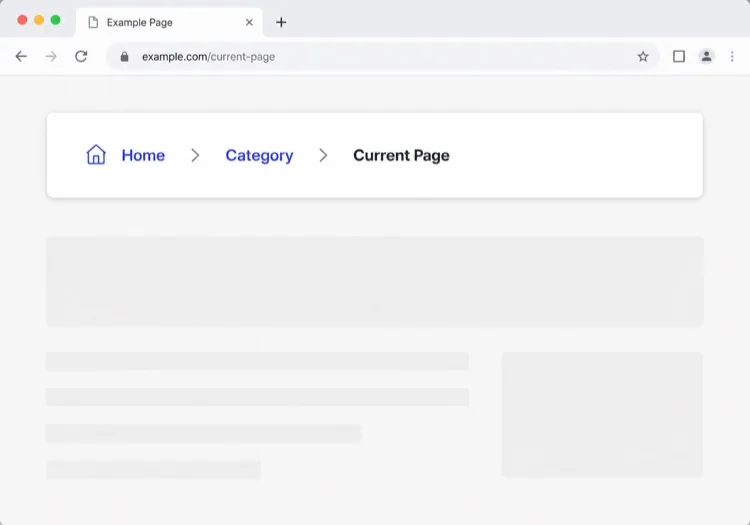
Chevron Trail With a Plain Current Crumb

Three or four levels, chevron separators, last crumb unlinked. The baseline every other variant extends — and the one place to get the semantics right, because the markup is copied everywhere else.

Create a breadcrumb component wrapped in a nav element with aria-label="Breadcrumb", containing an ordered list. Render ancestors as links and the final segment as plain text carrying aria-current="page", never as a link to the page you are already on. Insert chevron separators with a CSS pseudo-element or an aria-hidden span so screen readers do not announce them between every item. Keep the trail on one line at desktop widths and allow it to wrap rather than horizontally scroll below 640px. Style the current crumb with a darker weight, not a different color alone.


Prova in MeDo
TruncatingCollapsed Middle

Ellipsis Between First and Last

For trails deeper than four levels. Collapse the middle rather than shrinking the font — an ellipsis that expands is honest, while a 10px crumb is just unreadable.

Create a breadcrumb that collapses when the trail exceeds four levels: show the root, an ellipsis button, the immediate parent and the current page. The ellipsis is a real button with aria-expanded and an accessible label such as "Show 3 hidden levels", and expanding it reveals the hidden crumbs inline rather than in a popover. Keep every level in the DOM at all times so the JSON-LD BreadcrumbList still describes the full path even while the visual trail is collapsed. Below 640px, show only the parent and current page with a back chevron in front of the parent.

Prova in MeDo
CommerceProduct Path

Category Trail With a Home Icon

Home icon, category, subcategory, product name. Build it from the category the shopper actually arrived through, not the product's first assigned category, or the trail contradicts the path they just took.

Create an e-commerce breadcrumb: a home icon link with a visually hidden "Home" label, then category and subcategory links, then the product name as the current crumb with aria-current="page". Truncate the product name with an ellipsis past 40 characters while keeping the full name in the title attribute and in the JSON-LD BreadcrumbList. Derive the category path from the collection the shopper navigated through rather than the product default, so the trail matches their route. Below 640px, collapse to a single back link showing the subcategory name preceded by a left chevron.

Prova in MeDo
DropdownSwitchable Crumb

Crumbs That Open a Sibling Menu

Each level doubles as a switcher listing its siblings, which turns a trail into a lateral navigation tool. Standard in cloud consoles where the path is organisation, project, environment.

Create a breadcrumb where each segment is a link plus a small chevron button that opens a menu of that level's siblings — switch project, switch environment, switch service. Give each chevron aria-expanded and aria-haspopup="menu", open the menu on Enter, Space or Down arrow, move through items with arrow keys, close on Escape and return focus to the chevron. Keep the segment label itself a plain link so clicking it navigates rather than opening the menu. Add a filter input inside any menu with more than ten siblings. On mobile, render the menu as a bottom sheet.

Prova in MeDo
SEOStructured Trail

Trail With JSON-LD BreadcrumbList

The visual trail plus the schema.org markup that makes Google render a path instead of a bare URL in results. Build both from one array, or they drift apart the first time the IA changes.

Create a breadcrumb component that emits both the visual trail and a schema.org BreadcrumbList as JSON-LD in a script type="application/ld+json" block, generated from the same array of segments so the two can never disagree. Each ListItem needs position, name and an absolute item URL — relative URLs are ignored. Include the current page as the final ListItem even though it renders unlinked. Do not include the trail in more than one place on the page, since duplicate BreadcrumbList blocks are treated as conflicting. Render the JSON-LD server-side so crawlers see it without executing JavaScript.

Prova in MeDo
ContentEditorial Path

Kicker Trail Above the Headline

A two-level trail styled as a section kicker rather than a UI control: uppercase, small, sitting directly above the headline. It does navigational and editorial work at once.

Create a breadcrumb styled as an editorial kicker sitting directly above an article headline: two levels — vertical then topic — in small uppercase text with wide letter spacing, separated by a thin slash, with the current article omitted from the visible trail since the headline beneath already names it. Keep the article as the final entry in the JSON-LD BreadcrumbList even though it is not rendered. Use nav with aria-label="Breadcrumb" so it is still a navigation landmark rather than decorative type, and keep the same trail on mobile at a reduced size rather than collapsing it.

Prova in MeDo

Come personalizzare il tuo Breadcrumb

Adatta il separatore alla voce del tuo brand

Sostituisci il "/" predefinito con un'icona chevron, una freccia o persino un glifo personalizzato. Una scelta di design sottile che rende i breadcrumb nativi nel tuo design system anziché aggiunti.

Tronca i percorsi lunghi su mobile

Su schermi piccoli, mostra solo il genitore immediato e la pagina corrente, nascondendo i segmenti intermedi dietro i puntini di sospensione. Questo mantiene il componente leggibile senza sacrificare la gerarchia completa su desktop.

Aggiungi il markup schema.org BreadcrumbList

Chiedi a MeDo di includere dati strutturati JSON-LD insieme all'HTML. I motori di ricerca li usano per mostrare breadcrumb direttamente nelle pagine dei risultati, aumentando il tasso di clic per i contenuti profondi.

Stila il segmento attivo in modo distintivo

Il crumb della pagina corrente non dovrebbe mai sembrare un link. Peso in grassetto, colore più scuro o una pillola di sfondo sottile comunicano "sei qui" senza testo aggiuntivo.

Chi usa il componente Breadcrumb

Negozi e-commerce

Le pagine prodotto si trovano 3–4 livelli in profondità. Un breadcrumb consente agli acquirenti di saltare da un prodotto alla sua categoria o sottocategoria all'istante — riducendo la frustrazione di navigazione durante le sessioni di acquisto.

Siti di documentazione

La documentazione con sezioni annidate (Guide > Autenticazione > OAuth) beneficia enormemente dei breadcrumb. I lettori che arrivano dalla ricerca capiscono immediatamente dove si trovano all'interno di un grande albero di contenuti.

Siti di notizie ed editoriali

Gli articoli annidati sotto argomenti e verticali (Tecnologia > IA > Strumenti) usano i breadcrumb per esporre categorie di contenuti correlati, incoraggiando i lettori a esplorare anziché rimbalzare dopo un singolo articolo.

Help center SaaS

Le pagine di supporto annidate sotto aree prodotto (Fatturazione > Fatture > Download) usano i breadcrumb per consentire agli utenti di risalire a una categoria e trovare risposte adiacenti senza tornare alla ricerca principale.

Pattern di Breadcrumb per siti web diversi

Lo stesso componente breadcrumb, calibrato sul tipo di sito su cui viene pubblicato.

01 / 06

E-commerce Breadcrumb

Category, subcategory, product, with a home icon at the root. The one detail worth getting right is which category path you render: showing the product's default category when the shopper arrived through a different collection makes the trail lead somewhere they never were.

Stili e varianti di Breadcrumb

Scegli la variante che si adatta al resto della pagina, poi generala.

01 / 06

Chevron Breadcrumb

A right chevron between crumbs, the most legible separator at small sizes. Insert it with a pseudo-element or an aria-hidden span so a screen reader does not read "greater than" between every level.

Breadcrumb in React, Next.js, Vue e Svelte

React, Next.js, Vue 3, SvelteKit, Astro o HTML puro: lo stesso breadcrumb, sei modi per integrarlo.

01 / 06

React Breadcrumb

No state at all, so this stays a plain function component. Take the segments as an array of label and href pairs rather than parsing a path string inside it — URL slugs make poor crumb labels.

src/components/Breadcrumb.tsx

export function Breadcrumb({ items }) {
  return (
    <nav aria-label="Breadcrumb">
      <ol className="flex items-center gap-2">
        {items.map((it, i) => (
          <li key={it.href}>
            {i === items.length - 1
              ? <span aria-current="page">{it.label}</span>
              : <a href={it.href}>{it.label}</a>}
          </li>
        ))}
      </ol>
    </nav>
  )
}

Come aggiungere il tuo Breadcrumb a un progetto

Quattro passaggi, dalla scelta di un modello di breadcrumb alla messa in produzione.

01~30s

Pick a Breadcrumb Pattern

Count your depth. Three or four levels take the simple trail, deeper needs the collapsing variant, and a console where users switch between siblings needs the dropdown crumbs.

02~10s

Copy the Prompt

Paste it into MeDo, Lovable, Bolt, v0 or Cursor. Keep the aria-current and aria-hidden separator clauses — those two are what separate a real breadcrumb from a row of styled links.

03~1min

Generate and Refine

You get React + Tailwind back with a live preview. Follow up in plain English — "swap the slash for a chevron", "add the JSON-LD block", "collapse the middle past four levels".

04~2min

Mount It in Your Layout

Render it in the page or a nested layout where the ancestor titles are already loaded, above the h1 and below the header. Pass real labels rather than URL slugs, and emit the JSON-LD from the same array.

Domande comuni su Breadcrumb

Come creo un breadcrumb con l'IA?

Apri MeDo, descrivi la gerarchia del tuo sito e lo stile visivo desiderato, e MeDo genera un componente breadcrumb pronto per la produzione. Puoi specificare separatori, icone, colori dei link e se includere dati strutturati — tutto in italiano naturale.

Qual è il miglior generatore di breadcrumb IA?

MeDo è progettato specificamente per generare componenti UI da prompt. A differenza degli strumenti IA generici, MeDo comprende i vincoli di design, i requisiti di accessibilità e le convenzioni front-end, così il breadcrumb generato è effettivamente utilizzabile — non solo sintatticamente corretto.

MeDo può generare un breadcrumb con dati strutturati (schema.org)?

Sì. Chiedi a MeDo di includere il markup JSON-LD BreadcrumbList nel tuo prompt, e produrrà sia il componente visivo HTML/CSS che il blocco script schema.org. Questo aiuta i motori di ricerca a mostrare i breadcrumb direttamente nei risultati di ricerca.

Come rendo accessibile un breadcrumb?

Un breadcrumb completamente accessibile usa un wrapper <nav aria-label="Breadcrumb">, una lista ordinata, aria-current="page" sull'ultimo elemento e link focalizzabili da tastiera. MeDo applica questi pattern per impostazione predefinita quando genera componenti breadcrumb.

La pagina corrente deve essere un link in un breadcrumb?

No. La pagina corrente deve essere testo normale, non un link — collegare alla pagina su cui ci si trova già è ridondante e può confondere gli screen reader. MeDo renderizza i crumb antenati come link e l'ultimo crumb come un'etichetta senza link, visivamente distinta.

Posso generare un breadcrumb per un progetto React o Next.js?

Sì. MeDo può generare componenti breadcrumb come componenti funzionali React usando pattern di routing dinamico di Next.js, inclusa la lettura dei segmenti di percorso da usePathname o params. Specifica il tuo framework nel prompt e MeDo adatta l'output di conseguenza.