MeDo

KI-Breadcrumb-Generator.

Geben Sie einen Prompt ein und erhalten Sie in Sekunden eine vollständig gestaltete Breadcrumb-Navigation. MeDo versteht Ihre Seitenstruktur und generiert sauberes, barrierefreies Pfad-Markup — bereit zum Einbinden in jede Seite.

Breadcrumb
Breadcrumb

Jede mehrstufige Website braucht einen guten Breadcrumb.

Breadcrumbs senken die Absprungrate, indem sie Besuchern einen Ein-Klick-Weg zurück in der Hierarchie bieten — ohne die Browser-Zurück-Schaltfläche. Sie signalisieren Suchmaschinen auch die Seitentiefe und tragen zu besserer Crawlbarkeit und der Berechtigung für strukturierte Daten bei. Ein gut gebauter Breadcrumb ist eine kleine Komponente mit überproportionalem Einfluss auf UX und SEO.

6 Vorlagen

Breadcrumb-Vorlagen, die Sie generieren können

Jede Vorlage ist ein echter Prompt, kein Screenshot. Kopieren Sie ihn in einen KI-Editor oder führen Sie ihn in MeDo aus und erhalten Sie React- und Tailwind-Code zurück.

BasicSimple Trail

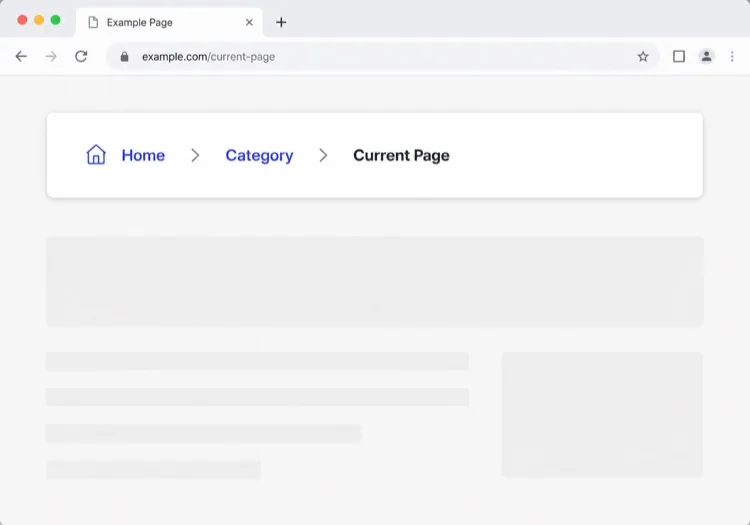
Chevron Trail With a Plain Current Crumb

Three or four levels, chevron separators, last crumb unlinked. The baseline every other variant extends — and the one place to get the semantics right, because the markup is copied everywhere else.

Create a breadcrumb component wrapped in a nav element with aria-label="Breadcrumb", containing an ordered list. Render ancestors as links and the final segment as plain text carrying aria-current="page", never as a link to the page you are already on. Insert chevron separators with a CSS pseudo-element or an aria-hidden span so screen readers do not announce them between every item. Keep the trail on one line at desktop widths and allow it to wrap rather than horizontally scroll below 640px. Style the current crumb with a darker weight, not a different color alone.


In MeDo testen
TruncatingCollapsed Middle

Ellipsis Between First and Last

For trails deeper than four levels. Collapse the middle rather than shrinking the font — an ellipsis that expands is honest, while a 10px crumb is just unreadable.

Create a breadcrumb that collapses when the trail exceeds four levels: show the root, an ellipsis button, the immediate parent and the current page. The ellipsis is a real button with aria-expanded and an accessible label such as "Show 3 hidden levels", and expanding it reveals the hidden crumbs inline rather than in a popover. Keep every level in the DOM at all times so the JSON-LD BreadcrumbList still describes the full path even while the visual trail is collapsed. Below 640px, show only the parent and current page with a back chevron in front of the parent.

In MeDo testen
CommerceProduct Path

Category Trail With a Home Icon

Home icon, category, subcategory, product name. Build it from the category the shopper actually arrived through, not the product's first assigned category, or the trail contradicts the path they just took.

Create an e-commerce breadcrumb: a home icon link with a visually hidden "Home" label, then category and subcategory links, then the product name as the current crumb with aria-current="page". Truncate the product name with an ellipsis past 40 characters while keeping the full name in the title attribute and in the JSON-LD BreadcrumbList. Derive the category path from the collection the shopper navigated through rather than the product default, so the trail matches their route. Below 640px, collapse to a single back link showing the subcategory name preceded by a left chevron.

In MeDo testen
DropdownSwitchable Crumb

Crumbs That Open a Sibling Menu

Each level doubles as a switcher listing its siblings, which turns a trail into a lateral navigation tool. Standard in cloud consoles where the path is organisation, project, environment.

Create a breadcrumb where each segment is a link plus a small chevron button that opens a menu of that level's siblings — switch project, switch environment, switch service. Give each chevron aria-expanded and aria-haspopup="menu", open the menu on Enter, Space or Down arrow, move through items with arrow keys, close on Escape and return focus to the chevron. Keep the segment label itself a plain link so clicking it navigates rather than opening the menu. Add a filter input inside any menu with more than ten siblings. On mobile, render the menu as a bottom sheet.

In MeDo testen
SEOStructured Trail

Trail With JSON-LD BreadcrumbList

The visual trail plus the schema.org markup that makes Google render a path instead of a bare URL in results. Build both from one array, or they drift apart the first time the IA changes.

Create a breadcrumb component that emits both the visual trail and a schema.org BreadcrumbList as JSON-LD in a script type="application/ld+json" block, generated from the same array of segments so the two can never disagree. Each ListItem needs position, name and an absolute item URL — relative URLs are ignored. Include the current page as the final ListItem even though it renders unlinked. Do not include the trail in more than one place on the page, since duplicate BreadcrumbList blocks are treated as conflicting. Render the JSON-LD server-side so crawlers see it without executing JavaScript.

In MeDo testen
ContentEditorial Path

Kicker Trail Above the Headline

A two-level trail styled as a section kicker rather than a UI control: uppercase, small, sitting directly above the headline. It does navigational and editorial work at once.

Create a breadcrumb styled as an editorial kicker sitting directly above an article headline: two levels — vertical then topic — in small uppercase text with wide letter spacing, separated by a thin slash, with the current article omitted from the visible trail since the headline beneath already names it. Keep the article as the final entry in the JSON-LD BreadcrumbList even though it is not rendered. Use nav with aria-label="Breadcrumb" so it is still a navigation landmark rather than decorative type, and keep the same trail on mobile at a reduced size rather than collapsing it.

In MeDo testen

So passen Sie Ihre Breadcrumb an

Trennzeichen an Ihre Marke anpassen

Ersetzen Sie das Standard-„/" durch ein Chevron-Symbol, einen Pfeil oder ein benutzerdefiniertes Zeichen. Eine dezente Designentscheidung, die Breadcrumbs zum natürlichen Teil Ihres Designsystems macht, anstatt aufgesetzt zu wirken.

Lange Pfade auf Mobilgeräten kürzen

Zeigen Sie auf kleinen Bildschirmen nur das unmittelbare Elternelement und die aktuelle Seite und verstecken Sie mittlere Segmente hinter Auslassungspunkten. So bleibt die Komponente lesbar, ohne die vollständige Hierarchie auf dem Desktop zu opfern.

schema.org BreadcrumbList-Markup hinzufügen

Bitten Sie MeDo, JSON-LD-strukturierte Daten neben dem HTML einzufügen. Suchmaschinen nutzen diese, um Breadcrumbs direkt in den Suchergebnisseiten anzuzeigen und erhöhen so die Klickrate für tief verschachtelte Inhalte.

Das aktive Segment auffällig gestalten

Der aktuelle Seiten-Crumb sollte nie wie ein Link aussehen. Fettschrift, dunklere Farbe oder ein subtiler Hintergrund vermitteln „Sie sind hier" ohne zusätzlichen Text.

Wer die Breadcrumb-Komponente nutzt

Online-Shops

Produktseiten befinden sich 3–4 Ebenen tief. Ein Breadcrumb ermöglicht es Käufern, von einem Produkt sofort zu seiner Kategorie oder Unterkategorie zu springen — was die Navigationsfrustration beim Stöbern reduziert.

Dokumentationsseiten

Dokumentationen mit verschachtelten Abschnitten (Guides > Authentifizierung > OAuth) profitieren enorm von Breadcrumbs. Leser, die über die Suche landen, verstehen sofort, wo sie sich in einem großen Inhaltsbaum befinden.

Nachrichten- und Redaktionsseiten

Artikel unter Themen und Kategorien (Technik > KI > Tools) nutzen Breadcrumbs, um verwandte Inhaltskategorien sichtbar zu machen und Leser zum Weiterlesen zu animieren, anstatt nach einem einzelnen Artikel abzuspringen.

SaaS-Hilfezentren

Support-Seiten unter Produktbereichen (Abrechnung > Rechnungen > Herunterladen) nutzen Breadcrumbs, damit Benutzer zu einer Kategorie zurückgehen und benachbarte Antworten finden können, ohne zur Wurzelsuche zurückzukehren.

Breadcrumb-Muster für verschiedene Websites

Dieselbe breadcrumb-Komponente, abgestimmt auf die Art der Website, auf der sie läuft.

01 / 06

E-commerce Breadcrumb

Category, subcategory, product, with a home icon at the root. The one detail worth getting right is which category path you render: showing the product's default category when the shopper arrived through a different collection makes the trail lead somewhere they never were.

Breadcrumb-Stile und -Varianten

Wählen Sie die Variante, die zum Rest der Seite passt, und generieren Sie sie.

01 / 06

Chevron Breadcrumb

A right chevron between crumbs, the most legible separator at small sizes. Insert it with a pseudo-element or an aria-hidden span so a screen reader does not read "greater than" between every level.

Breadcrumb in React, Next.js, Vue und Svelte

React, Next.js, Vue 3, SvelteKit, Astro oder reines HTML — dieselbe breadcrumb, sechs Wege zur Einbindung.

01 / 06

React Breadcrumb

No state at all, so this stays a plain function component. Take the segments as an array of label and href pairs rather than parsing a path string inside it — URL slugs make poor crumb labels.

src/components/Breadcrumb.tsx

export function Breadcrumb({ items }) {
  return (
    <nav aria-label="Breadcrumb">
      <ol className="flex items-center gap-2">
        {items.map((it, i) => (
          <li key={it.href}>
            {i === items.length - 1
              ? <span aria-current="page">{it.label}</span>
              : <a href={it.href}>{it.label}</a>}
          </li>
        ))}
      </ol>
    </nav>
  )
}

So fügen Sie Ihre Breadcrumb einem Projekt hinzu

Vier Schritte, von der Auswahl einer breadcrumb-Vorlage bis zum Einsatz in der Produktion.

01~30s

Pick a Breadcrumb Pattern

Count your depth. Three or four levels take the simple trail, deeper needs the collapsing variant, and a console where users switch between siblings needs the dropdown crumbs.

02~10s

Copy the Prompt

Paste it into MeDo, Lovable, Bolt, v0 or Cursor. Keep the aria-current and aria-hidden separator clauses — those two are what separate a real breadcrumb from a row of styled links.

03~1min

Generate and Refine

You get React + Tailwind back with a live preview. Follow up in plain English — "swap the slash for a chevron", "add the JSON-LD block", "collapse the middle past four levels".

04~2min

Mount It in Your Layout

Render it in the page or a nested layout where the ancestor titles are already loaded, above the h1 and below the header. Pass real labels rather than URL slugs, and emit the JSON-LD from the same array.

Häufige Fragen zu Breadcrumb

Wie erstelle ich einen Breadcrumb mit KI?

Öffnen Sie MeDo, beschreiben Sie Ihre Seitenhierarchie und den gewünschten visuellen Stil, und MeDo generiert eine produktionsreife Breadcrumb-Komponente. Sie können Trennzeichen, Symbole, Link-Farben und ob strukturierte Daten enthalten sein sollen festlegen — alles in einfachem Deutsch.

Was ist der beste KI-Breadcrumb-Generator?

MeDo wurde speziell für die Generierung von UI-Komponenten aus Prompts entwickelt. Im Gegensatz zu allgemeinen KI-Tools versteht MeDo Designbeschränkungen, Barrierefreiheitsanforderungen und Frontend-Konventionen, sodass der generierte Breadcrumb tatsächlich verwendbar ist — nicht nur syntaktisch korrekt.

Kann MeDo einen Breadcrumb mit strukturierten Daten (schema.org) generieren?

Ja. Bitten Sie MeDo in Ihrem Prompt, JSON-LD-BreadcrumbList-Markup einzufügen, und es wird sowohl die visuelle HTML/CSS-Komponente als auch den schema.org-Skriptblock ausgeben. Dies hilft Suchmaschinen, Breadcrumbs direkt in den Suchergebnissen anzuzeigen.

Wie mache ich einen Breadcrumb barrierefrei?

Ein vollständig barrierefreier Breadcrumb verwendet einen <nav aria-label="Breadcrumb">-Wrapper, eine geordnete Liste, aria-current="page" beim letzten Element und tastaturfokussierbare Links. MeDo wendet diese Muster standardmäßig an, wenn Breadcrumb-Komponenten generiert werden.

Sollte die aktuelle Seite im Breadcrumb ein Link sein?

Nein. Die aktuelle Seite sollte reiner Text sein, kein Link — auf die Seite zu verlinken, auf der man sich bereits befindet, ist redundant und kann Screenreader verwirren. MeDo rendert Vorfahren-Crumbs als Links und den letzten Crumb als nicht verlinktes, visuell hervorgehobenes Label.

Kann ich einen Breadcrumb für ein React- oder Next.js-Projekt generieren?

Ja. MeDo kann Breadcrumb-Komponenten als React-Funktionskomponenten generieren, die dynamische Routing-Muster von Next.js verwenden, einschließlich des Lesens von Pfadsegmenten aus usePathname oder params. Geben Sie Ihr Framework im Prompt an und MeDo passt die Ausgabe entsprechend an.