MeDo

AI 브레드크럼 생성기.

프롬프트를 입력하면 몇 초 만에 완전히 스타일링된 브레드크럼 내비게이션 컴포넌트를 얻을 수 있습니다. MeDo는 사이트 구조를 이해하고 깔끔하고 접근 가능한 경로 마크업을 생성합니다 — 어떤 페이지에도 바로 삽입할 수 있습니다.

브레드크럼
브레드크럼

모든 다단계 사이트에는 훌륭한 브레드크럼이 필요합니다.

브레드크럼은 브라우저 뒤로 가기 버튼을 누르지 않고도 방문자가 계층 구조를 한 클릭으로 올라갈 수 있는 경로를 제공하여 이탈률을 줄입니다. 또한 검색 엔진에 페이지 깊이를 알려주어 크롤 가능성 향상과 구조화된 데이터 적격성에 기여합니다. 잘 구축된 브레드크럼은 UX와 SEO 모두에 큰 영향을 미치는 작은 컴포넌트입니다.

템플릿 6개

생성할 수 있는 브레드크럼 템플릿

모든 템플릿은 스크린샷이 아니라 실제 프롬프트입니다. 어떤 AI 에디터에든 붙여넣거나 MeDo에서 실행해 React + Tailwind 코드를 그대로 받으세요.

BasicSimple Trail

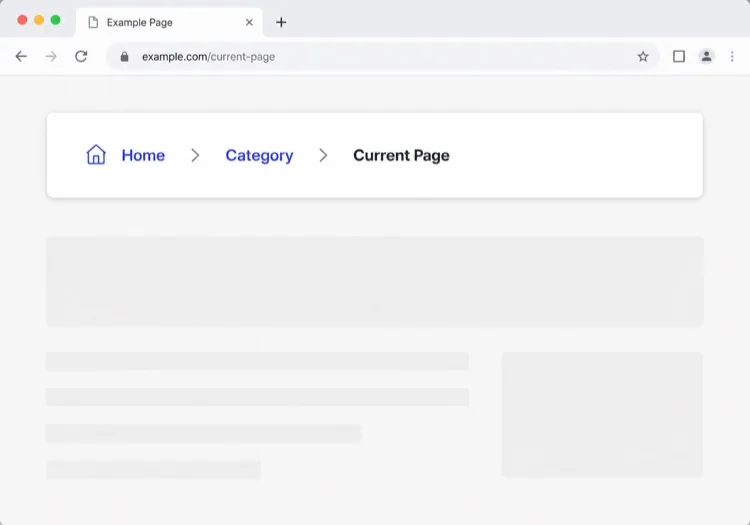
Chevron Trail With a Plain Current Crumb

Three or four levels, chevron separators, last crumb unlinked. The baseline every other variant extends — and the one place to get the semantics right, because the markup is copied everywhere else.

Create a breadcrumb component wrapped in a nav element with aria-label="Breadcrumb", containing an ordered list. Render ancestors as links and the final segment as plain text carrying aria-current="page", never as a link to the page you are already on. Insert chevron separators with a CSS pseudo-element or an aria-hidden span so screen readers do not announce them between every item. Keep the trail on one line at desktop widths and allow it to wrap rather than horizontally scroll below 640px. Style the current crumb with a darker weight, not a different color alone.


MeDo에서 시도하기
TruncatingCollapsed Middle

Ellipsis Between First and Last

For trails deeper than four levels. Collapse the middle rather than shrinking the font — an ellipsis that expands is honest, while a 10px crumb is just unreadable.

Create a breadcrumb that collapses when the trail exceeds four levels: show the root, an ellipsis button, the immediate parent and the current page. The ellipsis is a real button with aria-expanded and an accessible label such as "Show 3 hidden levels", and expanding it reveals the hidden crumbs inline rather than in a popover. Keep every level in the DOM at all times so the JSON-LD BreadcrumbList still describes the full path even while the visual trail is collapsed. Below 640px, show only the parent and current page with a back chevron in front of the parent.

MeDo에서 시도하기
CommerceProduct Path

Category Trail With a Home Icon

Home icon, category, subcategory, product name. Build it from the category the shopper actually arrived through, not the product's first assigned category, or the trail contradicts the path they just took.

Create an e-commerce breadcrumb: a home icon link with a visually hidden "Home" label, then category and subcategory links, then the product name as the current crumb with aria-current="page". Truncate the product name with an ellipsis past 40 characters while keeping the full name in the title attribute and in the JSON-LD BreadcrumbList. Derive the category path from the collection the shopper navigated through rather than the product default, so the trail matches their route. Below 640px, collapse to a single back link showing the subcategory name preceded by a left chevron.

MeDo에서 시도하기
DropdownSwitchable Crumb

Crumbs That Open a Sibling Menu

Each level doubles as a switcher listing its siblings, which turns a trail into a lateral navigation tool. Standard in cloud consoles where the path is organisation, project, environment.

Create a breadcrumb where each segment is a link plus a small chevron button that opens a menu of that level's siblings — switch project, switch environment, switch service. Give each chevron aria-expanded and aria-haspopup="menu", open the menu on Enter, Space or Down arrow, move through items with arrow keys, close on Escape and return focus to the chevron. Keep the segment label itself a plain link so clicking it navigates rather than opening the menu. Add a filter input inside any menu with more than ten siblings. On mobile, render the menu as a bottom sheet.

MeDo에서 시도하기
SEOStructured Trail

Trail With JSON-LD BreadcrumbList

The visual trail plus the schema.org markup that makes Google render a path instead of a bare URL in results. Build both from one array, or they drift apart the first time the IA changes.

Create a breadcrumb component that emits both the visual trail and a schema.org BreadcrumbList as JSON-LD in a script type="application/ld+json" block, generated from the same array of segments so the two can never disagree. Each ListItem needs position, name and an absolute item URL — relative URLs are ignored. Include the current page as the final ListItem even though it renders unlinked. Do not include the trail in more than one place on the page, since duplicate BreadcrumbList blocks are treated as conflicting. Render the JSON-LD server-side so crawlers see it without executing JavaScript.

MeDo에서 시도하기
ContentEditorial Path

Kicker Trail Above the Headline

A two-level trail styled as a section kicker rather than a UI control: uppercase, small, sitting directly above the headline. It does navigational and editorial work at once.

Create a breadcrumb styled as an editorial kicker sitting directly above an article headline: two levels — vertical then topic — in small uppercase text with wide letter spacing, separated by a thin slash, with the current article omitted from the visible trail since the headline beneath already names it. Keep the article as the final entry in the JSON-LD BreadcrumbList even though it is not rendered. Use nav with aria-label="Breadcrumb" so it is still a navigation landmark rather than decorative type, and keep the same trail on mobile at a reduced size rather than collapsing it.

MeDo에서 시도하기

브레드크럼 커스터마이즈 방법

브랜드 보이스에 맞는 구분자 선택

기본 "/"를 셰브론 아이콘, 화살표 또는 맞춤형 글리프로 바꾸세요. 브레드크럼을 디자인 시스템에 자연스럽게 녹아들게 만드는 미묘한 디자인 선택입니다.

모바일에서 긴 경로 생략

작은 화면에서는 직접 상위 항목과 현재 페이지만 표시하고 중간 세그먼트는 줄임표 뒤에 숨기세요. 데스크탑에서 전체 계층 구조를 유지하면서 컴포넌트의 가독성을 높일 수 있습니다.

schema.org BreadcrumbList 마크업 추가

MeDo에 HTML과 함께 JSON-LD 구조화 데이터를 포함하도록 요청하세요. 검색 엔진은 이를 사용하여 검색 결과 페이지에 직접 브레드크럼을 렌더링하여 깊은 콘텐츠의 클릭률을 높입니다.

활성 세그먼트를 시각적으로 구분

현재 페이지 크럼은 절대 링크처럼 보여서는 안 됩니다. 굵은 글씨, 더 어두운 색상, 또는 미묘한 배경 필이 추가 텍스트 없이 "여기에 있습니다"를 전달합니다.

브레드크럼 컴포넌트를 사용하는 사람

이커머스 스토어

상품 페이지는 3~4단계 깊이에 위치합니다. 브레드크럼을 통해 쇼핑객은 상품에서 카테고리나 서브카테고리로 즉시 이동할 수 있습니다 — 탐색 세션 중 내비게이션 불편을 줄여줍니다.

문서 사이트

중첩된 섹션(가이드 > 인증 > OAuth)이 있는 문서는 브레드크럼에서 큰 혜택을 받습니다. 검색에서 도착한 독자들은 큰 콘텐츠 트리 내 자신의 위치를 즉시 이해할 수 있습니다.

뉴스 및 편집 사이트

토픽과 버티컬(기술 > AI > 도구) 아래에 중첩된 기사는 브레드크럼을 사용하여 관련 콘텐츠 카테고리를 노출시키고, 독자들이 하나의 기사 후 이탈하는 대신 탐색을 계속하도록 유도합니다.

SaaS 헬프 센터

제품 영역(결제 > 청구서 > 다운로드) 아래에 중첩된 지원 페이지는 브레드크럼을 사용하여 사용자가 루트 검색으로 돌아가지 않고도 카테고리로 돌아가 인접한 답변을 찾을 수 있게 합니다.

웹사이트 유형별 브레드크럼 패턴

같은 브레드크럼 컴포넌트를 게시되는 사이트 유형에 맞춰 조정합니다.

01 / 06

E-commerce Breadcrumb

Category, subcategory, product, with a home icon at the root. The one detail worth getting right is which category path you render: showing the product's default category when the shopper arrived through a different collection makes the trail lead somewhere they never were.

브레드크럼 스타일과 변형

페이지의 나머지 부분과 어울리는 변형을 골라 바로 생성하세요.

01 / 06

Chevron Breadcrumb

A right chevron between crumbs, the most legible separator at small sizes. Insert it with a pseudo-element or an aria-hidden span so a screen reader does not read "greater than" between every level.

React, Next.js, Vue, Svelte에서의 브레드크럼

React, Next.js, Vue 3, SvelteKit, Astro 또는 순수 HTML — 같은 브레드크럼을 여섯 가지 방식으로 넣을 수 있습니다.

01 / 06

React Breadcrumb

No state at all, so this stays a plain function component. Take the segments as an array of label and href pairs rather than parsing a path string inside it — URL slugs make poor crumb labels.

src/components/Breadcrumb.tsx

export function Breadcrumb({ items }) {
  return (
    <nav aria-label="Breadcrumb">
      <ol className="flex items-center gap-2">
        {items.map((it, i) => (
          <li key={it.href}>
            {i === items.length - 1
              ? <span aria-current="page">{it.label}</span>
              : <a href={it.href}>{it.label}</a>}
          </li>
        ))}
      </ol>
    </nav>
  )
}

브레드크럼을 프로젝트에 추가하는 방법

브레드크럼 템플릿을 고르고 프로덕션에 배포하기까지 네 단계.

01~30s

Pick a Breadcrumb Pattern

Count your depth. Three or four levels take the simple trail, deeper needs the collapsing variant, and a console where users switch between siblings needs the dropdown crumbs.

02~10s

Copy the Prompt

Paste it into MeDo, Lovable, Bolt, v0 or Cursor. Keep the aria-current and aria-hidden separator clauses — those two are what separate a real breadcrumb from a row of styled links.

03~1min

Generate and Refine

You get React + Tailwind back with a live preview. Follow up in plain English — "swap the slash for a chevron", "add the JSON-LD block", "collapse the middle past four levels".

04~2min

Mount It in Your Layout

Render it in the page or a nested layout where the ancestor titles are already loaded, above the h1 and below the header. Pass real labels rather than URL slugs, and emit the JSON-LD from the same array.

브레드크럼에 대한 자주 묻는 질문

AI로 브레드크럼을 만드는 방법은?

MeDo를 열고 사이트 계층 구조와 원하는 시각적 스타일을 설명하면 MeDo가 프로덕션 준비된 브레드크럼 컴포넌트를 생성합니다. 구분자, 아이콘, 링크 색상, 구조화 데이터 포함 여부를 한국어로 지정할 수 있습니다.

최고의 AI 브레드크럼 생성기는?

MeDo는 프롬프트에서 UI 컴포넌트를 생성하기 위해 특별히 구축되었습니다. 범용 AI 도구와 달리 MeDo는 디자인 제약, 접근성 요구 사항, 프론트엔드 관례를 이해하므로 생성된 브레드크럼은 실제로 사용 가능합니다 — 구문적으로 올바른 것에 그치지 않습니다.

MeDo는 구조화 데이터(schema.org)가 포함된 브레드크럼을 생성할 수 있나요?

네. 프롬프트에서 JSON-LD BreadcrumbList 마크업을 포함하도록 MeDo에 요청하면, 시각적 HTML/CSS 컴포넌트와 schema.org 스크립트 블록 모두를 출력합니다. 이를 통해 검색 엔진이 검색 결과에 직접 브레드크럼을 표시하는 데 도움이 됩니다.

브레드크럼을 접근 가능하게 만들려면?

완전히 접근 가능한 브레드크럼은 <nav aria-label="브레드크럼"> 래퍼, 순서 있는 목록, 마지막 항목의 aria-current="page", 키보드 포커스 가능한 링크를 사용합니다. MeDo는 브레드크럼 컴포넌트를 생성할 때 기본적으로 이러한 패턴을 적용합니다.

브레드크럼에서 현재 페이지는 링크여야 하나요?

아니요. 현재 페이지는 일반 텍스트여야 하며, 링크가 아니어야 합니다 — 이미 있는 페이지로 링크하는 것은 중복이며 스크린 리더를 혼란스럽게 할 수 있습니다. MeDo는 상위 크럼을 링크로, 마지막 크럼을 링크 없는 시각적으로 구분된 레이블로 렌더링합니다.

React 또는 Next.js 프로젝트용 브레드크럼을 생성할 수 있나요?

네. MeDo는 usePathname이나 params에서 경로 세그먼트를 읽는 것을 포함하여 Next.js의 동적 라우팅 패턴을 사용하는 React 함수형 컴포넌트로 브레드크럼 컴포넌트를 생성할 수 있습니다. 프롬프트에서 프레임워크를 지정하면 MeDo가 그에 맞게 출력을 조정합니다.