MeDo

KI-Kontaktformular-Generator.

Beschreiben Sie die benötigten Felder, den gewünschten Ton und die wichtigen Validierungsregeln — MeDo verwandelt Ihren Prompt in eine vollständige, barrierefreie Kontaktformular-Komponente in Sekunden.

Kontaktformular
Kontaktformular

Jede Website braucht ein gutes Kontaktformular

Ein Kontaktformular ist oft die letzte Komponente, mit der ein Besucher interagiert, bevor er zum Lead wird — trotzdem ist es meistens ein Nachgedanke. Schlechtes Felddesign, fehlende Validierung und verwirrende Fehlerzustände erzeugen Reibung, die Conversions genau im Moment der Absicht tötet. Ein gut gestaltetes Kontaktformular signalisiert Professionalität, reduziert Abbrüche und macht es den richtigen Personen leicht, Sie zu erreichen.

6 Vorlagen

Kontaktformular-Vorlagen, die Sie generieren können

Jede Vorlage ist ein echter Prompt, kein Screenshot. Kopieren Sie ihn in einen KI-Editor oder führen Sie ihn in MeDo aus und erhalten Sie React- und Tailwind-Code zurück.

BasicInquiry

Name, Email, Message Form

Three fields and nothing else. The right default when you have no routing logic yet — every field you add past this point has to justify itself against a measurable drop in completions.

Create a three-field contact form — full name, email, message — inside a bordered card. Every input gets a visible label tied by htmlFor, and validates on blur rather than on every keystroke: name non-empty, email checked against a permissive pattern, message at least twenty characters with a live counter. Render each error in a span referenced by aria-describedby and set aria-invalid on the failing input. On submit, disable the button, swap its label for a spinner with role="status", then replace the card with a confirmation that names the reply window. On failure keep every typed value, show a retry banner and move focus to it. Add a honeypot field and a minimum time-to-submit check instead of a CAPTCHA.


In MeDo testen
QualifyingStudio

Project Type and Budget Form

Adds the two questions that decide whether you reply today or next week. Worth the extra friction for service businesses, wasteful for anything self-serve.

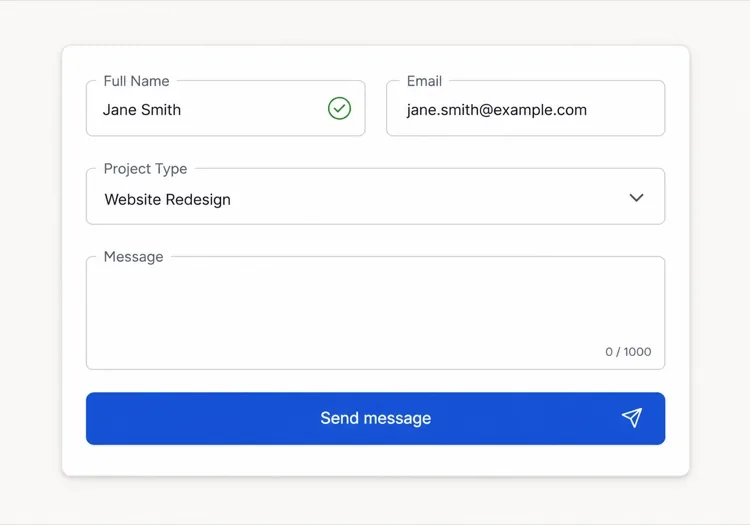
Create an agency inquiry form in a light card: full name, work email, a project type select (Brand Identity, Web Design, Motion, Other), a budget radio group (Under $5k, $5k-$20k, $20k+) wrapped in a fieldset with a legend, and a message textarea. Mark the select and the radio group required but validate on submit, not on mount, so the form never opens already covered in red. Collect the failures into an error summary above the card with in-page links to each field, set aria-invalid and aria-describedby on the offenders, and move focus to the summary heading. Show a pending state on the button, a success panel replacing the card, and a failure banner that preserves every answer.

In MeDo testen
BranchingSwitchboard

Sales or Support Split Form

One URL, two queues. Stops enterprise leads from landing in the bug tracker without asking you to maintain two contact pages that drift apart.

Create a contact form that opens with a two-option segmented control — Sales inquiry or Support request — built from radio inputs in a fieldset, and swaps the fields beneath it. Sales shows company, team size and budget; Support shows account email, affected feature and a severity select. Announce the swap through an aria-live="polite" region and move focus to the first field of the new branch. Validate only the visible branch, keep the hidden branch out of the submitted payload, and wire every error to its input with aria-describedby and aria-invalid. On submit show a pending button, then a success message naming the queue the request went to. Rate-limit repeat submissions from the same session and include a hidden honeypot.

In MeDo testen
High trustChambers

Confidential Consultation Form

For regulated practices, where the reassurance copy next to the submit button does more work than the field layout does. Say what happens to the data before you ask for it.

Create a consultation request form for a law or financial practice: full name, email, phone with a format hint in the label rather than as placeholder-only text, a matter type select for routing, a preferred contact method radio group, and a details textarea with a note that this form is not privileged communication. Put a one-line confidentiality statement directly above the submit button, not in the footer. Validate on blur, expose errors through aria-describedby, and set aria-invalid on failures. Submit button reads Request a confidential consultation, goes to a disabled pending state, then a success panel stating the response window and an alternative phone number. On failure show the error inline and never clear the textarea.

In MeDo testen
Two columnLedger

Contact Details Beside the Form

Form on the right, address, hours and direct email on the left. Cuts the volume of people who fill in a form to ask a question the sidebar already answered.

Create a two-column contact section: on the left, an office address, opening hours, a direct email and phone as real mailto and tel links; on the right, a card form with name, email, subject select and message. Stack the columns on mobile with the form first. Labels are always visible, errors validate on blur and attach via aria-describedby with aria-invalid on the input, and the submit button moves through idle, pending with a role="status" spinner, and success states. On failure show a banner above the form, focus it, and keep all values. Add a honeypot input hidden from assistive technology and a timestamp check to drop bot submissions.

In MeDo testen
Multi stepEnquire

Three-Step Contact Wizard

Splits a long inquiry into three short screens with a step indicator. Only pays off past about eight fields — below that the wizard adds clicks and removes context.

Create a three-step contact wizard: step one collects name and email, step two collects project type, budget and timeline, step three shows a message textarea and a read-only review of the earlier answers. Render a step indicator with aria-current="step" on the active item. Validate the current step before allowing Next, focus the first invalid field, and expose errors with aria-describedby and aria-invalid. Keep all answers in state so Back never loses data. The final submit shows a pending state, then a success screen replacing the wizard, and on failure returns to step three with a retry banner and every answer intact. Include a honeypot field.

In MeDo testen

So passen Sie Ihre Kontaktformular an

Fragen Sie nur nach dem, was Sie tatsächlich verwenden

Jedes zusätzliche Feld reduziert die Ausfüllrate. Prüfen Sie Ihr Formular: Wenn Sie nicht beschreiben können, wie ein Feld Ihre Reaktion auf die Einsendung beeinflusst, entfernen Sie es. Name, E-Mail und eine qualifizierende Frage reichen oft aus, um ein Gespräch zu beginnen.

Schreiben Sie Validierungsfehler, die leiten, nicht tadeln

Ersetzen Sie Meldungen wie „Ungültige E-Mail" durch „Bitte geben Sie eine gültige E-Mail-Adresse ein, z. B. sie@beispiel.de". Spezifischer, handlungsorientierter Fehlertext reduziert die Wiedereinreichungs-Reibung und schafft Vertrauen bei Besuchern, die ehrliche Fehler machen.

Gestalten Sie Ihren Erfolgszustand so sorgfältig wie das Formular selbst

Die Post-Submit-Bestätigung ist auf den meisten Websites eine verpasste Chance. Nutzen Sie sie, um Erwartungen zu setzen („Wir antworten innerhalb eines Werktages"), eine Alternative anzubieten („Oder buchen Sie direkt einen Anruf") oder Ihre Markenstimme zu verstärken — nicht nur ein generisches „Danke".

Verwenden Sie bedingte Felder, um das Formular kurz zu halten

Zeigen Sie zusätzliche Fragen nur an, wenn sie für frühere Antworten relevant sind — z. B. ein Budget-Feld erst nach Auswahl von „Neues Projekt". Bedingte Logik reduziert die wahrgenommene Länge und fokussiert jeden Besucher auf genau die Eingaben, die für seine Situation relevant sind.

Wer die Kontaktformular-Komponente nutzt

Kreativagentur oder Freelancer

Agentur-Kontaktformulare enthalten typischerweise eine Projekttyp-Auswahl, einen Budgetbereich und ein Zeitplan-Feld neben Name und E-Mail — damit das Studio genug Kontext hat, um eingehende Leads vor der ersten Antwort zu qualifizieren und zu priorisieren.

SaaS oder Tech-Produkt

Produkt-Kontaktformulare verzweigen häufig am Anfang in „Vertriebsanfrage" und „Support-Anfrage" und zeigen dann pro Pfad relevante Felder an — so bleiben Enterprise-Leads von Bug-Berichten getrennt, ohne zwei separate Seiten zu erfordern.

Professionelle Dienstleistungen (Recht, Finanzen, Gesundheit)

Hochvertrauens-Kontaktformulare in regulierten Branchen betonen Vertraulichkeitszusicherungen, enthalten ein Anliegen-Typ-Dropdown zur Weiterleitung und ersetzen generische Submit-Buttons durch Texte wie „Vertrauliche Beratung anfragen".

Event oder Konferenz

Event-Anfrageformulare fragen nach Teilnahmetyp, Unternehmensgröße für Sponsoring-Stufen und bevorzugten Sitzungsthemen — und dienen gleichzeitig als Lead-Capture und Zielgruppensegmentierungs-Tool, noch bevor die Veranstaltung beginnt.

Kontaktformular-Muster für verschiedene Websites

Dieselbe kontaktformular-Komponente, abgestimmt auf die Art der Website, auf der sie läuft.

01 / 06

Agency and Studio Contact Forms

Project type, budget band and timeline earn their place here because they decide reply order, not because they look thorough. The one field to cut first is company website — you can find it from the email domain in less time than the visitor spends typing it.

Kontaktformular-Stile und -Varianten

Wählen Sie die Variante, die zum Rest der Seite passt, und generieren Sie sie.

01 / 06

Card Form With Visible Labels

A bordered card, one column, labels above every input. The most boring option and the one that tests best, because a label above the field survives autofill, zoom and translation without collapsing into the value.

Kontaktformular in React, Next.js, Vue und Svelte

React, Next.js, Vue 3, SvelteKit, Astro oder reines HTML — dieselbe kontaktformular, sechs Wege zur Einbindung.

01 / 06

React Contact Form

Keep the form uncontrolled and read values from FormData on submit — controlled state on every field re-renders the whole form on each keystroke for no benefit. Hold only errors and status in state.

src/components/ContactForm.tsx

export function ContactForm() {
  const [status, setStatus] = useState('idle')

  async function onSubmit(e) {
    e.preventDefault()
    setStatus('pending')
    const data = new FormData(e.currentTarget)
    const res = await send(data)
    setStatus(res.ok ? 'success' : 'error')
  }

  return <form onSubmit={onSubmit} noValidate>{/* fields */}</form>
}

So fügen Sie Ihre Kontaktformular einem Projekt hinzu

Vier Schritte, von der Auswahl einer kontaktformular-Vorlage bis zum Einsatz in der Produktion.

01~30s

Pick a Contact Form Template

Match the template to how you triage replies — three fields if every message goes to one inbox, the branching form if sales and support are different queues.

02~10s

Copy the Prompt

Paste it into MeDo, Lovable, Bolt, v0 or Cursor. Replace the placeholder select options with your real ones first, since the option list is what determines the routing you have to build behind it.

03~2min

Generate and Refine

You get React + Tailwind with a live preview. Follow up in plain English — "validate on blur, not on change", "add an error summary above the card", "keep the values on a failed submit".

04~2min

Wire Up the Submit Handler

Point the action at a serverless function, Resend, Formspree or your own API. Test the failure path before shipping: a form that silently drops a message is worse than no form at all.

Häufige Fragen zu Kontaktformular

Was ist ein KI-Kontaktformular-Generator?

Ein KI-Kontaktformular-Generator nimmt eine Beschreibung in natürlicher Sprache über die gewünschten Felder, Validierungsregeln und das Design entgegen und erzeugt eine vollständige, gestaltete Formularkomponente mit funktionierendem Code. MeDo generiert die gesamte Komponente — Layout, Labels, Fehlerzustände, Erfolgszustand und Barrierefreiheitsattribute — damit Sie sie direkt in Ihr Projekt einbinden können.

Wie erstelle ich ein Kontaktformular mit KI?

Öffnen Sie MeDo und beschreiben Sie Ihr Formular auf Deutsch: listen Sie die benötigten Felder, Validierungsanforderungen, den visuellen Stil und spezielle Verhaltensweisen wie bedingte Felder oder eine individuelle Erfolgsmeldung auf. MeDo generiert die Komponente sofort. Sie können sie mit Folgeprompts verfeinern — Feldtyp ändern, Validierung anpassen oder Layout neu gestalten — bis sie genau richtig ist.

Welches ist das beste KI-Tool zum Erstellen von Kontaktformularen?

MeDo ist speziell für die Generierung einzelner UI-Komponenten aus Prompts entwickelt, einschließlich Kontaktformulare. Im Gegensatz zu allgemeinen KI-Chat-Tools versteht MeDo Formular-Barrierefreiheit (ARIA-Labels, Tastaturnavigation, Fokus-Management), Validierungsmuster und Komponentenstruktur — sodass die Ausgabe produktionsreif ist, nicht nur plausibler Code.

Kann KI ein Kontaktformular mit Validierung generieren?

Ja. Wenn Sie Validierungsanforderungen in Ihren Prompt aufnehmen — z. B. „Pflichtfelder", „gültiges E-Mail-Format" oder „mindestens 20 Zeichen im Nachrichtenfeld" — generiert MeDo Inline-Validierungslogik zusammen mit der Komponente. Sie können auch nach spezifischen Validierungsbibliotheken oder nativer HTML5-Constraint-Validierung fragen, je nach Ihrem Stack.

Wie füge ich ein Kontaktformular ohne Plugin zu meiner Website hinzu?

Generieren Sie die Formularkomponente mit MeDo und verbinden Sie den Submit-Handler mit einem beliebigen HTTP-Endpunkt — einer serverlosen Funktion, einem Formularverarbeitungsdienst wie Resend oder Formspree, oder Ihrer eigenen Backend-API. Da MeDo sauberen Komponentencode ohne externe Formular-Bibliotheks-Abhängigkeiten produziert, behalten Sie die volle Kontrolle über die Übermittlungslogik und das Daten-Routing.

Welche Felder sollte ein Kontaktformular enthalten?

Ein Kontaktformular benötigt mindestens ein Namensfeld, ein E-Mail-Adressfeld und ein Nachrichten-Textarea. Darüber hinaus fügen Sie nur Felder hinzu, die Ihre Reaktion verändern: eine Betreff- oder Projekttyp-Auswahl zur Weiterleitung, ein Telefon-Feld für Anrufangebote oder einen Budgetbereich für Dienstleistungsunternehmen. Jedes zusätzliche Pflichtfeld erhöht die Abbruchrate, halten Sie die Standardversion kurz und verwenden Sie bedingte Logik für Erweiterungen.
