MeDo

AI 문의 양식 생성기.

필요한 필드, 원하는 톤, 중요한 유효성 검사 규칙을 설명하세요 — MeDo가 프롬프트를 몇 초 만에 완전하고 접근성 높은 문의 양식 컴포넌트로 변환합니다.

문의 양식
문의 양식

모든 웹사이트에는 훌륭한 문의 양식이 필요합니다

문의 양식은 방문자가 리드가 되기 전에 마지막으로 상호작용하는 컴포넌트인 경우가 많지만, 대부분은 뒷전으로 밀려납니다. 부실한 필드 디자인, 누락된 유효성 검사, 혼란스러운 오류 상태는 의도의 순간에 정확히 전환을 죽이는 마찰을 만듭니다. 잘 설계된 문의 양식은 전문성을 전달하고, 이탈을 줄이며, 적절한 사람들이 쉽게 연락할 수 있게 합니다.

템플릿 6개

생성할 수 있는 문의 양식 템플릿

모든 템플릿은 스크린샷이 아니라 실제 프롬프트입니다. 어떤 AI 에디터에든 붙여넣거나 MeDo에서 실행해 React + Tailwind 코드를 그대로 받으세요.

BasicInquiry

Name, Email, Message Form

Three fields and nothing else. The right default when you have no routing logic yet — every field you add past this point has to justify itself against a measurable drop in completions.

Create a three-field contact form — full name, email, message — inside a bordered card. Every input gets a visible label tied by htmlFor, and validates on blur rather than on every keystroke: name non-empty, email checked against a permissive pattern, message at least twenty characters with a live counter. Render each error in a span referenced by aria-describedby and set aria-invalid on the failing input. On submit, disable the button, swap its label for a spinner with role="status", then replace the card with a confirmation that names the reply window. On failure keep every typed value, show a retry banner and move focus to it. Add a honeypot field and a minimum time-to-submit check instead of a CAPTCHA.


MeDo에서 시도하기
QualifyingStudio

Project Type and Budget Form

Adds the two questions that decide whether you reply today or next week. Worth the extra friction for service businesses, wasteful for anything self-serve.

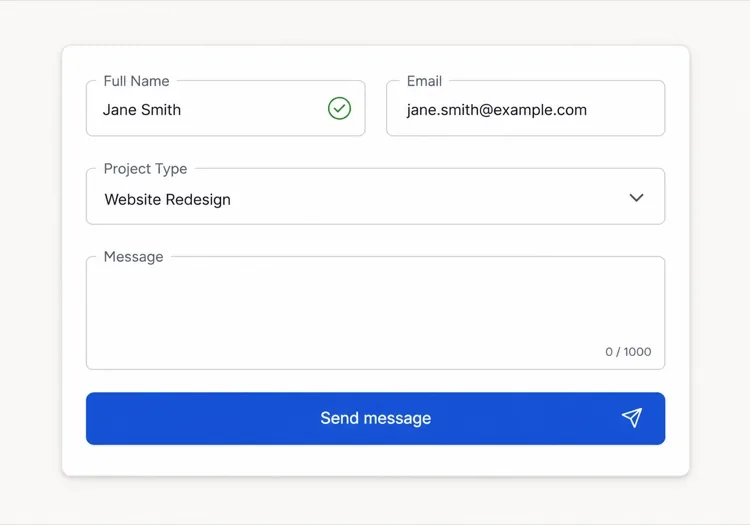
Create an agency inquiry form in a light card: full name, work email, a project type select (Brand Identity, Web Design, Motion, Other), a budget radio group (Under $5k, $5k-$20k, $20k+) wrapped in a fieldset with a legend, and a message textarea. Mark the select and the radio group required but validate on submit, not on mount, so the form never opens already covered in red. Collect the failures into an error summary above the card with in-page links to each field, set aria-invalid and aria-describedby on the offenders, and move focus to the summary heading. Show a pending state on the button, a success panel replacing the card, and a failure banner that preserves every answer.

MeDo에서 시도하기
BranchingSwitchboard

Sales or Support Split Form

One URL, two queues. Stops enterprise leads from landing in the bug tracker without asking you to maintain two contact pages that drift apart.

Create a contact form that opens with a two-option segmented control — Sales inquiry or Support request — built from radio inputs in a fieldset, and swaps the fields beneath it. Sales shows company, team size and budget; Support shows account email, affected feature and a severity select. Announce the swap through an aria-live="polite" region and move focus to the first field of the new branch. Validate only the visible branch, keep the hidden branch out of the submitted payload, and wire every error to its input with aria-describedby and aria-invalid. On submit show a pending button, then a success message naming the queue the request went to. Rate-limit repeat submissions from the same session and include a hidden honeypot.

MeDo에서 시도하기
High trustChambers

Confidential Consultation Form

For regulated practices, where the reassurance copy next to the submit button does more work than the field layout does. Say what happens to the data before you ask for it.

Create a consultation request form for a law or financial practice: full name, email, phone with a format hint in the label rather than as placeholder-only text, a matter type select for routing, a preferred contact method radio group, and a details textarea with a note that this form is not privileged communication. Put a one-line confidentiality statement directly above the submit button, not in the footer. Validate on blur, expose errors through aria-describedby, and set aria-invalid on failures. Submit button reads Request a confidential consultation, goes to a disabled pending state, then a success panel stating the response window and an alternative phone number. On failure show the error inline and never clear the textarea.

MeDo에서 시도하기
Two columnLedger

Contact Details Beside the Form

Form on the right, address, hours and direct email on the left. Cuts the volume of people who fill in a form to ask a question the sidebar already answered.

Create a two-column contact section: on the left, an office address, opening hours, a direct email and phone as real mailto and tel links; on the right, a card form with name, email, subject select and message. Stack the columns on mobile with the form first. Labels are always visible, errors validate on blur and attach via aria-describedby with aria-invalid on the input, and the submit button moves through idle, pending with a role="status" spinner, and success states. On failure show a banner above the form, focus it, and keep all values. Add a honeypot input hidden from assistive technology and a timestamp check to drop bot submissions.

MeDo에서 시도하기
Multi stepEnquire

Three-Step Contact Wizard

Splits a long inquiry into three short screens with a step indicator. Only pays off past about eight fields — below that the wizard adds clicks and removes context.

Create a three-step contact wizard: step one collects name and email, step two collects project type, budget and timeline, step three shows a message textarea and a read-only review of the earlier answers. Render a step indicator with aria-current="step" on the active item. Validate the current step before allowing Next, focus the first invalid field, and expose errors with aria-describedby and aria-invalid. Keep all answers in state so Back never loses data. The final submit shows a pending state, then a success screen replacing the wizard, and on failure returns to step three with a retry banner and every answer intact. Include a honeypot field.

MeDo에서 시도하기

문의 양식 커스터마이즈 방법

실제로 사용할 정보만 요청하세요

추가 필드가 늘어날수록 완료율은 떨어집니다. 양식을 점검하세요: 해당 필드가 제출에 대한 응답에 어떤 영향을 미치는지 설명할 수 없다면 제거하세요. 이름, 이메일, 그리고 하나의 적격 질문만으로도 대화를 시작하기에 충분한 경우가 많습니다.

꾸짖는 것이 아닌 안내하는 유효성 검사 오류를 작성하세요

"유효하지 않은 이메일" 같은 메시지를 "유효한 이메일 주소를 입력해 주세요, 예: you@example.com"으로 교체하세요. 구체적이고 실행 가능한 오류 텍스트는 재제출 마찰을 줄이고 정직한 실수를 하는 방문자와의 신뢰를 구축합니다.

성공 상태를 양식 자체만큼 신중하게 디자인하세요

제출 후 확인 메시지는 대부분의 사이트에서 놓치는 기회입니다. 기대치를 설정하고("1영업일 이내에 답변합니다"), 대안을 제공하고("또는 직접 통화를 예약하세요"), 브랜드 보이스를 강화하는 데 사용하세요 — 단순한 "감사합니다"가 아닌.

조건부 필드를 사용하여 양식을 짧게 유지하세요

이전 답변과 관련 있을 때만 추가 질문을 표시하세요 — 예를 들어, 방문자가 "새 프로젝트"를 선택한 후에만 예산 필드를 표시. 조건 로직은 체감 길이를 줄이고 각 방문자를 자신의 상황에 중요한 입력에 정확히 집중시킵니다.

문의 양식 컴포넌트를 사용하는 사람

크리에이티브 에이전시 또는 프리랜서

에이전시 문의 양식은 일반적으로 이름과 이메일 외에 프로젝트 유형 선택기, 예산 범위, 일정 필드를 포함하여 — 첫 번째 답변 전에 수신 리드를 평가하고 우선순위를 정할 수 있는 충분한 맥락을 스튜디오에 제공합니다.

SaaS 또는 테크 제품

제품 문의 양식은 상단에서 "영업 문의" vs. "지원 요청"으로 분기한 후 각 경로별 관련 필드를 표시합니다 — 두 개의 별도 페이지 없이 엔터프라이즈 리드를 버그 리포트와 분리합니다.

전문 서비스 (법률, 금융, 의료)

규제 산업의 고신뢰 문의 양식은 기밀 보장을 강조하고, 라우팅을 위한 안건 유형 드롭다운을 포함하며, 일반적인 제출 버튼을 "기밀 상담 요청"과 같은 문구로 대체합니다.

이벤트 또는 컨퍼런스 사이트

이벤트 문의 양식은 참석 유형, 스폰서십 티어를 위한 회사 규모, 선호 세션 주제를 묻습니다 — 이벤트가 시작되기 전부터 리드 캡처와 오디언스 세그먼테이션 도구로 동시에 기능합니다.

웹사이트 유형별 문의 양식 패턴

같은 문의 양식 컴포넌트를 게시되는 사이트 유형에 맞춰 조정합니다.

01 / 06

Agency and Studio Contact Forms

Project type, budget band and timeline earn their place here because they decide reply order, not because they look thorough. The one field to cut first is company website — you can find it from the email domain in less time than the visitor spends typing it.

문의 양식 스타일과 변형

페이지의 나머지 부분과 어울리는 변형을 골라 바로 생성하세요.

01 / 06

Card Form With Visible Labels

A bordered card, one column, labels above every input. The most boring option and the one that tests best, because a label above the field survives autofill, zoom and translation without collapsing into the value.

React, Next.js, Vue, Svelte에서의 문의 양식

React, Next.js, Vue 3, SvelteKit, Astro 또는 순수 HTML — 같은 문의 양식을 여섯 가지 방식으로 넣을 수 있습니다.

01 / 06

React Contact Form

Keep the form uncontrolled and read values from FormData on submit — controlled state on every field re-renders the whole form on each keystroke for no benefit. Hold only errors and status in state.

src/components/ContactForm.tsx

export function ContactForm() {
  const [status, setStatus] = useState('idle')

  async function onSubmit(e) {
    e.preventDefault()
    setStatus('pending')
    const data = new FormData(e.currentTarget)
    const res = await send(data)
    setStatus(res.ok ? 'success' : 'error')
  }

  return <form onSubmit={onSubmit} noValidate>{/* fields */}</form>
}

문의 양식을 프로젝트에 추가하는 방법

문의 양식 템플릿을 고르고 프로덕션에 배포하기까지 네 단계.

01~30s

Pick a Contact Form Template

Match the template to how you triage replies — three fields if every message goes to one inbox, the branching form if sales and support are different queues.

02~10s

Copy the Prompt

Paste it into MeDo, Lovable, Bolt, v0 or Cursor. Replace the placeholder select options with your real ones first, since the option list is what determines the routing you have to build behind it.

03~2min

Generate and Refine

You get React + Tailwind with a live preview. Follow up in plain English — "validate on blur, not on change", "add an error summary above the card", "keep the values on a failed submit".

04~2min

Wire Up the Submit Handler

Point the action at a serverless function, Resend, Formspree or your own API. Test the failure path before shipping: a form that silently drops a message is worse than no form at all.

문의 양식에 대한 자주 묻는 질문

AI 문의 양식 생성기란 무엇인가요?

AI 문의 양식 생성기는 원하는 필드, 유효성 검사 규칙, 디자인에 대한 자연어 설명을 받아 작동하는 코드가 포함된 완전하고 스타일이 적용된 양식 컴포넌트를 생성합니다. MeDo는 전체 컴포넌트를 생성합니다 — 레이아웃, 라벨, 오류 상태, 성공 상태, 접근성 속성 — 프로젝트에 바로 넣을 수 있습니다.

AI로 문의 양식을 어떻게 만드나요?

MeDo를 열고 한국어로 양식을 설명하세요: 필요한 필드, 유효성 검사 요구 사항, 비주얼 스타일, 조건부 필드나 커스텀 성공 메시지 같은 특수 동작을 나열합니다. MeDo가 즉시 컴포넌트를 생성합니다. 후속 프롬프트로 개선할 수 있습니다 — 필드 유형 변경, 유효성 검사 조정, 레이아웃 재설계 — 완벽해질 때까지.

문의 양식을 만드는 데 가장 좋은 AI 도구는?

MeDo는 문의 양식을 포함한 개별 UI 컴포넌트를 프롬프트에서 생성하기 위해 특별히 설계되었습니다. 일반 AI 채팅 도구와 달리 MeDo는 양식 접근성(ARIA 라벨, 키보드 내비게이션, 포커스 관리), 유효성 검사 패턴, 컴포넌트 구조를 이해하므로 — 출력은 프로덕션 준비 상태이며, 그럴듯해 보이기만 하는 코드가 아닙니다.

AI가 유효성 검사가 포함된 문의 양식을 생성할 수 있나요?

네. 프롬프트에 유효성 검사 요구 사항을 포함하면 — 예를 들어 "필수 필드", "유효한 이메일 형식", "메시지 필드 최소 20자" — MeDo가 컴포넌트와 함께 인라인 유효성 검사 로직을 생성합니다. 스택에 따라 특정 유효성 검사 라이브러리나 네이티브 HTML5 제약 유효성 검사를 요청할 수도 있습니다.

플러그인 없이 웹사이트에 문의 양식을 추가하는 방법은?

MeDo로 양식 컴포넌트를 생성한 후 제출 핸들러를 원하는 HTTP 엔드포인트에 연결하세요 — 서버리스 함수, Resend나 Formspree 같은 양식 처리 서비스, 또는 자체 백엔드 API. MeDo는 외부 양식 라이브러리 의존성 없이 깨끗한 컴포넌트 코드를 생성하므로 제출 로직과 데이터 라우팅에 대한 완전한 제어를 유지합니다.

문의 양식에는 어떤 필드를 포함해야 하나요?

최소한 문의 양식에는 이름 필드, 이메일 주소 필드, 메시지 텍스트 영역이 필요합니다. 그 이상은 응답 방식을 바꾸는 필드만 추가하세요: 라우팅을 위한 주제 또는 프로젝트 유형 선택기, 통화를 제공하는 경우 전화 필드, 서비스 기업의 예산 범위. 추가 필수 필드는 이탈을 증가시키므로 기본값은 짧게 유지하고 관련이 있을 때 조건 로직으로 확장하세요.
