MeDo

AI ब्लॉग सेक्शन जेनरेटर।

जो ब्लॉग लेआउट चाहते हैं उसका विवरण दें — कार्ड स्टाइल, पोस्ट की संख्या, फीचर्ड आर्टिकल, कैटेगरी फिल्टर — और MeDo पूरा कॉम्पोनेंट बना देता है। एक भी CSS ग्रिड प्रॉपर्टी को छुए बिना पॉलिश्ड ब्लॉग सेक्शन डिलीवर करें।

ब्लॉग सेक्शन
ब्लॉग सेक्शन

एक बेहतरीन ब्लॉग सेक्शन पाठकों को नियमित विज़िटर बनाता है।

आपका ब्लॉग SEO और विश्वास निर्माण के लिए आपके सबसे प्रभावशाली एसेट्स में से एक है — लेकिन तभी जब विज़िटर इसे ढूंढ और एक्सप्लोर कर सकें। एक अच्छी तरह से डिज़ाइन किया गया ब्लॉग सेक्शन तुरंत आपकी बेहतरीन सामग्री दिखाता है, दृश्यमान कैटेगरी के ज़रिए विषय-क्षेत्र में प्रभुत्व बताता है, और पाठकों को लैंडिंग पेज से कंटेंट फनल में ले जाता है। MeDo आपको जेनेरिक थीम में फिट होने के बजाय अपने ब्रांड और कंटेंट वॉल्यूम के अनुसार सटीक लेआउट बनाने देता है।

6 टेम्पलेट

ब्लॉग सेक्शन टेम्पलेट जो आप जेनरेट कर सकते हैं

हर टेम्पलेट एक असली प्रॉम्प्ट है, स्क्रीनशॉट नहीं। इसे किसी भी AI एडिटर में कॉपी करें, या MeDo में चलाकर React + Tailwind कोड सीधे पाएं।

Three cardAcme

Three-Card Homepage Preview

The smallest blog section that still looks intentional. Three posts and a View all link — enough to prove the blog is alive without turning a marketing page into an index.

Create a blog preview section with a section heading, a one-line subheading and a three-column card grid. Each card holds a 16:9 cover image in a fixed aspect-ratio box, a category pill above the title, a two-line title clamped with line-clamp-2, a two-line excerpt clamped with line-clamp-2, and a footer row with author name, publish date in a time element with a machine-readable datetime, and a reading-time estimate. Make the whole card one link with the heading as the accessible name rather than adding a separate Read more link. Below the grid, a centred View all posts link. Two columns on tablet, one on mobile, with the cover images lazy loaded.
MeDo में आज़माएं
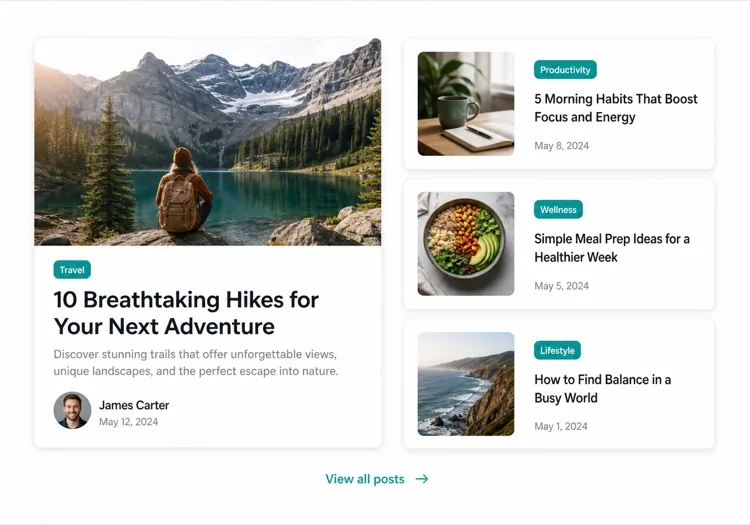
Featured splitEditorial

One Featured Post, Three Stacked

Creates a clear lead story, which an even grid never does. Only works if the featured post is genuinely your best — promoting whatever published last makes the asymmetry look arbitrary.

Create an asymmetric blog section: on the left, a featured post card taking about 60% of the width with a large 3:2 cover image, a category pill, a headline at display size, a three-line excerpt and an author row with avatar, date and reading time. On the right, three compact cards stacked vertically, each with a small square thumbnail on the left and a category, a two-line clamped title and a date on the right. Divide the stacked cards with hairline rules rather than shadows so they read as a list next to the feature. Stack the feature above the list on tablet and below on mobile, keeping the feature image eager loaded.

MeDo में आज़माएं
Index gridMega

Paginated Post Index

The standalone blog page rather than a homepage teaser. Nine cards is the ceiling before the grid stops being scannable — past that, pagination beats a longer page or infinite scroll.

Create a blog index section: a page heading, a horizontal row of category filter chips, and a nine-card grid at three columns. Each card carries a cover image in a fixed 16:9 box, a category pill, a clamped two-line title, a clamped two-line excerpt, and a meta row with author, a time element for the date and a reading time. Below the grid, numbered pagination with previous and next controls, aria-current on the active page, and real anchor hrefs to /blog/page/2 so pages are crawlable and linkable rather than swapped in by client state. Show a labelled empty state when a filter returns nothing. Two columns on tablet, one on mobile.

MeDo में आज़माएं
Text listLedger

Dated List With No Images

No thumbnails, just date, title and one line of description. Faster to scan than any card grid and the honest choice when your posts have no cover art — a grid of stock photography reads worse than plain text.

Create an image-free blog list: rows separated by hairline rules, each row showing a left-aligned date in a fixed-width muted column, then the post title as a link at large text size, a one-line clamped description beneath it, and a right-aligned reading time. Group the rows under year headings when the list spans multiple years. Give each row a full-width hover background so the whole row reads as the hit target, and keep the vertical rhythm tight so twenty posts fit in two screens. Stack the date above the title on mobile. Use an ordered list with time elements for the dates.

MeDo में आज़माएं
Category tabsStudio

Topic Tabs Over a Card Grid

Turns a mixed blog into something a reader can navigate by interest. Needs at least a few posts per tab — a tab that opens onto two articles makes the blog look thinner than one undivided grid would.

Create a blog section with topic tabs above a six-card grid: tabs labelled All, Engineering, Design and Product with a post count beside each. Use real tab semantics — a tablist with arrow-key navigation, aria-selected, and managed focus — and reflect the active tab in the URL so a topic view is linkable. Switching a tab swaps the card set with a short fade rather than a layout jump, and keeps the grid height stable by always rendering a fixed number of card slots. Each card has a cover image, category pill, clamped title and excerpt, and a meta row with author and date. Announce the result count in an aria-live region.

MeDo में आज़माएं
ChangelogShipfast

Release Notes Timeline

A blog section for product updates, where version and date matter more than a cover image. Keep the newest entry expanded and the rest collapsed so the page opens on what changed most recently.

Create a changelog-style blog section: a vertical timeline with a left rail of dots and connecting line, each entry showing a version tag, a date in a time element, a type pill for Added, Fixed or Changed, a title and a two-to-three sentence summary. Expand the most recent entry by default and render the rest as collapsed disclosure panels using button plus aria-expanded so keyboard users can open them. Add anchor links on each version so a specific release can be linked directly, and a Subscribe to updates link at the top of the section. Collapse the left rail to a simple stacked list on mobile.

MeDo में आज़माएं

अपने ब्लॉग सेक्शन को कैसे कस्टमाइज़ करें

फीचर्ड पोस्ट से शुरुआत करें

अपने सबसे महत्वपूर्ण आर्टिकल को बड़े कार्ड से हाइलाइट करें — फुल-विड्थ कवर इमेज, लंबा एक्सर्प्ट और अलग विज़ुअल ट्रीटमेंट शामिल करें। MeDo को बताएं कि कौन सी पोस्ट "featured" है और वह असिमेट्रिक लेआउट अपने आप बना देगा।

कैटेगरी या टैग फिल्टर जोड़ें

यदि आप कई विषयों पर पोस्ट करते हैं, तो MeDo से ग्रिड के ऊपर हॉरिज़ॉन्टल फिल्टर बार शामिल करने को कहें। इससे आपका ब्लॉग सेक्शन एक सेल्फ-सर्विस डिस्कवरी टूल बन जाता है और पाठक पेज पर अधिक समय बिताते हैं।

ऑथर कॉन्टेक्स्ट दिखाएं

ऑथर अवतार, नाम और रीड-टाइम अनुमान शामिल करने से विश्वास बनता है और पाठक की अपेक्षाएं सेट होती हैं। इन मेटाडेटा फील्ड्स को प्रॉम्प्ट में उल्लेख करें और ये हर कार्ड में जुड़ जाएंगे।

पोस्ट काउंट से कार्ड डेंसिटी कंट्रोल करें

बिल्कुल तय करें कि कितने पोस्ट दिखाने हैं — होमपेज प्रीव्यू के लिए तीन कार्ड, स्टैंडअलोन ब्लॉग इंडेक्स पेज के लिए छह से नौ। मार्केटिंग पेजों पर इनफाइनाइट ग्रिड से बचने के लिए "सभी देखें" CTA के साथ जोड़ें।

ब्लॉग सेक्शन कंपोनेंट का उपयोग कौन करता है

SaaS मार्केटिंग साइट

होमपेज पर तीन-कार्ड प्रीव्यू सेक्शन जो प्रोडक्ट ट्यूटोरियल, कस्टमर स्टोरी और रिलीज़ नोट्स से लिंक करता है — कन्वर्ज़न फ्लो को बाधित किए बिना ब्लॉग ट्रैफिक लाता है।

कंटेंट-फर्स्ट पब्लिकेशन

हीरो आर्टिकल, कैटेगरी टैब और पेजिनेटेड कार्ड ग्रिड के साथ फुल-विड्थ एडिटोरियल लेआउट — एक प्रोफेशनल पब्लिकेशन से पाठकों की सभी अपेक्षाएं पूरी करता है।

एजेंसी या स्टूडियो

केस स्टडी और थॉट-लीडरशिप पोस्ट का मिनिमल दो-कॉलम मोज़ेक, जो संभावित क्लाइंट को क्लिक करने से पहले ही एक्सपर्टीज़ की गहराई दिखाता है।

ई-कॉमर्स ब्रांड

बड़ी इमेज और छोटे टीज़र के साथ लाइफस्टाइल ब्लॉग सेक्शन जो खरीदारी गाइड, ट्रेंड राउंडअप और बिहाइंड-द-सीन स्टोरी से लिंक करता है और खरीदारी का इरादा बढ़ाता है।

अलग-अलग वेबसाइटों के लिए ब्लॉग सेक्शन पैटर्न

वही ब्लॉग सेक्शन कंपोनेंट, उस वेबसाइट के प्रकार के हिसाब से ढाला गया जहाँ वह लगेगा।

01 / 06

SaaS Marketing Blog Section

A three-card teaser on the homepage, not an index. The job is proving the product is maintained and that someone is writing about the problem, so lead with the tutorial or customer story — release notes belong in their own changelog, not competing for the same three slots.

ब्लॉग सेक्शन की शैलियाँ और वेरिएंट

जो वेरिएंट बाकी पेज से मेल खाता है उसे चुनें और जेनरेट करें।

01 / 06

Three-Card Grid

Equal cards in one row with a View all link beneath. The right default on a marketing page where the blog is supporting evidence rather than the destination, and it stays honest when you have only published a handful of posts.

React, Next.js, Vue और Svelte में ब्लॉग सेक्शन

React, Next.js, Vue 3, SvelteKit, Astro या सादा HTML — वही ब्लॉग सेक्शन, जोड़ने के छह तरीके।

01 / 06

React Blog Section

Keep the posts in one typed array and let the card be a pure function of a post. No state is needed unless you add filters, which is what makes this section safe to render on the server.

src/components/BlogSection.tsx

type Post = { slug: string; title: string; excerpt: string; date: string; minutes: number }

export function BlogSection({ posts }: { posts: Post[] }) {
  return (
    <ul className="grid gap-8 md:grid-cols-3">
      {posts.map((post) => (
        <PostCard key={post.slug} post={post} />
      ))}
    </ul>
  )
}

अपने ब्लॉग सेक्शन को प्रोजेक्ट में कैसे जोड़ें

ब्लॉग सेक्शन टेम्पलेट चुनने से प्रोडक्शन में भेजने तक, चार चरण।

01~30s

Pick a Blog Layout

Choose by post volume and by whether you have cover art — three cards for a homepage teaser, a featured split when one post should lead, a dated list when the posts have no images worth showing.

02~10s

Copy the Prompt

Take the prompt into MeDo, or paste it into Lovable, Bolt, v0 or Cursor. Name the metadata you actually have first — author, reading time, category — since a card designed around fields you cannot populate is the usual reason these sections get rebuilt.

03~1min

Generate and Refine

You get React + Tailwind back with a live preview. Follow up in plain English — "clamp titles to two lines", "drop the excerpt on mobile", "move the category above the title" — instead of tuning class strings by hand.

04~2min

Connect Your Posts

Point the component at your real source — an MDX directory, a content collection or a CMS query — and map the fields once. Sort by date server-side and let the card stay a pure function of a post.

ब्लॉग सेक्शन के बारे में सामान्य प्रश्न

AI से ब्लॉग सेक्शन कैसे बनाएं?

MeDo खोलें और जरूरी ब्लॉग लेआउट का विवरण दें — कार्ड स्टाइल, पोस्ट की संख्या, फीचर्ड आर्टिकल चाहिए या नहीं, कौन से मेटाडेटा फील्ड दिखाने हैं (ऑथर, डेट, रीड टाइम) और कोई फिल्टर। MeDo कुछ ही सेकंड में पूरा कॉम्पोनेंट कोड तैयार कर देता है। फिर आप इसे अपने प्रोजेक्ट में कॉपी कर सकते हैं और फॉलो-अप प्रॉम्प्ट से रिफाइन कर सकते हैं।

सबसे अच्छा AI ब्लॉग सेक्शन जेनरेटर कौन सा है?

MeDo को खास तौर पर सिर्फ डिज़ाइन मॉकअप नहीं, बल्कि असली वेबसाइट कॉम्पोनेंट बनाने के लिए बनाया गया है। सामान्य AI चैट टूल्स के विपरीत, MeDo लेआउट सिस्टम, कार्ड पैटर्न और रेस्पॉन्सिव बिहेवियर को समझता है — इसलिए आपका ब्लॉग सेक्शन भारी एडिटिंग की ज़रूरत वाले कच्चे शुरुआती पॉइंट की बजाय क्लीन, प्रोडक्शन-रेडी कोड के रूप में निकलता है।

क्या AI रेस्पॉन्सिव ब्लॉग कार्ड ग्रिड बना सकता है?

हां। MeDo रेस्पॉन्सिव-फर्स्ट कॉम्पोनेंट बनाता है। डेस्कटॉप साइज पर कितने कॉलम चाहिए बताएं और वह ब्रेकपॉइंट्स अपने आप हैंडल कर लेता है — आपकी ओर से बिना किसी अतिरिक्त मेहनत के मोबाइल पर सिंगल-कॉलम स्टैक में बदल जाता है।

AI-जेनरेटेड ब्लॉग सेक्शन में कैटेगरी फिल्टर कैसे जोड़ें?

प्रॉम्प्ट में फिल्टर की ज़रूरत शामिल करें — उदाहरण के लिए, "कार्ड ग्रिड के ऊपर डिज़ाइन, इंजीनियरिंग और प्रोडक्ट के लिए कैटेगरी फिल्टर टैब जोड़ें।" MeDo फिल्टर UI और मेल खाती कंडीशनल डिस्प्ले लॉजिक जेनरेट करेगा।

क्या मैं AI से फीचर्ड ब्लॉग पोस्ट लेआउट बना सकता हूं?

बिल्कुल। MeDo से एक बड़े फीचर्ड कार्ड और उसके बगल में छोटे सेकेंडरी कार्ड वाला असिमेट्रिक लेआउट बनाने को कहें। यह एडिटोरियल पैटर्न कॉर्नरस्टोन कंटेंट को हाइलाइट करते हुए कई हालिया पोस्ट दिखाने के सबसे प्रभावशाली तरीकों में से एक है।

क्या AI-जेनरेटेड ब्लॉग सेक्शन में ऑथर और डेट मेटाडेटा शामिल होता है?

हां — बस प्रॉम्प्ट में जो मेटाडेटा चाहते हैं उसका उल्लेख करें। MeDo ऑथर नाम और अवतार, पब्लिश डेट, अनुमानित रीड टाइम, कैटेगरी टैग और एक्सर्प्ट शामिल कर सकता है। आप तय करते हैं कि हर कार्ड पर क्या दिखे।

अभी अपना ब्लॉग सेक्शन जेनरेट करें।

कोई भी प्रॉम्प्ट आज़माएं — मुफ्त, कोई साइन अप नहीं।
