MeDo

مولّد نماذج الاتصال بالذكاء الاصطناعي.

صِف الحقول التي تحتاجها، والنبرة التي تريدها، وقواعد التحقق المهمة — MeDo يحوّل أمرك النصي إلى مكوّن نموذج اتصال كامل وسهل الوصول في ثوانٍ.

نموذج اتصال
نموذج اتصال

كل موقع يحتاج نموذج اتصال رائع

نموذج الاتصال غالباً ما يكون آخر مكوّن يتفاعل معه الزائر قبل أن يصبح عميلاً محتملاً — ومع ذلك فإن معظمها فكرة لاحقة. تصميم الحقول السيء، والتحقق المفقود، وحالات الخطأ المربكة تخلق احتكاكاً يقتل التحويلات في لحظة النية بالضبط. نموذج اتصال مصمم جيداً يشير إلى الاحترافية، ويقلل معدل المغادرة، ويسهّل على الأشخاص المناسبين الوصول إليك.

6 قالبًا

قوالب نموذج اتصال التي يمكنك توليدها

كل قالب هو طلب حقيقي لا صورة. انسخه إلى أي محرّر ذكاء اصطناعي، أو شغّله في MeDo لتحصل على كود React و Tailwind مباشرة.

BasicInquiry

Name, Email, Message Form

Three fields and nothing else. The right default when you have no routing logic yet — every field you add past this point has to justify itself against a measurable drop in completions.

Create a three-field contact form — full name, email, message — inside a bordered card. Every input gets a visible label tied by htmlFor, and validates on blur rather than on every keystroke: name non-empty, email checked against a permissive pattern, message at least twenty characters with a live counter. Render each error in a span referenced by aria-describedby and set aria-invalid on the failing input. On submit, disable the button, swap its label for a spinner with role="status", then replace the card with a confirmation that names the reply window. On failure keep every typed value, show a retry banner and move focus to it. Add a honeypot field and a minimum time-to-submit check instead of a CAPTCHA.


جرّبه في MeDo
QualifyingStudio

Project Type and Budget Form

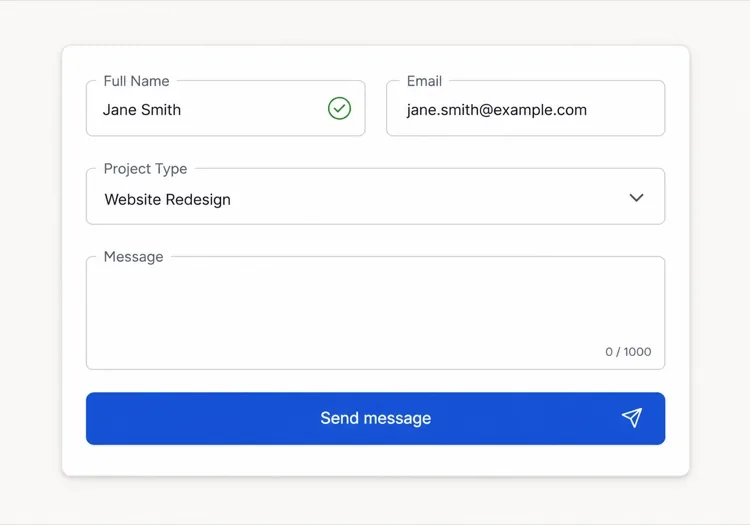
Adds the two questions that decide whether you reply today or next week. Worth the extra friction for service businesses, wasteful for anything self-serve.

Create an agency inquiry form in a light card: full name, work email, a project type select (Brand Identity, Web Design, Motion, Other), a budget radio group (Under $5k, $5k-$20k, $20k+) wrapped in a fieldset with a legend, and a message textarea. Mark the select and the radio group required but validate on submit, not on mount, so the form never opens already covered in red. Collect the failures into an error summary above the card with in-page links to each field, set aria-invalid and aria-describedby on the offenders, and move focus to the summary heading. Show a pending state on the button, a success panel replacing the card, and a failure banner that preserves every answer.

جرّبه في MeDo
BranchingSwitchboard

Sales or Support Split Form

One URL, two queues. Stops enterprise leads from landing in the bug tracker without asking you to maintain two contact pages that drift apart.

Create a contact form that opens with a two-option segmented control — Sales inquiry or Support request — built from radio inputs in a fieldset, and swaps the fields beneath it. Sales shows company, team size and budget; Support shows account email, affected feature and a severity select. Announce the swap through an aria-live="polite" region and move focus to the first field of the new branch. Validate only the visible branch, keep the hidden branch out of the submitted payload, and wire every error to its input with aria-describedby and aria-invalid. On submit show a pending button, then a success message naming the queue the request went to. Rate-limit repeat submissions from the same session and include a hidden honeypot.

جرّبه في MeDo
High trustChambers

Confidential Consultation Form

For regulated practices, where the reassurance copy next to the submit button does more work than the field layout does. Say what happens to the data before you ask for it.

Create a consultation request form for a law or financial practice: full name, email, phone with a format hint in the label rather than as placeholder-only text, a matter type select for routing, a preferred contact method radio group, and a details textarea with a note that this form is not privileged communication. Put a one-line confidentiality statement directly above the submit button, not in the footer. Validate on blur, expose errors through aria-describedby, and set aria-invalid on failures. Submit button reads Request a confidential consultation, goes to a disabled pending state, then a success panel stating the response window and an alternative phone number. On failure show the error inline and never clear the textarea.

جرّبه في MeDo
Two columnLedger

Contact Details Beside the Form

Form on the right, address, hours and direct email on the left. Cuts the volume of people who fill in a form to ask a question the sidebar already answered.

Create a two-column contact section: on the left, an office address, opening hours, a direct email and phone as real mailto and tel links; on the right, a card form with name, email, subject select and message. Stack the columns on mobile with the form first. Labels are always visible, errors validate on blur and attach via aria-describedby with aria-invalid on the input, and the submit button moves through idle, pending with a role="status" spinner, and success states. On failure show a banner above the form, focus it, and keep all values. Add a honeypot input hidden from assistive technology and a timestamp check to drop bot submissions.

جرّبه في MeDo
Multi stepEnquire

Three-Step Contact Wizard

Splits a long inquiry into three short screens with a step indicator. Only pays off past about eight fields — below that the wizard adds clicks and removes context.

Create a three-step contact wizard: step one collects name and email, step two collects project type, budget and timeline, step three shows a message textarea and a read-only review of the earlier answers. Render a step indicator with aria-current="step" on the active item. Validate the current step before allowing Next, focus the first invalid field, and expose errors with aria-describedby and aria-invalid. Keep all answers in state so Back never loses data. The final submit shows a pending state, then a success screen replacing the wizard, and on failure returns to step three with a retry banner and every answer intact. Include a honeypot field.

جرّبه في MeDo

كيف تخصّص نموذج اتصال الخاص بك

اسأل فقط عما ستستخدمه فعلاً

كل حقل إضافي يقلل معدلات الإكمال. راجع نموذجك: إذا لم تستطع وصف كيف يؤثر كل حقل على طريقة ردك على الإرسال، احذفه. الاسم والبريد الإلكتروني وسؤال تأهيلي واحد غالباً ما يكفي لبدء محادثة.

اكتب أخطاء تحقق ترشد لا توبّخ

استبدل رسائل مثل "بريد إلكتروني غير صالح" بـ "الرجاء إدخال عنوان بريد إلكتروني صحيح، مثل you@example.com". نص الخطأ المحدد والقابل للتنفيذ يقلل احتكاك إعادة الإرسال ويبني الثقة مع الزوار الذين يرتكبون أخطاء صادقة.

صمّم حالة النجاح بنفس عناية النموذج

تأكيد ما بعد الإرسال فرصة ضائعة في معظم المواقع. استخدمه لتحديد التوقعات ("نرد خلال يوم عمل واحد")، أو تقديم بديل ("أو احجز مكالمة مباشرة")، أو تعزيز صوت علامتك التجارية — ليس مجرد "شكراً" عام.

استخدم الحقول الشرطية لإبقاء النموذج قصيراً

اعرض أسئلة إضافية فقط عندما تكون ذات صلة بإجابات سابقة — مثلاً، إظهار حقل الميزانية فقط بعد اختيار "مشروع جديد". المنطق الشرطي يقلل الطول المُدرَك ويركّز كل زائر بالضبط على المدخلات المهمة لحالته.

من يستخدم مكوّن نموذج اتصال

وكالة إبداعية أو مستقل

نماذج اتصال الوكالات تتضمن عادةً محدد نوع المشروع، ونطاق الميزانية، وحقل الجدول الزمني إلى جانب الاسم والبريد الإلكتروني — مما يمنح الاستوديو سياقاً كافياً لتأهيل وترتيب أولويات العملاء المحتملين قبل الرد الأول.

SaaS أو منتج تقني

نماذج اتصال المنتجات غالباً ما تتفرع إلى "استفسار مبيعات" مقابل "طلب دعم" في الأعلى، ثم تعرض حقولاً ذات صلة لكل مسار — تفصل عملاء المؤسسات عن تقارير الأخطاء دون الحاجة لصفحتين منفصلتين.

خدمات مهنية (قانون، مالية، رعاية صحية)

نماذج الاتصال عالية الثقة في الصناعات المنظمة تؤكد على ضمانات السرية، وتتضمن قائمة منسدلة لنوع القضية للتوجيه، وتستبدل أزرار الإرسال العامة بنصوص مثل "طلب استشارة سرية".

موقع فعاليات أو مؤتمرات

نماذج استفسار الفعاليات تسأل عن نوع الحضور، وحجم الشركة لمستويات الرعاية، والمواضيع المفضلة — تعمل كأداة لالتقاط العملاء المحتملين وتقسيم الجمهور حتى قبل بدء الفعالية.

أنماط نموذج اتصال لمواقع مختلفة

المكوّن نموذج اتصال نفسه، مُهيّأ لنوع الموقع الذي يُنشر عليه.

01 / 06

Agency and Studio Contact Forms

Project type, budget band and timeline earn their place here because they decide reply order, not because they look thorough. The one field to cut first is company website — you can find it from the email domain in less time than the visitor spends typing it.

أنماط نموذج اتصال وتنويعاته

اختر التنويعة التي تناسب بقية الصفحة، ثم ولّدها.

01 / 06

Card Form With Visible Labels

A bordered card, one column, labels above every input. The most boring option and the one that tests best, because a label above the field survives autofill, zoom and translation without collapsing into the value.

نموذج اتصال في React و Next.js و Vue و Svelte

React و Next.js و Vue 3 و SvelteKit و Astro أو HTML صِرف — المكوّن نموذج اتصال نفسه بست طرق للإضافة.

01 / 06

React Contact Form

Keep the form uncontrolled and read values from FormData on submit — controlled state on every field re-renders the whole form on each keystroke for no benefit. Hold only errors and status in state.

src/components/ContactForm.tsx

export function ContactForm() {
  const [status, setStatus] = useState('idle')

  async function onSubmit(e) {
    e.preventDefault()
    setStatus('pending')
    const data = new FormData(e.currentTarget)
    const res = await send(data)
    setStatus(res.ok ? 'success' : 'error')
  }

  return <form onSubmit={onSubmit} noValidate>{/* fields */}</form>
}

كيف تضيف نموذج اتصال إلى مشروعك

أربع خطوات، من اختيار قالب نموذج اتصال إلى إطلاقه في الإنتاج.

01~30s

Pick a Contact Form Template

Match the template to how you triage replies — three fields if every message goes to one inbox, the branching form if sales and support are different queues.

02~10s

Copy the Prompt

Paste it into MeDo, Lovable, Bolt, v0 or Cursor. Replace the placeholder select options with your real ones first, since the option list is what determines the routing you have to build behind it.

03~2min

Generate and Refine

You get React + Tailwind with a live preview. Follow up in plain English — "validate on blur, not on change", "add an error summary above the card", "keep the values on a failed submit".

04~2min

Wire Up the Submit Handler

Point the action at a serverless function, Resend, Formspree or your own API. Test the failure path before shipping: a form that silently drops a message is worse than no form at all.

أسئلة شائعة حول نموذج اتصال

ما هو مولّد نماذج الاتصال بالذكاء الاصطناعي؟

مولّد نماذج الاتصال بالذكاء الاصطناعي يأخذ وصفاً بلغة طبيعية للحقول وقواعد التحقق والتصميم المطلوب وينتج مكوّن نموذج كامل ومنسّق مع كود عامل. MeDo يولّد المكوّن بالكامل — التخطيط، التسميات، حالات الخطأ، حالة النجاح وخصائص إمكانية الوصول — حتى تتمكن من إدراجه مباشرة في مشروعك.

كيف أنشئ نموذج اتصال بالذكاء الاصطناعي؟

افتح MeDo وصِف نموذجك بالعربية: اذكر الحقول المطلوبة، ومتطلبات التحقق، والأسلوب البصري، وأي سلوك خاص مثل الحقول الشرطية أو رسالة نجاح مخصصة. MeDo يولّد المكوّن فوراً. يمكنك تحسينه بأوامر متابعة — تغيير نوع حقل، أو ضبط التحقق، أو إعادة تصميم التخطيط — حتى يصبح مثالياً.

ما هي أفضل أداة ذكاء اصطناعي لبناء نماذج الاتصال؟

MeDo مصمم خصيصاً لتوليد مكوّنات واجهة مستخدم فردية من الأوامر النصية، بما في ذلك نماذج الاتصال. على عكس أدوات الدردشة العامة بالذكاء الاصطناعي، يفهم MeDo إمكانية الوصول للنماذج (تسميات ARIA، التنقل بلوحة المفاتيح، إدارة التركيز)، وأنماط التحقق، وبنية المكوّنات — لذا المخرجات جاهزة للإنتاج وليست مجرد كود يبدو معقولاً.

هل يمكن للذكاء الاصطناعي توليد نموذج اتصال مع تحقق؟

نعم. عندما تضمّن متطلبات التحقق في أمرك النصي — مثلاً "حقول مطلوبة" أو "تنسيق بريد إلكتروني صحيح" أو "٢٠ حرفاً على الأقل في حقل الرسالة" — يولّد MeDo منطق التحقق المباشر مع المكوّن. يمكنك أيضاً طلب مكتبات تحقق محددة أو تحقق قيود HTML5 الأصلي حسب مجموعتك التقنية.

كيف أضيف نموذج اتصال لموقعي بدون إضافة؟

ولّد مكوّن النموذج باستخدام MeDo، ثم اربط معالج الإرسال بأي نقطة نهاية HTTP — دالة بدون خادم، أو خدمة معالجة نماذج مثل Resend أو Formspree، أو واجهة برمجة تطبيقات الخلفية الخاصة بك. لأن MeDo ينتج كود مكوّن نظيف بدون تبعيات مكتبة نماذج خارجية، تحتفظ بالتحكم الكامل في منطق الإرسال وتوجيه البيانات.

ما الحقول التي يجب أن يتضمنها نموذج الاتصال؟

كحد أدنى، يحتاج نموذج الاتصال حقل اسم، وحقل بريد إلكتروني، ومنطقة نص للرسالة. بعد ذلك، أضف فقط الحقول التي تغيّر طريقة ردك: محدد موضوع أو نوع مشروع للتوجيه، أو حقل هاتف إذا كنت تقدم مكالمات، أو نطاق ميزانية لشركات الخدمات. كل حقل مطلوب إضافي يزيد معدل المغادرة، لذا أبقِ الافتراضي قصيراً واستخدم المنطق الشرطي للتوسع عند الحاجة.
