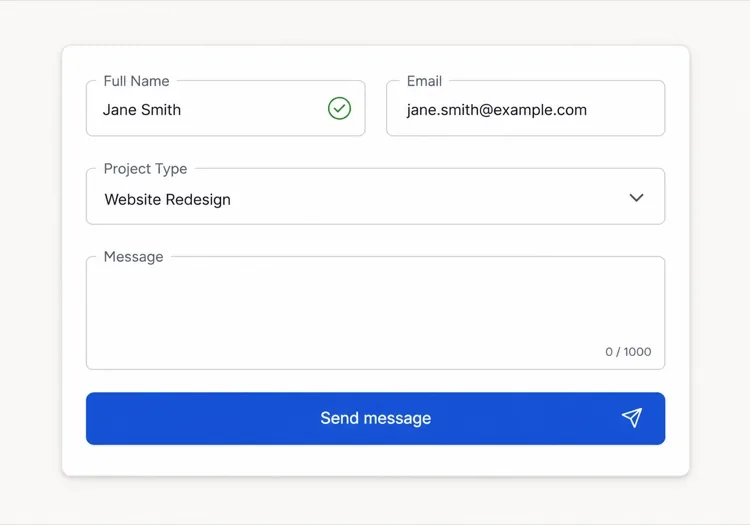
AI聯絡表單產生器。

描述您需要的欄位、想要的語氣和重要的驗證規則——MeDo在幾秒內將您的提示詞轉化為完整的、無障礙的聯絡表單元件。

聯絡表單
聯絡表單

每個網站都需要一個出色的聯絡表單

聯絡表單通常是訪客在成為潛在客戶之前最後互動的元件——然而大多數只是事後考慮。糟糕的欄位設計、缺失的驗證和令人困惑的錯誤狀態會在意向產生的確切時刻製造摩擦、扼殺轉換。精心設計的聯絡表單傳達專業性、減少放棄率,讓合適的人輕鬆聯絡到您。

6 個模板

可以產生的 聯絡表單 模板

每個模板都是真實的提示詞,而非截圖。複製到任何 AI 編輯器,或在 MeDo 中執行,直接取得 React + Tailwind 程式碼。

BasicInquiry

Name, Email, Message Form

Three fields and nothing else. The right default when you have no routing logic yet — every field you add past this point has to justify itself against a measurable drop in completions.

Create a three-field contact form — full name, email, message — inside a bordered card. Every input gets a visible label tied by htmlFor, and validates on blur rather than on every keystroke: name non-empty, email checked against a permissive pattern, message at least twenty characters with a live counter. Render each error in a span referenced by aria-describedby and set aria-invalid on the failing input. On submit, disable the button, swap its label for a spinner with role="status", then replace the card with a confirmation that names the reply window. On failure keep every typed value, show a retry banner and move focus to it. Add a honeypot field and a minimum time-to-submit check instead of a CAPTCHA.


在 MeDo 中試試
QualifyingStudio

Project Type and Budget Form

Adds the two questions that decide whether you reply today or next week. Worth the extra friction for service businesses, wasteful for anything self-serve.

Create an agency inquiry form in a light card: full name, work email, a project type select (Brand Identity, Web Design, Motion, Other), a budget radio group (Under $5k, $5k-$20k, $20k+) wrapped in a fieldset with a legend, and a message textarea. Mark the select and the radio group required but validate on submit, not on mount, so the form never opens already covered in red. Collect the failures into an error summary above the card with in-page links to each field, set aria-invalid and aria-describedby on the offenders, and move focus to the summary heading. Show a pending state on the button, a success panel replacing the card, and a failure banner that preserves every answer.

在 MeDo 中試試
BranchingSwitchboard

Sales or Support Split Form

One URL, two queues. Stops enterprise leads from landing in the bug tracker without asking you to maintain two contact pages that drift apart.

Create a contact form that opens with a two-option segmented control — Sales inquiry or Support request — built from radio inputs in a fieldset, and swaps the fields beneath it. Sales shows company, team size and budget; Support shows account email, affected feature and a severity select. Announce the swap through an aria-live="polite" region and move focus to the first field of the new branch. Validate only the visible branch, keep the hidden branch out of the submitted payload, and wire every error to its input with aria-describedby and aria-invalid. On submit show a pending button, then a success message naming the queue the request went to. Rate-limit repeat submissions from the same session and include a hidden honeypot.

在 MeDo 中試試
High trustChambers

Confidential Consultation Form

For regulated practices, where the reassurance copy next to the submit button does more work than the field layout does. Say what happens to the data before you ask for it.

Create a consultation request form for a law or financial practice: full name, email, phone with a format hint in the label rather than as placeholder-only text, a matter type select for routing, a preferred contact method radio group, and a details textarea with a note that this form is not privileged communication. Put a one-line confidentiality statement directly above the submit button, not in the footer. Validate on blur, expose errors through aria-describedby, and set aria-invalid on failures. Submit button reads Request a confidential consultation, goes to a disabled pending state, then a success panel stating the response window and an alternative phone number. On failure show the error inline and never clear the textarea.

在 MeDo 中試試
Two columnLedger

Contact Details Beside the Form

Form on the right, address, hours and direct email on the left. Cuts the volume of people who fill in a form to ask a question the sidebar already answered.

Create a two-column contact section: on the left, an office address, opening hours, a direct email and phone as real mailto and tel links; on the right, a card form with name, email, subject select and message. Stack the columns on mobile with the form first. Labels are always visible, errors validate on blur and attach via aria-describedby with aria-invalid on the input, and the submit button moves through idle, pending with a role="status" spinner, and success states. On failure show a banner above the form, focus it, and keep all values. Add a honeypot input hidden from assistive technology and a timestamp check to drop bot submissions.

在 MeDo 中試試
Multi stepEnquire

Three-Step Contact Wizard

Splits a long inquiry into three short screens with a step indicator. Only pays off past about eight fields — below that the wizard adds clicks and removes context.

Create a three-step contact wizard: step one collects name and email, step two collects project type, budget and timeline, step three shows a message textarea and a read-only review of the earlier answers. Render a step indicator with aria-current="step" on the active item. Validate the current step before allowing Next, focus the first invalid field, and expose errors with aria-describedby and aria-invalid. Keep all answers in state so Back never loses data. The final submit shows a pending state, then a success screen replacing the wizard, and on failure returns to step three with a retry banner and every answer intact. Include a honeypot field.

在 MeDo 中試試

如何自訂你的 聯絡表單

只問您真正會使用的資訊

每增加一個欄位都會降低完成率。審查您的表單:如果您無法描述某個欄位如何影響您對提交的回應,就刪除它。姓名、電子郵件和一個資格問題通常就足以開始對話。

編寫引導而非斥責的驗證錯誤

將「無效郵箱」之類的訊息替換為「請輸入有效的電子郵件地址,例如 you@example.com」。具體、可操作的錯誤文字減少了重新提交的摩擦,並與犯誠實錯誤的訪客建立信任。

像設計表單一樣精心設計成功狀態

提交後的確認在大多數網站上是被忽視的機會。用它來設定期望(「我們將在一個工作天內回覆」)、提供替代方案(「或直接預約通話」)或強化品牌聲音——而不僅僅是通用的「謝謝」。

使用條件欄位保持表單簡短

僅在與之前的回答相關時才顯示額外問題——例如,只有在訪客選擇「新專案」後才顯示預算欄位。條件邏輯減少了感知長度,讓每個訪客精確聚焦於對其情況重要的輸入。

誰在使用 聯絡表單 組件

創意機構或自由工作者

機構聯絡表單通常在姓名和電子郵件之外包含專案類型選擇器、預算範圍和時間軸欄位——為工作室提供足夠的上下文,在首次回覆之前就能評估和優先排序傳入的潛在客戶。

SaaS或科技產品

產品聯絡表單通常在頂部分為「銷售諮詢」和「支援請求」,然後按路徑顯示相關欄位——無需兩個單獨的頁面即可將企業潛在客戶與錯誤報告分開。

專業服務(法律、金融、醫療)

受監管行業的高信任聯絡表單強調保密保證,包含用於路由的事務類型下拉選單,並將通用提交按鈕替換為「申請保密諮詢」等文案。

活動或會議網站

活動諮詢表單詢問參與類型、贊助層級的公司規模和首選主題——在活動開始之前同時充當潛在客戶擷取和受眾分群工具。

不同網站的 聯絡表單 方案

同一個 聯絡表單 組件,針對它所在網站的類型作調整。

01 / 06

Agency and Studio Contact Forms

Project type, budget band and timeline earn their place here because they decide reply order, not because they look thorough. The one field to cut first is company website — you can find it from the email domain in less time than the visitor spends typing it.

聯絡表單 的風格與變體

挑選與頁面其餘部分相襯的變體,然後產生它。

01 / 06

Card Form With Visible Labels

A bordered card, one column, labels above every input. The most boring option and the one that tests best, because a label above the field survives autofill, zoom and translation without collapsing into the value.

在 React、Next.js、Vue 與 Svelte 中使用 聯絡表單

React、Next.js、Vue 3、SvelteKit、Astro 或純 HTML —— 同一個 聯絡表單,六種接入方式。

01 / 06

React Contact Form

Keep the form uncontrolled and read values from FormData on submit — controlled state on every field re-renders the whole form on each keystroke for no benefit. Hold only errors and status in state.

src/components/ContactForm.tsx

export function ContactForm() {
  const [status, setStatus] = useState('idle')

  async function onSubmit(e) {
    e.preventDefault()
    setStatus('pending')
    const data = new FormData(e.currentTarget)
    const res = await send(data)
    setStatus(res.ok ? 'success' : 'error')
  }

  return <form onSubmit={onSubmit} noValidate>{/* fields */}</form>
}

如何把 聯絡表單 加入專案

四個步驟,從挑選 聯絡表單 模板到推上生產環境。

01~30s

Pick a Contact Form Template

Match the template to how you triage replies — three fields if every message goes to one inbox, the branching form if sales and support are different queues.

02~10s

Copy the Prompt

Paste it into MeDo, Lovable, Bolt, v0 or Cursor. Replace the placeholder select options with your real ones first, since the option list is what determines the routing you have to build behind it.

03~2min

Generate and Refine

You get React + Tailwind with a live preview. Follow up in plain English — "validate on blur, not on change", "add an error summary above the card", "keep the values on a failed submit".

04~2min

Wire Up the Submit Handler

Point the action at a serverless function, Resend, Formspree or your own API. Test the failure path before shipping: a form that silently drops a message is worse than no form at all.

關於 聯絡表單 的常見問題

什麼是AI聯絡表單產生器?

AI聯絡表單產生器接受對所需欄位、驗證規則和設計的自然語言描述,產生帶有可用程式碼的完整樣式化表單元件。MeDo產生整個元件——佈局、標籤、錯誤狀態、成功狀態和無障礙屬性——讓您可以直接放入專案中。

如何用AI建立聯絡表單?

開啟MeDo並用中文描述您的表單:列出所需欄位、驗證要求、視覺樣式以及條件欄位或自訂成功訊息等特殊行為。MeDo立即產生元件。您可以用後續提示詞進行優化——更改欄位類型、調整驗證或重新設計佈局——直到完全滿意。

建構聯絡表單的最佳AI工具是什麼?

MeDo專為從提示詞產生單個UI元件而設計,包括聯絡表單。與通用AI聊天工具不同,MeDo理解表單無障礙性(ARIA標籤、鍵盤導航、焦點管理)、驗證模式和元件結構——因此輸出是生產就緒的,而不僅僅是看起來合理的程式碼。

AI能產生帶驗證的聯絡表單嗎?

可以。當您在提示詞中包含驗證要求時——例如「必填欄位」、「有效電子郵件格式」或「訊息欄位至少20個字元」——MeDo會在元件旁產生內聯驗證邏輯。您還可以根據技術堆疊要求特定的驗證庫或原生HTML5約束驗證。

如何在不使用外掛的情況下給網站添加聯絡表單?

用MeDo產生表單元件,然後將提交處理程式連接到任何HTTP端點——無伺服器函式、Resend或Formspree等表單處理服務,或您自己的後端API。由於MeDo產生的元件程式碼不依賴外部表單庫,您可以完全控制提交邏輯和資料路由。

聯絡表單應該包含哪些欄位?

聯絡表單至少需要一個姓名欄位、一個電子郵件地址欄位和一個訊息文字區域。除此之外,只添加會改變您回應方式的欄位:用於路由的主題或專案類型選擇器、如果提供電話諮詢則添加電話欄位、服務型企業的預算範圍。每增加一個必填欄位都會增加放棄率,因此保持預設簡短,在相關時使用條件邏輯擴展。
