MeDo

Generatore di Moduli di Contatto IA.

Descrivi i campi di cui hai bisogno, il tono che desideri e le regole di validazione che contano — MeDo trasforma il tuo prompt in un componente modulo di contatto completo e accessibile in pochi secondi.

Modulo di Contatto
Modulo di Contatto

Ogni sito web ha bisogno di un ottimo modulo di contatto

Un modulo di contatto è spesso l'ultimo componente con cui un visitatore interagisce prima di diventare un lead — eppure la maggior parte sono un ripensamento. Un design dei campi scadente, validazione mancante e stati di errore confusi creano attrito che uccide le conversioni nel momento esatto dell'intenzione. Un modulo di contatto ben progettato comunica professionalità, riduce l'abbandono e rende facile per le persone giuste raggiungerti.

6 modelli

Modelli di Modulo di Contatto che puoi generare

Ogni modello è un prompt reale, non uno screenshot. Copialo in qualsiasi editor IA, oppure eseguilo in MeDo e ottieni codice React + Tailwind.

BasicInquiry

Name, Email, Message Form

Three fields and nothing else. The right default when you have no routing logic yet — every field you add past this point has to justify itself against a measurable drop in completions.

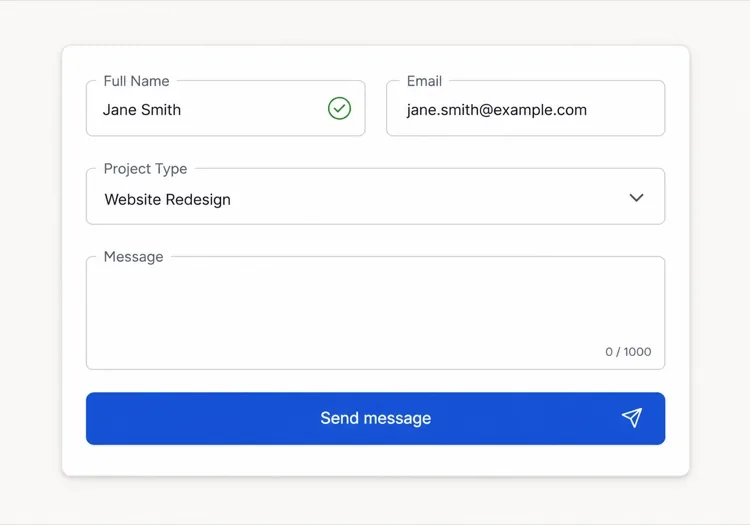
Create a three-field contact form — full name, email, message — inside a bordered card. Every input gets a visible label tied by htmlFor, and validates on blur rather than on every keystroke: name non-empty, email checked against a permissive pattern, message at least twenty characters with a live counter. Render each error in a span referenced by aria-describedby and set aria-invalid on the failing input. On submit, disable the button, swap its label for a spinner with role="status", then replace the card with a confirmation that names the reply window. On failure keep every typed value, show a retry banner and move focus to it. Add a honeypot field and a minimum time-to-submit check instead of a CAPTCHA.


Prova in MeDo
QualifyingStudio

Project Type and Budget Form

Adds the two questions that decide whether you reply today or next week. Worth the extra friction for service businesses, wasteful for anything self-serve.

Create an agency inquiry form in a light card: full name, work email, a project type select (Brand Identity, Web Design, Motion, Other), a budget radio group (Under $5k, $5k-$20k, $20k+) wrapped in a fieldset with a legend, and a message textarea. Mark the select and the radio group required but validate on submit, not on mount, so the form never opens already covered in red. Collect the failures into an error summary above the card with in-page links to each field, set aria-invalid and aria-describedby on the offenders, and move focus to the summary heading. Show a pending state on the button, a success panel replacing the card, and a failure banner that preserves every answer.

Prova in MeDo
BranchingSwitchboard

Sales or Support Split Form

One URL, two queues. Stops enterprise leads from landing in the bug tracker without asking you to maintain two contact pages that drift apart.

Create a contact form that opens with a two-option segmented control — Sales inquiry or Support request — built from radio inputs in a fieldset, and swaps the fields beneath it. Sales shows company, team size and budget; Support shows account email, affected feature and a severity select. Announce the swap through an aria-live="polite" region and move focus to the first field of the new branch. Validate only the visible branch, keep the hidden branch out of the submitted payload, and wire every error to its input with aria-describedby and aria-invalid. On submit show a pending button, then a success message naming the queue the request went to. Rate-limit repeat submissions from the same session and include a hidden honeypot.

Prova in MeDo
High trustChambers

Confidential Consultation Form

For regulated practices, where the reassurance copy next to the submit button does more work than the field layout does. Say what happens to the data before you ask for it.

Create a consultation request form for a law or financial practice: full name, email, phone with a format hint in the label rather than as placeholder-only text, a matter type select for routing, a preferred contact method radio group, and a details textarea with a note that this form is not privileged communication. Put a one-line confidentiality statement directly above the submit button, not in the footer. Validate on blur, expose errors through aria-describedby, and set aria-invalid on failures. Submit button reads Request a confidential consultation, goes to a disabled pending state, then a success panel stating the response window and an alternative phone number. On failure show the error inline and never clear the textarea.

Prova in MeDo
Two columnLedger

Contact Details Beside the Form

Form on the right, address, hours and direct email on the left. Cuts the volume of people who fill in a form to ask a question the sidebar already answered.

Create a two-column contact section: on the left, an office address, opening hours, a direct email and phone as real mailto and tel links; on the right, a card form with name, email, subject select and message. Stack the columns on mobile with the form first. Labels are always visible, errors validate on blur and attach via aria-describedby with aria-invalid on the input, and the submit button moves through idle, pending with a role="status" spinner, and success states. On failure show a banner above the form, focus it, and keep all values. Add a honeypot input hidden from assistive technology and a timestamp check to drop bot submissions.

Prova in MeDo
Multi stepEnquire

Three-Step Contact Wizard

Splits a long inquiry into three short screens with a step indicator. Only pays off past about eight fields — below that the wizard adds clicks and removes context.

Create a three-step contact wizard: step one collects name and email, step two collects project type, budget and timeline, step three shows a message textarea and a read-only review of the earlier answers. Render a step indicator with aria-current="step" on the active item. Validate the current step before allowing Next, focus the first invalid field, and expose errors with aria-describedby and aria-invalid. Keep all answers in state so Back never loses data. The final submit shows a pending state, then a success screen replacing the wizard, and on failure returns to step three with a retry banner and every answer intact. Include a honeypot field.

Prova in MeDo

Come personalizzare il tuo Modulo di Contatto

Chiedi solo ciò che userai davvero

Ogni campo aggiuntivo riduce i tassi di completamento. Verifica il tuo modulo: se non riesci a descrivere come ogni campo influenza la tua risposta all'invio, eliminalo. Nome, e-mail e una domanda qualificante sono spesso sufficienti per iniziare una conversazione.

Scrivi errori di validazione che guidano, non che rimproverano

Sostituisci messaggi come "E-mail non valida" con "Inserisci un indirizzo e-mail valido, es. tu@esempio.it". Un testo di errore specifico e attuabile riduce l'attrito di reinvio e costruisce fiducia con i visitatori che commettono errori innocenti.

Progetta il tuo stato di successo con la stessa cura del modulo stesso

La conferma post-invio è un'opportunità persa nella maggior parte dei siti. Usala per stabilire aspettative ("Rispondiamo entro un giorno lavorativo"), offrire un'alternativa ("Oppure prenota una chiamata direttamente") o rafforzare la voce del tuo brand — non solo un generico "Grazie".

Usa campi condizionali per mantenere il modulo breve

Mostra domande aggiuntive solo quando sono rilevanti per le risposte precedenti — ad esempio, rivela un campo budget solo dopo che un visitatore seleziona "Nuovo progetto". La logica condizionale riduce la lunghezza percepita e concentra ogni visitatore esattamente sugli input che contano per la sua situazione.

Chi usa il componente Modulo di Contatto

Agenzia creativa o freelancer

I moduli di contatto delle agenzie includono tipicamente un selettore tipo di progetto, un range di budget e un campo timeline accanto a nome e e-mail — dando allo studio abbastanza contesto per qualificare e dare priorità ai lead in entrata prima della prima risposta.

SaaS o prodotto tech

I moduli di contatto dei prodotti spesso si diramano tra "Richiesta commerciale" e "Richiesta di supporto" all'inizio, poi mostrano campi rilevanti per ogni percorso — mantenendo i lead enterprise separati dai bug report senza richiedere due pagine separate.

Servizi professionali (legale, finanza, sanità)

I moduli di contatto ad alta fiducia nelle industrie regolamentate enfatizzano garanzie di riservatezza, includono un dropdown per il tipo di questione per l'instradamento e sostituiscono i pulsanti di invio generici con testi come "Richiedi una consulenza riservata".

Evento o conferenza

I moduli di richiesta per eventi chiedono tipo di partecipazione, dimensione aziendale per i livelli di sponsorship e argomenti di sessione preferiti — funzionando sia come strumento di cattura lead che di segmentazione del pubblico prima ancora che l'evento inizi.

Pattern di Modulo di Contatto per siti web diversi

Lo stesso componente modulo di contatto, calibrato sul tipo di sito su cui viene pubblicato.

01 / 06

Agency and Studio Contact Forms

Project type, budget band and timeline earn their place here because they decide reply order, not because they look thorough. The one field to cut first is company website — you can find it from the email domain in less time than the visitor spends typing it.

Stili e varianti di Modulo di Contatto

Scegli la variante che si adatta al resto della pagina, poi generala.

01 / 06

Card Form With Visible Labels

A bordered card, one column, labels above every input. The most boring option and the one that tests best, because a label above the field survives autofill, zoom and translation without collapsing into the value.

Modulo di Contatto in React, Next.js, Vue e Svelte

React, Next.js, Vue 3, SvelteKit, Astro o HTML puro: lo stesso modulo di contatto, sei modi per integrarlo.

01 / 06

React Contact Form

Keep the form uncontrolled and read values from FormData on submit — controlled state on every field re-renders the whole form on each keystroke for no benefit. Hold only errors and status in state.

src/components/ContactForm.tsx

export function ContactForm() {
  const [status, setStatus] = useState('idle')

  async function onSubmit(e) {
    e.preventDefault()
    setStatus('pending')
    const data = new FormData(e.currentTarget)
    const res = await send(data)
    setStatus(res.ok ? 'success' : 'error')
  }

  return <form onSubmit={onSubmit} noValidate>{/* fields */}</form>
}

Come aggiungere il tuo Modulo di Contatto a un progetto

Quattro passaggi, dalla scelta di un modello di modulo di contatto alla messa in produzione.

01~30s

Pick a Contact Form Template

Match the template to how you triage replies — three fields if every message goes to one inbox, the branching form if sales and support are different queues.

02~10s

Copy the Prompt

Paste it into MeDo, Lovable, Bolt, v0 or Cursor. Replace the placeholder select options with your real ones first, since the option list is what determines the routing you have to build behind it.

03~2min

Generate and Refine

You get React + Tailwind with a live preview. Follow up in plain English — "validate on blur, not on change", "add an error summary above the card", "keep the values on a failed submit".

04~2min

Wire Up the Submit Handler

Point the action at a serverless function, Resend, Formspree or your own API. Test the failure path before shipping: a form that silently drops a message is worse than no form at all.

Domande comuni su Modulo di Contatto

Cos'è un generatore di moduli di contatto IA?

Un generatore di moduli di contatto IA prende una descrizione in linguaggio naturale dei campi, regole di validazione e design desiderati e produce un componente modulo completo e stilizzato con codice funzionante. MeDo genera l'intero componente — layout, etichette, stati di errore, stato di successo e attributi di accessibilità — così puoi inserirlo direttamente nel tuo progetto.

Come creo un modulo di contatto con l'IA?

Apri MeDo e descrivi il tuo modulo in italiano: elenca i campi necessari, i requisiti di validazione, lo stile visivo e qualsiasi comportamento speciale come campi condizionali o un messaggio di successo personalizzato. MeDo genera il componente immediatamente. Puoi perfezionarlo con prompt di follow-up — cambiare un tipo di campo, regolare la validazione o ridisegnare il layout — finché non è esattamente giusto.

Qual è il miglior strumento IA per creare moduli di contatto?

MeDo è progettato appositamente per generare singoli componenti UI dai prompt, inclusi i moduli di contatto. A differenza degli strumenti di chat IA generali, MeDo comprende l'accessibilità dei moduli (label ARIA, navigazione da tastiera, gestione del focus), i pattern di validazione e la struttura dei componenti — quindi l'output è pronto per la produzione, non solo codice dall'aspetto plausibile.

L'IA può generare un modulo di contatto con validazione?

Sì. Quando includi requisiti di validazione nel tuo prompt — ad esempio, "campi obbligatori", "formato e-mail valido" o "minimo 20 caratteri nel campo messaggio" — MeDo genera la logica di validazione inline insieme al componente. Puoi anche richiedere librerie di validazione specifiche o la validazione dei vincoli HTML5 nativa a seconda del tuo stack.

Come aggiungo un modulo di contatto al mio sito senza plugin?

Genera il componente modulo con MeDo, poi collega il gestore di invio a qualsiasi endpoint HTTP — una funzione serverless, un servizio di gestione moduli come Resend o Formspree, o la tua API backend. Poiché MeDo produce codice componente pulito senza dipendenze da librerie di moduli esterne, mantieni il pieno controllo sulla logica di invio e sull'instradamento dei dati.

Quali campi dovrebbe includere un modulo di contatto?

Come minimo, un modulo di contatto necessita di un campo nome, un campo indirizzo e-mail e un textarea per il messaggio. Oltre a questo, aggiungi solo i campi che cambiano il modo in cui rispondi: un selettore di oggetto o tipo di progetto per l'instradamento, un campo telefono se offri chiamate, o un range di budget per le aziende di servizi. Ogni campo obbligatorio aggiuntivo aumenta l'abbandono, quindi mantieni il default breve e usa la logica condizionale per espandere quando rilevante.
