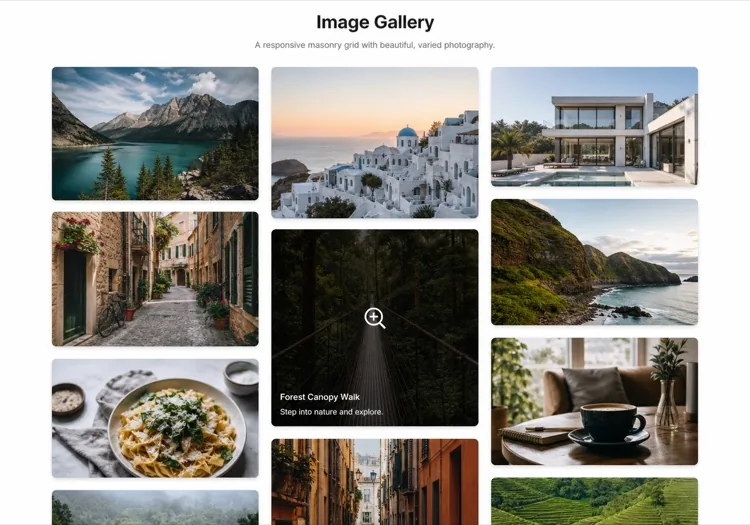
AI畫廊生成器。

描述您想要的網格,MeDo在數秒內生成完全設計好的圖片畫廊。瀑布流佈局、燈箱覆蓋層、懸停效果、響應式斷點 — 全部來自一個提示詞。

圖片畫廊
圖片畫廊

優秀的畫廊將訪客變為信賴者。

圖片是網路上最快速的信任訊號 — 訪客會在200毫秒內對您的視覺品質形成判斷。結構良好的畫廊讓這種品質大規模展現,無論您展示的是作品集、產品目錄還是活動照片。合適的佈局也影響SEO:帶有alt文字和結構化資料的正確結構化圖片元件有助於圖片搜尋可見性和頁面互動指標。

6 個模板

可以產生的 圖片畫廊 模板

每個模板都是真實的提示詞,而非截圖。複製到任何 AI 編輯器,或在 MeDo 中執行,直接取得 React + Tailwind 程式碼。

Uniform gridAcme

Fixed Aspect-Ratio Image Grid

Every tile the same shape, so the grid reads as one object rather than a collage. The right default for product shots — and the wrong one for editorial photography, where cropping to a square throws away the composition.

Create a responsive image grid: four columns on desktop, three on tablet, two on mobile, with a consistent gap. Wrap each image in a 4:3 aspect-ratio box with object-fit: cover so the grid never reflows as images resolve, and set explicit width and height attributes on every img. Use loading="lazy" and decoding="async" on everything below the first row, and eager loading plus fetchpriority="high" on the first row so the largest contentful paint is not deferred. Add a hover state that lifts the tile slightly and fades in a caption over a gradient scrim; drive the same state from :focus-visible so keyboard users see it. Render each item as a figure with figcaption.


在 MeDo 中試試
MasonryMega

Column Masonry With Mixed Heights

Keeps the original aspect ratio of every shot, which is the point for photography. The trap is CSS columns — they order items top-to-bottom per column, so a chronological set reads out of sequence.

Create a masonry image gallery that preserves each image's native aspect ratio. Use CSS grid with grid-auto-rows set to a small row unit and a span calculated per item from its intrinsic ratio, rather than CSS multi-column, so reading order stays left-to-right and matches the source order. Set the aspect-ratio property on every image wrapper from the known width and height so the grid reserves the exact space before the file loads and nothing shifts. Three columns on desktop, two on tablet, one on mobile. Lazy load below the fold, add a blurred low-resolution placeholder that cross-fades to the full image, and keep a fixed gap on both axes.

在 MeDo 中試試
LightboxLumen

Grid With a Full-Screen Lightbox

The interaction most galleries get half right: the overlay opens, then Escape does nothing and focus is still behind it. Trap focus and restore it to the thumbnail on close or the gallery is unusable by keyboard.

Create an image grid where clicking a tile opens a full-screen lightbox. The overlay renders as a dialog with aria-modal, moves focus to the close button on open, traps Tab within the overlay, closes on Escape and on backdrop click, and returns focus to the thumbnail that opened it. Support left and right arrow keys plus on-screen previous and next buttons, show a counter such as 4 of 18, and render the caption beneath the image. Preload the neighbouring two images so navigation is instant, lock body scroll while open, and add touch swipe on mobile. Respect prefers-reduced-motion by dropping the zoom transition.

在 MeDo 中試試
FilterableStudio

Category Filters Above the Grid

Worth adding past a dozen images and a liability below it — three filter chips over nine photos is furniture. Filter in the URL, not just in state, so a client can send a link to one category.

Create a filterable image gallery: a horizontal row of category chips above a responsive grid, with an All chip active by default and a count beside each label. Filtering hides non-matching items and animates the remaining tiles to their new positions with a transform-based transition rather than re-laying out abruptly. Reflect the active filter in the URL query string so a filtered view is linkable and survives reload. Use real button semantics with aria-pressed on each chip, announce the resulting item count in an aria-live region, and show an empty state when a category has no items. Keep the aspect-ratio boxes fixed so filtering never changes tile size.

在 MeDo 中試試
CarouselReel

Scroll-Snap Thumbnail Carousel

For a strip inside a page rather than a full section — a product detail block or a case study. Build it on scroll-snap, not a JavaScript slider, so it still works with a trackpad and a touch drag.

Create a horizontal image carousel using CSS scroll-snap: a flex row with overflow-x auto, scroll-snap-type x mandatory and scroll-snap-align center on each slide, so native touch and trackpad scrolling work without a slider library. Sit a thumbnail strip beneath it where the active thumb is outlined and clicking one scrolls the main rail to that slide via scrollIntoView with smooth behaviour. Add previous and next buttons that disable at each end, hide the scrollbar visually while keeping keyboard scrolling intact, and give the rail a role and label so it is announced as a group. Fixed aspect-ratio slides, lazy loading past the second image.

在 MeDo 中試試
MosaicEditorial

Asymmetric Feature Mosaic

One image spans two columns and two rows, the rest fill around it. Gives a set of otherwise equal photographs a focal point — but only ever promote one tile, because two hero cells cancel each other out.

Create an asymmetric mosaic gallery on a six-column CSS grid: the first item spans four columns and two rows, two items span two columns each, and the remainder fill single cells, with explicit grid-column and grid-row spans rather than auto-placement. Give every cell a fixed aspect-ratio box and object-fit: cover so the mosaic holds its shape at any image size. Collapse to a two-column grid on tablet and a single column on mobile, keeping the feature image first. Add a hover scrim with a title and a year, lazy load everything after the feature cell, and eager load the feature image so it can be the largest contentful paint.

在 MeDo 中試試

如何自訂你的 圖片畫廊

選擇配合內容密度的佈局

統一網格適用於一致性很重要的產品攝影。瀑布流網格在混合長寬比內容(如編輯照片或作品集拍攝)中表現出色。只需更新提示詞即可讓MeDo切換佈局 — 無需結構重構。

為大型集合新增分類篩選

當畫廊包含十幾張以上圖片時,按標籤或分類篩選可顯著提升可用性。讓MeDo在網格上方新增篩選欄,並在切換分類時為佈局過渡新增動畫。

透過延遲載入最佳化Core Web Vitals

畫廊是造成LCP和佈局偏移分數不佳的主要原因之一。讓MeDo包含原生延遲載入、明確的圖片尺寸和佔位模糊漸顯效果,以保持效能指標整潔。

讓燈箱支援鍵盤和螢幕閱讀器

一個能鎖定焦點、回應Escape和箭頭鍵、並向螢幕閱讀器播報圖片描述的燈箱更具包容性 — 也能避免無障礙稽核失敗。在MeDo提示詞中指定這些需求,它們將從一開始就內建。

誰在使用 圖片畫廊 組件

創意作品集

設計師、攝影師和插畫師依賴畫廊作為網站的核心。帶有簡潔燈箱的瀑布流網格讓作品自由展現,不會被UI元素搶奪注意力。

電商產品頁面

帶有縮圖條和縮放功能的多圖產品畫廊直接影響購買決策。建構良好的畫廊透過幫助買家在購買前仔細檢視產品來減少退貨。

活動和婚禮網站

活動攝影師和場館使用畫廊展示過往作品並建立社會認證。按活動類型組織的可篩選網格讓潛在客戶能快速找到相關案例。

房產列表

具有完整照片畫廊的房產列表 — 包括突出的主圖、縮圖條和全螢幕燈箱 — 比僅有靜態圖片的列表獲得明顯更多的諮詢。

不同網站的 圖片畫廊 方案

同一個 圖片畫廊 組件,針對它所在網站的類型作調整。

01 / 06

Photography Portfolio Gallery

Masonry, no crops, and a lightbox that shows the frame at full width. Square-cropping a photographer's work into a uniform grid destroys the composition they were hired for. Keep the chrome minimal — captions on hover, not permanently on top of the image.

圖片畫廊 的風格與變體

挑選與頁面其餘部分相襯的變體,然後產生它。

01 / 06

Uniform Grid

Equal tiles at one aspect ratio. Reads as a single object and is trivially responsive, at the cost of cropping every image to the same shape — fine for products, destructive for photography.

在 React、Next.js、Vue 與 Svelte 中使用 圖片畫廊

React、Next.js、Vue 3、SvelteKit、Astro 或純 HTML —— 同一個 圖片畫廊,六種接入方式。

01 / 06

React Gallery

Map over an images array where each entry carries its intrinsic width and height, and use them to set the aspect-ratio box. Only the lightbox needs state — the grid itself is pure markup.

src/components/Gallery.tsx

export function Gallery({ images }) {
  const [open, setOpen] = useState(null)
  return (
    <ul className="grid gap-4 md:grid-cols-3">
      {images.map((img, i) => (
        <li key={img.src} style={{ aspectRatio: img.w / img.h }}>
          <button onClick={() => setOpen(i)}>
            <img src={img.src} alt={img.alt} width={img.w} height={img.h} loading="lazy" />
          </button>
        </li>
      ))}
    </ul>
  )
}

如何把 圖片畫廊 加入專案

四個步驟,從挑選 圖片畫廊 模板到推上生產環境。

01~30s

Pick a Gallery Layout

Choose by what your images have in common — uniform grid when the shapes match, masonry when they do not, mosaic when one image should lead, carousel when the gallery is a block inside a longer page.

02~10s

Copy the Prompt

Take the prompt into MeDo, or paste it into Lovable, Bolt, v0 or Cursor. Set your real column counts and aspect ratio before running it, since those two decisions drive every breakpoint that follows.

03~1min

Generate and Refine

You get React + Tailwind back with a live preview. Follow up in plain English — "add Escape to close", "two columns on tablet", "captions under the image instead of over it" — rather than editing grid spans by hand.

04~2min

Wire Up Your Images

Swap the placeholders for your own files with real alt text and intrinsic width and height on every one. That is what keeps the grid from shifting as images resolve, and it is the step most likely to be skipped.

關於 圖片畫廊 的常見問題

如何用AI建立圖片畫廊?

開啟MeDo,描述您想要的畫廊 — 佈局風格、欄數、懸停行為以及是否需要燈箱。MeDo在數秒內生成完整的、可用於生產的畫廊元件。您可以透過完善提示詞進行迭代,直到輸出符合您的願景。

最好的AI畫廊生成器是什麼?

MeDo專為從自然語言提示詞生成UI元件而建構。與通用AI工具不同,MeDo理解響應式網格、CSS過渡、延遲載入和無障礙模式等前端規範 — 因此生成的畫廊實際上可以部署,而不僅僅是視覺模型。

可以用AI生成瀑布流畫廊嗎?

可以。只需在MeDo提示詞中指定「瀑布流佈局」。MeDo將生成基於CSS Grid或Masonry的佈局,優雅地處理不同高度的圖片,在每個斷點提供正確的間距和響應式欄數。

如何為AI生成的畫廊新增燈箱?

在MeDo提示詞中包含「燈箱」— 例如,「點擊圖片應開啟帶導覽箭頭的全螢幕燈箱。」MeDo將連接點擊處理器、覆蓋層和鍵盤控制。您還可以在同一提示詞中請求滑動支援、圖片說明或關閉按鈕等功能。

AI畫廊生成器能建立可篩選的畫廊嗎?

可以。讓MeDo在畫廊提示詞中包含篩選欄或基於標籤的導覽。MeDo將生成篩選UI、為每個圖片插槽分配分類,並在切換篩選時為網格過渡新增動畫 — 全部一次性完成。

如何讓AI生成的畫廊對SEO友善?

告訴MeDo包含描述性alt文字佔位符、正確的figure/figcaption標記和延遲載入屬性。對於更豐富的圖片SEO,您還可以讓MeDo為每個畫廊項目新增ImageObject結構化資料(schema.org),幫助搜尋引擎準確索引您的圖片。