MeDo

AI 갤러리 생성기.

원하는 그리드를 설명하면 MeDo가 몇 초 만에 완전히 스타일링된 이미지 갤러리를 생성합니다. 메이슨리 레이아웃, 라이트박스 오버레이, 호버 효과, 반응형 브레이크포인트 — 모두 하나의 프롬프트에서.

갤러리
갤러리

훌륭한 갤러리는 방문자를 신뢰자로 바꿉니다.

이미지는 웹에서 가장 빠른 신뢰 신호입니다 — 방문자는 200ms 이내에 귀하의 시각적 품질에 대한 의견을 형성합니다. 잘 구조화된 갤러리는 포트폴리오, 제품 카탈로그, 이벤트 사진을 전시할 때 그 품질이 대규모로 말하게 합니다. 올바른 레이아웃은 SEO에도 영향을 미칩니다: alt 텍스트와 구조화된 데이터가 있는 적절히 구조화된 이미지 컴포넌트는 이미지 검색 가시성과 페이지 참여 지표에 기여합니다.

템플릿 6개

생성할 수 있는 갤러리 템플릿

모든 템플릿은 스크린샷이 아니라 실제 프롬프트입니다. 어떤 AI 에디터에든 붙여넣거나 MeDo에서 실행해 React + Tailwind 코드를 그대로 받으세요.

Uniform gridAcme

Fixed Aspect-Ratio Image Grid

Every tile the same shape, so the grid reads as one object rather than a collage. The right default for product shots — and the wrong one for editorial photography, where cropping to a square throws away the composition.

Create a responsive image grid: four columns on desktop, three on tablet, two on mobile, with a consistent gap. Wrap each image in a 4:3 aspect-ratio box with object-fit: cover so the grid never reflows as images resolve, and set explicit width and height attributes on every img. Use loading="lazy" and decoding="async" on everything below the first row, and eager loading plus fetchpriority="high" on the first row so the largest contentful paint is not deferred. Add a hover state that lifts the tile slightly and fades in a caption over a gradient scrim; drive the same state from :focus-visible so keyboard users see it. Render each item as a figure with figcaption.


MeDo에서 시도하기
MasonryMega

Column Masonry With Mixed Heights

Keeps the original aspect ratio of every shot, which is the point for photography. The trap is CSS columns — they order items top-to-bottom per column, so a chronological set reads out of sequence.

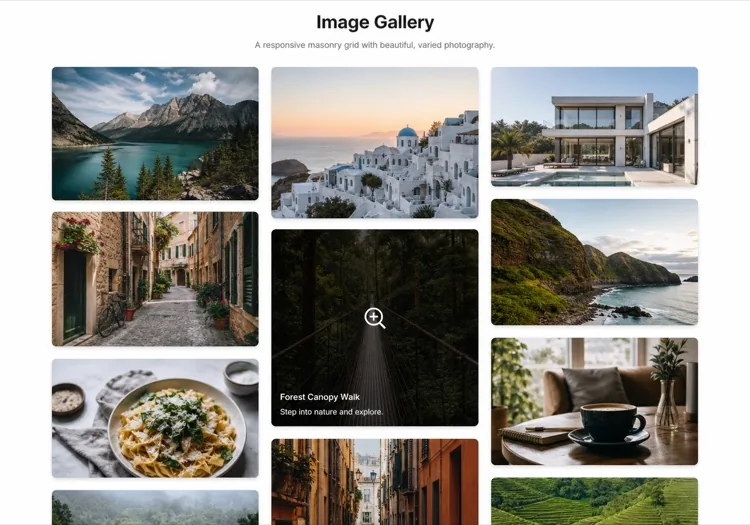
Create a masonry image gallery that preserves each image's native aspect ratio. Use CSS grid with grid-auto-rows set to a small row unit and a span calculated per item from its intrinsic ratio, rather than CSS multi-column, so reading order stays left-to-right and matches the source order. Set the aspect-ratio property on every image wrapper from the known width and height so the grid reserves the exact space before the file loads and nothing shifts. Three columns on desktop, two on tablet, one on mobile. Lazy load below the fold, add a blurred low-resolution placeholder that cross-fades to the full image, and keep a fixed gap on both axes.

MeDo에서 시도하기
LightboxLumen

Grid With a Full-Screen Lightbox

The interaction most galleries get half right: the overlay opens, then Escape does nothing and focus is still behind it. Trap focus and restore it to the thumbnail on close or the gallery is unusable by keyboard.

Create an image grid where clicking a tile opens a full-screen lightbox. The overlay renders as a dialog with aria-modal, moves focus to the close button on open, traps Tab within the overlay, closes on Escape and on backdrop click, and returns focus to the thumbnail that opened it. Support left and right arrow keys plus on-screen previous and next buttons, show a counter such as 4 of 18, and render the caption beneath the image. Preload the neighbouring two images so navigation is instant, lock body scroll while open, and add touch swipe on mobile. Respect prefers-reduced-motion by dropping the zoom transition.

MeDo에서 시도하기
FilterableStudio

Category Filters Above the Grid

Worth adding past a dozen images and a liability below it — three filter chips over nine photos is furniture. Filter in the URL, not just in state, so a client can send a link to one category.

Create a filterable image gallery: a horizontal row of category chips above a responsive grid, with an All chip active by default and a count beside each label. Filtering hides non-matching items and animates the remaining tiles to their new positions with a transform-based transition rather than re-laying out abruptly. Reflect the active filter in the URL query string so a filtered view is linkable and survives reload. Use real button semantics with aria-pressed on each chip, announce the resulting item count in an aria-live region, and show an empty state when a category has no items. Keep the aspect-ratio boxes fixed so filtering never changes tile size.

MeDo에서 시도하기
CarouselReel

Scroll-Snap Thumbnail Carousel

For a strip inside a page rather than a full section — a product detail block or a case study. Build it on scroll-snap, not a JavaScript slider, so it still works with a trackpad and a touch drag.

Create a horizontal image carousel using CSS scroll-snap: a flex row with overflow-x auto, scroll-snap-type x mandatory and scroll-snap-align center on each slide, so native touch and trackpad scrolling work without a slider library. Sit a thumbnail strip beneath it where the active thumb is outlined and clicking one scrolls the main rail to that slide via scrollIntoView with smooth behaviour. Add previous and next buttons that disable at each end, hide the scrollbar visually while keeping keyboard scrolling intact, and give the rail a role and label so it is announced as a group. Fixed aspect-ratio slides, lazy loading past the second image.

MeDo에서 시도하기
MosaicEditorial

Asymmetric Feature Mosaic

One image spans two columns and two rows, the rest fill around it. Gives a set of otherwise equal photographs a focal point — but only ever promote one tile, because two hero cells cancel each other out.

Create an asymmetric mosaic gallery on a six-column CSS grid: the first item spans four columns and two rows, two items span two columns each, and the remainder fill single cells, with explicit grid-column and grid-row spans rather than auto-placement. Give every cell a fixed aspect-ratio box and object-fit: cover so the mosaic holds its shape at any image size. Collapse to a two-column grid on tablet and a single column on mobile, keeping the feature image first. Add a hover scrim with a title and a year, lazy load everything after the feature cell, and eager load the feature image so it can be the largest contentful paint.

MeDo에서 시도하기

갤러리 커스터마이즈 방법

콘텐츠 밀도에 맞는 레이아웃 선택

균일한 그리드는 일관성이 중요한 제품 사진에 적합합니다. 메이슨리 그리드는 에디토리얼 사진이나 포트폴리오 샷과 같은 혼합 종횡비 콘텐츠에서 빛납니다. 프롬프트를 업데이트하기만 하면 MeDo에게 레이아웃 전환을 요청할 수 있습니다 — 구조적 리팩토링이 필요 없습니다.

대규모 컬렉션용 카테고리 필터 추가

갤러리에 12개 이상의 이미지가 있을 때 태그나 카테고리 필터링은 사용성을 극적으로 향상시킵니다. MeDo에게 그리드 위에 필터 바를 포함하고 카테고리 전환 시 레이아웃 트랜지션을 애니메이션하도록 요청하세요.

Lazy loading으로 Core Web Vitals 최적화

갤러리는 나쁜 LCP와 레이아웃 시프트 점수의 주요 원인 중 하나입니다. MeDo에게 네이티브 lazy loading, 명시적 이미지 크기, placeholder blur-up 효과를 포함하도록 요청하여 성능 지표를 깨끗하게 유지하세요.

라이트박스를 키보드와 스크린 리더에 접근 가능하게 만들기

포커스를 가두고, Escape와 화살표 키에 응답하고, 스크린 리더에 이미지 설명을 알려주는 라이트박스는 훨씬 더 포용적입니다 — 접근성 감사 실패도 방지합니다. 이러한 요구 사항을 MeDo 프롬프트에 명시하면 처음부터 내장됩니다.

갤러리 컴포넌트를 사용하는 사람

크리에이티브 포트폴리오

디자이너, 사진작가, 일러스트레이터는 갤러리를 사이트의 중심으로 활용합니다. 깔끔한 라이트박스가 있는 메이슨리 그리드는 UI가 주의를 빼앗지 않으면서 작품이 숨 쉴 수 있게 합니다.

이커머스 상품 페이지

썸네일 스트립과 줌 기능이 있는 멀티 이미지 상품 갤러리는 구매 결정에 직접적으로 영향을 미칩니다. 잘 구축된 갤러리는 구매자가 구매 전 제품을 철저히 검토할 수 있게 하여 반품을 줄입니다.

이벤트 및 웨딩 사이트

이벤트 사진작가와 행사장은 과거 작업을 보여주고 사회적 증거를 구축하기 위해 갤러리를 사용합니다. 이벤트 유형별로 정리된 필터링 가능한 그리드는 잠재 고객이 관련 사례를 빠르게 찾을 수 있게 합니다.

부동산 매물

눈에 띄는 히어로 이미지, 썸네일 스트립, 풀스크린 라이트박스를 포함하는 완전한 기능의 사진 갤러리가 있는 매물 정보는 정적 이미지만 있는 매물보다 현저히 더 많은 문의를 발생시킵니다.

웹사이트 유형별 갤러리 패턴

같은 갤러리 컴포넌트를 게시되는 사이트 유형에 맞춰 조정합니다.

01 / 06

Photography Portfolio Gallery

Masonry, no crops, and a lightbox that shows the frame at full width. Square-cropping a photographer's work into a uniform grid destroys the composition they were hired for. Keep the chrome minimal — captions on hover, not permanently on top of the image.

갤러리 스타일과 변형

페이지의 나머지 부분과 어울리는 변형을 골라 바로 생성하세요.

01 / 06

Uniform Grid

Equal tiles at one aspect ratio. Reads as a single object and is trivially responsive, at the cost of cropping every image to the same shape — fine for products, destructive for photography.

React, Next.js, Vue, Svelte에서의 갤러리

React, Next.js, Vue 3, SvelteKit, Astro 또는 순수 HTML — 같은 갤러리을 여섯 가지 방식으로 넣을 수 있습니다.

01 / 06

React Gallery

Map over an images array where each entry carries its intrinsic width and height, and use them to set the aspect-ratio box. Only the lightbox needs state — the grid itself is pure markup.

src/components/Gallery.tsx

export function Gallery({ images }) {
  const [open, setOpen] = useState(null)
  return (
    <ul className="grid gap-4 md:grid-cols-3">
      {images.map((img, i) => (
        <li key={img.src} style={{ aspectRatio: img.w / img.h }}>
          <button onClick={() => setOpen(i)}>
            <img src={img.src} alt={img.alt} width={img.w} height={img.h} loading="lazy" />
          </button>
        </li>
      ))}
    </ul>
  )
}

갤러리을 프로젝트에 추가하는 방법

갤러리 템플릿을 고르고 프로덕션에 배포하기까지 네 단계.

01~30s

Pick a Gallery Layout

Choose by what your images have in common — uniform grid when the shapes match, masonry when they do not, mosaic when one image should lead, carousel when the gallery is a block inside a longer page.

02~10s

Copy the Prompt

Take the prompt into MeDo, or paste it into Lovable, Bolt, v0 or Cursor. Set your real column counts and aspect ratio before running it, since those two decisions drive every breakpoint that follows.

03~1min

Generate and Refine

You get React + Tailwind back with a live preview. Follow up in plain English — "add Escape to close", "two columns on tablet", "captions under the image instead of over it" — rather than editing grid spans by hand.

04~2min

Wire Up Your Images

Swap the placeholders for your own files with real alt text and intrinsic width and height on every one. That is what keeps the grid from shifting as images resolve, and it is the step most likely to be skipped.

갤러리에 대한 자주 묻는 질문

AI로 이미지 갤러리를 어떻게 만드나요?

MeDo를 열고 원하는 갤러리를 설명하세요 — 레이아웃 스타일, 열 수, 호버 동작, 라이트박스 필요 여부. MeDo가 몇 초 만에 완전한 프로덕션 준비된 갤러리 컴포넌트를 생성합니다. 프롬프트를 다듬어 결과가 비전과 일치할 때까지 반복할 수 있습니다.

최고의 AI 갤러리 생성기는 무엇인가요?

MeDo는 자연어 프롬프트에서 UI 컴포넌트를 생성하기 위해 특별히 구축되었습니다. 범용 AI 도구와 달리, MeDo는 반응형 그리드, CSS 트랜지션, lazy loading, 접근성 패턴 같은 프론트엔드 규칙을 이해합니다 — 따라서 생성된 갤러리는 실제로 배포 가능하며 단순한 시각적 목업이 아닙니다.

AI로 메이슨리 갤러리를 생성할 수 있나요?

네. MeDo 프롬프트에서 "메이슨리 레이아웃"을 지정하기만 하면 됩니다. MeDo는 가변 높이 이미지를 우아하게 처리하는 CSS Grid 또는 Masonry 기반 레이아웃을 생성하며, 각 브레이크포인트에서 적절한 간격과 반응형 열 수를 제공합니다.

AI 생성 갤러리에 라이트박스를 어떻게 추가하나요?

MeDo 프롬프트에 "라이트박스"를 포함하세요 — 예를 들어, "이미지 클릭 시 내비게이션 화살표가 있는 풀스크린 라이트박스가 열려야 합니다." MeDo가 클릭 핸들러, 오버레이, 키보드 컨트롤을 연결합니다. 같은 프롬프트에서 스와이프 지원, 이미지 캡션, 닫기 버튼 등의 기능도 요청할 수 있습니다.

AI 갤러리 생성기로 필터링 가능한 갤러리를 만들 수 있나요?

네. MeDo에게 갤러리 프롬프트에 필터 바 또는 태그 기반 내비게이션을 포함하도록 요청하세요. MeDo가 필터 UI를 생성하고, 각 이미지 슬롯에 카테고리를 할당하고, 필터 전환 시 그리드 트랜지션을 애니메이션합니다 — 모두 한 번의 패스로.

AI 생성 갤러리를 SEO 친화적으로 만들려면?

설명적인 alt 텍스트 placeholder, 올바른 figure/figcaption 마크업, lazy loading 속성을 포함하도록 MeDo에게 말하세요. 더 풍부한 이미지 SEO를 위해, 각 갤러리 항목에 ImageObject 구조화 데이터(schema.org)를 추가하도록 MeDo에게 요청할 수도 있으며, 이는 검색 엔진이 이미지를 정확하게 인덱싱하는 데 도움이 됩니다.