MeDo

AIギャラリージェネレーター。

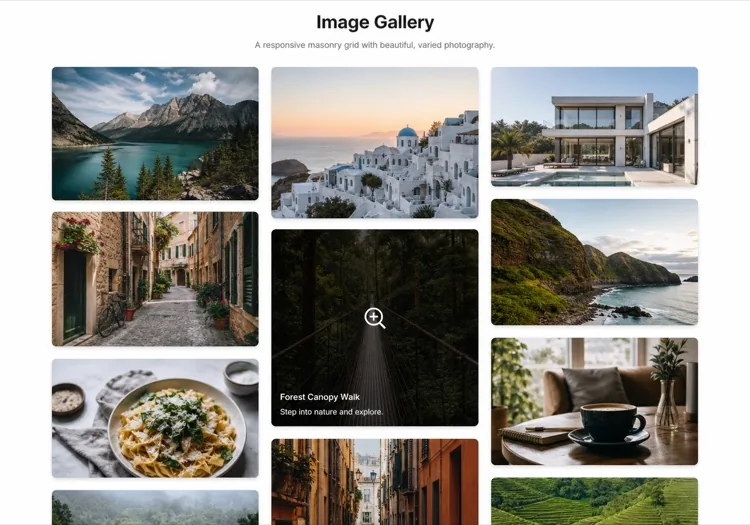
欲しいグリッドを説明するだけで、MeDoが数秒で完全にスタイリングされた画像ギャラリーを生成します。マソンリーレイアウト、ライトボックスオーバーレイ、ホバーエフェクト、レスポンシブブレークポイント — すべてが1つのプロンプトから。

ギャラリー
ギャラリー

優れたギャラリーは訪問者を信者に変えます。

画像はウェブ上で最も素早い信頼シグナルです — 訪問者は200ミリ秒未満であなたのビジュアル品質について意見を形成します。よく構造化されたギャラリーは、ポートフォリオ、製品カタログ、イベント写真を展示する場合でも、その品質を大規模に伝えます。適切なレイアウトはSEOにも影響します:alt テキストと構造化データを持つ適切に構造化された画像コンポーネントは、画像検索の可視性とページエンゲージメント指標に貢献します。

6 個のテンプレート

生成できる ギャラリー テンプレート

どのテンプレートもスクリーンショットではなく実際のプロンプトです。任意の AI エディタに貼り付けるか、MeDo で実行して React + Tailwind のコードを受け取れます。

Uniform gridAcme

Fixed Aspect-Ratio Image Grid

Every tile the same shape, so the grid reads as one object rather than a collage. The right default for product shots — and the wrong one for editorial photography, where cropping to a square throws away the composition.

Create a responsive image grid: four columns on desktop, three on tablet, two on mobile, with a consistent gap. Wrap each image in a 4:3 aspect-ratio box with object-fit: cover so the grid never reflows as images resolve, and set explicit width and height attributes on every img. Use loading="lazy" and decoding="async" on everything below the first row, and eager loading plus fetchpriority="high" on the first row so the largest contentful paint is not deferred. Add a hover state that lifts the tile slightly and fades in a caption over a gradient scrim; drive the same state from :focus-visible so keyboard users see it. Render each item as a figure with figcaption.


MeDoで試す
MasonryMega

Column Masonry With Mixed Heights

Keeps the original aspect ratio of every shot, which is the point for photography. The trap is CSS columns — they order items top-to-bottom per column, so a chronological set reads out of sequence.

Create a masonry image gallery that preserves each image's native aspect ratio. Use CSS grid with grid-auto-rows set to a small row unit and a span calculated per item from its intrinsic ratio, rather than CSS multi-column, so reading order stays left-to-right and matches the source order. Set the aspect-ratio property on every image wrapper from the known width and height so the grid reserves the exact space before the file loads and nothing shifts. Three columns on desktop, two on tablet, one on mobile. Lazy load below the fold, add a blurred low-resolution placeholder that cross-fades to the full image, and keep a fixed gap on both axes.

MeDoで試す
LightboxLumen

Grid With a Full-Screen Lightbox

The interaction most galleries get half right: the overlay opens, then Escape does nothing and focus is still behind it. Trap focus and restore it to the thumbnail on close or the gallery is unusable by keyboard.

Create an image grid where clicking a tile opens a full-screen lightbox. The overlay renders as a dialog with aria-modal, moves focus to the close button on open, traps Tab within the overlay, closes on Escape and on backdrop click, and returns focus to the thumbnail that opened it. Support left and right arrow keys plus on-screen previous and next buttons, show a counter such as 4 of 18, and render the caption beneath the image. Preload the neighbouring two images so navigation is instant, lock body scroll while open, and add touch swipe on mobile. Respect prefers-reduced-motion by dropping the zoom transition.

MeDoで試す
FilterableStudio

Category Filters Above the Grid

Worth adding past a dozen images and a liability below it — three filter chips over nine photos is furniture. Filter in the URL, not just in state, so a client can send a link to one category.

Create a filterable image gallery: a horizontal row of category chips above a responsive grid, with an All chip active by default and a count beside each label. Filtering hides non-matching items and animates the remaining tiles to their new positions with a transform-based transition rather than re-laying out abruptly. Reflect the active filter in the URL query string so a filtered view is linkable and survives reload. Use real button semantics with aria-pressed on each chip, announce the resulting item count in an aria-live region, and show an empty state when a category has no items. Keep the aspect-ratio boxes fixed so filtering never changes tile size.

MeDoで試す
CarouselReel

Scroll-Snap Thumbnail Carousel

For a strip inside a page rather than a full section — a product detail block or a case study. Build it on scroll-snap, not a JavaScript slider, so it still works with a trackpad and a touch drag.

Create a horizontal image carousel using CSS scroll-snap: a flex row with overflow-x auto, scroll-snap-type x mandatory and scroll-snap-align center on each slide, so native touch and trackpad scrolling work without a slider library. Sit a thumbnail strip beneath it where the active thumb is outlined and clicking one scrolls the main rail to that slide via scrollIntoView with smooth behaviour. Add previous and next buttons that disable at each end, hide the scrollbar visually while keeping keyboard scrolling intact, and give the rail a role and label so it is announced as a group. Fixed aspect-ratio slides, lazy loading past the second image.

MeDoで試す
MosaicEditorial

Asymmetric Feature Mosaic

One image spans two columns and two rows, the rest fill around it. Gives a set of otherwise equal photographs a focal point — but only ever promote one tile, because two hero cells cancel each other out.

Create an asymmetric mosaic gallery on a six-column CSS grid: the first item spans four columns and two rows, two items span two columns each, and the remainder fill single cells, with explicit grid-column and grid-row spans rather than auto-placement. Give every cell a fixed aspect-ratio box and object-fit: cover so the mosaic holds its shape at any image size. Collapse to a two-column grid on tablet and a single column on mobile, keeping the feature image first. Add a hover scrim with a title and a year, lazy load everything after the feature cell, and eager load the feature image so it can be the largest contentful paint.

MeDoで試す

ギャラリー をカスタマイズする方法

コンテンツ密度に合ったレイアウトを選ぶ

均一なグリッドは一貫性が重要な製品写真に適しています。マソンリーグリッドは編集写真やポートフォリオショットなど、アスペクト比が混在するコンテンツで輝きます。プロンプトを更新するだけでMeDoにレイアウト変更を依頼できます — 構造的なリファクタリングは不要です。

大規模コレクション用にカテゴリーフィルターを追加

ギャラリーに数十枚以上の画像がある場合、タグやカテゴリーによるフィルタリングはユーザビリティを劇的に向上させます。MeDoにグリッド上部にフィルターバーを含め、カテゴリー切り替え時のレイアウトトランジションをアニメーション化するよう依頼してください。

Lazy LoadingでCore Web Vitalsを最適化

ギャラリーはLCPとレイアウトシフトのスコア低下の主要因の1つです。MeDoにネイティブLazy Loading、明示的な画像寸法、プレースホルダーブラーアップエフェクトを含めるよう依頼し、パフォーマンス指標をクリーンに保ちましょう。

ライトボックスをキーボードとスクリーンリーダーでアクセシブルに

フォーカスをトラップし、EscapeキーとArrowキーに応答し、スクリーンリーダーに画像説明をアナウンスするライトボックスは、はるかにインクルーシブです — アクセシビリティ監査の失敗も回避できます。これらの要件をMeDoのプロンプトで指定すれば、最初から組み込まれます。

ギャラリー コンポーネントを使うのは誰か

クリエイティブポートフォリオ

デザイナー、フォトグラファー、イラストレーターはギャラリーをサイトの中心として活用しています。クリーンなライトボックス付きのマソンリーグリッドは、UIが注意を奪い合うことなく作品を引き立たせます。

ECサイトの商品ページ

サムネイルストリップとズーム機能を備えたマルチ画像商品ギャラリーは、購買決定に直接影響します。よく構築されたギャラリーは、購入前に商品を十分に確認できるようにすることで返品を減らします。

イベント・ウェディングサイト

イベントフォトグラファーや会場は、過去の作品を紹介しソーシャルプルーフを構築するためにギャラリーを使用します。イベントタイプ別に整理されたフィルタリング可能なグリッドにより、見込み客が関連する事例を素早く見つけられます。

不動産物件情報

目立つヒーロー画像、サムネイルストリップ、フルスクリーンライトボックスを含むフル機能の写真ギャラリーを持つ物件情報は、静的画像のみの物件情報よりも大幅に多くの問い合わせを獲得します。

サイト種別ごとの ギャラリー パターン

同じ ギャラリー コンポーネントを、掲載するサイトの種類に合わせて調整します。

01 / 06

Photography Portfolio Gallery

Masonry, no crops, and a lightbox that shows the frame at full width. Square-cropping a photographer's work into a uniform grid destroys the composition they were hired for. Keep the chrome minimal — captions on hover, not permanently on top of the image.

ギャラリー のスタイルとバリアント

ページ全体のトーンに合うバリアントを選び、そのまま生成します。

01 / 06

Uniform Grid

Equal tiles at one aspect ratio. Reads as a single object and is trivially responsive, at the cost of cropping every image to the same shape — fine for products, destructive for photography.

React・Next.js・Vue・Svelte での ギャラリー

React、Next.js、Vue 3、SvelteKit、Astro、素の HTML — 同じ ギャラリー を 6 通りの方法で組み込めます。

01 / 06

React Gallery

Map over an images array where each entry carries its intrinsic width and height, and use them to set the aspect-ratio box. Only the lightbox needs state — the grid itself is pure markup.

src/components/Gallery.tsx

export function Gallery({ images }) {
  const [open, setOpen] = useState(null)
  return (
    <ul className="grid gap-4 md:grid-cols-3">
      {images.map((img, i) => (
        <li key={img.src} style={{ aspectRatio: img.w / img.h }}>
          <button onClick={() => setOpen(i)}>
            <img src={img.src} alt={img.alt} width={img.w} height={img.h} loading="lazy" />
          </button>
        </li>
      ))}
    </ul>
  )
}

ギャラリー をプロジェクトに追加する方法

ギャラリー テンプレートを選んで本番に載せるまでの 4 ステップ。

01~30s

Pick a Gallery Layout

Choose by what your images have in common — uniform grid when the shapes match, masonry when they do not, mosaic when one image should lead, carousel when the gallery is a block inside a longer page.

02~10s

Copy the Prompt

Take the prompt into MeDo, or paste it into Lovable, Bolt, v0 or Cursor. Set your real column counts and aspect ratio before running it, since those two decisions drive every breakpoint that follows.

03~1min

Generate and Refine

You get React + Tailwind back with a live preview. Follow up in plain English — "add Escape to close", "two columns on tablet", "captions under the image instead of over it" — rather than editing grid spans by hand.

04~2min

Wire Up Your Images

Swap the placeholders for your own files with real alt text and intrinsic width and height on every one. That is what keeps the grid from shifting as images resolve, and it is the step most likely to be skipped.

ギャラリーに関するよくある質問

AIで画像ギャラリーを作成するには?

MeDoを開き、希望するギャラリーを説明してください — レイアウトスタイル、列数、ホバー動作、ライトボックスが必要かどうか。MeDoは数秒で完全な本番対応ギャラリーコンポーネントを生成します。プロンプトを改良してイテレーションし、出力がビジョンに一致するまで調整できます。

最高のAIギャラリージェネレーターは?

MeDoは自然言語プロンプトからUIコンポーネントを生成するために特別に構築されています。一般的なAIツールとは異なり、MeDoはレスポンシブグリッド、CSSトランジション、Lazy Loading、アクセシビリティパターンなどのフロントエンド規約を理解しているため、生成されたギャラリーは実際にデプロイ可能であり、単なるビジュアルモックではありません。

AIでマソンリーギャラリーを生成できますか?

はい。MeDoのプロンプトで「マソンリーレイアウト」と指定するだけです。MeDoは可変高さの画像をエレガントに処理するCSS GridまたはMasonry ベースのレイアウトを生成し、各ブレークポイントで適切な間隔とレスポンシブな列数を提供します。

AI生成ギャラリーにライトボックスを追加するには?

MeDoのプロンプトに「ライトボックス」を含めてください — 例えば「画像をクリックするとナビゲーション矢印付きのフルスクリーンライトボックスが開く」。MeDoがクリックハンドラー、オーバーレイ、キーボードコントロールを接続します。同じプロンプトでスワイプサポート、画像キャプション、閉じるボタンなどの機能も要求できます。

AIギャラリージェネレーターでフィルタリング可能なギャラリーを作成できますか?

はい。ギャラリープロンプトにフィルターバーまたはタグベースのナビゲーションを含めるようMeDoに依頼してください。MeDoはフィルターUI を生成し、各画像スロットにカテゴリーを割り当て、フィルター切り替え時のグリッドトランジションをアニメーション化します — すべて1回のパスで。

AI生成ギャラリーをSEOフレンドリーにするには?

説明的なaltテキストプレースホルダー、正しいfigure/figcaptionマークアップ、Lazy Loading属性を含めるようMeDoに伝えてください。より充実した画像SEOのために、各ギャラリー要素にImageObject構造化データ(schema.org)を追加するようMeDoに依頼することもでき、検索エンジンが画像を正確にインデックスするのに役立ちます。